
giriiş
Thank you for choosing the T&G Wireless Speaker TG619C. This manual provides essential information for setting up, operating, and maintaining your new portable speaker. Please read this manual carefully before use to ensure optimal performance and longevity of your device.
The T&G Wireless Speaker TG619C is designed to deliver rich, immersive audio with the convenience of wireless connectivity. It features a 1200mAh battery for extended playtime and supports various audio sources including Bluetooth, memory cards, and USB drives.
Güvenlik Bilgileri
- Hoparlörü suya, neme veya aşırı sıcaklıklara maruz bırakmayın.
- Hoparlörü düşürmekten veya sert darbelere maruz bırakmaktan kaçının.
- Hoparlörü kendiniz sökmeye, tamir etmeye veya değiştirmeye çalışmayın. Gerekirse yetkili servis personeliyle iletişime geçin.
- Hoparlörü ısı kaynaklarından, doğrudan güneş ışığından ve yanıcı maddelerden uzak tutun.
- Use only the provided or a certified charger cable for charging.
- Çocukların erişemeyeceği yerde saklayınız.
Paket İçeriği
Lütfen paketi açarken içeriğini kontrol edin. Eksik veya hasarlı bir ürün varsa, satıcınızla iletişime geçin.
- 1 x T&G Wireless Speaker TG619C
- 1 x Şarj Cihazı Kablosu
Ürün Bittiview
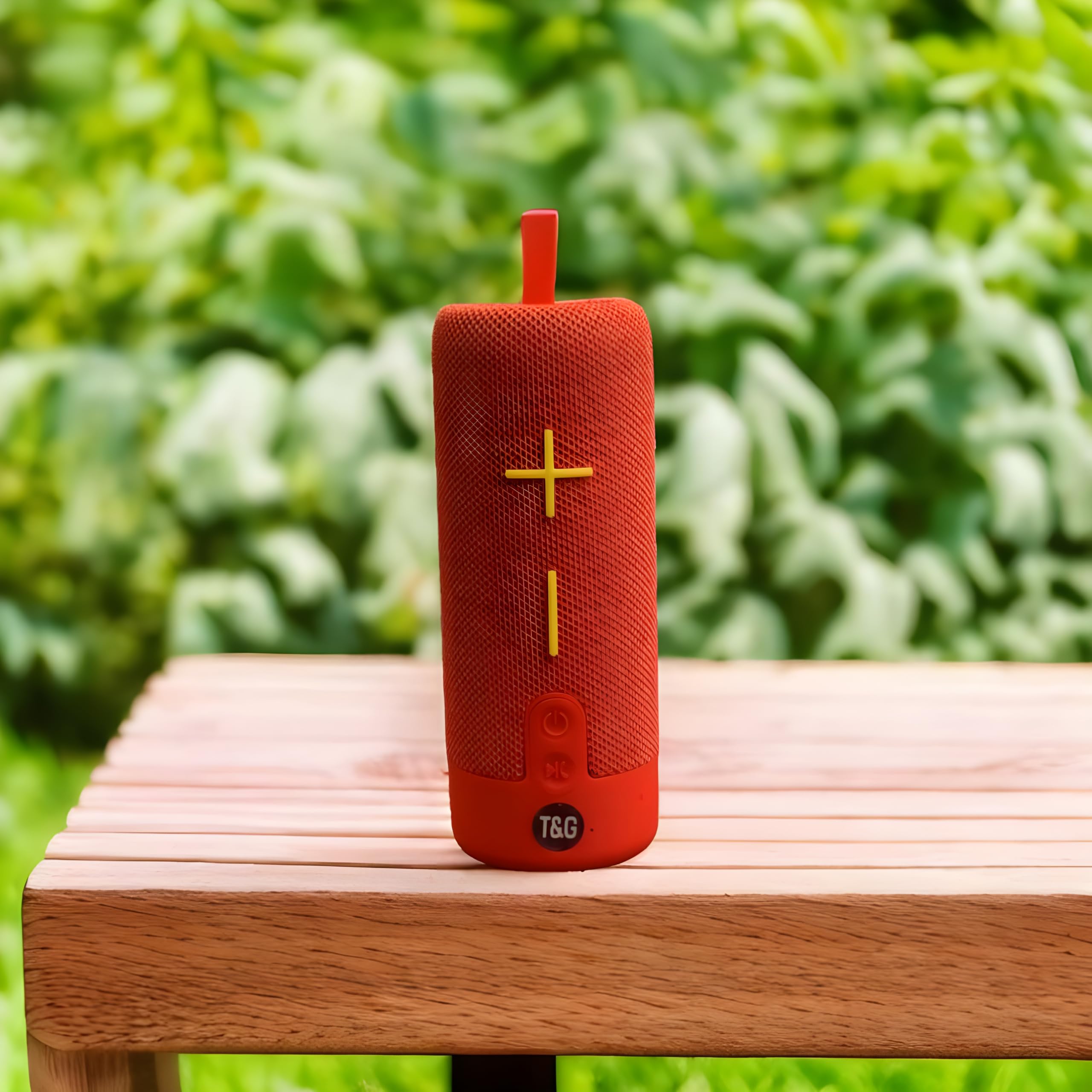
This image displays the T&G Wireless Speaker in red, highlighting its compact, cylindrical design. Visible features include the speaker grille and a control panel with buttons for power, volume, and mode selection.
The T&G Wireless Speaker TG619C is a portable audio device designed for ease of use and versatility. It features a robust speaker grille, intuitive control buttons for power, volume adjustment, track navigation, and mode switching. Input ports for charging, USB drives, and memory cards are typically located on the side or rear of the unit.
Kurmak
Hoparlörü Şarj Etme
Before first use, fully charge the speaker. Connect the provided charger cable to the speaker's charging port and the other end to a USB power adapter (not included) or a computer's USB port. The charging indicator light will illuminate during charging and turn off or change color when fully charged.
Açma/Kapatma
To power on the speaker, press and hold the power button for a few seconds until you hear an audible prompt or see an indicator light. To power off, press and hold the power button again.
Bluetooth Eşleştirme
- Hoparlörün açık olduğundan ve Bluetooth eşleştirme modunda olduğundan emin olun (genellikle yanıp sönen bir LED ile gösterilir).
- Akıllı telefonunuzda, tabletinizde veya Bluetooth özellikli diğer cihazınızda Bluetooth ayarlarına gidin.
- Arama available devices and select "T&G Speaker" (or similar name) from the list.
- Eşleştirme işlemi tamamlandığında, hoparlör bir onay sesi çıkaracak ve LED göstergesi genellikle yanıp sönmeyi durduracaktır.
Kullanım Talimatları
Müzik Çalmak
After successful Bluetooth pairing, you can stream audio from your connected device. Use your device's media player to control playback (play/pause, skip tracks).
Ses Kontrolü
Press the '+' button to increase volume and the '-' button to decrease volume. You can also adjust the volume from your connected device.
Mod Seçimi
Press the 'M' (Mode) button to switch between available input modes: Bluetooth, Memory Card (TF card), and USB drive. The speaker will announce the current mode.
Using Memory Card/USB Drive
Insert a compatible memory card (TF card) or USB drive into the respective slot. The speaker will automatically detect the storage device and begin playing audio files. Use the track navigation buttons on the speaker to skip songs.
Bakım
- Hoparlörü yumuşak ve kuru bir bezle temizleyin. Aşındırıcı temizleyiciler veya çözücüler kullanmayın.
- Hoparlörü kullanılmadığı zaman serin ve kuru bir yerde saklayın.
- To prolong battery life, avoid fully discharging the battery frequently and charge it regularly, even if not in use for extended periods.
- Bağlantı noktalarını toz ve kalıntılardan uzak tutun.
Sorun giderme
| Sorun | Çözüm |
|---|---|
| Hoparlör açılmıyor. | Ensure the battery is charged. Connect the charger cable and try again. |
| Hoparlörden ses gelmiyor. | Check the volume level on both the speaker and your connected device. Ensure the speaker is correctly paired via Bluetooth or the correct input mode is selected. |
| Bluetooth üzerinden eşleştirme yapılamıyor. | Ensure the speaker is in Bluetooth pairing mode (flashing LED). Turn off and on Bluetooth on your device. Move the speaker closer to your device. Clear previous Bluetooth connections on your device. |
| Memory card/USB drive not playing. | Ensure the speaker is in the correct mode (Memory Card/USB). Check that the files on the card/drive are compatible audio formats. Ensure the card/drive is inserted correctly. |
Özellikler
| Özellik | Detay |
|---|---|
| Marka | T&g |
| Model Adı | TG619C |
| Hoparlör Tipi | Taşınabilir |
| Renk | Kırmızı |
| Pil Kapasitesi | 1200mAh |
| Bağlantı | Wireless (Bluetooth), Memory Card (TF), USB |
| Ürün Boyutları (D x G x Y) | 6.9D x 6.6G x 17.8Y santimetre |
| Dahil Bileşenler | Şarj kablosu |
| Menşei ülke | Çin |
Garanti ve Destek
Bu ürün ile birlikte gelir GARANTİ YOK üreticinin belirttiği özelliklere göre.
For any support inquiries, technical assistance, or issues not covered in this manual, please contact the seller or retailer where the product was purchased. Please retain your proof of purchase for any potential service requests.