
SCSETC S8X 1 Pack
SCSETC S8X Motosiklet Bluetooth İnterkom Kask Kulaklığı Kullanım Kılavuzu
Model: S8X 1 Pack
giriiş
This user manual provides comprehensive instructions for the SCSETC S8X Motorcycle Bluetooth Intercom Helmet Headset. It covers setup, operation, maintenance, and troubleshooting to ensure optimal performance and user experience. The S8X is designed for clear communication, music streaming, and GPS navigation for motorcyclists, offering robust features like long-distance intercom, hands-free calling, and IP67 waterproof protection.
Paket İçeriği
Başlamadan önce, lütfen paketinizde tüm bileşenlerin mevcut olduğundan emin olun:
- S8X Bluetooth Intercom Unit
- Headset with Speakers
- Boom Mikrofonu
- Yumuşak Tel Mikrofon
- Mounting Bracket (Clip-in)
- Yapışkan Montaj
- USB Şarj Kablosu
- Kullanım Kılavuzu (bu belge)
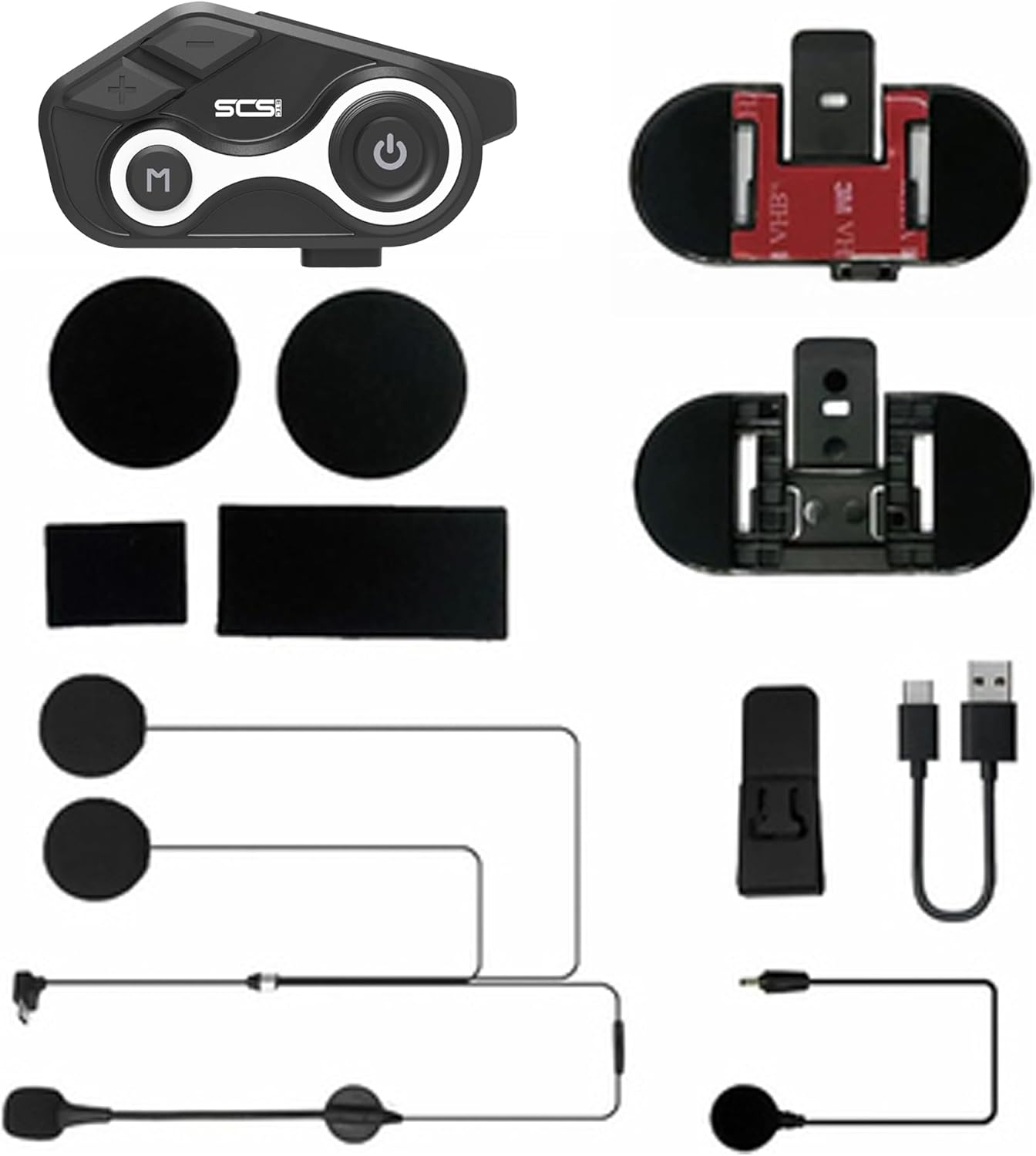
Resim: Üzeriview of the SCSETC S8X package contents, showing the main intercom unit, two types of microphones (boom and soft wire), speakers, mounting options (clip and adhesive), and a charging cable.
Kurulum ve Yükleme
1. Cihazın Şarj Edilmesi
Before first use, fully charge the S8X unit. Connect the provided USB charging cable to the charging port on the intercom unit and a compatible USB power source. The charging indicator light will show the charging status. A full charge takes approximately 2 hours.
- • Pil Kapasitesi: 650mAh
- • Charging Time: Approximately 2 hours
- • Talk/Music Time: Up to 10 hours
- • Standby Time: Up to 15 days

Image: Visual representation of the S8X's battery life and charging capabilities, highlighting its 650mAh battery, 2-hour charging time, and 15-day standby duration.
2. İnterkom Ünitesinin Montajı
The S8X offers two mounting options for your helmet:
- Clip-in Mount: Slide the clip-in bracket between the helmet shell and the inner padding. Ensure it is securely fastened.
- Yapışkan Montaj: Clean the desired helmet surface thoroughly. Peel off the protective film from the adhesive mount and firmly press it onto the helmet for at least 30 seconds. Allow 24 hours for the adhesive to cure before attaching the intercom unit.
Once the bracket is installed, slide the S8X intercom unit onto the bracket until it clicks into place.
3. Hoparlör ve Mikrofon Kurulumu
The S8X comes with two microphone options to suit different helmet types:
- Hoparlör Yerleştirme: Attach the speakers to the helmet's ear pockets using the hook-and-loop fasteners. Ensure they are positioned directly over your ears for optimal sound quality.
- Microphone Selection & Placement:
- Boom Mikrofon: Ideal for open-face or modular helmets. Attach it to the inside of the helmet near your mouth, ensuring it is close but not touching.
- Yumuşak Kablolu Mikrofon: Suitable for full-face helmets. Position it inside the chin bar, close to your mouth.
- Kablo yönetimi: Route all cables neatly under the helmet padding to prevent interference and ensure comfort. Connect the speaker/microphone cable to the corresponding port on the S8X unit.
Kullanım Talimatları

Image: The main control unit of the S8X intercom, featuring clearly labeled buttons for power, volume, and mode selection.
1. Güç Açma/Kapatma
- Güç Açık: Press and hold the Power button (usually the large circular button with a power icon) for approximately 3 seconds until you hear an audible prompt.
- Kapat: Sesli bir uyarı duyana kadar Güç düğmesini yaklaşık 3 saniye basılı tutun.
2. Bluetooth Eşleştirme (Telefon)
To pair your S8X with a mobile phone:
- Ensure the S8X is powered off.
- Eşleştirme modunu göstermek için gösterge ışığı kırmızı ve mavi renkte dönüşümlü olarak yanıp sönene kadar Güç düğmesini yaklaşık 5-7 saniye basılı tutun.
- On your phone, enable Bluetooth and search for "S8X" in the list of available devices.
- Select "S8X" to connect. Once paired, the indicator light will flash blue slowly.
The S8X uses Bluetooth 5.1 technology for stable and efficient wireless connectivity.
3. Intercom Communication (Rider-to-Rider)
The S8X supports communication between two riders up to 1000 meters (0.6 miles) in open terrain.
- Ensure both S8X units are powered on and not connected to any other Bluetooth devices.
- On one unit, press and hold the Intercom button (often the 'M' button or a dedicated intercom button) for 3 seconds until the indicator light flashes red and blue rapidly.
- On the second unit, briefly press the Intercom button.
- The units will automatically search and pair. Once connected, the indicator lights will flash blue slowly, and you will hear a confirmation tone.

Image: Illustrates the 1000-meter intercom range of the S8X, showing two riders maintaining communication while on their motorcycles.
Video: A demonstration of the S8X walkie-talkie features, including sound quality, battery life, waterproof design, GPS navigation, and intercom capabilities.
4. Müzik Çalma ve FM Radyo
- Müzik Çalma: Once paired with your phone, open your music app. Use the volume buttons (+/-) on the S8X to adjust volume. The main knob or 'M' button may control play/pause and track skipping (refer to quick start guide for specific button functions).
- FM Radyo: Press the Mode button (often the 'M' button) to switch to FM radio mode. Use the volume buttons (+/-) to scan for stations or adjust frequency.
The S8X delivers Hi-Fi stereo sound quality with 40mm speakers and features CVC technology for noise suppression, ensuring clear audio even at high speeds.

Image: Explains the audio technology of the S8X, including Hi-Fi stereo sound and DSP & CVC noise cancellation, demonstrating its effectiveness in reducing background noise.
5. Hands-Free Calling and GPS Navigation
- Eller Serbest Arama: When a call comes in, the S8X will announce it. Briefly press the Power button to answer, or press and hold to reject. During a call, use the volume buttons to adjust the call volume.
- GPS navigasyon: Once paired with your phone, GPS voice prompts from your navigation app will be transmitted through the S8X speakers.
Bakım
Proper maintenance ensures the longevity and performance of your S8X intercom.
- Temizlik: Üniteyi yumuşak, damp bez. Sert kimyasallar veya aşındırıcı temizleyiciler kullanmayın.
- Su Geçirmez Koruma: The S8X has an IP67 waterproof rating, meaning it is protected against dust and can withstand immersion in water up to 1 meter for 30 minutes. While designed for all-weather use, avoid prolonged submersion or high-pressure water jets.
- Pil Bakım: To preserve battery life, avoid fully discharging the unit frequently. Charge it regularly, especially if storing for extended periods. Store in a cool, dry place.

Image: Demonstrates the S8X's IP67 waterproof protection, showing a rider confidently using the device in rainy conditions.
Sorun giderme
If you encounter issues with your S8X, please refer to the following common solutions:
| Sorun | Olası Neden / Çözüm |
|---|---|
| Cihaz açılmıyor. | Battery is low or depleted. Charge the device fully. |
| Telefon/interkom ile eşleştirilemiyor. | Ensure the device is in pairing mode (flashing red/blue). Make sure other Bluetooth devices are disconnected. Try restarting both devices. |
| Ses yok veya ses seviyesi düşük. | Check volume levels on both the S8X and your connected device. Ensure speakers are correctly positioned and connected. |
| İnterkomun menzili beklenenden daha kısa. | Obstacles (buildings, dense trees) can reduce range. Ensure line of sight for optimal performance. |
| Poor sound quality / excessive noise. | Ensure microphone is positioned correctly and not obstructed. CVC noise reduction works best when the microphone is close to your mouth. Check for strong wind noise. |
If the issue persists, please contact SCSETC customer support for further assistance.
Özellikler
| Özellik | Detay |
|---|---|
| Model Adı | S8X-S8XD |
| Bluetooth Sürümü | 5.1 |
| interkom aralığı | 1000 metreye (0.6 mil) kadar |
| Pil Kapasitesi | 650mAh Lityum Polimer |
| Şarj Süresi | 2 Saat |
| Konuşma/Müzik Saati | 10 Saate Kadar |
| Bekleme Süresi | 15 Güne Kadar |
| Su Direnç Seviyesi | IP67 Su Geçirmez |
| Gürültü Kontrolü | CVC Technology, Built-in CSR chip |
| Frekans Aralığı | 20 Hz - 20,000 Hz |
| Boyutlar | 3.53 x 1.56 x 0.6 inç |
| Ürün Ağırlığı | 8.8 ons (250 Gram) |
| Dahil Bileşenler | Headset, Intercom, GPS, FM Radio |
Garanti ve Destek
For warranty information, technical support, or any inquiries regarding your SCSETC S8X Motorcycle Bluetooth Intercom Helmet Headset, please contact the manufacturer directly.
Üretici: SCSETC
You can visit the official SCSETC store on Amazon for more information and support: SCSETC Amazon Store
Ask a question about this manual
Ask about setup, troubleshooting, compatibility, parts, safety, or missing instructions. Manuals+ will review the question and use this page’s manual context to help answer it.