
1. Giriş
This manual provides detailed instructions for the installation, operation, and maintenance of the Yitouniu EWeLink 2-Channel Smart WiFi Switch Relay. This device enables remote control of household appliances and electronic devices via a mobile application, RF remote control, and voice commands through smart assistants like Alexa and Google Home. It supports various operating modes and timing functions to enhance smart home automation.
2. Güvenlik Bilgileri
- Elektrik çarpmasını önlemek için kurulum veya bakım işlemlerinden önce gücün kesildiğinden emin olun.
- Installation should be performed by qualified personnel or under strict adherence to electrical safety guidelines.
- Maksimum akım ve hacmi aşmayıntagCihaz için belirtilen e derecelendirmeleri.
- Cihazı sudan, nemden ve aşırı sıcaklıklardan uzak tutun.
- Gücü tekrar vermeden önce tüm kablo bağlantılarının sağlam ve doğru olduğundan emin olun.
3. Ürün Bittiview
The Yitouniu EWeLink Smart WiFi Switch Relay is a compact, 2-channel device designed for integrating traditional appliances into a smart home system. It features WiFi and Bluetooth connectivity for app control and supports RF 433MHz for remote control.

Resim 3.1: Ön view of the Yitouniu EWeLink Smart WiFi Switch Relay. The device is white with branding and connection labels visible.

Resim 3.2: Yakın çekim view of the Yitouniu EWeLink Smart WiFi Switch Relay, showing input terminals (N, L), output terminals (NO, COM, NC), and model information.

Image 3.3: The compact size of the Yitouniu EWeLink Smart WiFi Switch Relay, held in a hand for scale.
4. Özellikler
| Parametre | Değer |
|---|---|
| Giriş Voltage | AC/DC 85-250V, Micro USB 5V input |
| Maksimum Akım | 10A |
| Maksimum Güç | 2200W |
| WiFi Standardı | WiFi 2.4GHz b/n/g + Bluetooth (IEEE 802.11b/g/n) |
| Çalışma Sıcaklığı | -20°C ila 70°C |
| Malzeme | Alev geciktirici ABS |
| Ürün Boyutları | 2.76 x 1.77 x 1.1 inç |
| Ürün Ağırlığı | 1.76 ons |
| İletişim Türü | Normalde Açık |
| Uluslararası Koruma Derecelendirmesi | IP65 |
| Sertifikasyon | FCC |
5. Kurulum ve Kurulum
5.1 Kablolama Talimatları
The device supports both AC/DC 85-250V input and Micro USB 5V input. Ensure correct wiring based on your application. The relay has Normally Open (NO), Common (COM), and Normally Closed (NC) contacts for controlling external devices.
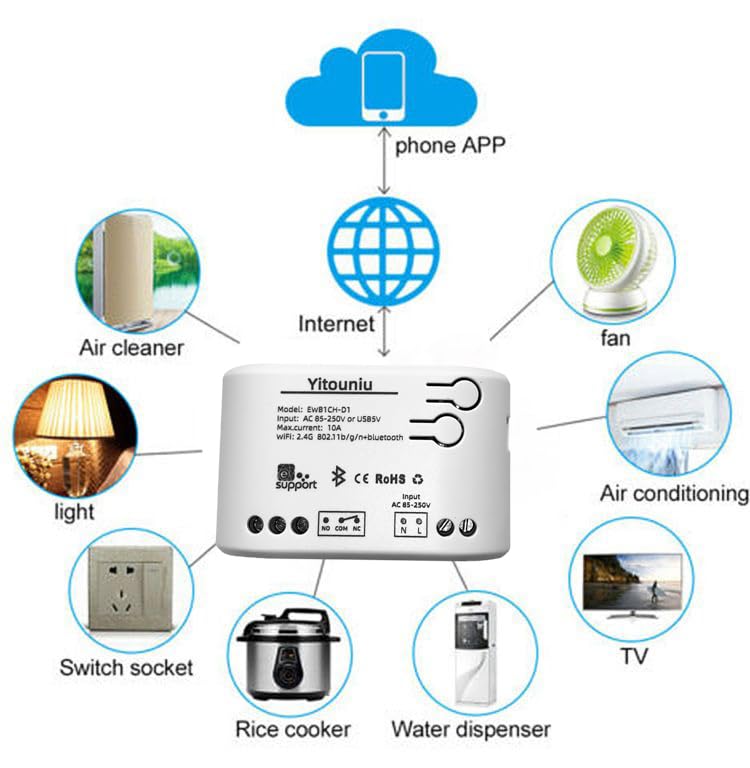
Image 5.1: Diagram illustrating the connectivity of the Yitouniu EWeLink Smart WiFi Switch Relay to various household appliances like lights, fans, and air conditioners, all controlled via a phone app and the internet.
5.2 Uygulama İndirme ve Eşleştirme
- İndir eWe Bağlantısı Apple App Store veya Google Play Store'dan uygulama.
- Bir hesap kaydedin ve giriş yapın.
- Power on the Smart WiFi Switch Relay.
- Open the eWeLink app, tap the '+' icon to add a device.
- Follow the on-screen instructions to connect the device to your 2.4GHz WiFi network.

Image 5.2: Screenshots of the eWeLink app interface, showing controls for a garage door (ON/OFF) and a scheduling function for setting specific times.
6. Çalışma Modları
The device supports three operating modes: self-locking, interlocking, and inching (micromotion). These modes can typically be configured within the eWeLink app or via physical buttons on the device, depending on the specific model variant.
- Otomatik Kilitleme Modu: Each channel operates independently. Pressing the button (or app control) turns the relay ON, pressing it again turns it OFF.
- Interlocking Mode: When one channel is turned ON, all other channels are automatically turned OFF. This is useful for applications where only one device should be active at a time.
- Inching (Micromotion) Mode: The relay turns ON for a set duration (e.g., 0.5 seconds to 1 hour) and then automatically turns OFF. This is suitable for momentary actions like garage door openers or pulse controls.
7. App Control and Voice Control
7.1 eWeLink App Features
The eWeLink app provides comprehensive control over your Smart WiFi Switch Relay:
- Uzaktan Açma/Kapama: Control connected devices from anywhere with an internet connection.
- Zamanlama Fonksiyonları: Set schedules, countdowns, or recurring timers for automatic on/off operations.
- Bağımsız Kontrol: Each of the two channels can be controlled independently.
- Cihaz Paylaşımı: Share control of your devices with family members.
- Grup Kontrolü: Organize multiple smart devices into groups for simultaneous control.

Image 7.1: A user remotely controlling home lighting via the eWeLink mobile application, demonstrating the convenience of app-based control.

Image 7.2: Illustration of the eWeLink app's group control and sharing functions, allowing multiple users to manage devices across different rooms.

Image 7.3: The timing function interface within the eWeLink app, enabling users to set specific on/off times for connected appliances.
7.2 Ses Kontrol Entegrasyonu
The Yitouniu Smart WiFi Switch Relay is compatible with popular voice assistants, including Amazon Alexa and Google Home/Nest. To enable voice control:
- Ensure your Smart WiFi Switch Relay is successfully paired with the eWeLink app.
- Alexa veya Google Home uygulamasını açın.
- 'Beceriler' veya 'Google ile Çalışır' bölümüne gidin.
- Arama and enable the 'eWeLink Smart Home' skill/service.
- İstendiğinde eWeLink hesabınızı bağlayın.
- Discover devices. Your Smart WiFi Switch Relay should now be controllable via voice commands.
Exampkomutlar:
- "Alexa, oturma odasının ışığını aç."
- "Hey Google, vantilatörü kapat."

Image 7.4: A user interacting with voice assistants like Amazon Alexa and Google Home to control smart devices, highlighting the voice control capability of the relay.
8. Bakım
The Yitouniu Smart WiFi Switch Relay requires minimal maintenance. Follow these guidelines:
- Temizlik: Cihazı kuru, yumuşak bir bezle silin. Sıvı temizleyiciler veya çözücüler kullanmayın.
- Bağlantı Kontrolü: Kabloların bağlantılarının sağlamlığını korumak için periyodik olarak kontrol edin.
- Donanım Yazılımı Güncellemeleri: Keep the eWeLink app updated to receive the latest firmware for the device, which may include performance improvements and new features.
9. Sorun Giderme
- Cihaz WiFi'a bağlanmıyor:
- Ensure your WiFi network is 2.4GHz. The device does not support 5GHz networks.
- Check if the WiFi password entered in the app is correct.
- Move the device closer to your WiFi router.
- Cihazınızı ve yönlendiricinizi yeniden başlatın.
- Uygulamada cihaz çevrimdışı:
- Ev internet bağlantınızın aktif olduğundan emin olun.
- Cihazın çalışır durumda olup olmadığını kontrol edin.
- Cihazı yeniden başlatın.
- Ses kontrolü çalışmıyor:
- Confirm the eWeLink skill/service is enabled and linked in your Alexa or Google Home app.
- Ensure the device is named clearly in the eWeLink app and discovered by your voice assistant.
- İnternet bağlantınızı kontrol edin.
- Device not responding to RF remote:
- Ensure the RF remote is paired with the switch. Refer to the RF pairing instructions (if applicable to your specific remote).
- Check the battery in the RF remote.
10. Kutuda Neler Var?
Ürün ambalajını açtığınızda aşağıdaki öğeleri bulmalısınız:
- 1 x Yitouniu Wifi 2-Channel Relay Switch
- 1 x Kullanım Kılavuzu (bu belge)
11. Garanti ve Destek
This product comes with a standard manufacturer's warranty. For specific warranty terms, conditions, and duration, please refer to the documentation included with your purchase or contact Yitouniu customer support. For technical assistance or further inquiries, please visit the official Yitouniu websiteyi ziyaret edin veya müşteri hizmetleri kanallarıyla iletişime geçin.