
FLEXISPOT OC4-PRO
FLEXISPOT OC4-PRO Office Chair User Manual
Model: OC4-PRO
1. Giriş
Thank you for choosing the FLEXISPOT OC4-PRO Office Chair. This ergonomic chair is designed to provide maximum comfort and support for extended periods, featuring multiple adjustment points including headrest, lumbar support, armrests, and seat height. This manual provides essential information for assembly, operation, maintenance, and troubleshooting to ensure optimal use and longevity of your chair.
2. Güvenlik Bilgileri
- Montaj ve kullanım öncesinde tüm talimatları dikkatlice okuyunuz.
- Ensure all components are securely fastened before using the chair.
- Sandalyenin üzerine çıkmayın veya basamak olarak kullanmayın.
- Do not exceed the maximum weight capacity of 400 LBS (181.44 kg).
- Montaj sırasında çocukları ve evcil hayvanları sandalyeden uzak tutun.
- Sandalyeyi düz ve sağlam bir yüzey üzerinde kullanın.
- Avoid exposing the chair to direct sunlight or extreme temperatures.
3. Paket İçeriği
Montaja başlamadan önce tüm bileşenlerin mevcut olduğundan emin olun. Herhangi bir parça eksik veya hasarlıysa, müşteri hizmetleriyle iletişime geçin.
- Kolçaklar
- Bel Desteği
- Tekerlekler
- Gazlı Asansör
- Baş dayanağı
- Kullanıcı Kılavuzu (bu kılavuz)
- Montaj Aletleri
- Sandalye Tabanı
- Koltuk Minderi
- arkalık
4. Montaj Talimatları
Assembly of the FLEXISPOT OC4-PRO chair is designed to be straightforward and can typically be completed within 30 minutes. A detailed user manual with step-by-step diagrams and all necessary assembly tools are included in the package. Please follow the specific instructions provided in the separate assembly guide for your model.
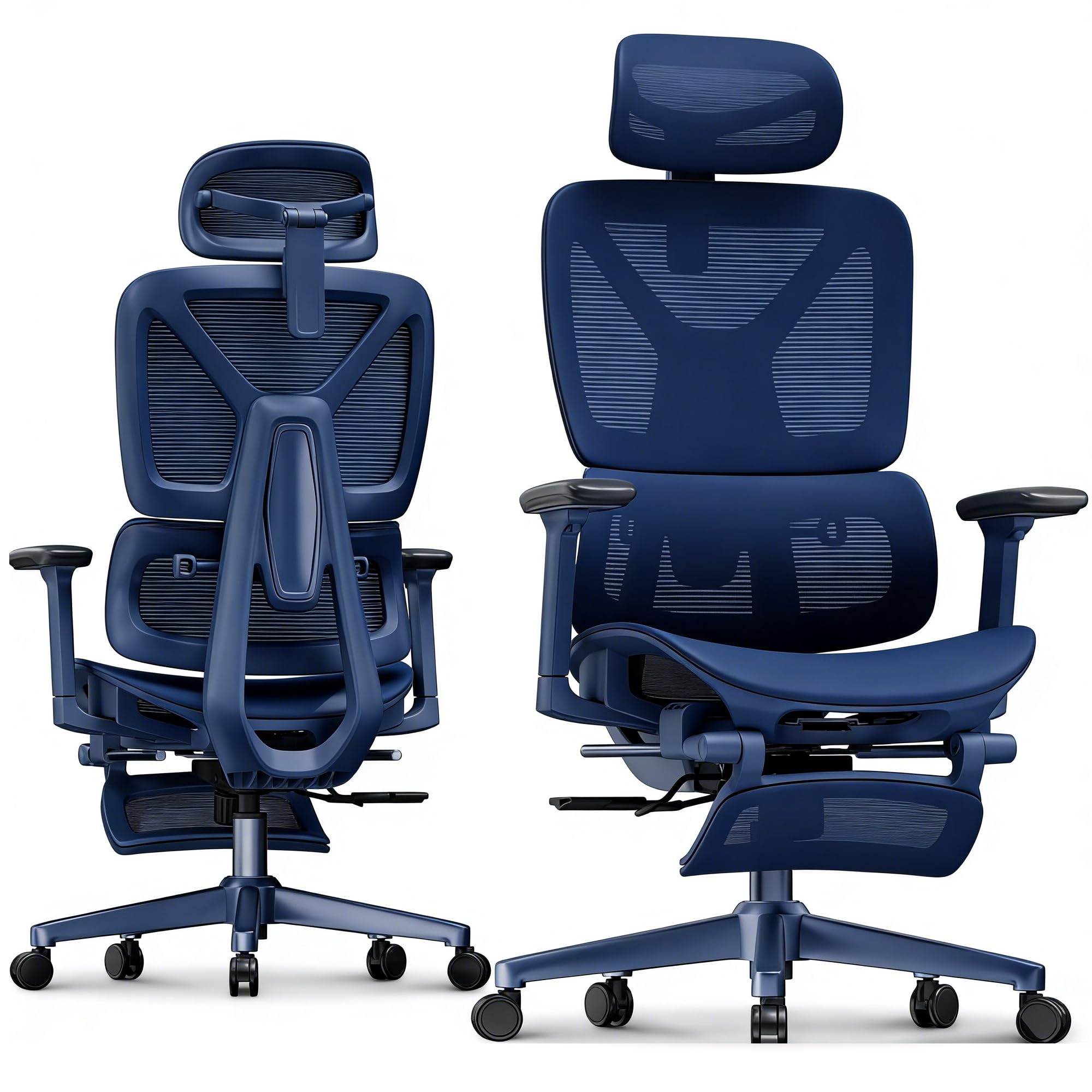
Image: FLEXISPOT OC4-PRO Office Chair. This image shows the fully assembled chair, highlighting its ergonomic design and mesh backrest.
5. Kullanım Talimatları
The FLEXISPOT OC4-PRO chair offers multiple adjustment features to customize your seating experience.
5.1. Koltuk Yükseklik Ayarı
Locate the lever on the right side beneath the seat. To raise the seat, lift the lever while taking your weight off the chair. To lower the seat, lift the lever while seated. Release the lever at the desired height.
5.2. Recline and Tilt Adjustment
The chair features an adjustable back angle and tilt tension. Use the lever on the left side to lock or unlock the recline function. Rotate the knob located beneath the seat, usually at the front, to adjust the tilt tension. Turn clockwise to increase tension (making it harder to recline) and counter-clockwise to decrease tension (making it easier to recline).
5.3. Bel Desteği Ayarı
The multi-functional lumbar support system can be adjusted vertically and horizontally to fit the curve of your lower back. Locate the adjustment controls on the backrest to position the lumbar support for optimal comfort.
5.4. Kolçak Ayarı
The 3D armrests can be adjusted in three dimensions: height, forward/backward, and pivot (inward/outward). Use the buttons or levers on the armrests to unlock and adjust them to your preferred position. Ensure they are locked securely after adjustment.
5.5. Baş Dayanağı Ayarı
The headrest can be adjusted for height and angle. Gently push or pull the headrest to move it up or down, and tilt it to find the most comfortable position for your neck and head.
5.6. 360° Rotation and Casters
The chair is equipped with a 360° swivel mechanism and smooth-rolling casters for easy movement. Ensure the casters are clean and free of debris for optimal performance on hard floors.
6. Bakım
- Temizlik: For general cleaning, wipe the chair with a damp cloth. For mesh and fabric areas, dry clean as needed. Avoid harsh chemical cleaners that may damage the material.
- Denetleme: Tüm vida ve cıvataların sıkılığını düzenli olarak kontrol edin. Gerekirse tekrar sıkın.
- Caster Bakımı: Tekerleklerin düzgün hareket etmesini sağlamak için, tekerleklerin saç ve kirden arındırılmış halde tutun.
- Depolamak: Store the chair in a cool, dry place away from direct sunlight when not in use for extended periods.
7. Sorun Giderme
| Sorun | Olası Neden | Çözüm |
|---|---|---|
| Sandalyenin yüksekliği ayarlanmıyor. | Gazlı kaldırma mekanizması arızalı veya kol devreye girmemiş. | Yükseklik ayar kolunun tamamen yerine oturduğundan emin olun. Sorun devam ederse, gazlı kaldırma mekanizmasının değiştirilmesi gerekebilir. Müşteri desteğiyle iletişime geçin. |
| Sandalye gıcırdıyor veya sallanıyor. | Gevşek vidalar veya parçalar. | Check and tighten all screws and bolts, especially those connecting the seat, backrest, and base. |
| Tekerlekler düzgün bir şekilde dönmüyor | Tekerleklerin arasına sıkışmış veya hasar görmüş parçalar. | Tekerleklerin üzerindeki saç veya kalıntıları temizleyin. Tekerlekler hasar görmüşse, değiştirilmeleri gerekebilir. |
| Sırt dayanağı yatırılmıyor veya kilitlenmiyor | Recline mechanism locked or tilt tension too high. | Ensure the recline lock lever is disengaged. Adjust the tilt tension knob counter-clockwise to reduce tension. |
8. Özellikler
| Marka | ESNEKLİK |
| Model Adı | OC4-PRO (Ergonomic office chair) |
| Renk | Siyah |
| Malzeme | Mesh & Nylon & Steel (Fill Material: Memory Foam) |
| Ürün Boyutları (D x G x Y) | 73.9D x 73.9G x 133.1Y Santimetre |
| Ürün Ağırlığı | 40 Pound (18.14 kg) |
| Maksimum Ağırlık Önerisi | 400 LBS (181.44 kg) |
| Özel Özellikler | Ergonomic, Adjustable Headrest, 3D Arm Rest, Adjustable Lumbar, Tilt, Back Support, Adjustable Recliner, Adjustable Height, Tilt Tension Control |
| Montaj Gerekli | Evet |
| Sertifikalar | BIFMA, SGS |
9. Garanti ve Destek
FLEXISPOT stands behind the quality of its products. For warranty information, technical support, or assistance with parts, please contact FLEXISPOT customer service. Refer to the official FLEXISPOT webBelirli garanti koşulları ve iletişim bilgileri için siteye veya satın alma belgelerinize bakın.
Müşteri Hizmetleri: For any questions or concerns, please reach out to FLEXISPOT's professional customer service team.
Ask a question about this manual
Ask about setup, troubleshooting, compatibility, parts, safety, or missing instructions. Manuals+ will review the question and use this page’s manual context to help answer it.