
Ourlife Ourlife WiFi Extender 300Mbps
Ourlife WiFi Genişletici 300Mbps Kullanım Kılavuzu
Modeli: Ourlife WiFi Extender 300Mbps (ASIN: B0D7HB4DBC)
giriiş
Thank you for choosing the Ourlife WiFi Extender. This device is designed to expand your existing Wi-Fi network coverage, eliminate dead spots, and provide a stable, high-speed internet connection throughout your home or office. With a data transfer rate of up to 300Mbps on the 2.4GHz band, it is ideal for streaming, online gaming, and general internet use. This manual provides detailed instructions for setup, operation, and troubleshooting.
Güvenlik Bilgileri
- Cihazı suya veya neme maruz bırakmayın.
- Cihazı kendiniz sökmeye veya onarmaya çalışmayın.
- Yalnızca üretici tarafından sağlanan veya önerilen güç adaptörünü kullanın.
- Cihazı ısı kaynaklarından ve doğrudan güneş ışığından uzak tutun.
- Aşırı ısınmayı önlemek için cihazın çevresinde uygun havalandırma olduğundan emin olun.
Paket İçeriği
Lütfen paket içeriğini dikkatlice kontrol edin. Herhangi bir ürün eksik veya hasarlıysa, satıcınızla iletişime geçin.
- Ourlife WiFi Genişletici (tekrarlayıcı gövde)
- Kullanıcı Kılavuzu
Ürün Bittiview
Ourlife WiFi Extender features a compact design with four high-gain external antennas for enhanced signal penetration and coverage. It includes an Ethernet port for wired connections.
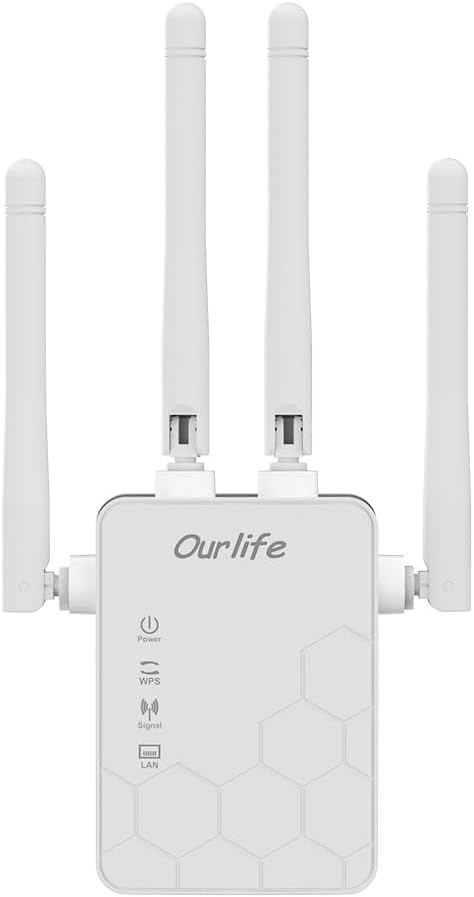
Resim: Ön view O'nunurlife WiFi Extender, showing the Ourlife logo, power indicator, WPS button, signal strength indicator, and LAN port indicator. Four external antennas are visible.
Temel Bileşenler:
- Güç Göstergesi: Cihaz açıldığında yanar.
- WPS Düğmesi: Used for quick, one-button setup with compatible routers.
- Sinyal Göstergesi: Shows the strength of the Wi-Fi signal received from the main router.
- LAN Bağlantı Noktası: An Ethernet port for connecting wired devices or for setting up the extender in Access Point (AP) mode.
- Harici Antenler: Four adjustable antennas to optimize signal reception and transmission.

Resim: Yan view O'nunurlife WiFi Extender with dimensions. The device measures approximately 17.2cm/6.8in in height, 5.4cm/2.1in in width, and 3.3cm/1.3in in depth.
Kurmak
Ourlife WiFi Extender offers two primary setup methods: WPS (Wi-Fi Protected Setup) for quick connection, and manual setup via a web tarayıcı.
Method 1: WPS Setup (Recommended for quick setup)
- Güç Açık: O'yu takınurlife WiFi Extender into an electrical outlet near your main Wi-Fi router. Wait for the Power indicator to light up.
- Genişletici üzerindeki WPS düğmesine basın: O cihazındaki WPS düğmesine basın.urlLife WiFi Genişletici. WPS gösterge ışığı yanıp sönmeye başlayacaktır.
- Yönlendiricide WPS'ye basın: İki dakika içinde ana Wi-Fi yönlendiricinizdeki WPS düğmesine basın.
- Bağlantıyı Bekleyin: The WPS indicator on the extender will stop blinking and remain solid when the connection is established. The Signal indicator will also light up, indicating a successful connection.
- Extender'ın yerini değiştirin: Once connected, unplug the extender and move it to a location halfway between your router and the Wi-Fi dead zone. Ensure the Signal indicator shows a strong signal (usually green or multiple bars) for optimal performance.

Image: Visual representation of the four simple setup steps: 1. Unbox, 2. Plug it in, 3. Press the button (WPS), 4. And Pair (with router).
Method 2: Manual Setup via Web Tarayıcı
- Güç Açık: O'yu takınurlife WiFi Extender into an electrical outlet near your computer or mobile device.
- Extender'ın Wi-Fi'ına bağlanın: On your computer or mobile device, connect to the Wi-Fi network named "Ourlife_Extender" (or similar, check the label on the device). No password is required for the initial connection.
- Açık Web Tarayıcı: Bir tane aç web browser (e.g., Chrome, Firefox, Safari) and enter the default IP address or domain name (e.g., 192.168.10.1 or reapeter.net) into the address bar. Refer to the device label or included mini-manual for the exact address.
- Giriş yapmak: Varsayılan kullanıcı adı ve şifreyi girin (genellikle yönetici/yönetici).
- Mod seç: Choose "Repeater Mode" or "AP Mode" based on your needs.
- Tekrarlayıcı Modu: Extends your existing Wi-Fi network wirelessly.
- AP Modu (Erişim Noktası): Converts a wired internet connection into a wireless Wi-Fi hotspot. Connect an Ethernet cable from your router to the extender's LAN port.
- Ağı Yapılandır:
- For Repeater Mode: Select your main Wi-Fi network from the list, enter its password, and choose whether to keep the same SSID or create a new one for the extended network.
- For AP Mode: Set a new SSID (network name) and password for the Wi-Fi hotspot.
- Ayarları Uygula: Ayarları kaydedin ve genişletici cihazın yeniden başlatılmasını bekleyin.
- Extender'ın yerini değiştirin: Once configured, unplug and relocate the extender to an optimal position.
İşletim
After successful setup, the Ourlife WiFi Extender will operate automatically. The Signal indicator will provide visual feedback on the connection quality.
Bağlantı Cihazları:
- Kablosuz cihazlar: Connect your smartphones, tablets, laptops, and other Wi-Fi enabled devices to the extended Wi-Fi network (the SSID you configured during setup).
- Wired Devices (via LAN Port): If you are using the extender in Repeater mode, you can connect a wired device (e.g., desktop PC, smart TV, game console) to the extender's LAN port using an Ethernet cable to provide it with network access.
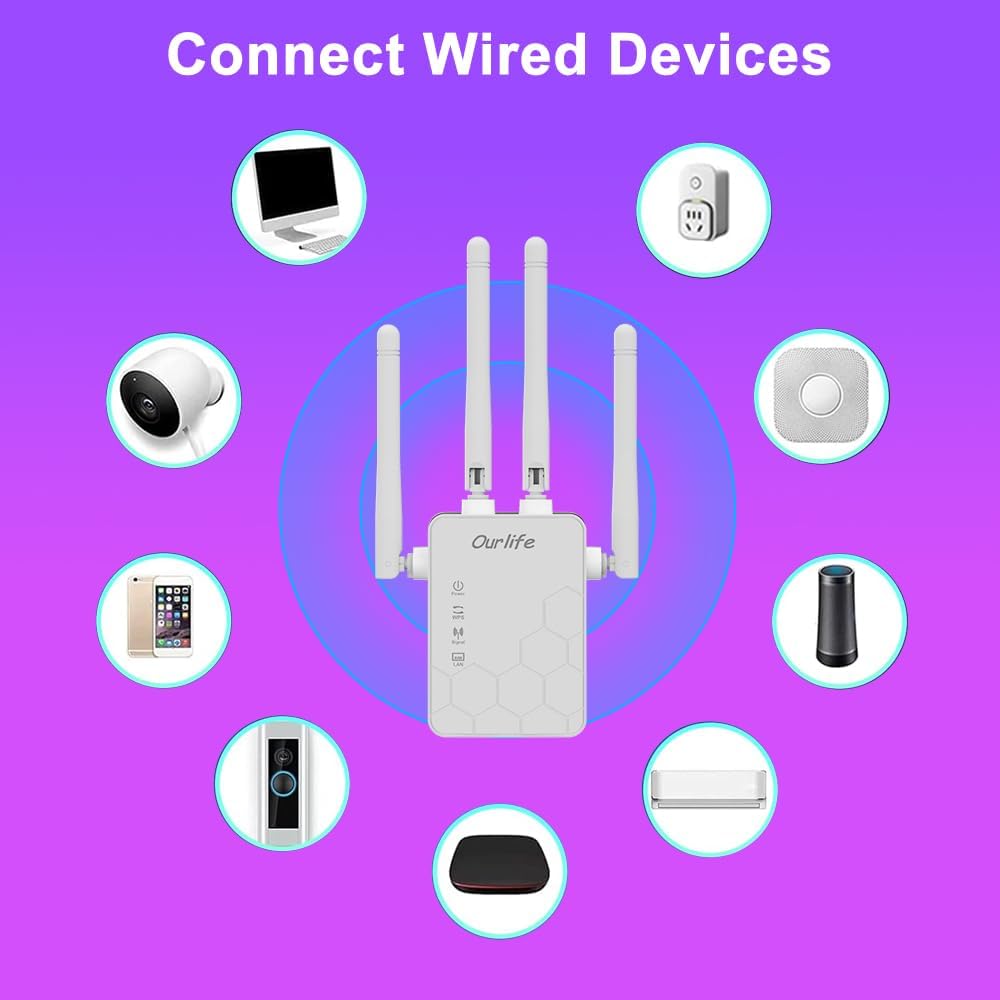
Image: Diagram showing various wired and wireless devices (e.g., desktop computer, smart plug, smart speaker, air conditioner, smart doorbell, security camera, smartphone) that can connect to the Ourlife WiFi Extender.

Resim: Ourlife WiFi Extender plugged into a wall outlet, with an Ethernet cable connected to its LAN port, illustrating its capability to provide a wired connection.
Bakım
Regular maintenance helps ensure the longevity and optimal performance of your Ourlife WiFi Extender.
- Temizlik: Cihazı temizlemek için yumuşak ve kuru bir bez kullanın. Sıvı temizleyiciler veya aerosoller kullanmayın.
- Donanım Yazılımı Güncellemeleri: Üreticinin periyodik olarak kontrol edin webÜrün yazılımı güncellemeleri için site. Ürün yazılımını güncellemek performansı artırabilir, özellikler ekleyebilir ve hataları düzeltebilir.
- Yeniden başlatma: Ağ sorunları yaşıyorsanız, genişleticiyi 10 saniye boyunca elektrik prizinden çıkarıp tekrar takarak yeniden başlatmayı deneyin.
- Optimum Yerleştirme: Ensure the extender is placed in an open area, away from large metal objects, concrete walls, and other electronic devices that may cause interference.
Sorun giderme
O cihazınızla ilgili sorunlarla karşılaşırsanızurlife WiFi Extender, refer to the following common problems and solutions:
| Sorun | Olası Çözüm |
|---|---|
| Genişletici açılmıyor. | Uzatıcının çalışan bir elektrik prizine güvenli bir şekilde takılı olduğundan emin olun. Farklı bir priz deneyin. |
| Cannot connect to the extender's Wi-Fi for setup. | Ensure you are connecting to the correct default SSID (e.g., "Ourlife_Extender"). Try restarting the extender and your device. |
| WPS setup fails. | Ensure your router supports WPS. Press the WPS button on both devices within the 2-minute window. Try manual setup if WPS continues to fail. |
| No internet access after connecting to the extended network. | Check if your main router has internet access. Relocate the extender closer to your main router to ensure a strong signal (check Signal indicator). Reconfigure the extender. |
| Slow speeds on the extended network. | Relocate the extender to an optimal position where the Signal indicator shows a strong connection to the main router. Avoid placing it near interference sources. Ensure your main router is providing good speeds. |
| Forgot login password for web yönetim sayfası. | Perform a factory reset on the extender (usually by pressing and holding a reset button for 5-10 seconds). This will revert all settings to default, including the login credentials. |
Özellikler
| Özellik | Detay |
|---|---|
| Marka | Ourleğer |
| Örnek | Ourlife WiFi Extender 300Mbps |
| ASIN | B0D7HB4DBC |
| Veri Aktarım Hızı | 300 Megabits Per Second (2.4GHz) |
| Antenler | 4 Yüksek Kazançlı Harici Anten |
| Ethernet Bağlantı Noktası | 1 x LAN Bağlantı Noktası |
| Renk | Beyaz |
| Bağlantı | Wireless-N (802.11n/g/b) |
| Güvenlik Protokolleri | Supports Wireless Security (WPA/WPA2) |
| Boyutlar (yaklaşık) | 17.2 cm (Y) x 5.4 cm (G) x 3.3 cm (D) |
Garanti ve Destek
For warranty information and technical support, please refer to the documentation included with your purchase or visit the official Ourleğer website. You can also contact Ourlife customer service directly for assistance with product setup, troubleshooting, or warranty claims.
Ourlife Store Link: O'yu ziyaret edinurlAmazon'da Life Mağazası