
DVT-C9F24992D65E215A7DD6011D34514A46
Kullanım Kılavuzu
JVC RM-SUXQ30UW RM-SUXQ30US UX-Q30S UX-Q30B UX-Q30P UX-Q30B UX-Q30W Mikro Kompakt Bileşenli Stereo Sistem için Tucus Uzaktan Kumandası
Model: DVT-C9F24992D65E215A7DD6011D34514A46 | Brand: Generic
giriiş
This manual provides essential information for the setup, operation, and maintenance of your new Tucus replacement remote control. This remote is designed to be compatible with various JVC Micro COMPACT COMPONENT Stereo Systems, including models RM-SUXQ30UW, RM-SUXQ30US, UX-Q30S, UX-Q30B, UX-Q30P, and UX-Q30W. While it is a replacement remote and not the original device's remote, common functions are expected to operate normally. Please review this guide thoroughly to ensure proper use and longevity of your remote control.
Kurmak
1. Pil Kurulumu
Uzaktan kumanda çalışması için iki (2) adet AA pil gerektirir (dahil değildir). Pilleri takmak için şu adımları izleyin:
- Uzaktan kumandanın arkasındaki pil bölmesini bulun.
- Pil bölmesi kapağını açmak için aşağı veya dışarı doğru kaydırın.
- İki adet AA pil takın ve pozitif (+) ve negatif (-) kutupların bölmenin içindeki işaretlerle doğru şekilde hizalandığından emin olun.
- Pil bölmesi kapağını yerine güvenli bir şekilde oturana kadar kaydırın.

Figure 1: Back of the remote control showing the battery compartment cover.
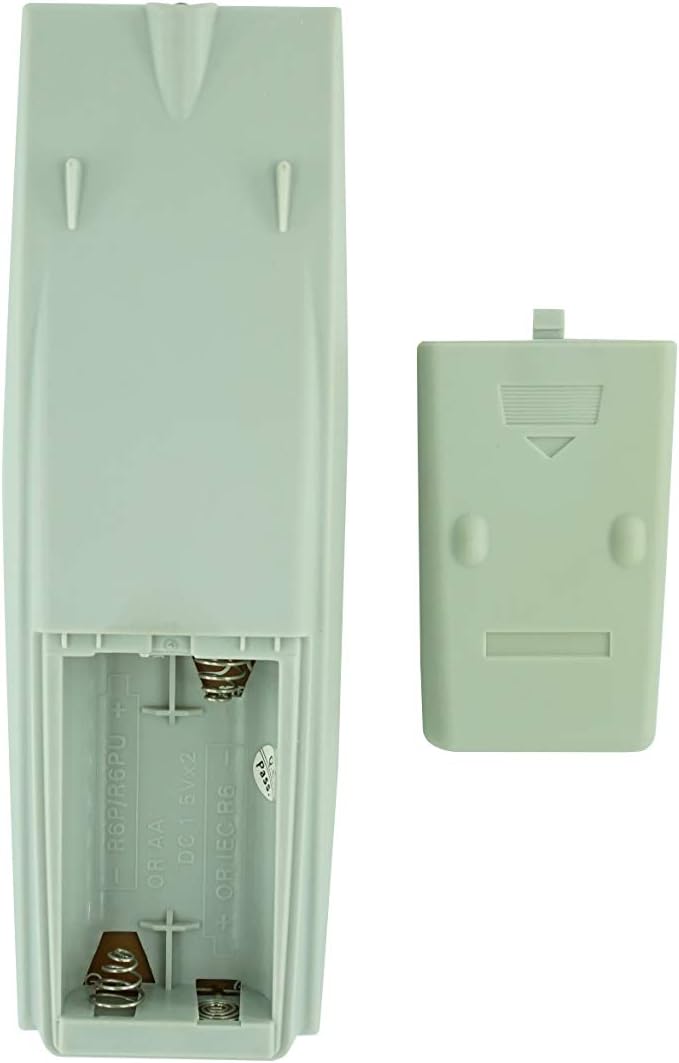
Figure 2: Battery compartment with cover removed, ready for battery insertion.
2. İlk Kullanım
Once batteries are installed, the remote control is ready for use. Point the remote directly at your JVC Micro COMPACT COMPONENT Stereo System. No additional programming is typically required for this replacement remote for the listed compatible models.
Kullanım Talimatları
This remote control provides access to the primary functions of your JVC stereo system. Below is a general overview of common button functions. Please note that while the functionality is guaranteed, the exact button layout may differ slightly from your original remote.

Şekil 3: Ön view düğme düzenine sahip uzaktan kumandanın.
Temel Fonksiyonlar:
- BEKLEME/AÇIK: Powers the stereo system on or off.
- EKRAN: Changes or shows display information.
- SAAT/ZAMANLAYICI: Accesses clock and timer settings.
- UYUMAK: Sets a sleep timer for automatic power off.
- Sayı Tuşları (0-9, +10): Direct input for track numbers, radio frequencies, etc.
- BAS / TİZ: Bas ve tiz seviyelerini ayarlar.
- Navigation (UP, DOWN, LEFT, RIGHT, SET): Menüde gezinme ve seçim için kullanılır.
- Playback Controls (PLAY/PAUSE, STOP, FAST FORWARD, REWIND, SKIP): Medya oynatmayı kontrol eder.
- Source Selection (CD, TAPE, FM/AM, AUX/MD): Ses giriş kaynağını seçer.
- FM MODE / REV.MODE: Toggles FM stereo/mono or tape reverse mode.
- AUTO PRESET: Radyo istasyonlarını otomatik olarak tarar ve kaydeder.
- PRGM / RANDOM / REPEAT: Controls program, random, and repeat playback modes.
- PTY SEARCH / PTY SELECT: For Program Type search and selection on radio.
- DISPLAY / TA/News / Info: Provides additional display information or traffic/news announcements.
- AHB PRO: Activates or deactivates Active Hyper-Bass PRO.
- SES DÜZEYİ (+/-): Ana ses seviyesini ayarlar.
For specific advanced functions, please refer to the original instruction manual of your JVC Micro COMPACT COMPONENT Stereo System.
Bakım
Uzaktan Kumandayı Temizleme
Uzaktan kumandanın görünümünü ve işlevselliğini korumak için düzenli olarak temizleyin:
- Yüzeyi yumuşak, kuru bir bezle silin.
- İnatçı kirler için hafifçeampBezi su veya hafif, aşındırıcı olmayan bir temizleyiciyle ıslatın. Temizleyiciyi doğrudan kumandaya püskürtmeyin.
- Kumandanın yüzeyine veya iç bileşenlerine zarar verebileceğinden, sert kimyasallar, çözücüler veya aşındırıcı temizleme pedleri kullanmaktan kaçının.
Pil Değişimi
Replace batteries when the remote's response becomes sluggish or it stops functioning. Always replace both batteries at the same time with new ones of the same type (AA). Do not mix old and new batteries, or different types of batteries.
Depolamak
Uzaktan kumanda uzun süre kullanılmayacaksa, pil sızıntısını ve kumandaya zarar gelmesini önlemek için pilleri çıkarın.
Sorun giderme
- Uzaktan kumanda yanıt vermiyor:
- Pillerin doğru kutuplara (+/-) göre takılıp takılmadığını kontrol edin.
- Eski pilleri yenileriyle değiştirin.
- Ensure there are no obstructions between the remote control and the stereo system's infrared receiver.
- Uzaktan kumandanın etkili menzili içerisinde olduğunuzdan emin olun.
- Some buttons not working or unexpected behavior:
- This remote is a replacement and while common functions are supported, the button layout or specific advanced functions might not perfectly match your original remote. Refer to the button layout image in the Operating Instructions section.
- Ensure the stereo system is powered on and set to the correct input source.
- Remote appears damaged:
- If the remote has been dropped or exposed to liquids, internal damage may have occurred. In such cases, replacement may be necessary.
Özellikler
| Marka | Genel |
| Üretici | TUCUS |
| Model Numarası | DVT-C9F24992D65E215A7DD6011D34514A46 |
| Uyumlu Modeller | JVC RM-SUXQ30UW, RM-SUXQ30US, UX-Q30S, UX-Q30B, UX-Q30P, UX-Q30W Micro COMPACT COMPONENT Stereo SYSTEM |
| Malzeme Türü | Diğer |
| Güç Kaynağı | 2 x AA Pil (dahil değildir) |
| ASIN | B0D79958PW |
| İlk Mevcut Tarih | 17 Haziran 2024 |
Garanti Bilgileri
This product comes with a 3-month warranty from the date of purchase. This warranty covers manufacturing defects and ensures the remote control functions as intended for compatible models. Please retain your proof of purchase for any warranty claims.
Müşteri Desteği
If you have any questions regarding the compatibility or functionality of this remote control, or if your specific device model is not listed, please contact the seller directly for assistance. The seller stocks a wide range of remote controls and parts and can confirm suitability for your needs.
For general inquiries or to provide feedback, please refer to the contact information provided by your retailer or the seller.
Ask a question about this manual
Ask about setup, troubleshooting, compatibility, parts, safety, or missing instructions. Manuals+ will review the question and use this page’s manual context to help answer it.