
1. Giriş
Satın aldığınız için teşekkür ederizasing the Minetom BL-HW02 Outdoor RGB Christmas Laser Light Projector. This device is designed to create dynamic and decorative light displays for various occasions, both indoors and outdoors. Featuring multiple color combinations, motion effects, and remote control operation, it offers a versatile lighting solution. Please read this manual thoroughly before use to ensure proper operation and safety.
2. Güvenlik Bilgileri
- Göz Güvenliği: Do not look directly into the laser light beam. Direct exposure to laser light can cause eye damage.
- Güç Kaynağı: Güç kaynağının ses seviyesiyle eşleştiğinden emin oluntage requirements specified on the product label. Use only the provided power adapter.
- Açık Hava Kullanımı: While the projector is IP65 waterproof, ensure the power adapter and connections are protected from water exposure.
- Kurulum: Install the projector securely to prevent it from falling or being dislodged by wind or other environmental factors.
- Çocuklar ve Evcil Hayvanlar: Kazara hasar veya yaralanmayı önlemek için cihazı çocukların ve evcil hayvanların erişemeyeceği yerde saklayın.
- Sıcaklık: Do not operate the device outside its specified temperature range (-30°F to 104°F).
- Bakım: Cihazı kendiniz açmaya veya onarmaya çalışmayın. Tüm servis işlemlerini yetkili personele yaptırın.
3. Paket İçeriği
Paketin içinde tüm öğelerin mevcut olduğundan emin olun:
- Minetom RGB Christmas Laser Light Projector
- RF Uzaktan Kumanda
- Zemin alımı
- Yuvarlak Taban
- Power Adapter (with 16.4ft extension cord)
- Kullanım Kılavuzu (bu belge)
4. Kurulum
4.1 Choosing an Installation Method
The projector offers three installation options: ground-mounted, wall-mounted, or placed on a flat surface.
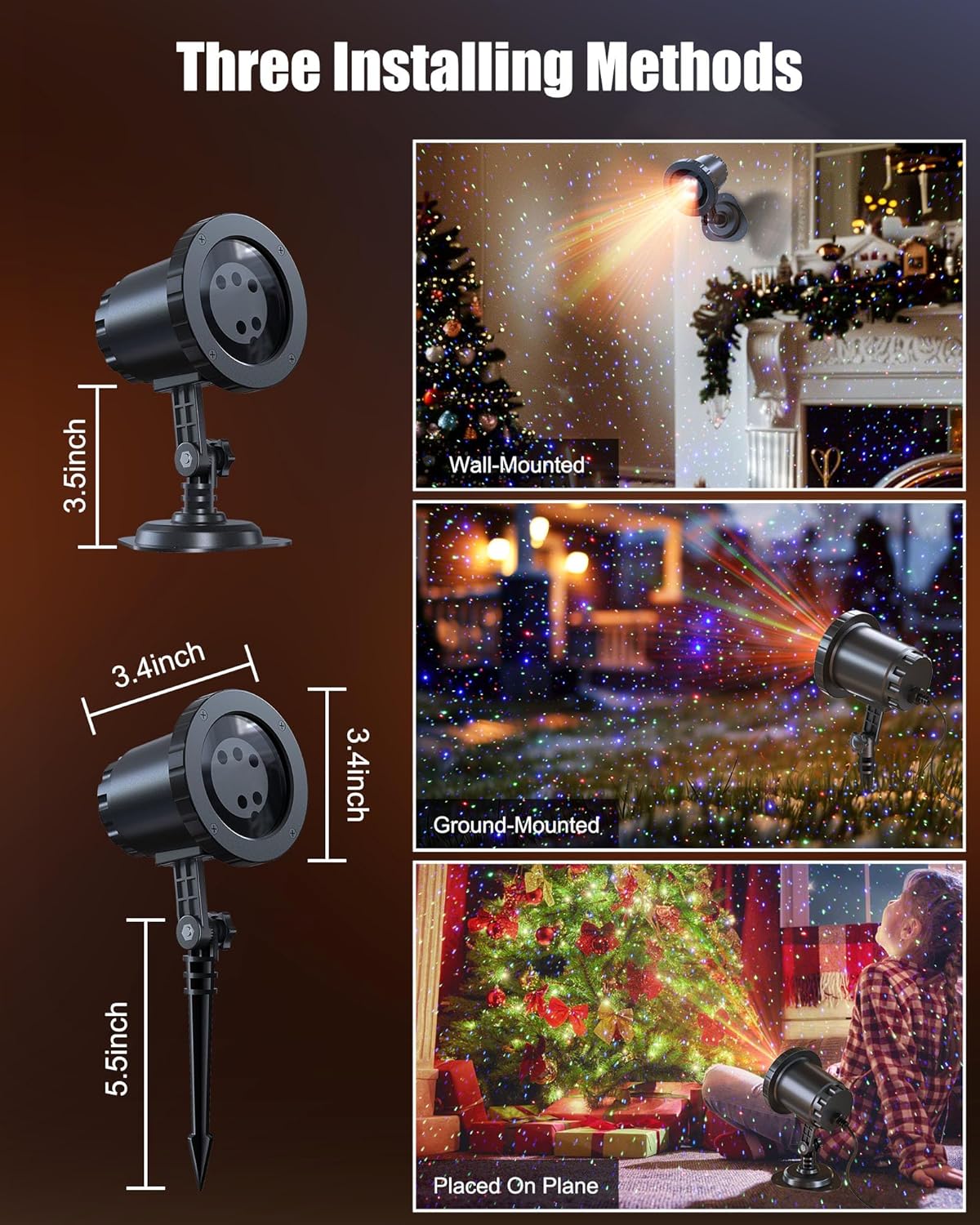
Image: The Minetom laser light projector can be installed in three ways: wall-mounted, ground-mounted, or placed on a flat surface using the included accessories.
- Ground-Mounted: Attach the ground stake to the projector. Insert the stake firmly into soft ground in your desired outdoor location.
- Duvara monte: Attach the round base to the projector. Secure the base to a wall using appropriate screws (not included) for a stable installation.
- Placed on Plane: Attach the round base to the projector. Place the projector on any stable, flat surface indoors or outdoors.
4.2 Güç Bağlantısı
- Connect the projector to the provided power adapter.
- Use the 16.4ft extension cord to reach a suitable outdoor power outlet.
- Tüm bağlantıların sağlam ve nemden korunmuş olduğundan emin olun.
- Güç adaptörünü topraklı bir elektrik prizine takın.
5. Kullanım Talimatları
Once powered on, the projector will begin its default light show. Use the RF remote control to customize the display.
5.1 Uzaktan Kumanda İşlevleri
The RF remote control allows you to manage various settings from a distance. Ensure 2*AAA batteries (not included) are installed in the remote.

Image: RF Remote Control layout with functions for each button.
| Düğme | İşlev |
|---|---|
| AÇIK/KAPALI | Projektörü açar veya kapatır. |
| 2 saat / 4 saat / 6 saat | Sets the timer for 2, 4, or 6 hours. |
| (H) Restore | Restores to default timing (6 hours on, 18 hours off). |
| Renk Döngüsü | Cycles through Green, Blue, Red-Green, Blue-Green, Red-Blue, Red-Green-Blue, and Red-Green-Blue cycle. |
| Solunum Modu | Activates a slow fade-in/fade-out effect. |
| Jumping Mode | Activates a rapid color change effect. |
| S0 (Static) | Sets the light display to static (no motion). |
| S- / S+ | Adjusts rotation speed (S- for slow, S+ for fast). |
| R / G / B | Selects Red, Green, or Blue light individually. |
| R/G/B Breathing | Activates breathing mode for individual Red, Green, or Blue colors. |
| R/G/B Strobe | Activates strobe mode for individual Red, Green, or Blue colors. Press sequentially to adjust speed (Slow, Medium, Fast, Stop). |
| R/G/B Steady | Sets individual Red, Green, or Blue colors to steady (non-flashing). |
5.2 Renk Kombinasyonu
The projector supports various color combinations to create diverse effects.

Resim: Eskiamples of the 7 available color combinations.
- Kırmızı
- Yeşil
- Mavi
- Kırmızı Yeşil
- Kırmızı Mavi
- Yeşil Mavi
- Kırmızı Yeşil Mavi
6. IP65 Su Geçirmezlik Derecesi
The projector body is designed with an IP65 waterproof rating, ensuring reliable performance in various weather conditions such as snow, rain, dust, and intense sunlight. It is cold-proof, operating effectively from -30°F to 104°F.

Image: The projector operating in rainy and snowy conditions, highlighting its IP65 waterproof and cold-proof features.
7. Kapsama Alanı
The projector can cover a significant area, illuminating indoor ceilings, walls, or outdoor walls, gardens, lawns, trees, and rooftops. From a distance of 32.8 feet, it can cover approximately 3229.17 square feet.

Image: Coverage area chart illustrating how the projected area expands with increased distance from the surface.
8. Bakım
- Temizlik: Gently wipe the projector lens and body with a soft, dry cloth. Do not use abrasive cleaners or solvents.
- Depolamak: Kullanılmadığı zamanlarda projektörü serin, kuru bir yerde, doğrudan güneş ışığından ve aşırı sıcaklıklardan uzakta saklayın.
- Kablo Denetimi: Periodically check the power cord and adapter for any signs of damage. Discontinue use if damage is found.
9. Sorun Giderme
| Sorun | Çözüm |
|---|---|
| Projektör açılmıyor. |
|
| Uzaktan kumanda yanıt vermiyor. |
|
| Işık çıkışı loş veya tutarsız. |
|
| Multiple projectors interfere with each other. |
|
10. Özellikler
| Özellik | Detay |
|---|---|
| Model Numarası | BL-HW02 |
| Marka | Minetom |
| Renk | Kırmızı Yeşil Mavi |
| Malzeme | Plastik |
| Bitiş Türü | Projektör |
| Işık Kaynağı Türü | Işık Yayan Diyot |
| Güç Kaynağı | Kablolu Elektrik |
| Montaj Tipi | Zemin Montajı, Duvar Montajı |
| Ürün Boyutları | 2.75"U x 2.75"G x 11.02"Y |
| Ürün Ağırlığı | 14 ons |
| Işın Açısı | 120 Derece |
| Su Geçirmezlik Derecesi | IP65 |
| Çalışma Sıcaklığı | -30°F ila 104°F |
| Coverage Area (approx.) | 3229.17 sq ft at 32.8 ft distance |
11. Garanti ve Destek
For warranty information or technical support, please refer to the contact details provided at the point of purchase or visit the official Minetom webSite. Satın alma belgeniz olarak satın alma fişinizi saklayın.