
1. Giriş
Thank you for choosing the SOVMIKU 5MP Wireless Security Camera System. This system provides reliable surveillance with high-resolution cameras, a compact Network Video Recorder (NVR), and advanced features like two-way audio and AI motion detection. This manual will guide you through the setup, operation, and maintenance of your new security system.
2. Paket İçeriği
Lütfen paketinizde tüm öğelerin mevcut olduğundan emin olun:
- Small NVR Unit (with 1TB HDD pre-installed)
- 5MP Wireless PTZ Cameras (2 units)
- NVR ve Kameralar için Güç Adaptörleri
- Montaj Vidaları ve Ankrajları
- Ethernet kablosu
- USB Mouse
- Kullanım Kılavuzu (bu belge)
3. Ürün Özellikleri
- 5 MP Ultra Yüksek Çözünürlük: Capture clear and detailed images and videos.
- PTZ İşlevselliği: Pan 355° horizontally and tilt 90° vertically for comprehensive 360° coverage.
- Gelişmiş Gece Görüşü: Equipped with IR-CUT for clear night vision up to 20 meters, supporting Smart, Infrared, and Full Color modes.
- İki Yönlü Ses: Communicate in real-time through the camera using your smartphone.
- AI Motion Detection & PIR Human Detection: Accurately detect human movement, reduce false alarms, and trigger spotlights and alarms.
- IP66 Hava Koşullarına Dayanıklı: Designed for both indoor and outdoor use, resistant to rain, snow, and extreme temperatures.
- H.265+ Video Sıkıştırma: Efficiently saves storage space by reducing video file sizes by approximately 50%.
- 1TB HDD & Continuous Recording: Supports 24/7 continuous recording for up to 30 days with automatic overwrite function.
- Easy Installation & Expansion: Simple setup with automatic wireless connection and support for up to 10 cameras.
- Multi-Device Access: Monitor from smartphones, tablets, and computers (Windows, Mac OS), with Alexa integration.
4. Kurulum Kılavuzu
Follow these steps to set up your SOVMIKU security camera system:
- Gücü bağlayın:
Connect the power adapters to the NVR and each camera. Ensure all devices power on correctly.

Image: Step 1 shows connecting power to both the camera and the NVR unit.
- Camera and NVR Connection:
The cameras and NVR are pre-paired and should connect automatically via 2.4GHz WiFi once powered on. No manual pairing is typically required.
Image: Step 2 illustrates the wireless connection between the camera and the NVR.
- NVR and Network Connection:
Connect the NVR to your router using the provided Ethernet cable for internet access. This enables remote viewbildirimler ve uyarılar.
Image: Step 3 shows connecting the NVR to a network router via an Ethernet cable.
- App Download and Device Binding:
Download the 'EseeCloud' app on your smartphone. Scan the QR code displayed on the NVR monitor or found in the app to bind your device for remote access.
Download the EseeCloud app here: EseeCloud App Download
Image: Step 4 demonstrates downloading the app and scanning a QR code for device binding.
- System Expansion (Optional):
The system supports adding up to 10 cameras for expanded coverage. Additional cameras can be easily paired with the NVR.

Image: This diagram illustrates the easy installation process via 2.4GHz WiFi and the system's ability to expand with up to 10 cameras.
5. Kullanım Talimatları
5.1.PTZ Kontrolü
Control the camera's pan (horizontal) and tilt (vertical) movements remotely via the EseeCloud app or NVR interface to adjust the viewaçı.

Image: The camera offers a wide field of view with 355 degrees horizontal and 90 degrees vertical rotation, providing comprehensive 360-degree coverage without blind spots.
5.2. Dijital Yakınlaştırma
Use the digital zoom feature in the app to magnify specific areas of the live feed or recorded footage for closer inspection.

Image: Utilize the 5x digital zoom to magnify specific areas of interest, allowing for detailed observation of distant objects or areas.
5.3. Gece Görüş Modları
The camera supports three night vision modes for optimal viewing in various lighting conditions:
- Akıllı mod: Automatically adjusts between infrared and full-color night vision based on detected motion.
- Kızılötesi Modu: Tamamen karanlıkta bile net siyah beyaz görüntüler sağlar.
- Tam Renkli Mod: Uses built-in spotlights to provide vivid color images even at night.

Image: This image compares the camera's night vision capabilities across Smart, Infrared, and Full Color modes, showcasing their respective visual outputs.
5.4. Çift Yönlü Ses
Access the two-way audio function through the EseeCloud app to speak and listen through the camera. This is useful for communicating with visitors or deterring unwanted guests.
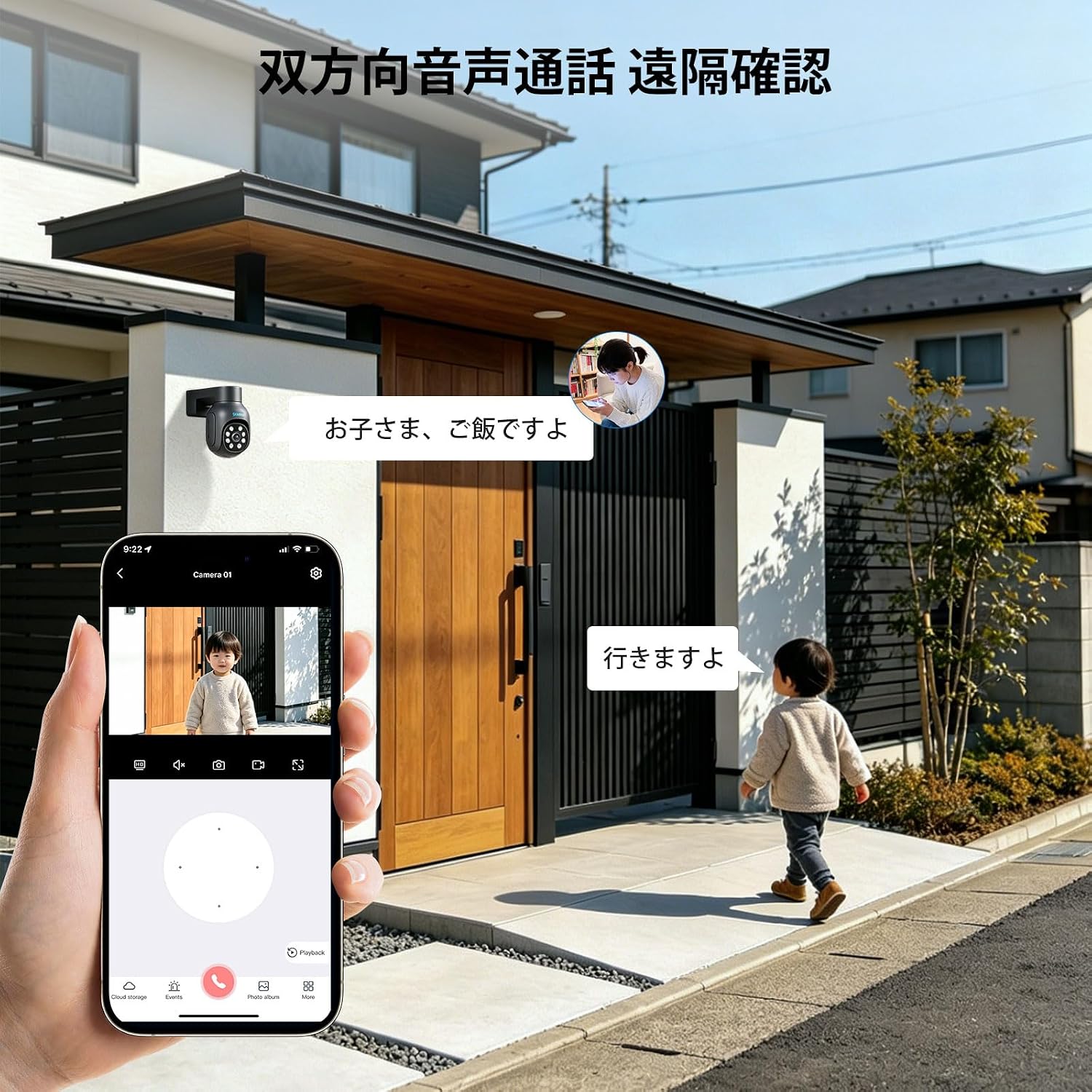
Image: A person is shown using a smartphone to engage in two-way audio communication with someone near the camera, demonstrating the remote interaction feature.
5.5. Hareket Algılama ve Uyarılar
The system uses PIR human detection and smart motion detection to identify suspicious activity. When motion is detected, the camera can activate a spotlight, sound an alarm, and send instant notifications to your smartphone via the EseeCloud app.

Image: This image depicts the camera's motion detection in action, with a spotlight illuminating an intruder and a notification appearing on a smartphone.
5.6. Kayıt ve Depolama
The NVR comes with a pre-installed 1TB HDD, supporting 24/7 continuous recording. Thanks to H.265+ video compression, storage is optimized, allowing for approximately 30 days of continuous footage. When the HDD is full, the system automatically overwrites the oldest recordings.

Image: This graphic illustrates the efficiency of H.265 compression, showing it reduces data size by about 50% compared to H.264.

Image: This image highlights the NVR's 1TB HDD and H.265+ compression, enabling 30 days of 24-hour continuous recording.
5.7. Multi-Device Access
Monitor your security system from various devices. The EseeCloud app is available for smartphones and tablets, and client software is available for Windows and Mac OS. The system also supports integration with Alexa.

Image: This image displays the system's compatibility with various devices, including smartphones, tablets, and desktop computers, along with app store icons and Alexa integration.
6. Bakım
- Düzenli Temizlik: Net görüntü kalitesini korumak için kamera lenslerini düzenli olarak yumuşak, kuru bir bezle temizleyin. Aşındırıcı temizleyicilerden kaçının.
- Donanım Yazılımı Güncellemeleri: Check for and install firmware updates for the NVR and cameras through the EseeCloud app to ensure optimal performance and security.
- Güç Kaynağı Kontrolü: Ensure all power connections are secure and free from damage.
- Ağ Kararlılığı: Maintain a stable 2.4GHz WiFi connection for reliable wireless camera performance.
7. Sorun Giderme
7.1. No Image Display
- Check if the camera and NVR are powered on.
- Ensure the cameras are within range of the NVR's wireless signal.
- Verify that the NVR is connected to a display monitor (if applicable) and the input source is correct.
7.2. Cannot Connect to App
- NVR'nin Ethernet kablosuyla internete bağlı olduğundan emin olun.
- Akıllı telefonunuzun internet bağlantısını kontrol edin.
- Re-scan the QR code in the EseeCloud app to re-bind the device.
- Restart the NVR and your router.
7.3. Motion Detection Not Working
- Verify that motion detection is enabled in the camera settings via the app or NVR.
- Hassasiyet ayarlarını düzenleyin.
- Kameranın görüşünü engelleyen herhangi bir şey olmadığından emin olun. view or PIR sensor.
7.4. Poor Night Vision
- Kamera lensini temizleyin.
- Ensure there are no reflective surfaces close to the camera that could interfere with infrared light.
- Check the selected night vision mode (Smart, Infrared, Full Color) in the settings.
8. Özellikler
| Özellik | Detay |
|---|---|
| Marka | SOVMIKU |
| Model Numarası | SFWK-10VY-2HD405Y-AT |
| Bağlantı Teknolojisi | Wired, Wireless (2.4GHz WiFi) |
| Kamera Çözünürlüğü | 5 Megapiksel |
| PTZ Döndürme | Yatay 355°, Dikey 90° |
| Gece Görüş Mesafesi | 20 metreye kadar |
| Su Geçirmezlik Derecesi | IP66 |
| Video Sıkıştırma | H.265 + |
| NVR Depolama | 1 TB HDD (önceden takılı) |
| Max Camera Support | 10 kameraya kadar |
| Ürün Boyutları (NVR) | 20x22x14 cm |
| Menşei ülke | Çin |
9. Garanti ve Destek
SOVMIKU provides a 12 ay garanti for this product from the date of purchase. Our dedicated customer support team is available to assist you with any questions or issues you may encounter.
For technical support or warranty claims, please contact us via email:
E-posta: sovmiku_JP@163.com
Please provide your model number and a detailed description of the issue when contacting support.

Image: This image provides SOVMIKU's customer service contact details, including the 12-month warranty and email address for support.