
DOOGEE SPUNK
DOOGEE S Punk Dayanıklı Akıllı Telefon Kullanım Kılavuzu
Model: SPUNK
1. Giriş
Welcome to the user manual for your new DOOGEE S Punk Rugged Smartphone. This guide provides essential information on setting up, operating, maintaining, and troubleshooting your device. Designed for durability and high performance, the DOOGEE S Punk is built to withstand challenging environments while offering advanced smartphone functionalities.
Please read this manual thoroughly to ensure proper use and to maximize the potential of your device.
2. Kutuda Neler Var?
Upon unboxing your DOOGEE S Punk Rugged Smartphone, please verify that all the following items are included:
- 1 x DOOGEE S Punk Cellphone
- 1 x Tip-C USB Kablosu
- 1 x Şarj Cihazı (33W)
- 1 x Packing Box / Manual / Warranty Card
3. Ürün Bittiview
The DOOGEE S Punk is engineered for robust performance and user convenience. Below are its key features and components.
3.1. Cihaz Düzeni
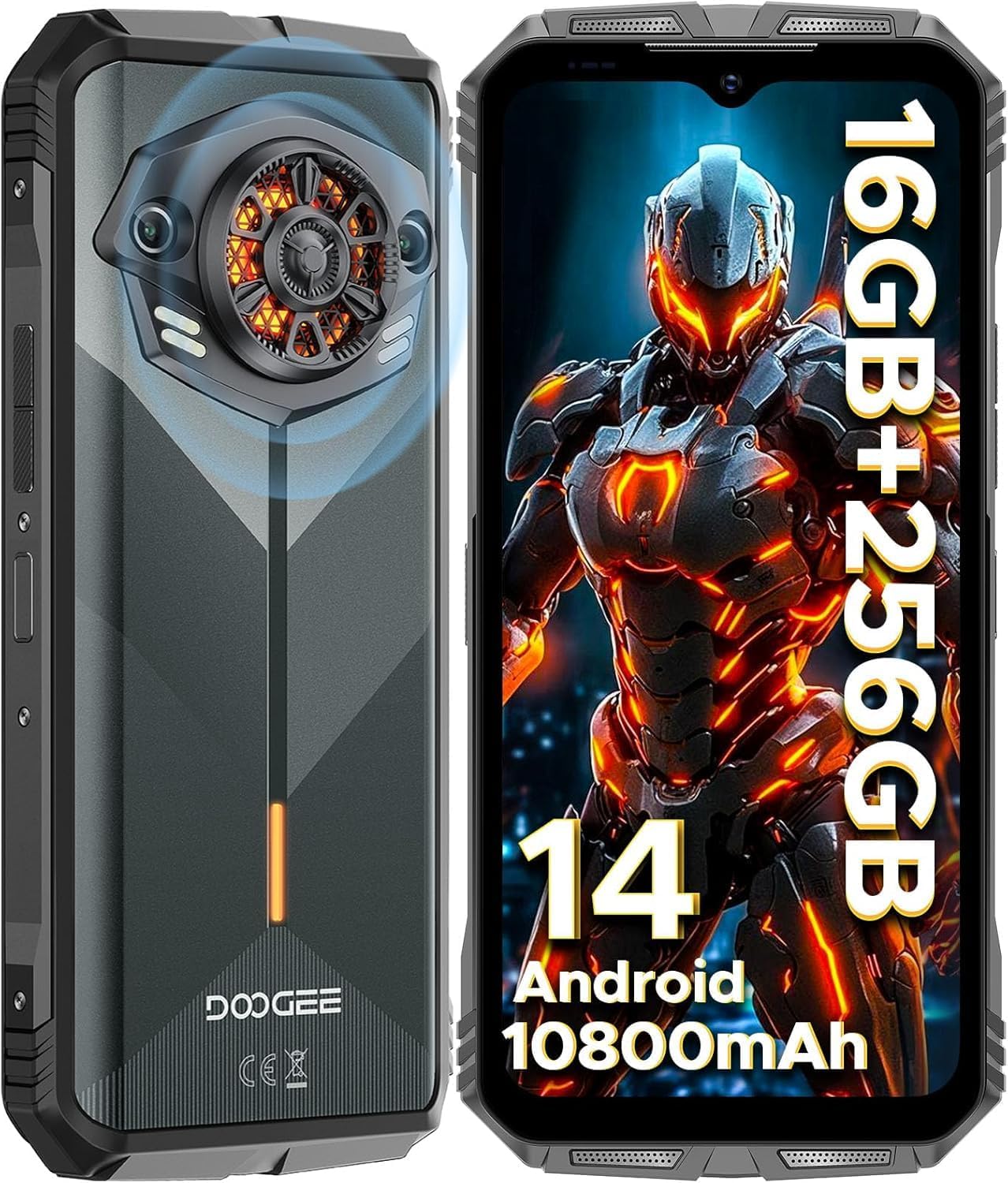
Ön ve arka view of the DOOGEE S Punk Rugged Smartphone, highlighting its robust design and camera module.
3.2. Ekran
The device features a 6.58-inch FHD+ 90Hz IPS Waterdrop display with Corning Gorilla Glass for enhanced durability. It offers a resolution of 1080x2408 pixels, a pixel density of 401 PPI, and displays 16.7 million colors with a 20:9 aspect ratio. The brightness reaches 400 nits, ensuring clear visibility even in sunlight.

The 6.58-inch FHD+ 90Hz IPS Waterdrop screen with Corning Gorilla Glass, showcasing its high resolution and vibrant colors.
3.3. Ses Sistemi
Equipped with a powerful 4W super speaker, the DOOGEE S Punk delivers an impressive 126 dB of sound output. This ensures clear audio for calls, music, and notifications, even in noisy environments.

Ayrıntılı view of the 4W super speaker, emphasizing its large amplitude and high volume capability.
3.4. Intelligent Interaction Lights
The DOOGEE S Punk features customizable intelligent interaction lights on the rear. These lights can be configured to display different colors (red, blue, green) for various scenarios, including incoming calls, music playback, SMS notifications, and charging, adding a unique visual element to your device.

Illustration of the intelligent interaction lights on the back of the phone, showing different color effects for various notifications.
4. Kurulum
4.1. SIM ve TF Kartlarının Takılması
The DOOGEE S Punk supports two Nano SIM cards or one Nano SIM and one TF card for expandable storage. Locate the SIM card tray on the side of the device. Use the provided SIM ejector tool to open the tray. Carefully place your SIM card(s) and/or TF card into the designated slots, ensuring correct orientation. Close the tray securely.
4.2. İlk Güç Açma ve Kurulum Sihirbazı
Press and hold the Power button until the DOOGEE logo appears. The phone will guide you through the initial setup wizard, where you can select your language, connect to Wi-Fi, set up your Google account, and configure security features like face unlock and fingerprint recognition.
5. Kullanım Talimatları
5.1. Android 14 İşletim Sistemi
The DOOGEE S Punk runs on the latest Android 14 operating system, providing a fast, smooth, and secure user experience. It features an octa-core processor for efficient multitasking and app performance.
5.2. Güvenlik Özellikleri
Your device offers advanced security options:
- Yüz Tanıma Kilidi: Register your face for quick and convenient unlocking.
- Yan Parmak İzi Tanıma: The fingerprint sensor is integrated into the side power button for easy access and secure unlocking.

Demonstration of the Face Unlock feature in use.

Illustration of the side-mounted fingerprint sensor for quick and secure access.
6. Kamera Özellikleri
Capture stunning photos and videos with the DOOGEE S Punk's versatile camera system.
6.1. Arka Kamera
The main rear camera is 50MP, capable of capturing high-resolution images with excellent detail. It supports various shooting modes including Panorama, Portrait, Macro, and Beauty mode.

Üzerindeview of the 50MP AI main camera and available shooting modes like AI Camera, Portrait, Mono, Beauty, Panorama, Pro Mode, Intelligent Scanning, and Night View.
6.2. Ön Kamera
The 16MP front camera is ideal for high-quality selfies and video calls, ensuring you capture your best moments anytime, anywhere.

The 16MP front camera, perfect for capturing clear selfies.
7. Bağlantı
The DOOGEE S Punk offers comprehensive connectivity options for seamless communication and navigation.
- Çift 4G SIM: Supports two Nano SIM cards for flexible network usage. Compatible with all UK carriers (Note: AT&T is not supported).
- NFC: Effortless connectivity for Google Pay, quick data sharing, and other NFC-enabled functions.
- KÜRESEL KONUMLAMA SİSTEMİ: Integrated GPS, GLONASS, Galileo, and Beidou support for precise location tracking and navigation.
- Wifi: Supports 2.4G/5G Wi-Fi for fast internet access.
- Bluetooth: Bluetooth 5.0 for connecting to wireless accessories.

Visual representation of the phone's connectivity options including Dual 4G SIM, Wi-Fi 2.4G/5G, and Bluetooth 5.0.

The NFC feature, enabling effortless connectivity for payments and data transfer.

The phone's GPS capabilities, showing its utility as a navigation tool for adventures.
8. Durability and Resilience
The DOOGEE S Punk is built to withstand extreme conditions, making it an ideal companion for outdoor enthusiasts and professionals.
- IP68 ve IP69K derecelendirmesi: Certified waterproof up to 1.5 meters for 30 minutes and fully dustproof.
- MIL-STD-810H Standardı: 1.5 metreye kadar yükseklikten düşmelere dayanıklıdır.
- Sıcaklık Direnci: Operates smoothly in temperatures ranging from -20°C to 55°C.

Visual representation of the phone's rugged features: drop-proof, dustproof 360°, IP68 waterproof, and extreme temperature resistance.
9. Pil ve Şarj
Experience extended usage with the DOOGEE S Punk's high-capacity battery and rapid charging capabilities.
- 10800mAh Pil: Provides up to 533 hours of standby time, 25 hours of talk time, 50 hours of music playback, or 24 hours of video playback.
- 33W Hızlı Şarj: Charges from 0% to 40% in just 30 minutes.
- OTG Desteği: Allows the phone to act as a power bank to charge other electronic devices.

Information on the 10800mAh battery's long-lasting performance, including standby, music, video, and OTG support.

Visualizing the 33W fast charging capability, allowing for quick power-ups.
10. Depolama ve Performans
The DOOGEE S Punk offers ample storage and robust performance for all your applications and media.
- 16GB RAM: Comprising 6GB physical RAM and 10GB virtual memory for smooth multitasking.
- 256 GB ROM: Expansive internal storage, expandable up to 1TB with a TF card.
- Sekiz Çekirdekli İşlemci: Ensures fast and smooth performance for all applications.

Details on the 16GB RAM and 256GB ROM, highlighting the phone's capacity for apps, photos, and videos.
11. Sorun Giderme
This section addresses common issues you might encounter with your DOOGEE S Punk Smartphone.
11.1. Cihaz Açılmıyor
- Ensure the battery is charged. Connect the phone to the 33W charger and wait a few minutes before attempting to power on.
- Zorla yeniden başlatmayı gerçekleştirmek için Güç düğmesini en az 10-15 saniye basılı tutun.
11.2. Kötü Çağrı Kalitesi veya Sinyal Yokluğu
- SIM kartınızın doğru takılıp takılmadığını kontrol edin.
- Verify that your carrier is supported by the device (Note: AT&T is not supported).
- Daha iyi şebeke kapsama alanına sahip bir bölgeye taşının.
- Telefonu yeniden başlatın.
11.3. Uygulamaların Çökmesi veya Donması
- Clear the cache and data of the problematic app through Settings > Apps.
- Ensure all apps and the Android system are updated to their latest versions.
- Sorun devam ederse uygulamayı kaldırıp yeniden yüklemeyi düşünün.
11.4. Pilin Hızlı Bitmesi
- Ekran parlaklığını azaltın ve ekran zaman aşımını daha kısa bir değere ayarlayın.
- Kullanılmayan arka plan uygulamalarını kapatın.
- Disable Wi-Fi, Bluetooth, and GPS when not needed.
- Güç tüketen uygulamaları belirlemek için Ayarlar'da pil kullanımını kontrol edin.
11.5. Water Damage (Despite IP Rating)
While the phone is IP68/IP69K rated, it's important to ensure all ports (USB-C, SIM tray) are completely sealed before exposure to water. If water ingress occurs, immediately power off the device and allow it to dry completely before attempting to power it on or charge it. Contact customer support if the issue persists after drying.
12. Özellikler
Detailed technical specifications for the DOOGEE S Punk Rugged Smartphone:
| Özellik | Şartname |
|---|---|
| Model Adı | SPUNK |
| İşletim Sistemi | Android 14 |
| CPU Modeli | Sekiz Çekirdekli |
| CPU Hızı | 1.6 GHz |
| Kurulu RAM Bellek Boyutu | 16 GB (6 GB + 10 GB sanal) |
| Bellek Depolama Kapasitesi | 256 GB (1 TB'a kadar genişletilebilir) |
| Ekran Boyutu | 6.58 inç |
| Çözünürlük | 1920x1080 (FHD+) |
| Yenileme Hızı | 90 Hz |
| Pil Kapasitesi | 10800 Miliamp Saat |
| Telefon Konuşma Süresi | 25 Saat |
| Arka Kamera | 50 MP Yapay Zeka Destekli Ana Kamera |
| Ön Kamera | 16 MP |
| Bağlantı Teknolojileri | Bluetooth, Wi-Fi, USB, NFC |
| Küresel Konumlama Sistemi | Doğru (GPS, GLONASS, Galileo, Beidou) |
| Özel Özellikler | Rugged Smartphone, Dual SIM, Waterproof, Built-In GPS, Intelligent Interaction Lights, 126dB Speaker |
| Ürün Boyutları | 7 x 3.26 x 0.7 inç |
| Ürün Ağırlığı | 1.46 pound |
| Renk | KARANLIK |
13. Garanti ve Destek
DOOGEE, yüksek kaliteli ürünler ve mükemmel müşteri hizmeti sunmaya kendini adamıştır.
- 2 Yıllık Sınırlı Garanti: Your DOOGEE S Punk Smartphone is covered by a 2-year free warranty from the date of purchase. This warranty covers manufacturing defects and workmanship.
- 30 Günlük Para İade Garantisi: If you are not satisfied with your purchase, you are entitled to a 30-day no-reason refund.
- Müşteri Desteği: For any issues or inquiries, our professional team is available for one-on-one online support. Please refer to the warranty card included in your packaging for contact details or visit the official DOOGEE webalan.

DOOGEE's commitment to customer service, including warranty and support.
Ask a question about this manual
Ask about setup, troubleshooting, compatibility, parts, safety, or missing instructions. Manuals+ will review the question and use this page’s manual context to help answer it.