
1. Giriş
This manual provides detailed instructions for the installation, operation, and maintenance of your ZUMIMALL ZS-GX2S 3MP Wireless Outdoor Security Camera. Please read this manual thoroughly before using the product to ensure proper functionality and safety.
The ZUMIMALL ZS-GX2S is a solar-powered, wireless outdoor security camera designed for comprehensive surveillance. It features 3MP resolution, 360° pan and tilt capabilities, AI detection, two-way audio, and IP66 weatherproofing, making it suitable for various outdoor environments.
2. Ürün Bittiview
2.1 Paket İçeriği
Paketin içeriği şu şekildedir:
- ZUMIMALL ZS-GX2S 3MP Wireless Outdoor Security Camera (2 units)
- Güneş Paneli (2 adet)
- Kamera Montaj Braketi
- Güneş Paneli Montaj Braketi
- USB Şarj Kablosu
- Screw Package (screws and wall anchors)
- Kullanım Kılavuzu
- Tip Sticker ('Hey! YOU ARE ON CAMERA')
2.2 Kamera Bileşenleri
Familiarize yourself with the main parts of the camera:
- Kamera Lensi: Foo video yakalartage.
- Beyaz Işık: Renkli gece görüşü için aydınlatma sağlar.
- PIR Sensörü: Hareketi algılar.
- Mikrofon: İki yönlü iletişim için ses kaydı yapar.
- Konuşmacı: Çift yönlü iletişim ve siren için ses çıkışı sağlar.
- Wi-Fi Anteni: Enhances wireless connectivity.
- Mod Göstergesi: Kamera durumunu gösterir.
- Sıfırlama tuşu: Used to reset the camera.
- Güç anahtarı: Kamerayı açar/kapatır.
- SD Kart Yuvası: Yerel video depolama için (128 GB'a kadar destekler).
- Type-C Şarj Portu: For connecting the solar panel or charging.

2.3 Temel Özellikler
- 3MP Full Color Image: Delivers 2K resolution, 1.5 times sharper than standard 1080p, with 4X digital zoom.
- 360° View: Offers 355° horizontal and 120° vertical rotation for comprehensive coverage.
- Güneş Enerjili ve %100 Kablosuz: Equipped with a high-efficiency solar panel and large-capacity rechargeable battery for continuous operation.
- 2.4G WiFi Bağlantısı: Features 4dBi dual antennas for stable wireless connection.
- Akıllı Yapay Zeka Tespiti: Advanced PIR sensor and AI algorithms identify persons, pets, vehicles, and parcels, reducing false alarms.
- Gerçek Zamanlı Uyarılar: Sends instant notifications to your mobile app upon motion detection.
- İki Yönlü Ses: Kamera aracılığıyla gerçek zamanlı iletişime olanak tanır.
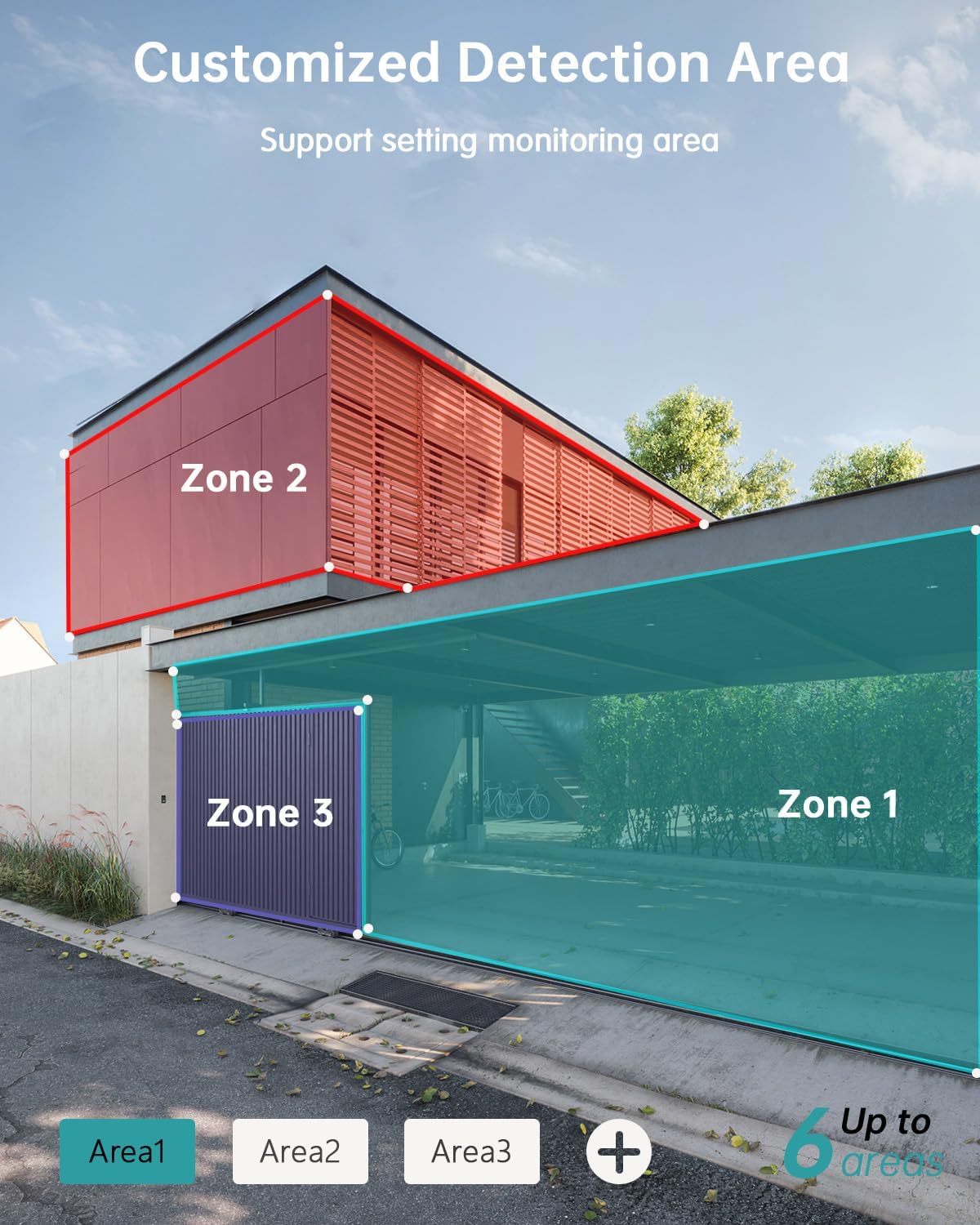
- Özelleştirilebilir Algılama Alanları: Set specific monitoring zones to focus on critical areas.
- IP66 Hava Koşullarına Dayanıklı: Designed to withstand various weather conditions, including rain, wind, and snow.
- Çoklu Depolama Seçenekleri: Supports local storage via Micro SD card (up to 128GB) and cloud storage.
- Alexa ile çalışır: Sesli kontrol ve canlı etkileşim için Amazon Alexa ile entegre olun. view Uyumlu cihazlarda.
3. Kurulum
3.1 Fiziksel Kurulum
Before permanent installation, ensure the camera has a strong 2.4G Wi-Fi signal in the desired location. The camera can be mounted on various surfaces including wood, drywall, stucco, or even gutters using appropriate fasteners.
- Montaj tabanını takın: Secure the camera's mounting base to your chosen surface using the provided screws and wall anchors.
- Güneş Panelini Bağlayın: Attach the solar panel to its bracket and position it to receive maximum sunlight. Connect the solar panel's Type-C cable to the camera's charging port. Ensure the cable is neatly managed to prevent damage.
- Kamerayı Monte Et: Align the camera with the mounting base and slide it down until it locks securely.

3.2 Uygulama Kurulumu ve Eşleştirme
The ZUMIMALL app is required to operate your camera. Follow these steps to set up the app and pair your camera:
- Uygulamayı indirin: Scan the QR code provided in the manual or on the product packaging, or search for 'ZUMIMALL' in your device's app store.
- Hesap Kaydı: Open the ZUMIMALL app and follow the on-screen instructions to register a new account or log in if you already have one.
- Cihaz Ekle: In the app, select 'Add Device' or the '+' icon. Follow the prompts to select your camera model.
- Kamerayı Açın: Kameranızın açık olduğundan emin olun.
- QR Kodunu Tara: The app will display a QR code. Hold your camera's lens towards your phone screen to scan the QR code. You will hear a confirmation sound when successful.
- Wi-Fi'ye bağlanın: Follow the app's instructions to connect the camera to your 2.4G Wi-Fi network.
- Kurulum tamamlandı: Bağlantı kurulduktan sonra kameranıza isim verebilir ve kullanmaya başlayabilirsiniz.

4. Operasyon
4.1 Canlı View ve Oynatma
Access the live feed and review kaydedilmiş footage directly from the ZUMIMALL app.
- Canlı View: Uygulamayı açın ve kameranızı seçin. view the real-time feed.
- Playback: Navigate to the 'History' or 'Cloud' section in the app to review Kaydedilen olaylar.

4.2 Hareket Algılama ve Uyarılar
The camera's AI detection system identifies specific objects and sends alerts.
- Yapay Zeka Tespiti: The camera can distinguish between persons, pets, vehicles, and parcels.
- Custom Areas: Set specific detection zones within the app to monitor areas of interest and reduce unnecessary alerts.
- Gerçek Zamanlı Bildirimler: Hareket algılandığında telefonunuza anında uyarılar alın.

4.3 İki Yönlü Ses
Engage in real-time conversations through the camera using the app's two-way audio feature.
4.4 PTZ Kontrolü
Control the camera's pan (horizontal) and tilt (vertical) movements directly from the app to adjust your viewaçı.
- Tava: 355° yatay dönüş.
- Tilt: 120° dikey dönüş.

4.5 Depolama Seçenekleri
Your camera offers flexible storage solutions for recorded footage.
- Mikro SD kart: Yerel depolama için belirlenmiş yuvaya bir Micro SD kart (en fazla 128 GB) takın.
- Bulut Depolama: ZUMIMALL offers cloud storage services for convenient access and backup of your recordings.
4.6 Alexa Entegrasyonu
The ZUMIMALL ZS-GX2S camera is compatible with Amazon Alexa. You can use voice commands to view Uyumlu Alexa özellikli cihazlarda canlı yayın.
5. Bakım
5.1 Batarya ve Güneş Enerjisiyle Şarj
The integrated solar panel is designed to keep your camera's battery charged, providing continuous operation.
- Ensure the solar panel is positioned in an area that receives direct sunlight for several hours daily.
- In periods of low sunlight or high usage, the camera's battery may require manual charging via the USB port.
5.2 Temizlik
Düzenli temizlik optimum performansın korunmasına yardımcı olur.
- Fotoğraf makinesinin objektifini ve güneş panelini yumuşak bir bezle nazikçe silin.amp toz ve döküntüleri temizlemek için bez.
- Avoid using harsh chemicals or abrasive materials that could damage the camera's surface or lens.
6. Sorun Giderme
If you encounter issues with your ZUMIMALL ZS-GX2S camera, consider the following common solutions:
- Güç Yok: Ensure the solar panel is receiving adequate sunlight or manually charge the camera using the USB cable.
- Wi-Fi Bağlantı Sorunları: Verify your Wi-Fi network is 2.4Ghz. Check the camera's proximity to the router and ensure a strong signal. Restart your router and camera if necessary.
- Yanlış alarm: Adjust the motion detection sensitivity settings in the app. Utilize the custom detection area feature to exclude irrelevant zones.
- No Recordings: Check if the Micro SD card is properly inserted and formatted. Ensure cloud storage is active if you are using that service.
- Kötü Görüntü Kalitesi: Kamera lensini temizleyin. Kameranın görüş alanında herhangi bir engel olmadığından emin olun. view.
- İki Yönlü Ses Sorunları: Check the volume settings on your phone and in the app. Ensure there are no obstructions blocking the camera's microphone or speaker.
For further assistance, please refer to the ZUMIMALL app's help section or contact customer support.
7. Özellikler
| Özellik | Detay |
|---|---|
| Model Numarası | ZS-GX2S |
| Çözünürlük | 3 MP (2K) |
| Güç Kaynağı | Solar Powered (with rechargeable Lithium Ion battery) |
| Bağlantı | 2.4G Kablosuz |
| Pan/Tilt Aralığı | 355° Yatay, 120° Dikey |
| Geniş Açılı Lens | 130° |
| Gece Görüşü | 3MP Color Night Vision (with 2 IR and 2 white lights) |
| Dijital Zoom | 4X |
| AI Algılama | Person, Pet, Vehicle, Parcel |
| Ses | Çift Yönlü Ses |
| Depolamak | Mikro SD Kart (128 GB'a kadar), Bulut Depolama |
| Hava Direnci | IP66 |
| Çalışma Sıcaklığı | -4°F ila 120°F (-20°C ila 50°C) |
| Uyumlu Cihazlar | Akıllı telefon, Amazon Alexa |
| Ürün Boyutları | 13.7 x 7.4 x 5.4 inç |
| Ürün Ağırlığı | 4.71 pound |
8. Garanti ve Destek
ZUMIMALL is committed to providing high-quality products and customer satisfaction. For warranty information, technical support, or any inquiries regarding your ZS-GX2S camera, please refer to the ZUMIMALL app's support section or visit the official ZUMIMALL website. You can also contact ZUMIMALL customer service directly for assistance.