
Revolution R180 Connect
Revolution R180 Connect Smart Toaster User Manual
Model: R180 Connect (R180C-01)
1. Giriş
This manual provides essential information for the safe and efficient operation of your Revolution R180 Connect Smart Toaster. Please read all instructions carefully before use and retain this manual for future reference.

Image 1.1: The Revolution R180 Connect Smart Toaster, featuring a touchscreen display and two toasting slots.
2. Önemli Güvenlik Bilgileri
Elektrikli aletleri kullanırken, aşağıdakiler de dahil olmak üzere temel güvenlik önlemlerine her zaman uyulmalıdır:
- Tüm talimatları okuyun.
- Sıcak yüzeylere dokunmayın. Kulp veya düğmeleri kullanın.
- Elektrik çarpmasına karşı korunmak için kabloyu, fişleri veya tost makinesini suya veya başka bir sıvıya batırmayın.
- Herhangi bir cihazın çocuklar tarafından veya çocukların yakınında kullanılması durumunda yakın gözetim gereklidir.
- Kullanılmadığında ve temizlemeden önce fişini prizden çekin. Parçaları takıp çıkarmadan önce soğumasını bekleyin.
- Hasarlı kablo veya fişle veya cihaz arızalandıktan veya herhangi bir şekilde hasar gördükten sonra cihazı çalıştırmayın. İnceleme, onarım veya ayarlama için müşteri hizmetleriyle iletişime geçin.
- Cihaz üreticisi tarafından önerilmeyen aksesuar aparatlarının kullanımı yaralanmalara sebep olabilir.
- Açık havada kullanmayınız.
- Kablonun masa veya tezgah kenarından sarkmasına veya sıcak yüzeylere temas etmesine izin vermeyin.
- Sıcak gazlı veya elektrikli ocakların üzerine veya yakınına, ya da ısıtılmış fırına koymayın.
- Sıcak yağ veya diğer sıcak sıvılar içeren bir cihazı hareket ettirirken son derece dikkatli olunmalıdır.
- Cihazı kullanım amacı dışında kullanmayınız.
- Yangın veya elektrik çarpması riski oluşturabileceğinden, büyük boyutlu yiyecekler, metal folyo paketler veya mutfak eşyaları tost makinesine konulmamalıdır.
- Tost makineleri çalışırken perde, drape, duvar vb. yanıcı maddelerle örtülürse veya temas ederse yangın çıkabilir.
- Tost makinesi fişe takılıyken yiyecekleri çıkarmaya çalışmayın.
- Gözetimsiz çalıştırmayın.
- The Toastie Press accessory (sold separately) is designed for use with this toaster. Ensure proper installation and removal as per its instructions.
3. Paket İçeriği
Paket açıldığında tüm eşyaların mevcut ve iyi durumda olduğundan emin olun:
- Revolution R180 Connect Smart Toaster
- Çıkarılabilir Kırıntı Tepsisi
- Kullanım Kılavuzu (bu belge)
Note: The Toastie Press and Warming Rack are sold separately and are not included in the standard package.
4. Kurulum
4.1 İlk Yerleştirme
- Place the toaster on a stable, flat, heat-resistant surface.
- Ensure adequate clearance (at least 6 inches) from walls, cabinets, and other objects to allow for proper ventilation.
- Do not place the toaster directly under cabinets or near flammable materials.
4.2 Güç Bağlantısı
- Güç kablosunu tamamen açın.
- Plug the toaster into a standard 120V AC electrical outlet.
- The touchscreen will illuminate, indicating the toaster is powered on.
4.3 Wi-Fi Bağlantısı (İsteğe Bağlı)
The R180 Connect features Wi-Fi connectivity for automatic clock setting, weather display, and over-the-air updates.
- On the touchscreen, navigate to the settings menu (gear icon).
- Select "Wi-Fi Setup" and follow the on-screen prompts to connect to your home network.
- Once connected, the toaster will automatically set the time and display local weather information.
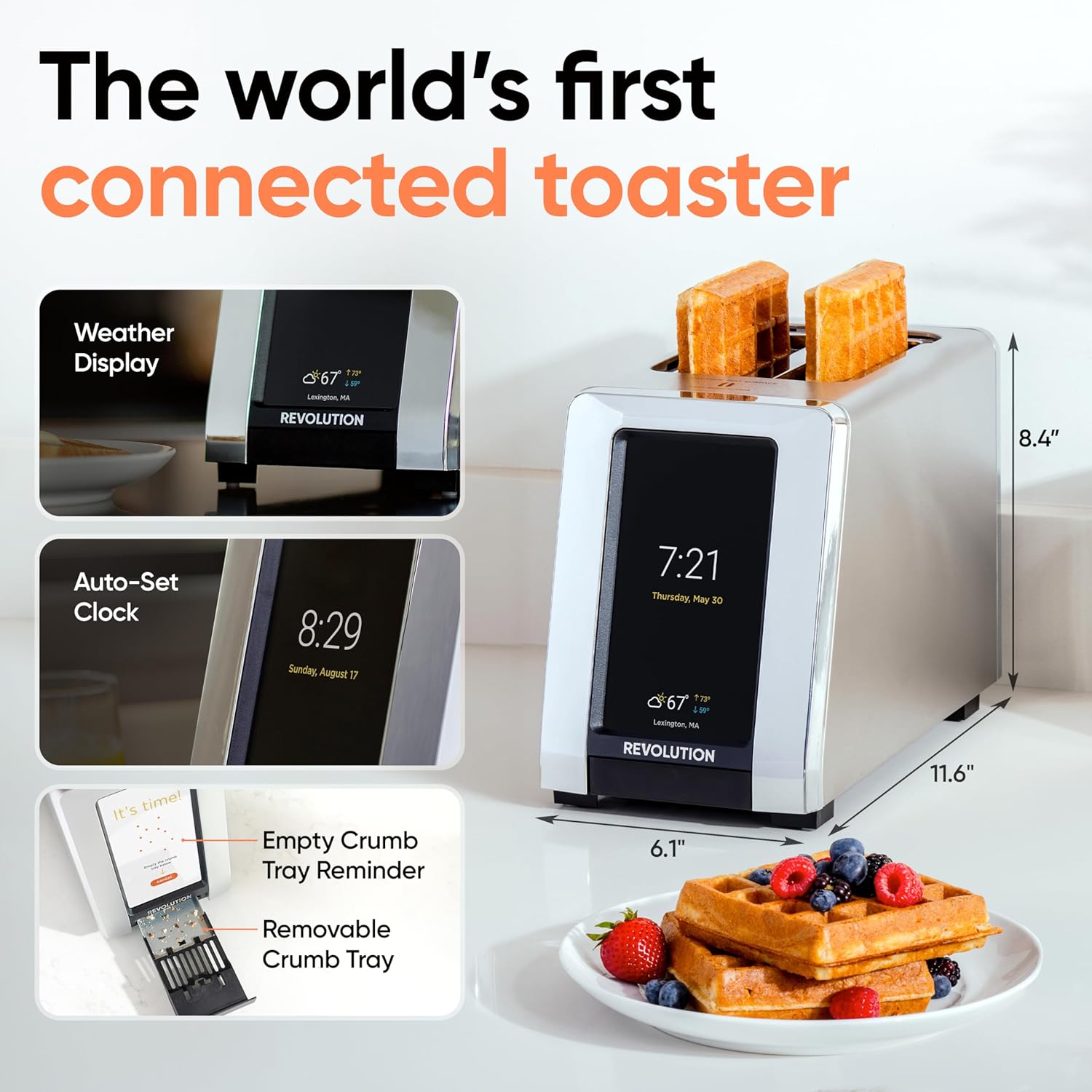
Image 4.1: The R180 Connect displaying weather and time, highlighting its smart features and dimensions.
5. Kullanım Talimatları
5.1 Temel Kızartma Teknikleri
The R180 Connect simplifies toasting with a 3-tap process:
- Select Bread Type: On the touchscreen, choose the icon corresponding to your food item (e.g., bread, bagel, waffle).
- Choose State: Select whether the item is Taze, Dondurulmuş, veya için Yeniden ısıtma.
- Adjust Browning Level: Use the slider or tap the desired browning level (1-7). The toaster remembers your last setting.
- Tost Yapmaya Başlayın: Dokunun Başlangıç button. The toaster will automatically lower the food and begin the toasting cycle.

Image 5.1: The toaster's touchscreen interface, demonstrating the selection of bread type and browning preferences.
5.2 İnstaGLO Technology
InstaGLO 2.0 heating technology rapidly reaches full heat in approximately 2 seconds. This process sears the outside of the food, locking in moisture and flavor, resulting in a crispy exterior and soft interior.

Image 5.2: Visual comparison illustrating the faster and tastier results achieved with InstaGLO technology.
5.3 Using the Toastie Press (Sold Separately)
The Revolution Toastie Press allows you to prepare grilled cheese, paninis, and quesadillas directly in your toaster without butter or oil. Refer to the Toastie Press instruction manual for detailed usage.
- Insert the Toastie Press into the toaster slots.
- Place your sandwich or food item inside the press.
- On the toaster's touchscreen, select "Toastie Mode" and choose your desired browning level.
- Musluk Başlangıç.
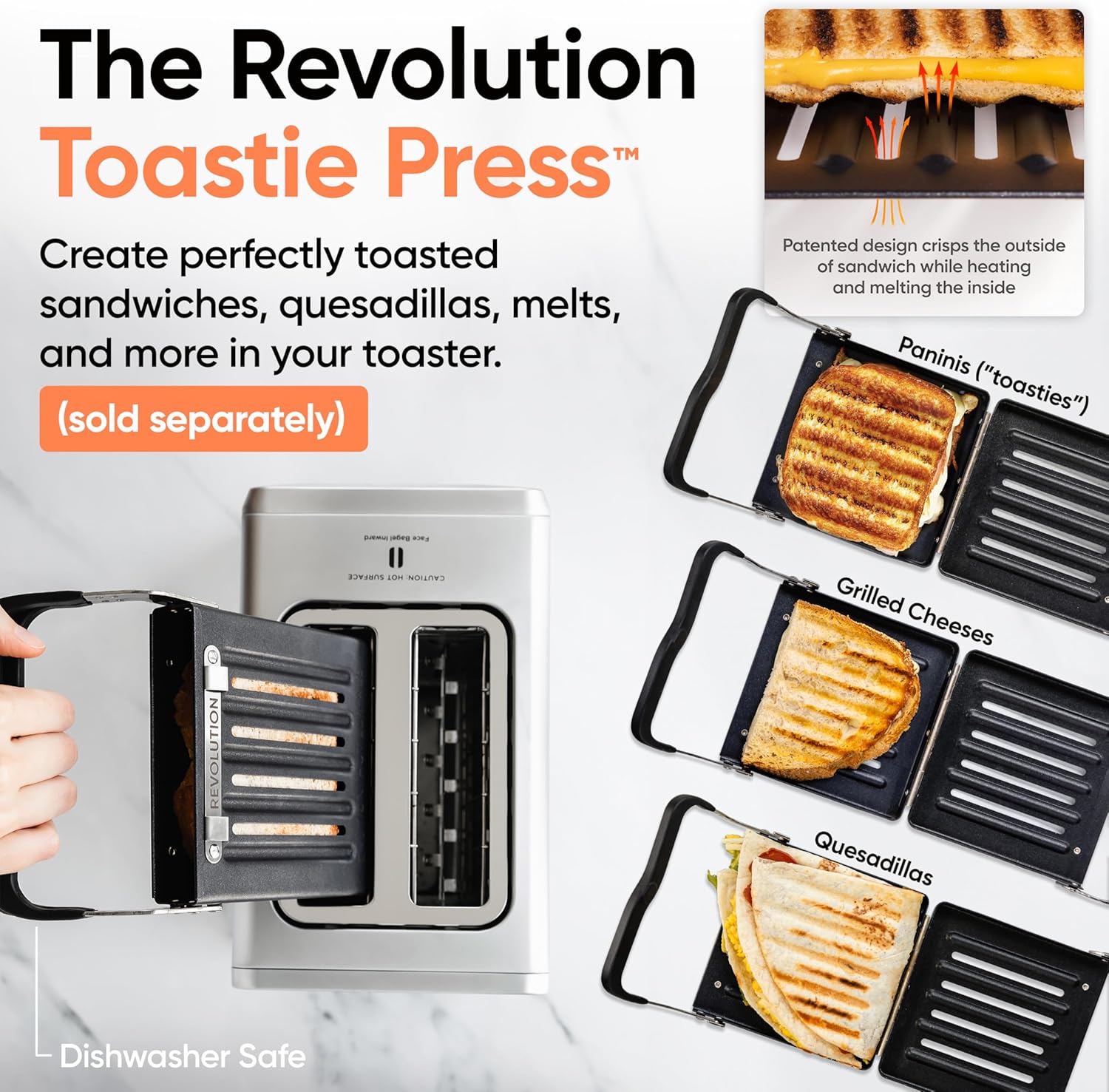
Image 5.3: The Revolution Toastie Press, an optional accessory for making toasted sandwiches.
6. Bakım ve Temizlik
6.1 Crumb Tray Cleaning
The toaster will periodically remind you to clean the crumb tray. Regular cleaning prevents crumb buildup and reduces fire risk.
- Unplug the toaster from the power outlet and allow it to cool completely.
- Locate the removable crumb tray at the bottom front of the toaster.
- Pull the tray out to remove it.
- Kırıntıları atın ve tepsiyi bir bezle temizleyin.amp Kumaş.
- Ensure the tray is completely dry before reinserting it into the toaster.
Image 6.1: The removable crumb tray, shown being accessed for cleaning.
6.2 Dış Temizlik
- Ensure the toaster is unplugged and cool.
- Dış yüzeyleri yumuşak, damp bez. Aşındırıcı temizleyiciler veya ovma süngerleri kullanmayın.
- For stainless steel models, use a stainless steel cleaner if necessary, following the product's instructions.
- Do not spray cleaning solutions directly onto the toaster.
7. Sorun Giderme
| Sorun | Olası Neden | Çözüm |
|---|---|---|
| Toaster does not power on. | Fişe takılı değil; priz arızalı. | Ensure the toaster is securely plugged into a working outlet. Test the outlet with another appliance. |
| Food is not toasting evenly. | Incorrect bread type or browning level selected; crumb tray full. | Verify the correct bread type and browning level are selected. Clean the crumb tray. |
| Wi-Fi bağlantısı başarısız. | Yanlış parola; kapsama alanı dışında; ağ sorunu. | Re-enter Wi-Fi password carefully. Move toaster closer to router. Restart router. |
| Toaster emits smoke. | Food lodged inside; crumb tray full; foreign object. | Immediately unplug the toaster. Allow to cool. Carefully remove any lodged food or foreign objects. Clean crumb tray. If smoke persists, discontinue use and contact customer support. |
8. Özellikler
- Modeli: R180 Connect (R180C-01)
- Marka: Devrim
- Dilim Sayısı: 2
- Netage: 1500 watt
- Cilttage: 120 Volt (AC)
- Malzeme: Paslanmaz çelik
- Ürün Ölçüleri: 11.65"D x 6.13"G x 8.4"Y
- Ürün Ağırlığı: 7.17 pound
- Özellik: Touchscreen, Wi-Fi Connectivity, InstaGLO Technology
- UPC: 810034150882
9. Garanti ve Destek
For warranty information, product registration, or technical support, please visit the official Revolution Cooking websitesine bakın veya müşteri hizmetleri departmanıyla iletişime geçin.
Revolution Cooking, LLC
Visit the Revolution Store on Amazon
Note: Specific warranty terms may vary by region and purchase date. Please refer to the documentation provided with your purchase for precise details.
Ask a question about this manual
Ask about setup, troubleshooting, compatibility, parts, safety, or missing instructions. Manuals+ will review the question and use this page’s manual context to help answer it.