
1. Giriş
The YITRANIC HP330 Portable Spectrometer is a versatile lighting measurement device designed for precise analysis of light color, color rendering index, and other critical lighting parameters. Featuring a 3.5-inch IPS touch screen and a wavelength range of 380-780 nm, this instrument offers accurate measurements and user-friendly operation. Its compact and robust design makes it suitable for both professional applications and on-site use.
This manual provides essential information for the proper setup, operation, maintenance, and troubleshooting of your HP330 Portable Spectrometer.
2. Temel Özellikler
- Yüksek Doğruluk: Equipped with a high-precision CCD sensor and a compact crossed Czerny Turner (CT) spectroscopy system for accurate light measurement. Wavelength Range: 380-780nm.
- Multifunctional Analysis: Analyzes comprehensive parameters such as color rendering index, irradiance, color tolerance, and color purity of light sources.
- Kompakt Tasarım: Lightweight and handheld, featuring a 3.5-inch IPS touch screen for direct, hassle-free data reading. Designed for both experienced users and beginners.
- Bağlantı: Connects wirelessly to Android devices via Bluetooth for real-time data monitoring and easier operation. PC software is also available for data export and analysis.
- Geniş Uygulama: Ideal for lighting analysis, horticulture, photography, manufacturing quality control, and scientific research.
3. Kutuda Neler Var?
Paketleri açtığınızda tüm eşyaların mevcut olduğundan emin olun:
- HP330 Spectrometer Unit
- Şarj Adaptörü
- Tip-C Veri Kablosu
4. Cihaz Bittiview
The HP330 features a sleek, portable design with a 3.5-inch IPS touch screen for intuitive interaction. The device integrates a high-precision optical path and a CCD detector (TCD1254) for accurate spectral analysis.
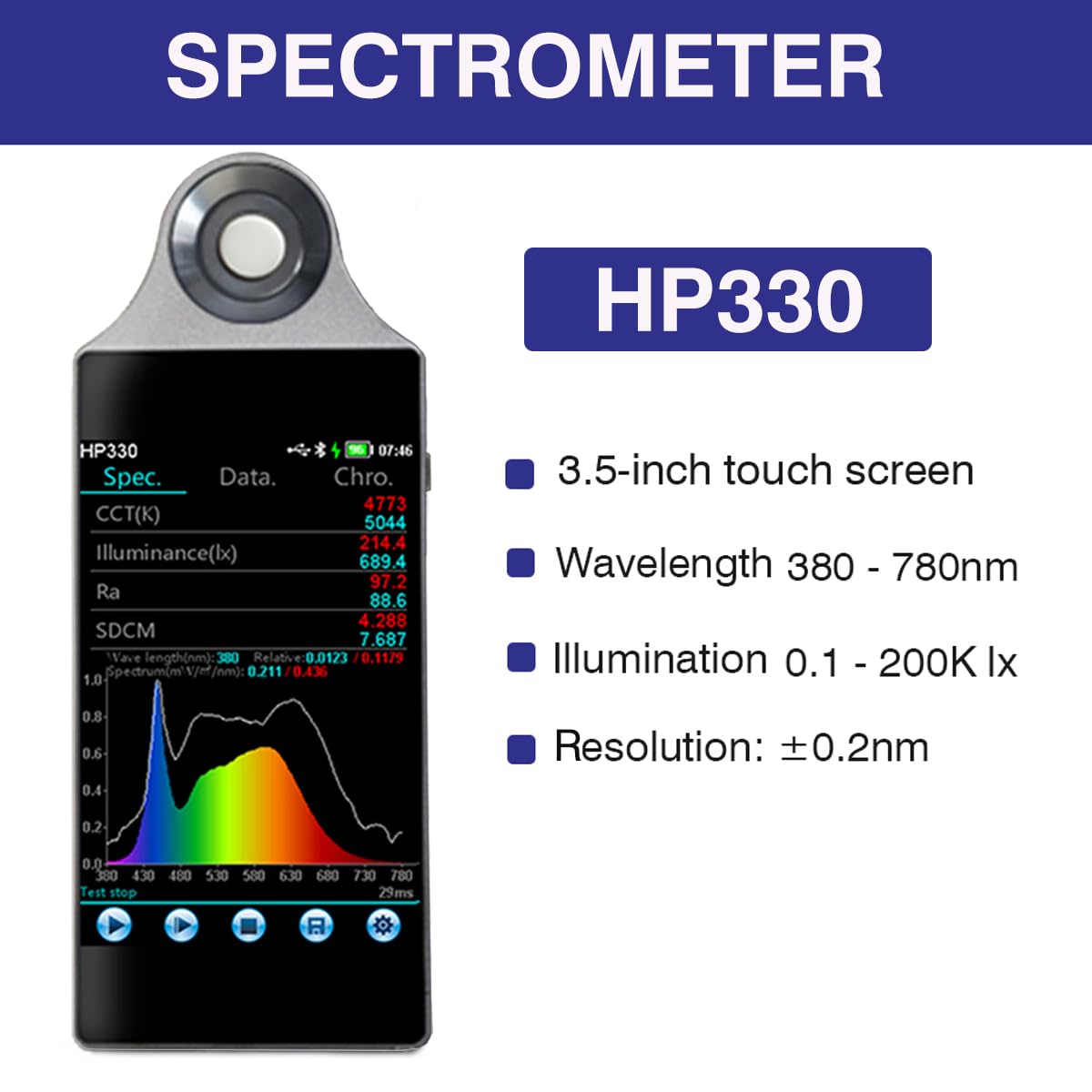
Şekil 4.1: Ön view of the HP330 Spectrometer displaying various light measurement parameters on its 3.5-inch touch screen.
The device's interface provides real-time data, including CCT(K), Illuminance(lx), Ra, SDCM, and spectral distribution graphs, allowing for immediate assessment of light source characteristics.
5. Kurulum
5.1 Cihazı Şarj Etme
- Connect the provided Type-C data cable to the HP330 spectrometer's charging port.
- Connect the other end of the cable to the charging adapter, then plug the adapter into a power outlet.
- The device will indicate charging status on its screen. Ensure the device is fully charged before first use for optimal battery life.
5.2 İlk Güç Açma
Press and hold the power button (location typically on the side or top of the device) for a few seconds until the screen illuminates. The device will boot up and display the main measurement interface.
5.3 Bluetooth Connectivity (Android App)
- Ensure Bluetooth is enabled on your Android smartphone or tablet.
- Download and install the official YITRANIC spectrometer application from the Google Play Store.
- Open the application and follow the on-screen instructions to search for and pair with your HP330 device. The device name will typically appear as "HP330" or similar.
- Once paired, you can monitor real-time data and control the spectrometer from your Android device.
5.4 PC Yazılım Kurulumu
The HP330 supports PC software for advanced data analysis and export. Refer to the manufacturer's website or included documentation for the latest software download and installation instructions for Windows and Mac systems.
6. Kullanım Talimatları
6.1 Basic Measurement via Touch Screen
The 3.5-inch IPS touch screen allows for direct operation and parameter analysis. Navigate through menus and settings by tapping and swiping on the screen. To initiate a measurement, typically press a 'Test' or 'Measure' icon on the screen. The device will then display the results.
6.2 Main Test Parameters
The HP330 can measure and display a wide range of lighting parameters, including:
- Illuminance (lx), Irradiance (W/m²)
- Candlelight (fc), Spectral Power Distribution
- CIE1931, CIE1960, CIE1976 Color Coordinates (x,y; u,v; u',v')
- SDCM (Standard Deviation of Color Matching)
- S/P Ratio, Purity (%)
- Red, Green, Blue Ratios (%)
- Color Tolerance Elliptic Graph
- Peak Wavelength (nm), Half Width (nm), Dominant Wavelength (nm)
- Central Wavelength (nm), Centroid (nm)
- Correlated Color Temperature (CCT(K)), Duv
- Color Rendering Index (CRI (Ra)), AvgR, P(λ)
6.3 Using the Android App and PC Software
The companion Android app and PC software enhance the functionality of the HP330 by providing advanced data monitoring, analysis, and export capabilities.
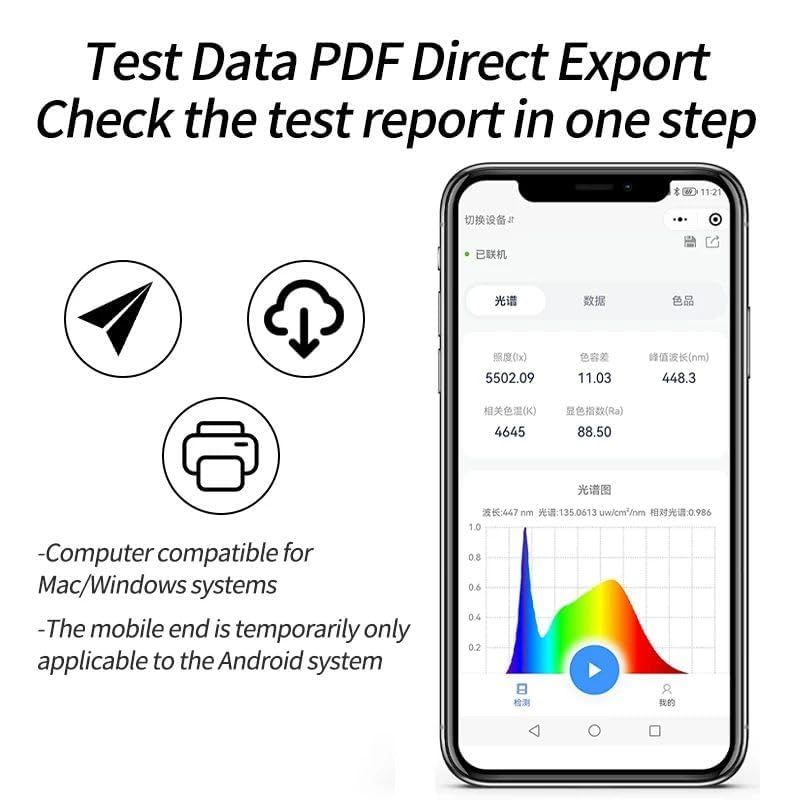
Figure 6.1: Screenshot of the mobile application interface, demonstrating direct PDF export of test data.
- Gerçek zamanlı izleme: View live measurement data on your connected device.
- Veri İhracatı: Export test data to PDF or other formats for reporting and record-keeping.
- Gelişmiş Analiz: Utilize the software for in-depth analysis, comparison testing, transmission testing, timing testing, and wavelength adjustment.
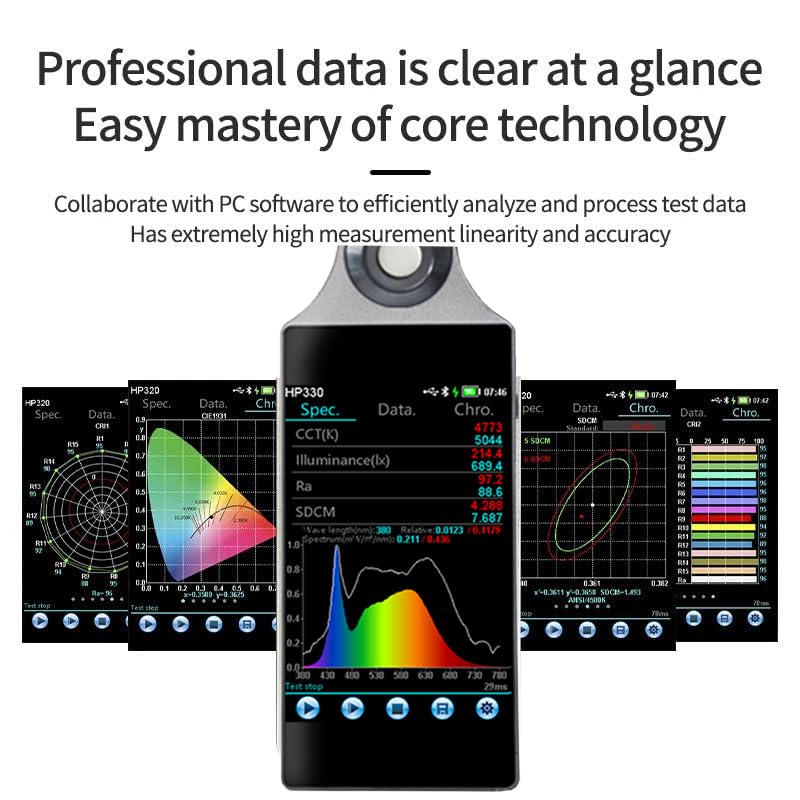
Figure 6.2: Various data visualizations and analysis options available through the spectrometer's interface and companion software.
7. Bakım
7.1 Temizlik
Gently wipe the device's exterior with a soft, dry cloth. For the screen, use a microfiber cloth specifically designed for electronics. Avoid using abrasive cleaners or solvents that could damage the device.
7.2 Storage and Operating Environment
To ensure the longevity and accuracy of your HP330 spectrometer, adhere to the following environmental guidelines:
- Depolama Ortamı: Humidity less than 70% RH, temperature less than 50°C.
- Çalışma Ortamı: Temperature between -10°C to +40°C, humidity between 0-70% RH.
Avoid exposing the device to extreme temperatures, high humidity, direct sunlight, or corrosive environments.
8. Sorun Giderme
This section addresses common issues you might encounter with your HP330 spectrometer.
8.1 Cihaz Açılmıyor
- Ensure the device is fully charged. Connect it to the charging adapter and allow sufficient time for charging.
- Verify that the power button is pressed and held for the required duration (typically 3-5 seconds).
8.2 Bluetooth Bağlantı Sorunları
- Confirm that Bluetooth is enabled on both the HP330 and your Android device.
- Ensure the HP330 is within the Bluetooth range of your Android device.
- Restart both the HP330 and your Android device, then attempt to pair again.
- Check if the YITRANIC app is updated to the latest version.
8.3 Software Compatibility or Display Issues
- Ensure you have downloaded the correct version of the PC or Android software for your operating system and region.
- If encountering display issues with characters or text, verify your system's language settings and ensure the software supports your chosen language.
- For persistent software problems, refer to the official YITRANIC support resources or contact customer service.
8.4 Yanlış Okumalar
- Ensure the device's optical sensor is clean and free from dust or smudges.
- Verify that the device is operating within its recommended environmental conditions (temperature and humidity).
- If you suspect calibration issues, contact YITRANIC customer support for assistance.
9. Özellikler
Detailed technical specifications for the YITRANIC HP330 Portable Spectrometer:
| Parametre | Değer |
|---|---|
| Model Numarası | HP330 |
| Dalga boyu aralığı | 380-780 nm |
| Spektral Çözünürlük | ±0.2 nm |
| Photometric Linearity | ±%0.3 |
| Detektör | CCD (TCD1254) |
| Görüntülemek | 3.5 inç IPS Dokunmatik Ekran |
| Bağlantı | Bluetooth (for Android), USB (for PC) |
| Güç Kaynağı | Built-in Lithium Battery, Type-C Charging |
| Depolama Sıcaklığı | <50°C |
| Depolama Nemi | <%70 RH |
| Çalışma Sıcaklığı | -10°C ile +40°C arası |
| Çalışma Nemi | %0-70 RH |
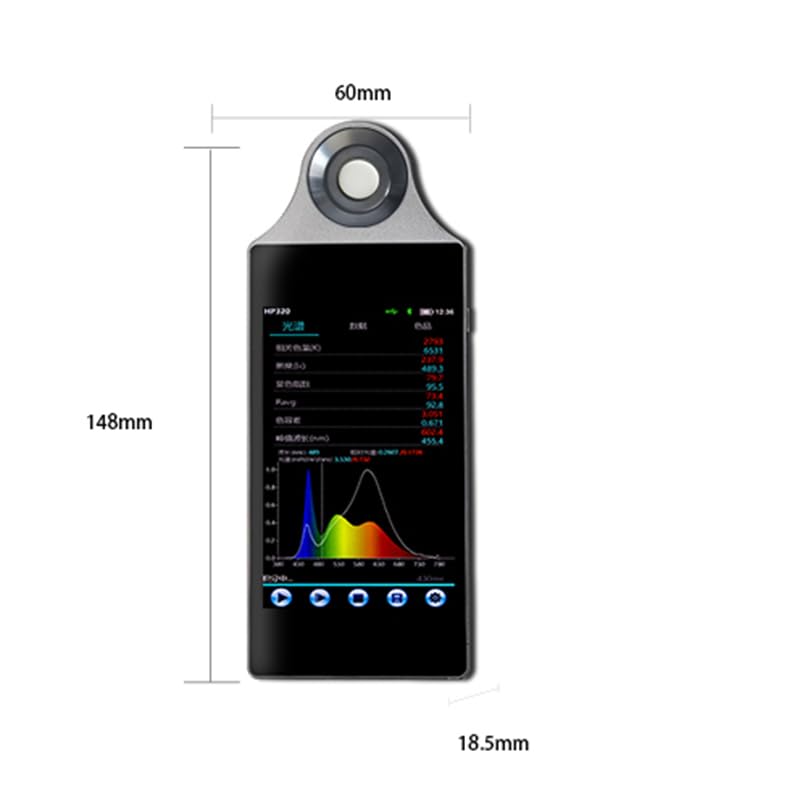
Figure 9.1: Dimensions of the HP330 Spectrometer.
10. Uygulamalar
The YITRANIC HP330 Portable Spectrometer is suitable for a wide range of applications, including:
- On-site testing of commercial, healthcare, home, and building lighting.
- Laboratory research and product development.
- Quality control and online monitoring of light source products.
- Horticulture and plant cultivation.
- Photography and lighting design.
- Scientific research in various fields.

Şekil 10.1: Ör.amples of diverse applications for the HP330 Spectrometer.
11. Garanti Bilgileri
The YITRANIC HP330 Portable Spectrometer comes with a 2 yıllık garanti Satın alma tarihinden itibaren geçerlidir. Bu garanti, üretim hatalarını kapsar ve ürünün normal kullanım koşullarında belirtilen performans standartlarını karşılamasını sağlar. Garanti talepleriniz için lütfen satın alma belgenizi saklayın.
For detailed warranty terms and conditions, please refer to the official YITRANIC website veya müşteri desteği ile iletişime geçin.
12. Destek Bilgileri
If you require technical assistance, have questions about your device, or need to report an issue, please contact YITRANIC customer support. You can typically find contact information on the official YITRANIC webSiteden veya ürününüzle birlikte gelen dokümanlardan yararlanabilirsiniz.
When contacting support, please have your product model (HP330) and purchase details readily available to facilitate a quicker resolution.