
T-Wolf GG-G530
T-Wolf RoboCop Competitive Gaming Mouse GG-G530 User Manual
Model: GG-G530
giriiş
This manual provides essential information for the setup, operation, and maintenance of your T-Wolf RoboCop Competitive Gaming Mouse GG-G530. Please read this manual thoroughly before using the product to ensure optimal performance and longevity.
Paket İçeriği
- 1 x T-Wolf RoboCop Competitive Gaming Mouse GG-G530
- 1 x Kullanım Kılavuzu (bu belge)
Ürün Özellikleri
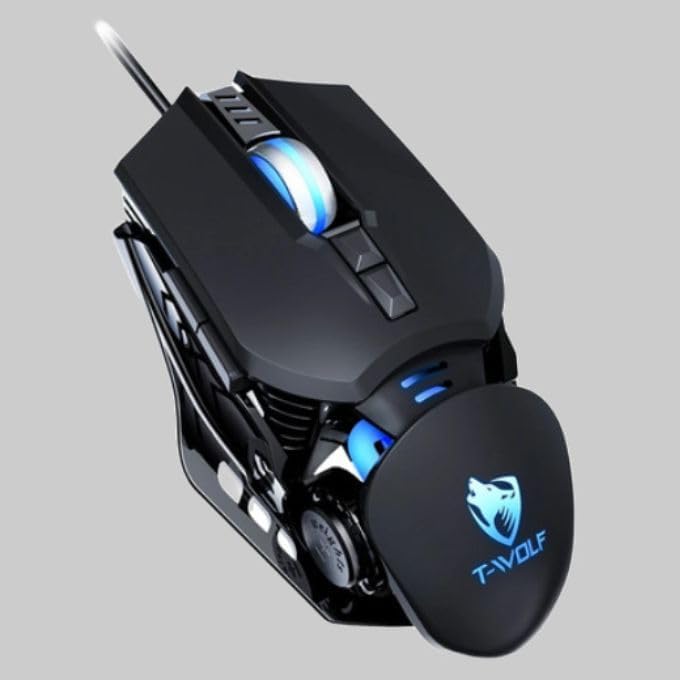
The T-Wolf RoboCop Competitive Gaming Mouse GG-G530 is designed for precision and comfort, suitable for both gaming and office use. Key features include:
- Optical Engine Design: Ensures stable operation and high sensitivity.
- Mechanical Armored Modeling: Distinctive and robust design.
- Symmetrical DIY Counterweight: Allows for adaptable weight adjustment.
- 7 Düğme: Includes left click, right click, scroll wheel, DPI switcher, and additional programmable buttons.
- Akıllı Bağlantı: Plug-and-play functionality with automatic driver installation.
- Ayarlanabilir DPI: Four levels of sensitivity (1200/2400/3200/6400 DPI) for precise control.
- Ergonomik Tasarım: Provides comfortable use for extended periods without fatigue.
- Four-Color Light Effect: Dynamic lighting for visual appeal.
- Kablolu Bağlantı: Reliable USB interface with a 150cm cable.
- Sistem Uyumluluğu: Windows ve Mac işletim sistemlerini destekler.
Kurmak
- Fareyi Bağlayın: Insert the USB connector of the T-Wolf RoboCop Gaming Mouse into an available USB port on your computer.
- Otomatik Sürücü Kurulumu: The operating system will automatically detect the mouse and install the necessary drivers. This process typically takes a few moments. No manual driver installation is required.
- Kullanıma hazır: Sürücüler yüklendikten sonra fare hemen kullanıma hazırdır.
Kullanım Talimatları
The T-Wolf RoboCop Gaming Mouse features 7 buttons for various functions. Familiarize yourself with their basic operations:
- Sol Tıklama Düğmesi: Birincil seçim ve etkileşim.
- Sağ Tıklama Butonu: Accesses contextual menus and secondary functions.
- Kaydırma tekerleği: Belgeler arasında gezinir ve web Sayfalar. Ayrıca orta tıklama düğmesi olarak da işlev görebilir.
- DPI Switcher Button: Fare hassasiyetini (DPI) ayarlar.
- Ek Düğmeler: The remaining buttons can be assigned specific functions through your operating system's mouse settings or compatible third-party software (note: no macro programming is natively supported by the mouse hardware).

DPI Ayarlaması
The mouse features an adjustable DPI (Dots Per Inch) setting, allowing you to change the cursor sensitivity on the fly. This is particularly useful for different tasks, such as precise aiming in games or fast navigation in general use.
- Bulun DPI Switcher Button, typically positioned behind the scroll wheel.
- Press the DPI Switcher Button to cycle through the available DPI settings: 1200 DPI, 2400 DPI, 3200 DPI, and 6400 DPI.
- Each press will change the sensitivity, allowing you to find the setting that best suits your current activity.

Bakım
To ensure the longevity and optimal performance of your T-Wolf RoboCop Gaming Mouse, follow these simple maintenance guidelines:
- Temizlik: Farenin yüzeyini silmek için yumuşak ve kuru bir bez kullanın. İnatçı kirler için hafifçe silin.ampBezi su veya hafif bir temizleme solüsyonuyla yıkayın. Sert kimyasallardan veya aşındırıcı malzemelerden kaçının.
- Optik sensör: Periodically clean the optical sensor on the underside of the mouse with a cotton swab to prevent dust buildup, which can affect tracking performance.
- Kablo Bakımı: Avoid sharply bending or pulling the USB cable to prevent internal damage.
- Depolamak: Kullanılmadığı zaman fareyi aşırı sıcaklıklardan uzak, temiz ve kuru bir ortamda saklayın.
Sorun giderme
If you encounter issues with your T-Wolf RoboCop Gaming Mouse, refer to the following common solutions:
- Fare Yanıt Vermiyor:
- USB kablosunun bilgisayarınızdaki çalışan bir USB portuna güvenli bir şekilde takılı olduğundan emin olun.
- Fareyi farklı bir USB portuna takmayı deneyin.
- Bilgisayarınızı yeniden başlatın.
- İmleç Hareketi Düzensiz veya Atlamalı:
- Farenin alt tarafındaki optik sensörü temizleyin.
- Fareyi temiz, yansıtmayan ve düz bir yüzeyde kullandığınızdan emin olun. Fare altlığı kullanılması önerilir.
- DPI ayarı çalışmıyor:
- Ensure you are pressing the correct DPI switcher button.
- The mouse cycles through fixed DPI settings; there is no visual indicator on the mouse itself for the current DPI level, only the change in cursor speed.
- Çalışmayan Düğmeler:
- Düğmelerin etkin ve doğru şekilde yapılandırıldığından emin olmak için işletim sisteminizin fare ayarlarını kontrol edin.
- Test the mouse on another computer to rule out a software or system issue.
Özellikler
| Örnek | GG-G530 |
| Malzeme | ABS + Electroplating |
| Takip Sistemi | Optik |
| Bağlantı | Kablolu |
| Kablo Uzunluğu | 150 cm |
| Arayüz Türü | USB |
| DPI Ayarları | 1200 / 2400 / 3200 / 6400 (Ayarlanabilir) |
| Düğme Sayısı | 7 |
| Hizmet Ömrü | Approximately three years |
| Çalışma yöntemi | Fotoelektrik |
| Işık Etkisi | Four-color cycling |
| Ürün Boyutu | 130x80x35 mm |
| Ürün Ağırlığı | 160 gr |
| Desteklenen Sistemler | Windows, Mac |
Garanti ve Destek
Your T-Wolf RoboCop Competitive Gaming Mouse GG-G530 comes with a 6 ay üretici garantisi satın alma tarihinden itibaren.
This warranty covers defects in materials and workmanship under normal use. It does not cover damage caused by accident, misuse, abuse, unauthorized modification, or external causes such as liquid damage.
For warranty claims or technical support, please contact your retailer or the point of purchase. Please retain your proof of purchase for warranty validation.

İlgili Belgeler - GG-G530
 |
Q8 Bluetooth Wireless Dual Mode Mouse Instruction Manual User manual for the T-WOLF Q8 Bluetooth and 2.4G wireless dual-mode mouse, covering specifications, system requirements, and setup instructions. |
 |
T-Wolf V1 Mouse Instruction Manual User manual for the T-Wolf V1 wired optical mouse, featuring setup instructions, button functions, and care guidelines for optimal performance. |
 |
T-Wolf X4 Game Mouse User Manual User manual for the T-Wolf X4 Three-Mode Bluetooth Wireless Gaming Mouse. Includes warnings, precautions, and after-sales service information. |
 |
T-WOLF X7 Tri-mode Light Emitting Gaming Mouse - Instruction Manual Official instruction manual for the T-WOLF X7 Tri-mode Light Emitting Gaming Mouse, detailing product features, specifications, usage instructions for 2.4GHz and Bluetooth modes, and warranty information. |
 |
T-WOLF X4 Tri-mode Gaming Mouse Instruction Manual Official instruction manual for the T-WOLF X4 Tri-mode Gaming Mouse, covering specifications, package contents, and setup instructions for 2.4GHz and Bluetooth modes. |
 |
T-WOLF TF-400 4-in-1 Gaming Kit User Manual Comprehensive user manual and technical specifications for the T-WOLF TF-400 4-in-1 gaming kit, featuring a backlit keyboard, optical mouse, fabric mouse pad, and stereo gaming headset. |
Ask a question about this manual
Ask about setup, troubleshooting, compatibility, parts, safety, or missing instructions. Manuals+ will review the question and use this page’s manual context to help answer it.