
1. Giriş
Satın aldığınız için teşekkür ederizasing the Womier SK80 Wired Gaming Keyboard. This mechanical keyboard features a 75% compact layout, an integrated LCD screen, hot-swappable switches, and customizable RGB backlighting. Designed for both gaming and daily use, it offers a comfortable and responsive typing experience. This manual provides detailed instructions for setup, operation, maintenance, and troubleshooting to ensure optimal performance of your keyboard.

Figure 1: Womier SK80 Wired Gaming Keyboard (Black)
2. Kurulum
2.1 Paket İçeriği
- Womier SK80 Keyboard Unit
- USB-C Kablosu
- Tuş Çektirmesi
- Kullanıcı Kılavuzu
2.2 Klavyenin Bağlanması
- Klavyenin arka tarafında bulunan USB-C bağlantı noktasını bulun.
- Verilen USB-C kablosunun bir ucunu klavyeye bağlayın.
- Connect the other end of the USB-C cable to an available USB port on your computer (Windows PC or Mac).
- Klavyeniz işletim sisteminiz tarafından otomatik olarak tanınacaktır.

Figure 2: USB-C Cable Connection
2.3 Sistem Uyumluluk Anahtarı
The keyboard features a switch to toggle between Windows and Mac operating system modes. Locate the switch on the back or side of the keyboard and set it to the appropriate position for your system.

Figure 3: Windows/Mac System Switch
2.4 Ayarlanabilir Ayak
The keyboard is equipped with adjustable feet on the underside. You can extend these feet to change the typing angle for improved ergonomics and comfort.

Figure 4: Adjustable Keyboard Feet
3. Operasyon
3.1 LCD Multimedia Display
The Womier SK80 features a vibrant color multimedia display on the upper right side. This screen provides visual feedback for various settings and functions:
- Custom GIF Images: Display personalized GIF animations.
- Caps Lock Status: Indicates whether Caps Lock is active.
- Bağlantı Modu: Shows the current connection status.
- WIN/MAC System: Confirms the selected operating system mode.
- Arka Aydınlatma Parlaklığı/Hızı: Ayarla ve view current backlight settings.
- RGB Modu/Renk: Seç ve önceden hazırlaview RGB lighting effects and colors.
- Hacim: Displays the current audio volume level.
- Dil: Shows the selected language setting.
The display screen is designed with an 11° tilt angle for optimal viewing ergonomics.

Figure 5: LCD Screen Displaying Various Settings
3.2 RGB Arka Aydınlatma
The keyboard offers extensive RGB backlighting customization:
- 19 Aydınlatma Efekti: Önceden ayarlanmış çeşitli aydınlatma desenlerinden birini seçin.
- 9 Aydınlatma Rengi: Select your preferred color scheme.
- Ayarlanabilir Parlaklık ve Hız: Fine-tune the intensity and animation speed of the backlight.
- Müzik Senkronizasyon Modu: In this mode, lighting patterns will dynamically respond to playing music.
All RGB backlight modes and settings can be customized using the dedicated keyboard driver software.
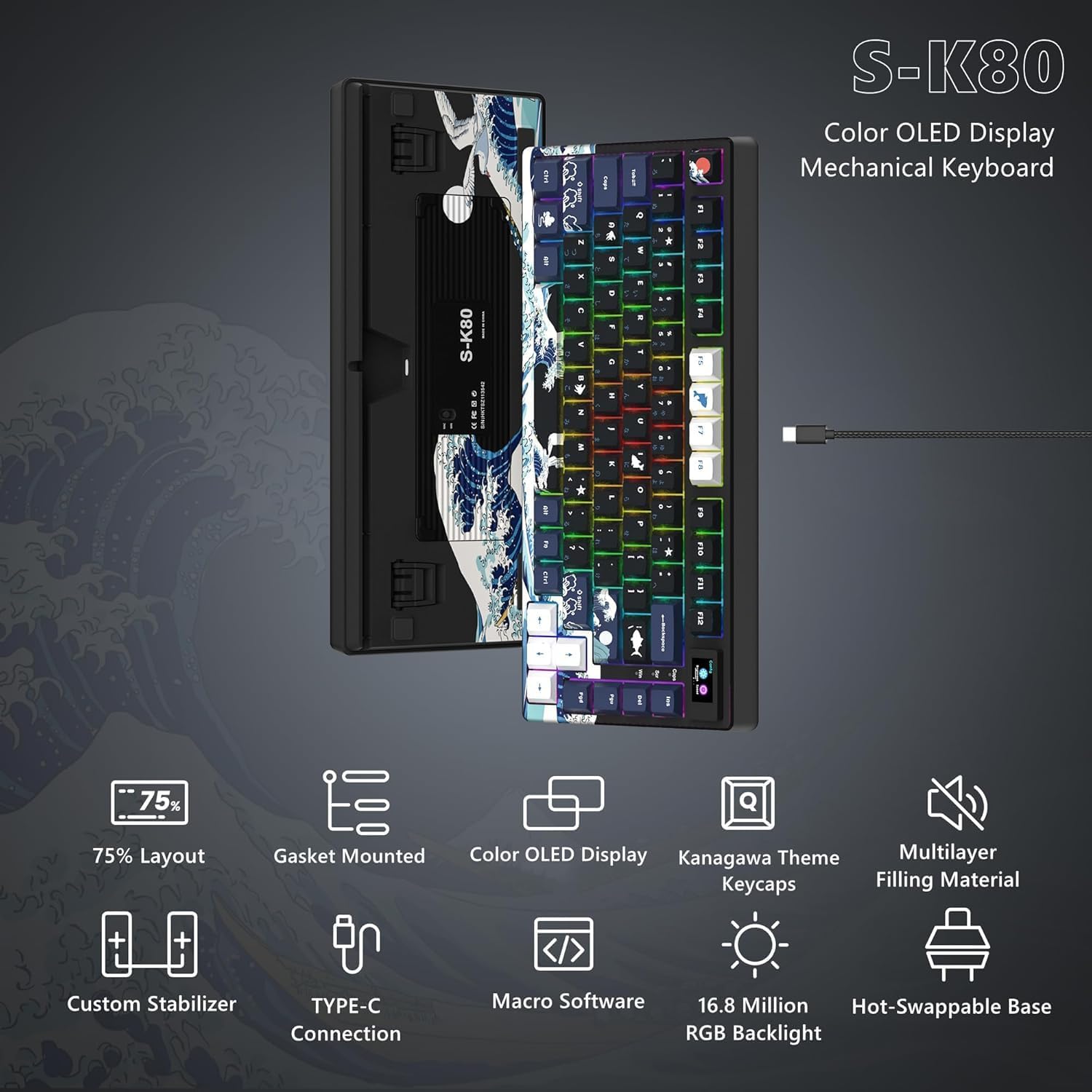
Figure 6: Customizable RGB Backlighting
3.3 Programlanabilir Yazılım
The Womier SK80 keyboard is fully customizable through its dedicated driver software. This software allows users to:
- Set dynamic GIF animations for the LCD screen.
- Define custom lighting effects.
- Program macro functions for individual keys.
Refer to the software's interface for detailed instructions on customization options.

Figure 7: Keyboard Driver Software Interface
3.4 Sıcak Değiştirilebilir Anahtarlar
The keyboard features a hot-swappable PCB, allowing you to easily change mechanical switches without soldering. It supports both 3-pin and 5-pin switches. This enables personalization of your typing feel and sound.
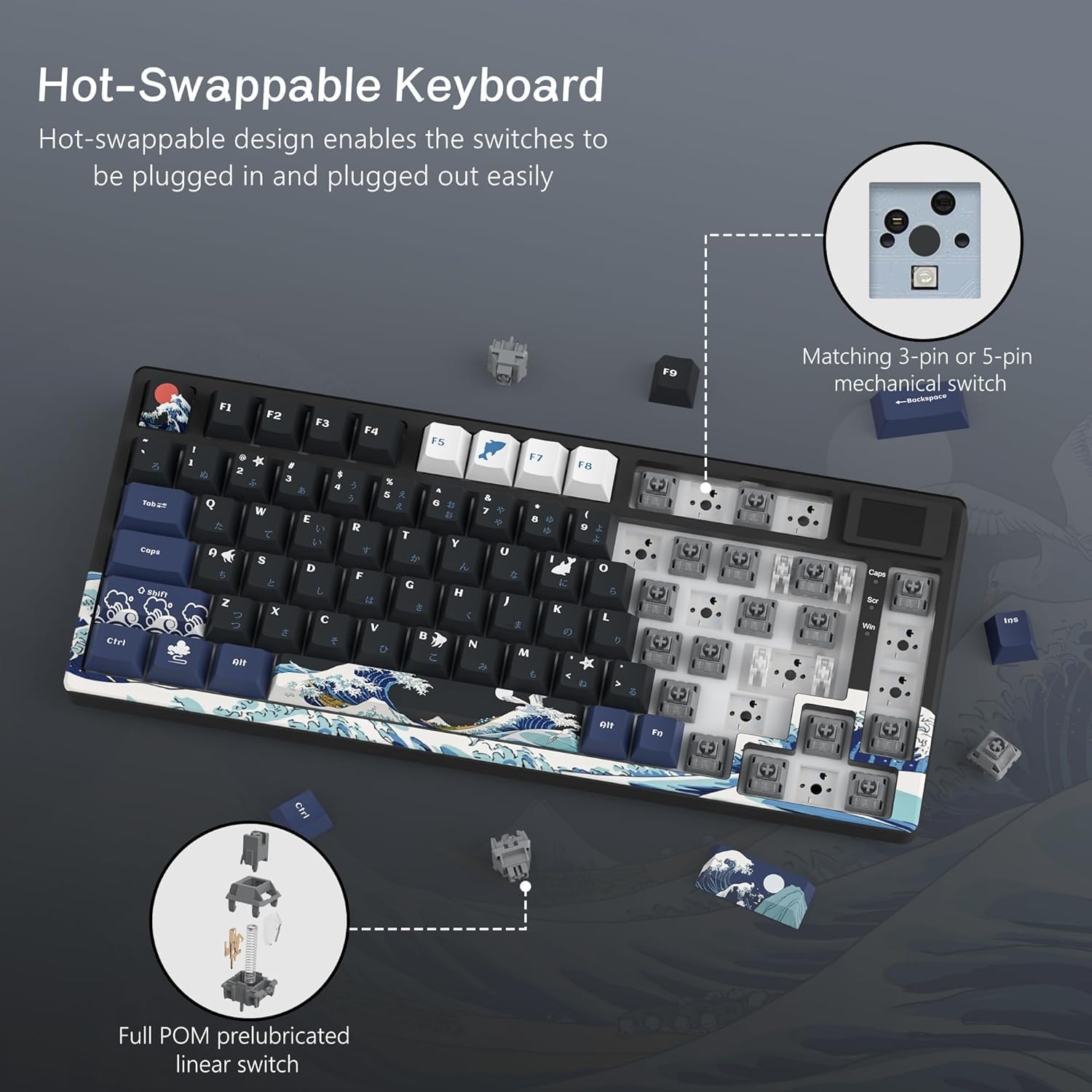
Figure 8: Hot-Swappable Switch Mechanism
3.5 Gasket Mount Design and Keycaps
The SK80 utilizes a gasket mount design, which enhances typing stability and reduces noise, contributing to a more immersive experience. It comes with classic Cherry profile PBT keycaps, offering durability and a comfortable feel.

Figure 9: Gasket Mount Structure and Keycap Profile
4. Bakım
4.1 Klavyeyi Temizleme
- Temizlemeden önce klavyeyi bilgisayarınızdan ayırın.
- Yumuşak, tüy bırakmayan bir bez kullanınampened with a small amount of water or a mild cleaning solution to wipe the keycaps and keyboard surface.
- Tuşlar arasındaki toz ve kalıntıları temizlemek için basınçlı hava veya küçük bir fırça kullanın.
- To clean under the keycaps, use the provided keycap puller to carefully remove them. Clean the switches and plate, then reattach the keycaps.
- Klavye yüzeyine veya tuş başlıklarındaki yazılara zarar verebileceğinden, sert kimyasallar veya aşındırıcı malzemeler kullanmaktan kaçının.
4.2 Anahtar Değişimi (Çalışırken Değiştirilebilir)
- Ensure the keyboard is disconnected from your computer.
- Use a keycap puller to remove the desired keycap.
- Use a switch puller (not included, but commonly available) to gently grip and pull the switch straight up from the PCB.
- Yeni anahtarın pimlerini PCB üzerindeki deliklerle hizalayın ve yerine oturana kadar sıkıca bastırın. Pimlerin bükülmediğinden emin olun.
- Tuş başlığını değiştirin.
5. Sorun Giderme
5.1 Klavye Yanıt Vermiyor
- USB-C kablosunun hem klavyeye hem de bilgisayara güvenli bir şekilde bağlandığından emin olun.
- Klavyeyi bilgisayarınızdaki farklı bir USB portuna bağlamayı deneyin.
- Bilgisayara özgü bir sorunu elemek için klavyeyi başka bir bilgisayarda test edin.
- Verify that the Windows/Mac compatibility switch is set correctly for your operating system.
5.2 Arka Aydınlatma Çalışmıyor veya Yanlış
- Check the backlight brightness settings via the LCD screen or the programmable software.
- Belirli bir aydınlatma ekipmanına ihtiyaç duyulmadığından emin olun.file is overriding your desired settings.
- If using the software, ensure it is up to date and correctly installed.
5.3 Anahtarların Kaydedilmemesi veya Çift Yazılması
- For hot-swappable switches, carefully remove the keycap and switch for the affected key. Reinsert the switch firmly to ensure proper contact.
- Clean any debris around the switch stem.
- Sorun devam ederse, anahtarı değiştirmeyi düşünün.
6. Özellikler
| Özellik | Tanım |
|---|---|
| Marka | Kadınlar |
| Örnek | SK80 |
| Bağlantı | Kablolu (USB-C) |
| Klavye Açıklaması | Mekanik |
| Önerilen Kullanım | Gaming, Office Work, Typing, Programming, Esports, General Computer Use |
| Özel Özellikler | LCD Screen, Hot-Swappable, RGB Backlight, 75% Compact Layout, Wired Connection, Windows/Mac Compatible, Gaming/Office Compatible, Japanese Layout, Programmable Keys, Customizable Display |
| Renk | Siyah |
| Backlight Color Support | RGB |
| Stil | Oyun |
| Ürün Boyutları (U x G x Y) | 34x17x3.5 cm |
| Uyumlu Cihazlar | Windows PC, Mac, Desktop Computers, Laptops, Gaming PCs |
| Anahtar Türü | Mechanical Switch (Hot-Swappable) |
| Klavye Düzeni | QWERTY (Japanese Layout) |
| Anahtar Sayısı | 80 (75% layout) |
| Waterproof Type | Su geçirmez değil |
| Uyumlu İşletim Sistemi Ailesi | Windows, Mac |
| Dahil Bileşenler | USB Cable, Keycap Puller, Keyboard Unit, User Manual |
| Product Exterior Material | ABS, Aluminum, Plastic, Polyethylene Terephthalate |
| Keyboard Plate Material | Aluminum Alloy, Polycarbonate |
7. Garanti Bilgileri
The Womier SK80 Wired Gaming Keyboard comes with a 1 yıllık üretici garantisi Satın alma tarihinden itibaren geçerlidir. Bu garanti, normal kullanım koşullarındaki malzeme ve işçilik kusurlarını kapsar. Garanti talepleriniz için lütfen satın alma belgenizi saklayın.
Garanti şunları kapsamaz:
- Kaza, kötü kullanım, yanlış kullanım, sel, yangın, deprem veya diğer dış nedenlerden kaynaklanan hasarlar.
- Damage caused by operating the product outside the permitted or intended uses described by Womier.
- Damage caused by service performed by anyone who is not a representative of Womier.
- Products or parts that have been modified to alter functionality or capability without the written permission of Womier.
8. Müşteri Desteği
For technical assistance, warranty claims, or general inquiries, please contact Womier customer support through the following channels:
- Çevrimiçi destek: Visit the official Womier webSSS ve destek kaynakları için site.
- E-posta: Ürün ambalajınıza veya resmi bilgilere bakın webDestek e-posta adresinin bulunduğu site.
When contacting support, please have your product model (SK80) and proof of purchase readily available.