
1. Giriş
Thank you for choosing the TONGVEO PTZ HDMI Camera. This manual provides essential information for the proper installation, operation, and maintenance of your camera. Please read this manual thoroughly before using the product to ensure optimal performance and to prevent damage. This camera is designed for high-quality video capture in various settings, including live streaming, video conferencing, education, and worship services.
2. Ürün Bittiview
2.1 Temel Özellikler
- Yüksek Çözünürlüklü Video: 1080p resolution at 60 frames per second (fps) for clear and smooth video.
- Optik Yakınlaştırma: 3x optical zoom lens with a 55.8° field of view, allowing for detailed close-ups without loss of quality.
- Pan/Tilt/Zoom (PTZ) İşlevselliği: Silent movement with 350° pan and 180° tilt capabilities, controllable remotely.
- Çoklu Çıktılar: HDMI and USB 3.0 for versatile connectivity.
- Kolay Kurulum: Plug and Play functionality, automatically recognized by computers without driver installation.
- Geniş Uyumluluk: Compatible with Windows, Mac, and popular conferencing software like Zoom, Skype, OBS, Google Hangouts, Cisco WebEx, and Microsoft Teams.
- Gelişmiş Görüntü İşleme: Superior white balance and exposure modes, supporting YUV, MJPG, and H.264 video compression formats.
- Uzaktan kumanda: Includes an infrared (IR) remote control with 10 presets for quick camera positioning.
- Kumanda Kolu Kontrolü: Supports external joystick control via RS485 or RS232 interfaces.
2.2 Paket İçeriği
Paketin içinde tüm öğelerin mevcut olduğundan emin olun:
- TONGVEO USB PTZ Camera
- 9.8ft USB 3.0 Kablosu
- DC 12V Güç Adaptörü
- IR Uzaktan Kumanda
- Vidalarla birlikte duvara monte aparatı
- Kullanım Kılavuzu (bu belge)

Image: Package contents including the camera, USB cable, power adapter, remote, wall mount, and user manual.
3. Kurulum
3.1 Fiziksel Kurulum
The TONGVEO PTZ camera offers flexible mounting options to suit various environments:
- Masaüstü Yerleşimi: Kamerayı sabit, düz bir yüzeye yerleştirin.
- Monitör Montajı: Securely attach to the top of a monitor.
- Duvara Montaj: Use the provided wall mount and screws to fix the camera to a wall.
- Tripod Montajı: Attach the camera to a standard tripod using the tripod screw hole at the base.
- Tavan Montajı: Install the camera upside down on the ceiling using a compatible mount (sold separately or included if specified).
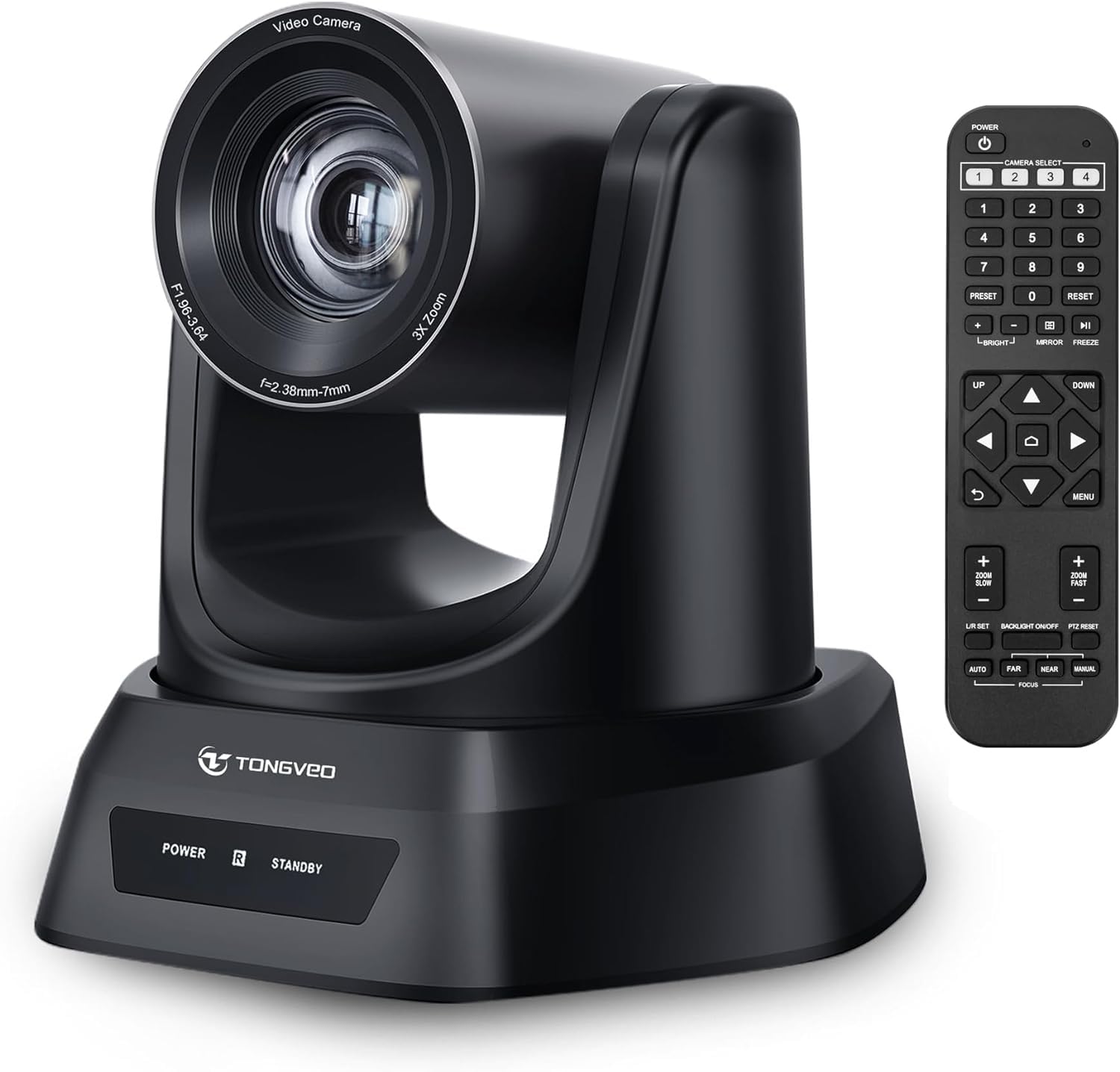
Resim: Üzeriview of the TONGVEO PTZ camera highlighting 3x optical zoom, 1080p 60fps, and pan/tilt capabilities.
3.2 Bağlantılar
Connect the camera to your devices using the ports on the rear panel:
- DC 12V Güç: Connect the included power adapter to the DC 12V port and then to a power outlet.
- USB 3.0: Connect the USB 3.0 cable from the camera to your computer (PC/Mac) for video and control.
- HDMI: Connect an HDMI cable from the camera to a display (TV/Monitor) or a video switcher (e.g., Blackmagic ATEM) for video output.
- RS232/RS485: These ports are for connecting an external joystick controller for advanced PTZ control. RS485 supports daisy-chaining multiple cameras.

Image: Rear panel of the TONGVEO PTZ camera showing DC 12V, RS485, RS232, USB, and HDMI ports.
3.3 Yazılım Kurulumu
The TONGVEO PTZ camera is a Plug and Play device. No specific drivers are required for most operating systems. Your computer should automatically recognize the camera when connected via USB. It supports the UVC1.1 standard.
4. Operasyon
4.1 Uzaktan Kumanda
Use the included IR remote control to manage camera functions:
- PTZ Movement: Use the directional buttons to pan (left/right) and tilt (up/down) the camera.
- Yakınlaştır: Adjust the optical zoom in and out. The remote typically offers fast and slow zoom options.
- Ön ayarlar: The remote allows you to save and recall up to 10 preset positions. To save a preset, move the camera to the desired position, then press the 'SET' button followed by a number (1-10). To recall a preset, press the corresponding number button.
- Camera Select: If multiple TONGVEO cameras are connected, use the camera select buttons to control a specific unit.
4.2 Görüntü Ayarları
Access the On-Screen Display (OSD) menu via the remote control to adjust image parameters:
- Odak: The camera features auto-focus by default. Manual focus adjustment is available through the OSD menu.
- Beyaz Dengesi: Adjust for accurate color reproduction under different lighting conditions.
- Maruziyet: Control brightness and contrast to optimize image visibility.
4.3 Yazılım Uyumluluğu
The camera is compatible with a wide range of operating systems and video conferencing applications:
- İşletim Sistemleri: Windows XP, Vista, 7, 8, 8.1, 10, 11; Mac 10.4 or higher.
- Uygulamalar: Zoom, Skype, Google Hangouts, Cisco WebEx, Microsoft Teams, GoToMeeting, BlueJeans, OBS, and other UVC-compliant software.

Image: Diagram illustrating the TONGVEO PTZ camera's compatibility with various devices and software platforms.
5. Bakım
To ensure the longevity and optimal performance of your TONGVEO PTZ camera, follow these maintenance guidelines:
- Temizlik: Fotoğraf makinesinin gövdesini temizlemek için yumuşak, kuru bir bez kullanın. Objektif için ise özel objektif temizleme bezi ve solüsyonu kullanın. Aşındırıcı temizleyicilerden veya çözücülerden kaçının.
- Depolamak: Uzun süre kullanılmadığı zamanlarda, kamerayı serin, kuru bir yerde, doğrudan güneş ışığından ve aşırı sıcaklıklardan uzakta saklayın.
- İşleme: Fotoğraf makinesini dikkatli kullanın. Düşürmekten veya şiddetli titreşimlere maruz bırakmaktan kaçının.
- Güç: Disconnect the power adapter when the camera is not in use or during electrical storms.
6. Sorun Giderme
If you encounter issues with your TONGVEO PTZ camera, refer to the following common problems and solutions:
- Güç Yok:
- Güç adaptörünün kameraya ve çalışan bir elektrik prizine güvenli bir şekilde bağlı olduğundan emin olun.
- Elektrik prizinin çalışır durumda olduğundan emin olun.
- Video Çıkışı Yok:
- Check all cable connections (USB, HDMI) are secure.
- Ensure the correct input source is selected on your display or video switcher.
- Verify the camera is selected as the video input device in your software (e.g., Zoom, OBS).
- Image is Blurry/Out of Focus:
- Allow the camera's auto-focus to adjust.
- Access the OSD menu to manually adjust the focus if needed.
- Merceğin temiz ve lekesiz olduğundan emin olun.
- Uzaktan Kumanda Çalışmıyor:
- Uzaktan kumandanın pillerini kontrol edin ve gerekirse değiştirin.
- Uzaktan kumanda ile kameranın kızılötesi alıcısı arasında herhangi bir engel bulunmadığından emin olun.
- PTZ Movement is Unresponsive:
- Verify the camera is powered on and the remote control is functioning.
- If using a joystick, ensure it is correctly connected via RS232/RS485.
7. Özellikler
Detailed technical specifications for the TONGVEO PTZ HDMI Camera (Model TV-NV3H-UK):
| Özellik | Şartname |
|---|---|
| Model Numarası | TV-NV3H-UK (819988df-b012-4f6a-b3ce-5c96af8001c3) |
| Marka | TONGVEO |
| Optik Yakınlaştırma | 3x |
| Etkili Video Çözünürlüğü | 1080 Pixels (1080p 60fps) |
| Fotoğraf Sensörü Teknolojisi | CMOS |
| Optik Sensör Boyutu | 1/2.7 inç |
| Maksimum Odak Uzaklığı | 10 Milimetre |
| Minimum Odak Uzaklığı | 5 Milimetre |
| Video Yakalama Formatı | MP4 (Supports YUV, MJPG, H.264) |
| Pan Hareketi | 350° |
| Eğim Hareketi | 180° |
| Bağlantı | HDMI, USB 3.0, RS232, RS485 |
| Güç Kaynağı | Doğru Akım 12V |
| Görüntü Sabitleme | HAYIR |
| Çalışma Sıcaklığı | -10°C ile +50°C arası |
| Paket Boyutları | 28x21x19 cm |
| Ağırlık | 2 kilogram |

Resim: Alt view of the TONGVEO PTZ camera showing model number (TV-V3H) and other regulatory information.
8. Garanti ve Destek
The TONGVEO PTZ HDMI Camera comes with a 3 yıllık garanti. For any questions, technical assistance, or warranty claims, please contact TONGVEO customer service. Our support team is available to respond to your inquiries within 24 hours.
Please refer to the contact information provided on the TONGVEO official webEn güncel destek kanalları için lütfen web sitemizi veya satın alma belgelerinizi kontrol edin.