
W26 Pro Max
W26 Pro Max Akıllı Saat, Bluetooth Kulaklık ve Mikrofon ile Birlikte, Seri 8 Uyumlu, Mavi Renk, Kullanım Kılavuzu
Model: W26 Pro Max
giriiş
This manual provides comprehensive instructions for the W26 Pro Max Smart Watch with Bluetooth Earphones. It covers setup, operation, maintenance, and troubleshooting to ensure optimal use of your device. The W26 Pro Max is a versatile 2-in-1 device, combining a smartwatch with integrated wireless Bluetooth earphones, designed to keep you connected and active.
Paket İçeriği
Paketi açtıktan sonra, lütfen tüm bileşenlerin eksiksiz olduğundan emin olun:
- W26 Pro Max Smart Watch
- Integrated Wireless Bluetooth Earphones
- Şarj kablosu
- Kullanım Kılavuzu (bu belge)
- Additional Watch Strap (if included as a free gift)

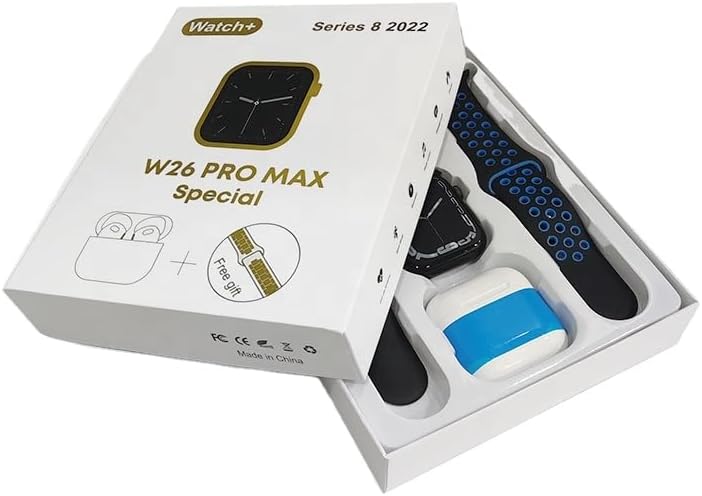
Image: The W26 Pro Max Smart Watch and its accompanying Bluetooth earphones, along with an extra watch strap, are neatly arranged within their retail packaging. The watch face is visible, and the earphones are housed in their charging case.

Resim: Yukarıdan aşağıya view of the W26 Pro Max Smart Watch and Bluetooth Earphones within their packaging. The watch, earphones, and an additional strap are clearly visible, indicating the complete product set.
Kurulum Kılavuzu
1. İlk Şarj
Before first use, fully charge both the smartwatch and the integrated earphones. Connect the provided charging cable to the watch and a compatible USB power source. The watch display will indicate charging status. Ensure the earphones are properly seated in their charging case within the watch.
2. Açma/Kapama
- Güç Açık: Press and hold the side button on the smartwatch until the screen illuminates.
- Kapat: Press and hold the side button, then select the "Power Off" option on the screen.
3. Akıllı Telefonunuzla Eşleştirme
To unlock full functionality, pair your W26 Pro Max with your smartphone via Bluetooth.
- Akıllı telefonunuzda Bluetooth'un etkinleştirildiğinden emin olun.
- On the W26 Pro Max, navigate to the Bluetooth settings.
- On your smartphone, search for available Bluetooth devices and select "W26 Pro Max" from the list.
- İstendiğinde her iki cihazda da eşleştirme isteğini onaylayın.
- For optimal performance, download and install the recommended companion application (e.g., "FitPro app" as mentioned in product description) from your smartphone's app store.
4. Earphone Pairing
The integrated earphones automatically pair with the smartwatch when removed from their charging slots. To pair them with another device (e.g., directly with your phone):
- Remove the earphones from the smartwatch.
- Eşleştirmek istediğiniz cihazda Bluetooth'u etkinleştirin.
- Arama "W26 Pro Max Earphones" (or similar name) in the Bluetooth device list and select to connect.
Kullanım Talimatları
Navigating the Smartwatch
- Dokunmatik ekran: Swipe left/right, up/down to navigate menus and access features. Tap to select.
- Yan Düğme: Press to return to the home screen or wake the device. Long press for power options or voice assistant.
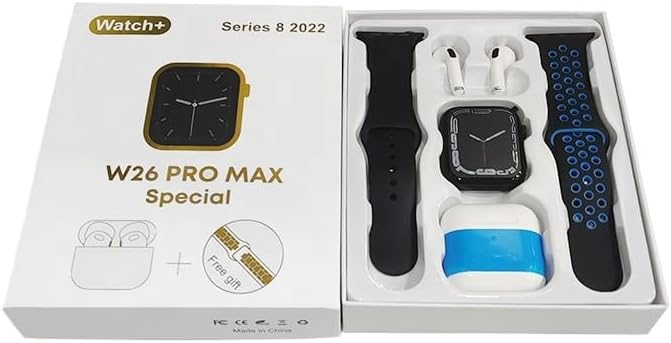
Image: The W26 Pro Max Smart Watch screen shows a voice assistant interface, with text bubbles indicating "Call Linda!" and "What's the weather like today?". This illustrates the voice command functionality.
Temel Özellikler
Fitness ve Sağlık Takibi
The W26 Pro Max is equipped with sensors to monitor various health metrics.
- Nabız İzleme: The optical heart rate sensor continuously tracks your heart rate. View real-time data on the watch or in the companion app.
- Pedometre: Günlük adım sayınızı, kat ettiğiniz mesafeyi ve yakılan kalorileri takip eder.
- Uyku Takibi: Derin uyku, hafif uyku ve uyanma süreleriniz de dahil olmak üzere uyku düzeninizi izler.

Image: The W26 Pro Max Smart Watch screen displays heart rate information, showing a graph of heart rate over time, current beats per minute (bpm), and blood pressure readings. This demonstrates the health monitoring capabilities.
Resim: Ayrıntılı view of the W26 Pro Max Smart Watch screen showing heart rate and blood pressure monitoring. The text explains that an optical heart rate sensor is used for precise calculation and data can be viewed on the watch or via the FitPro app.
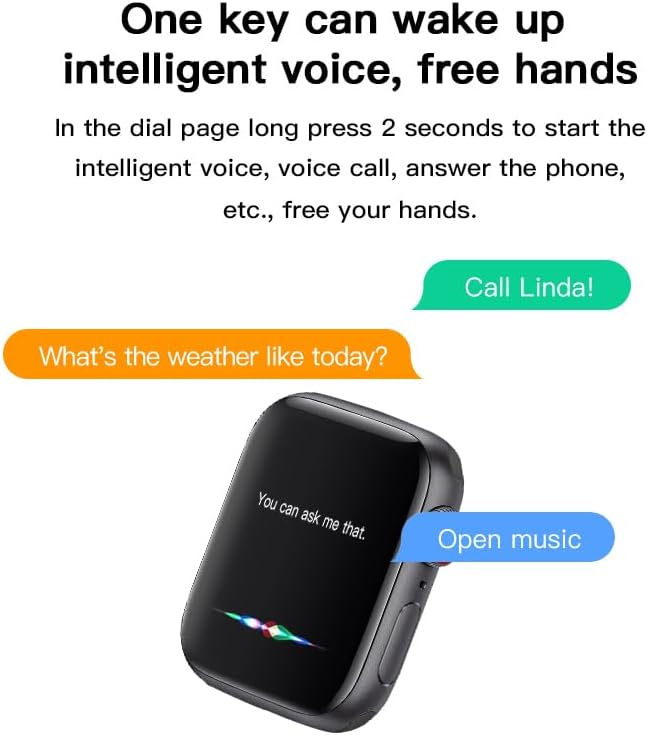
Image: The W26 Pro Max Smart Watch screen displays sleep monitoring data, showing sleep quality (Excellent), percentages of deep sleep, light sleep, and awake time, along with total sleep duration. This highlights the sleep tracking feature.
İletişim ve Medya
- Bluetooth Aramaları: Make and receive calls directly from your smartwatch using the integrated microphone and speaker.
- Bildirimler: Receive alerts for calls, messages, and app notifications from your paired smartphone.
- Müzik Çalma: Control music playing on your smartphone or listen directly via the integrated earphones.

Image: The W26 Pro Max Smart Watch screen shows music playback controls, including play/pause and skip track buttons, along with a visualizer. This indicates the watch's capability to control audio.
Sesli asistan
Long press the side button to activate the intelligent voice assistant. Use voice commands for calls, weather inquiries, music control, and more, providing hands-free operation.
Bakım ve Özen
- Temizlik: Wipe the watch and earphones with a soft, dry, lint-free cloth. For stubborn dirt, slightly dampBezi suyla yıkayın. Sert kimyasallardan veya aşındırıcı malzemelerden kaçının.
- Suya Dayanıklılık: The W26 Pro Max has an IP68 rating, meaning it is resistant to dust and can withstand immersion in water up to 1.5 meters for 30 minutes. However, it is not suitable for diving, hot showers, or saunas. Always dry the device thoroughly after exposure to water.
- Pil Bakım: To prolong battery life, avoid fully discharging the device frequently. Charge it regularly and store it in a cool, dry place when not in use for extended periods.
- Depolamak: Cihazı serin, kuru bir ortamda, doğrudan güneş ışığından ve aşırı sıcaklıklardan uzakta saklayın.
Sorun giderme
| Sorun | Olası Neden | Çözüm |
|---|---|---|
| Cihaz açılmıyor. | Pil zayıf. | Charge the device for at least 30 minutes before attempting to power on again. |
| Akıllı telefonla eşleştirilemiyor. | Bluetooth is off on phone/watch; device not in pairing mode; interference. | Ensure Bluetooth is enabled on both devices. Restart both devices. Move closer to the phone. Forget previous pairings and try again. |
| Earphones not connecting. | Earphones not properly seated; low earphone battery. | Ensure earphones are fully seated in their charging slots within the watch. Charge the watch to ensure earphones are charging. |
| Yanlış sağlık verileri. | Uygunsuz montaj; sensör tıkanıklığı. | Saatin bileğinize tam oturduğundan, çok sıkı veya çok gevşek olmadığından emin olun. Saatin arkasındaki sensörü temizleyin. |
| Kısa pil ömrü. | Frequent use of power-intensive features; old battery. | Reduce screen brightness, limit notifications, disable unnecessary features. Ensure full charge cycles. |
Özellikler
| Özellik | Detay |
|---|---|
| Model Numarası | W26 Pro Max |
| Görüntülemek | 1.78" AMOLED Touchscreen |
| İşletim Sistemi | OS giyin |
| Bağlantı | Bluetooth |
| Pil Kapasitesi | 280mAh (watch) |
| Pil Ömrü | En fazla 3 gün (tipik kullanım) |
| Suya Dayanıklılık | IP68 |
| Özel Özellikler | Integrated Bluetooth Earphones, Heart Rate Sensor, Pedometer, Sleep Tracker, Microphone, Speaker, Voice Assistant |
| Bellek Depolama Kapasitesi | 16 MB |
| Paket Boyutları | 16.8x12.8x3 cm |
| Ağırlık | 170 gr |
Garanti ve Destek
For information regarding warranty coverage and customer support, please refer to the documentation provided with your purchase or contact the retailer where the product was acquired. As this product is manufactured by "Generic", specific warranty details may vary by region and seller.
For technical assistance or further inquiries, please reach out to the customer service channels provided by your point of purchase.
Ask a question about this manual
Ask about setup, troubleshooting, compatibility, parts, safety, or missing instructions. Manuals+ will review the question and use this page’s manual context to help answer it.