
AXNEN HQ3
AXNEN HQ3 3-Axis Cell Phone Stabilizer User Manual
Model: HQ3 | Brand: AXNEN
giriiş
This manual provides comprehensive instructions for the safe and effective use of your AXNEN HQ3 3-Axis Cell Phone Stabilizer. Please read this manual thoroughly before operating the device to ensure optimal performance and to prevent damage.
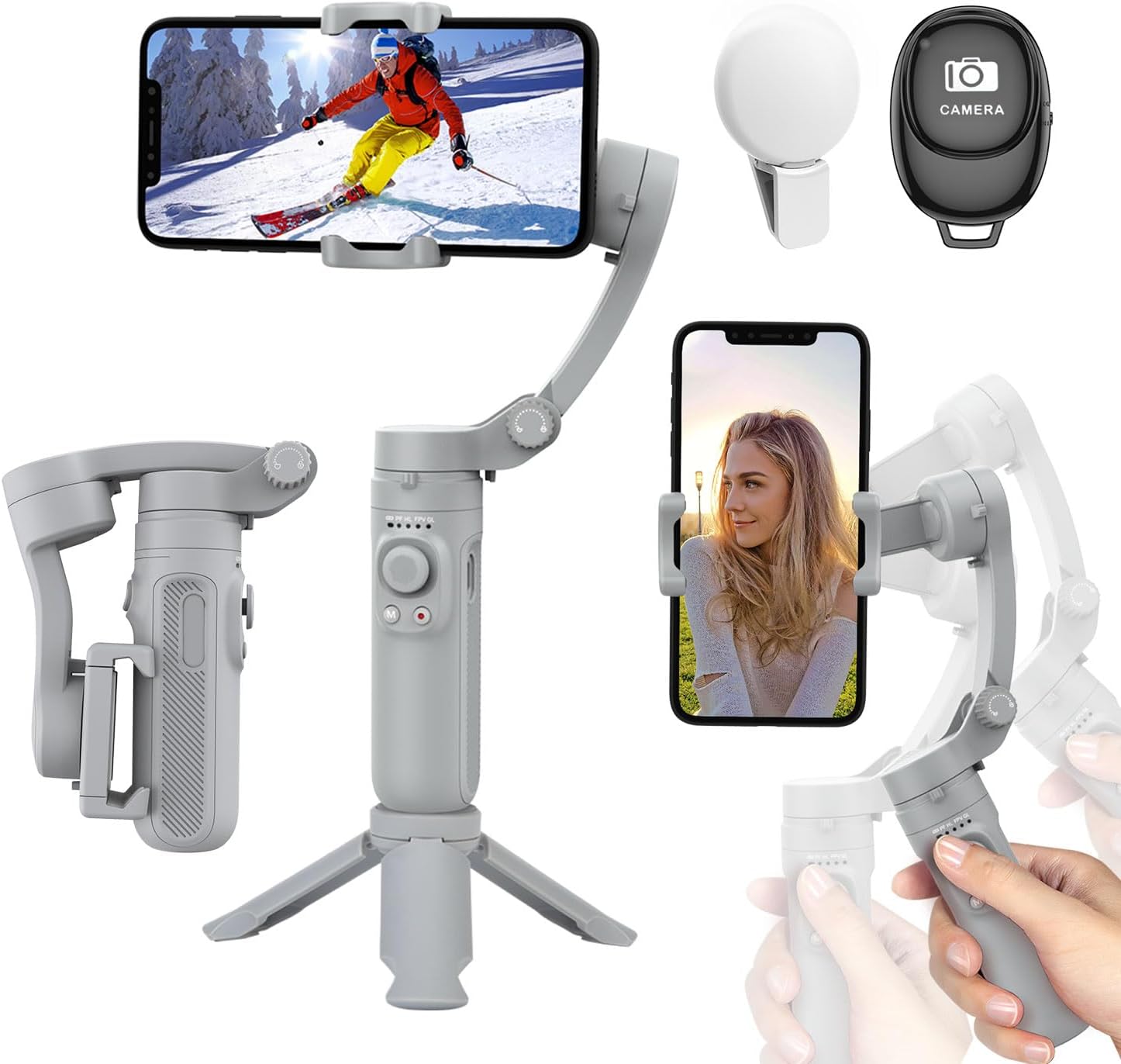
Figure 1: AXNEN HQ3 3-Axis Cell Phone Stabilizer with included accessories.
Ürün Bittiview
The AXNEN HQ3 is a portable and foldable 3-axis cell phone stabilizer designed to provide smooth and stable video footage and photos. It features multiple stabilization modes, a built-in fill light, and a detachable Bluetooth remote control.

Figure 2: Key features of the AXNEN HQ3 Gimbal.
Bileşenler:
- Gimbal Body with Integrated Handle and Controls
- Telefon Clamp
- Mini Tripod (integrated/detachable base)
- Detachable Bluetooth Remote Control
- Entegre Dolgu Işığı
- USB Şarj Kablosu
Kurmak
1. Gimbal'ı Şarj Etme:
Before first use, fully charge the gimbal. Connect the USB charging cable to the gimbal's charging port and a power source. The battery indicator lights will show charging status. A full charge provides up to 8 hours of continuous use.
2. Unfolding the Gimbal:
Gently unfold the gimbal from its compact, folded state. Ensure all axes are unlocked and can move freely before powering on.

Figure 3: The compact and foldable design of the gimbal, along with phone compatibility guidelines.
3. Mounting Your Smartphone:
- Telefon görüşmesini uzatınamp and carefully insert your smartphone.
- Ensure the phone is centered and balanced within the clamp. The gimbal supports phones between 5.5 cm and 8.5 cm wide, with a maximum weight of 280 g.
- For optimal performance, balance your phone before powering on the gimbal. If the phone is significantly off-center, the gimbal may vibrate or not stabilize correctly.
4. Açma ve Bluetooth Eşleştirme:
- Press and hold the power button on the gimbal until the indicator lights illuminate. The gimbal will automatically perform self-calibration.
- Akıllı telefonunuzda Bluetooth’u aktifleştirin.
- Arama "HQ3" or a similar device name in your phone's Bluetooth settings and pair with it.
- Once paired, you can control your phone's camera functions (shutter, video recording) using the gimbal's buttons and the detachable remote.
Gimbal'ı Çalıştırma
Stabilization Technology:
The AXNEN HQ3 utilizes a high-precision 3-axis stabilization system to keep your footage smooth and steady, even during movement. This significantly reduces camera shake and blur.

Figure 4: Visual demonstration of stabilization effect.

Figure 5: Understanding the 3-axis movement.
Çalışma Modları:
The gimbal features four distinct operating modes to suit various shooting scenarios:
- Pan Takip Modu (PF): The tilt and roll axes are locked, and the pan axis follows the direction of the handle. Ideal for smooth horizontal tracking shots.
- Horizontal Lock Mode (HL): The roll axis remains horizontal, and the pan axis follows the direction of the handle.
- Birinci Kişi View (FPV): All three axes follow the direction of the handle, allowing for dynamic, immersive shots that simulate the user's perspective.
- Global Lock (GL): All three axes are locked, keeping the camera pointed in a fixed direction regardless of gimbal movement. To enter Global Lock, press and hold the trigger button.
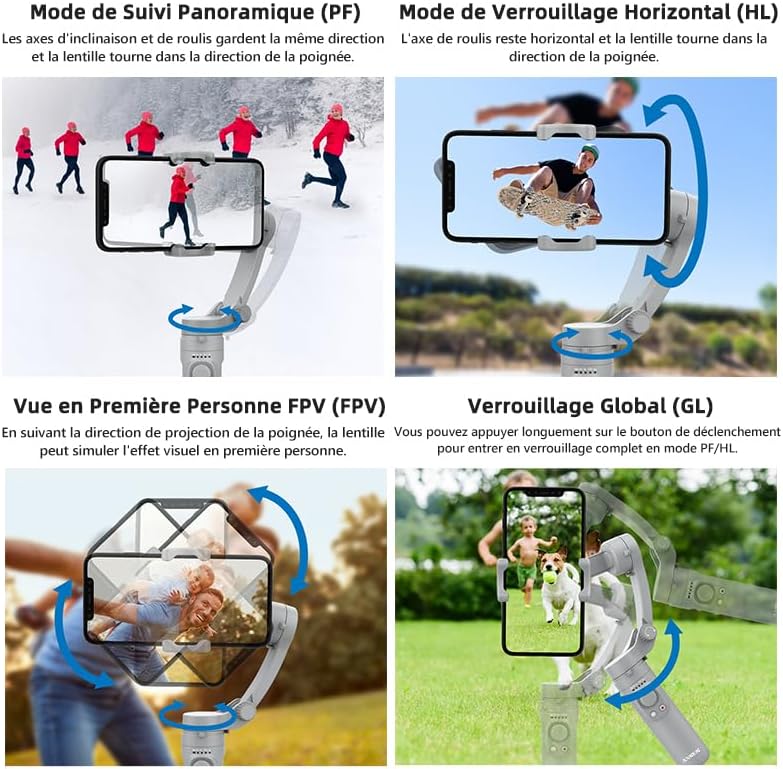
Figure 6: Visual representation of gimbal operating modes.
Switching Between Horizontal and Vertical Shooting:
The gimbal allows for easy switching between horizontal (landscape) and vertical (portrait) shooting orientations, catering to different video platforms and content needs.

Figure 7: Horizontal and Vertical Shooting, and Manual Lock feature.
Using the Fill Light:
The integrated fill light can be activated to provide additional illumination for your subjects, especially in low-light conditions. Refer to the gimbal's controls for light activation and brightness adjustment.
Bakım
- Temizlik: Gimbal'ı temizlemek için yumuşak, kuru bir bez kullanın. Sıvı temizleyiciler veya çözücüler kullanmayın.
- Depolamak: When not in use, fold the gimbal into its compact form and store it in a cool, dry place, away from direct sunlight and extreme temperatures.
- Pil Bakım: To prolong battery life, avoid fully discharging the battery frequently. Charge the gimbal regularly, even if not in use for extended periods.
- Aşırı Yüklemeden Kaçının: Do not mount phones heavier than the specified maximum weight (280g) to prevent damage to the motors.
Sorun giderme
| Sorun | Olası Neden | Çözüm |
|---|---|---|
| Gimbal vibrates or does not stabilize. | Phone is not balanced or too heavy. Gimbal not powered on correctly. | Ensure phone is centered and within weight limits (max 280g). Power off and restart the gimbal. |
| Bluetooth üzerinden bağlantı kurulamıyor. | Bluetooth not enabled on phone. Gimbal not in pairing mode. Interference. | Ensure phone Bluetooth is on. Restart gimbal and phone. Move closer to the gimbal. |
| Gimbal açılmıyor. | Pil zayıf. | Gimbal'ı tamamen şarj edin. |
| Uzaktan kumanda çalışmıyor. | Remote battery low. Not paired. | Check remote battery (if replaceable, otherwise assume integrated). Re-pair the remote with the gimbal. |
Özellikler
- Modeli: HQ3
- Marka: AXNEN
- Stabilizasyon: 3 Eksen
- Uyumlu Telefon Genişliği: 5.5 cm - 8.5 cm (2.17 inç - 3.35 inç)
- Maximum Phone Weight: 280 gr (0.62 lb)
- Gimbal Weight: 295 gr (0.65 lb)
- Katlanmış Boyutlar: 21.9 X 4.2 X 9.9 sm (8.62 X 1.65 X 3.9 olarak)
- Pil Kapasitesi: 2200mAh
- Çalışma Süresi: 8 saate kadar
- Bağlantı: Bluetooth
- Özellikler: Integrated Fill Light, Detachable Bluetooth Remote, Foldable Design
Garanti ve Destek
For any issues or inquiries regarding your AXNEN HQ3 stabilizer, please contact AXNEN customer service. As per product information, if you encounter any problems after receiving this phone stabilizer, please contact us immediately. We will reply and solve any problems within 12 hours.
Faydalı İpucu: Scan the QR code on the manual (physical manual) to watch instruction videos, which will make your use more convenient. For digital support, please visit the official AXNEN websiteyi ziyaret edin veya destek kanallarıyla iletişime geçin.
Garanti talepleri için lütfen satın alma belgenizi saklayın.
İlgili Belgeler - HQ3
 |
AOCHUAN Smart X Gimbal Sabitleyici Kullanım Kılavuzu AOCHUAN Smart X Gimbal Sabitleyici için kapsamlı kullanım kılavuzu; ürün özellikleri, kurulum, kullanım, uygulama entegrasyonu ve teknik özellikler hakkında bilgi içerir. Profesyonel kalitede video ve fotoğraf çekmek için akıllı telefon gimbalinizin nasıl açılacağını, katlanacağını, şarj edileceğini ve çeşitli mod ve işlevlerinin nasıl kullanılacağını öğrenin. |
 |
Hohem iSteadyMobile+ 3 Eksenli Akıllı Telefon Gimbal Kullanım Kılavuzu V1.0 Hohem iSteadyMobile+ 3 Eksenli Akıllı Telefon Gimbalı için kapsamlı kullanım kılavuzu; ürün listesi, giriş, pil ve şarj, uygulama indirme, ilk kullanım, modlar, çalışma, teknik özellikler, uyarılar ve garanti konularını kapsamaktadır. |
 |
AOCHUAN Smart S2 3 Eksenli Akıllı Telefon Gimbal Sabitleyici Kullanım Kılavuzu AOCHUAN Smart S2 3 eksenli akıllı telefon gimbal sabitleyiciye dair kapsamlı kılavuz; ürün özellikleri, kullanım, mikrofon talimatları, şarj, teknik özellikler ve garanti bilgilerini içermektedir. |
 |
AOCHUAN Smart XE Gimbal Kullanım Kılavuzu ve Ürün Bilgileri AOCHUAN Smart XE akıllı telefon gimbal'ına yönelik kapsamlı rehber; ürün özellikleri, kurulum, kullanım, şarj, teknik özellikler ve garanti bilgilerini kapsar. Gimbal'ı sabit video kaydı için nasıl açacağınızı, katlayacağınızı ve çalıştıracağınızı öğrenin. |
 |
Hohem iSteady X2 Kullanım Kılavuzu: Özellikler, Çalıştırma ve Teknik Özellikler Hohem iSteady X2 akıllı telefon gimbal sabitleyici için kapsamlı kullanım kılavuzu. Kurulum, kullanım, düğme fonksiyonları, çalışma modları, teknik özellikler ve garanti hakkında bilgi edinin. |
 |
KOSCHEAL Q09 Gimbal Sabitleyici Kullanım Kılavuzu: Özellikler, Çalıştırma ve Teknik Özellikler KOSCHEAL Q09 Gimbal Sabitleyici için kapsamlı kullanım kılavuzu. Özellikleri, Bluetooth bağlantısı, dolgu ışığı kullanımı, uzaktan kumanda fonksiyonları, şarjı ve akıllı telefonla fotoğraf ve video çekimi için en uygun teknik özellikler hakkında bilgi edinin. |
Ask a question about this manual
Ask about setup, troubleshooting, compatibility, parts, safety, or missing instructions. Manuals+ will review the question and use this page’s manual context to help answer it.