
1. Giriş
Thank you for choosing the JIGUUN PRO2000W-12 Pure Sine Wave Power Inverter. This manual provides essential information for the safe and efficient operation of your inverter. Please read it thoroughly before use and retain it for future reference.
This inverter converts 12V DC power from your battery into 120V AC power, suitable for powering various household appliances, electronics, and tools. Its pure sine wave output ensures compatibility with sensitive electronics, providing stable and clean power.

Image 1.1: JIGUUN 2000 Watt Pure Sine Wave Power Inverter with included battery cables.
2. Güvenlik Bilgileri
WARNING: Failure to follow these safety instructions may result in injury, damage to the inverter, or damage to connected devices.
- Havalandırma: İnverter çevresinde yeterli havalandırma olduğundan emin olun. Soğutma deliklerini kapatmayın.
- Çevre: Operate the inverter in a dry, well-ventilventilated area, away from direct sunlight, heat sources, flammable materials, and moisture.
- Bağlantılar: Always connect the inverter to a 12V DC battery. Ensure all connections are tight and secure to prevent arcing and overheating.
- Topraklama: The inverter must be properly grounded. Connect the grounding terminal to a suitable ground point.
- Yük Kapasitesi: Do not exceed the inverter's continuous power rating (2000W) or peak surge rating (4000W). Overloading can cause damage and trigger safety protections.
- Koruma Özellikleri: The inverter includes protection against undervoltage, aşırı sestage, overheating, overload, and short circuit. If a protection mode is activated, disconnect the load and troubleshoot the issue.
- Çocuklar: İnvertörü çocukların erişemeyeceği yerde saklayın.
- Bakım: Do not attempt to open or modify the inverter. Refer all servicing to qualified personnel.
3. Ürün Bittiview ve Bileşenler
Familiarize yourself with the various parts of your JIGUUN Power Inverter.

Image 3.1: Front and rear panel components of the JIGUUN Power Inverter.
Ön Panel:
- LCD Ekran: Shows battery level, DC input voltage, AC çıkış hacmitage, output frequency, and load power.
- Güç Göstergesi: Illuminates when the inverter is operational.
- Açma / kapama düğmesi: İnvertere giden ana gücü kontrol eder.
- USB Ports (2.1A): USB ile çalışan cihazları şarj etmek için.
- AC Receptacles (x4): Elektrikli ev aletlerini bağlamak için standart 120V AC prizler.
- AC Ground Terminal: For proper grounding of the inverter.
Arka panel:
- Negative DC Terminal (Black): 12V akünün negatif kutbuna bağlanır.
- Positive DC Terminal (Red): 12V akünün pozitif kutbuna bağlanır.
- Soğutma Fanları (2 adet): Automatically activate to dissipate heat and maintain optimal operating temperature.
4. Kutuda Neler Var?
Paketinizde tüm öğelerin mevcut olduğundan emin olun:
- 1x JIGUUN 2000W Pure Sine Wave Inverter
- 1x Uzaktan Kumanda
- 1x Set of Battery Cables (1x Red, 1x Black)
- 4x Spare Fuses (30A)
- 1x Alligator Clip Safety Ground
- 1x Kullanım Kılavuzu

Image 4.1: All items included in the JIGUUN Power Inverter package.
5. Kurulum
5.1 Akü Bağlantısı
- Ensure the inverter's ON/OFF switch is in the 'OFF' position.
- Bağlan KIRMIZI akü kablosuna Olumlu (+) 12V akünüzün terminali.
- Diğer ucunu bağlayın KIRMIZI kabloya Olumlu (+) DC input terminal on the inverter.
- Bağlan SİYAH akü kablosuna Olumsuz (-) 12V akünüzün terminali.
- Diğer ucunu bağlayın SİYAH kabloya Olumsuz (-) DC input terminal on the inverter.
- Tüm bağlantıların sıkı ve güvenli olduğundan emin olun. Gevşek bağlantılar aşırı ısınmaya ve hasara neden olabilir.

Image 5.1: DC input terminals for battery connection.

Image 5.2: Included battery cables for connection.
5.2 İnverterin Topraklanması
For safety, the inverter must be properly grounded. Connect the alligator clip safety ground cable from the inverter's ground terminal to a suitable ground point, such as the chassis of a vehicle or a dedicated earth ground.
5.3 Uzaktan Kumanda Kurulumu
The remote control allows for convenient power management from a distance. No wire connection is required for the remote control to function.
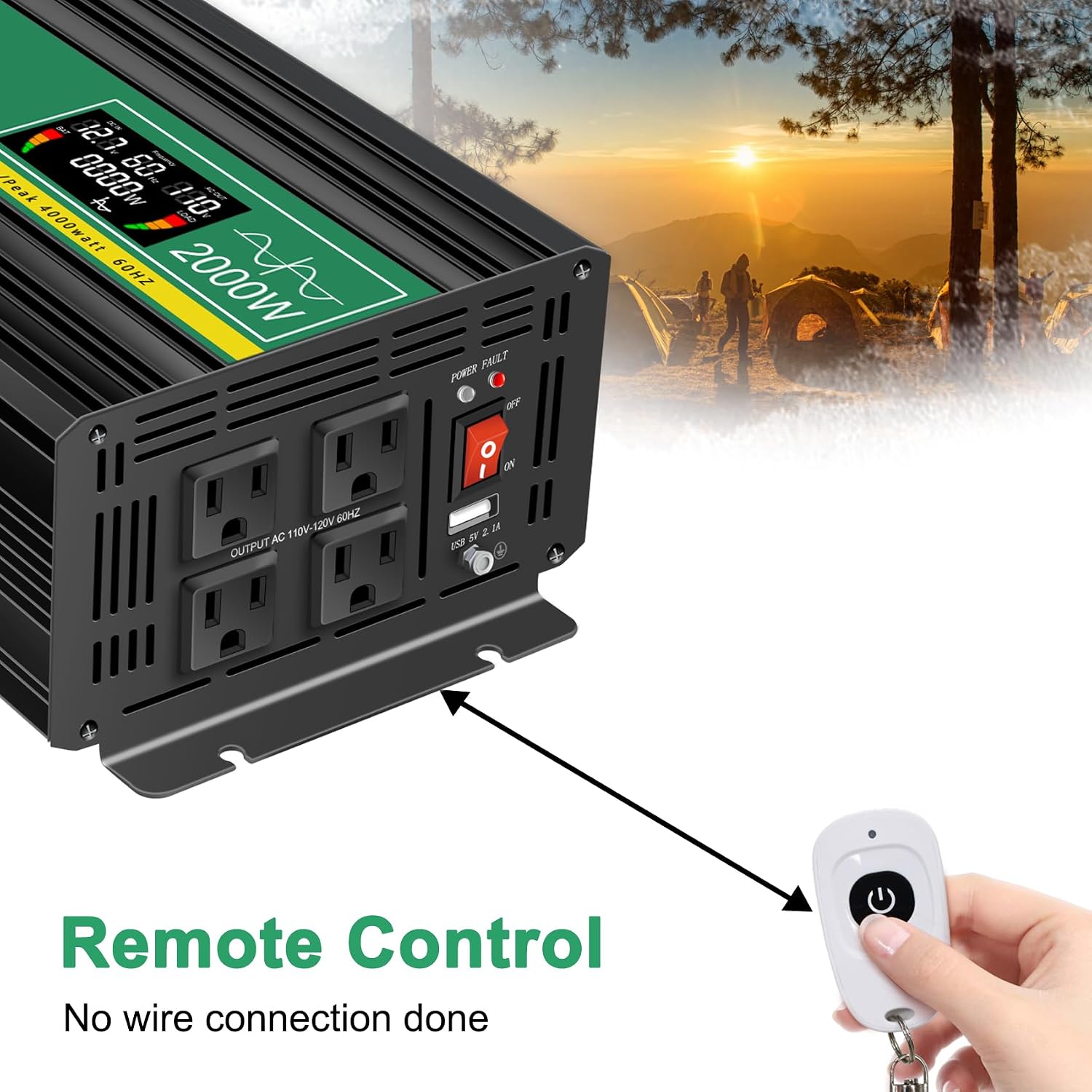
Image 5.3: Remote control for the JIGUUN Power Inverter.
6. Kullanım Talimatları
6.1 Açma/Kapatma
- After ensuring all connections are secure, flip the ON/OFF switch on the inverter to the 'ON' position. The LCD display will illuminate, and the power indicator will light up.
- To power off, flip the ON/OFF switch to the 'OFF' position.
- Alternatively, use the remote control to power the inverter on or off.
6.2 LCD Ekranın Kullanımı
The intelligent LCD display provides real-time information about the inverter's status:
- Pil Seviyesi Çubuğu: Bağlı bataryanın şarj seviyesini gösterir.
- Loads Level Bar: Shows the current power draw from connected AC devices.
- DC Giriş Hacmitage: hacmi görüntülertag12V aküden gelen e.
- AC Çıkış Hacmitage: Shows the 120V AC output voltage.
- Çıkış Frekansı: Displays the AC output frequency (60Hz).
- Yük Gücü: Indicates the total wattagBağlı cihazlar tarafından çizilen e.
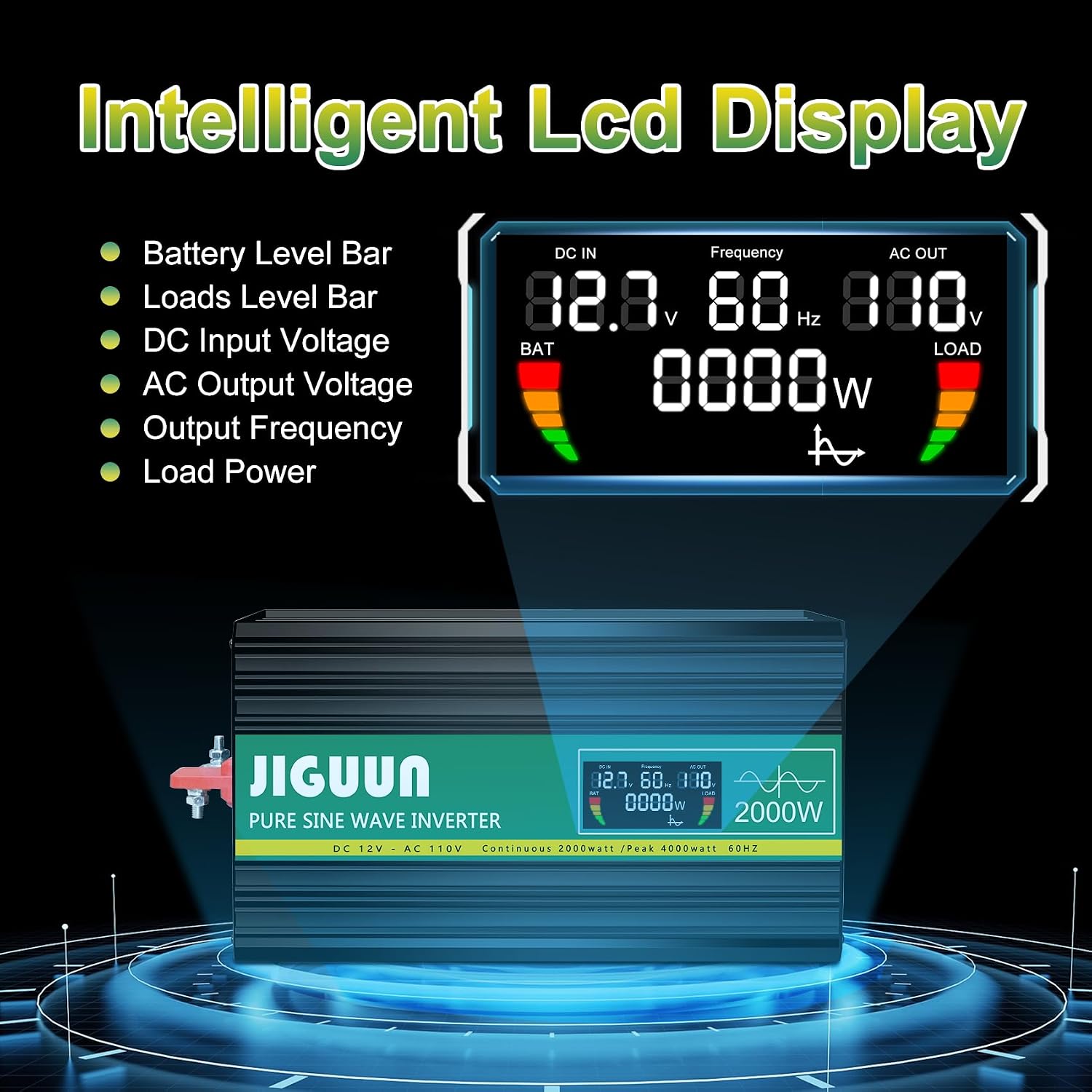
Resim 6.1: Ayrıntılı view of the LCD display information.
6.3 Connecting AC and USB Devices
- With the inverter powered on, plug your 120V AC appliances into the four AC receptacles.
- Plug your USB-powered devices into the USB ports for charging.
- Toplam su miktarını sağlayıntage of all connected AC devices does not exceed 2000W continuously.

Resim 6.2: Örn.amples of appliances powered by the inverter.
7. Bakım
7.1 Temizlik
Regularly clean the exterior of the inverter with a dry, soft cloth. Do not use liquid cleaners or solvents. Ensure cooling vents are free from dust and debris to maintain optimal airflow.
7.2 Soğutma Sistemi
The inverter features temperature-sensitive control fans that activate automatically when the internal temperature exceeds 45°C. These fans ensure rapid cooling and quiet operation. Ensure the fan vents are not obstructed.

Image 7.1: Inverter cooling fans and intelligent temperature control.
7.3 Sigorta Değişimi
The inverter has built-in fuses for protection. If a fuse needs replacement, it is recommended to contact customer service or a qualified technician. Spare 30A fuses are included in the package for emergency situations, but professional assistance is advised for replacement.

Image 7.2: Spare 30A fuses.
8. Sorun Giderme
İnverter düzgün çalışmıyorsa, aşağıdaki yaygın sorunlara ve çözümlere bakın:
| Sorun | Olası Neden | Çözüm |
|---|---|---|
| Güç çıkışı yok / İnverter açılmıyor | Gevşek pil bağlantıları Düşük pil hacmitage İnverter anahtarı KAPALI Sigorta atmış | Check and tighten battery cables. Pili şarj edin veya değiştirin. Ensure switch is ON. Contact customer service for fuse inspection/replacement. |
| Inverter shuts down / Error warning | Aşırı yük Aşırı ısınma Düşük/Yüksek giriş hacmitage Kısa devre | Bağlantılı yükü azaltın. Ensure proper ventilation, clear fan vents. Pil hacmini kontrol edintage. Disconnect all loads, check for faulty wiring/appliances. |
| Bağlı cihaz çalışmıyor. | Appliance power exceeds inverter capacity Cihaz arızası Inverter in protection mode | Verify appliance wattage. Cihazı farklı bir güç kaynağıyla test edin. Check inverter display for error codes. |
8.1 Protection System
The JIGUUN inverter is equipped with a comprehensive safety and security system (BMS) to protect itself and your devices:
- Pil Düşük Hacmitage Koruma
- Pil Aşırı Hacmitage Koruma
- Ters Polarite Koruması
- Kısa Devre Koruması
- İnvertör Aşırı Hacmitage Koruma
- İnverter Düşük Hacimtage Koruma
- Temperature Control (Overheating Protection)
- Ground Fault Circuit Interrupter (GFCI) Protection
- Aşırı Yük Koruması

Image 8.1: Comprehensive safety and security system icons.
9. Özellikler
| Özellik | Şartname |
|---|---|
| Model Adı | PRO2000W-12 |
| Sürekli Güç | 2000 Watt |
| Tepe Dalgalanma Gücü | 4000 Watt |
| DC Giriş Hacmitage | 12V |
| AC Çıkış Hacmitage | 120V |
| Çıkış Frekansı | 60Hz |
| Çıkış Dalga Formu | Saf sinus dalgası |
| Dönüşüm Verimliliği | >%90 |
| AC Çıkışları | 4 |
| USB Çıkışı | 2.1A |
| Ürün Ağırlığı | 11.11 pound |
| Boyutlar (U x G x Y) | 19.29 x 9.65 x 6.85 inç |
| Önerilen Kullanımlar | Home, Office, Vehicle (RV, Camping, Emergency) |
| Güç Kaynağı | Güneş ve Pille Çalışan |
10. Garanti ve Destek
10.1 Garanti Bilgileri
The JIGUUN PRO2000W-12 Power Inverter comes with a 1 yıllık garanti, which includes free replacement for manufacturing defects. Please retain your proof of purchase for warranty claims.
10.2 Müşteri Desteği
For technical assistance, troubleshooting, warranty claims, or any other inquiries, please contact JIGUUN customer service. Refer to the contact information provided with your product packaging or visit the official JIGUUN webDestek ayrıntıları için site.
