
LETIANPAI 1
LETIANPAI 36m LED Neon Rope Lights User Manual
Modeli: 1
1. Giriş
Thank you for choosing the LETIANPAI 36m LED Neon Rope Lights. This product is designed to provide versatile and vibrant lighting for various indoor and outdoor applications. Featuring RGB color options, app and remote control, music synchronization, and a timer function, these lights offer a customizable lighting experience. Please read this manual thoroughly before installation and use to ensure proper operation and safety.
2. Güvenlik Bilgileri
Ürüne zarar gelmesini veya kişisel yaralanmaları önlemek için lütfen aşağıdaki güvenlik önlemlerine uyun:
- Güç kaynağı hacmini sağlayıntage, bağlantı kurulmadan önce ürünün gereksinimlerini karşılar.
- Do not cut the LED rope lights while connected to power.
- The controller unit is su geçirmez değil. Protect it from moisture and direct water exposure.
- While the LED rope itself is rated IP65 for outdoor use, ensure all connections and the power adapter are protected from water if used outdoors. Exercise caution and ensure proper protection for all non-IP65 rated components.
- Ürünü tamir etmeye veya üzerinde değişiklik yapmaya çalışmayın. Yardım için müşteri desteğiyle iletişime geçin.
- Çocukların erişemeyeceği yerde saklayınız.
- LED ışığına uzun süre doğrudan göz temasından kaçının.
- Install using only the provided clips; the rope light does not have adhesive backing.
3. Paket İçeriği
Paketin içinde tüm öğelerin mevcut olduğundan emin olun:
- 36m LED Neon Rope Light (2 rolls)
- Güç Adaptörü
- Uzaktan kumanda
- Montaj Klipsleri ve Vidaları
- Kullanım Kılavuzu (bu belge)
4. Özellikler
| Özellik | Şartname |
|---|---|
| Marka | LETIANPAI |
| Model Numarası | 1 |
| Uzunluk | 36 metre (120 fit) |
| Renk | RGB (Multi-color) |
| Işık Kaynağı Türü | NEDEN OLMUŞ |
| Renk Sıcaklığı | 6500 Kelvin |
| Ingress Protection (Rope) | IP65 (Waterproof for the rope light itself) |
| Kontrol Yöntemleri | Remote Control, Mobile Application ("Lotus Lantern") |
| Özel Özellikler | Music Synchronization, Timer Function, Brightness/Speed Adjustment |
| Güç Kaynağı | Kablolu Elektrik |
| Enerji Verimliliği Sınıfı | A (EPREL Database Link) |
| Ürün Ağırlığı | 2.65 Kilogram |
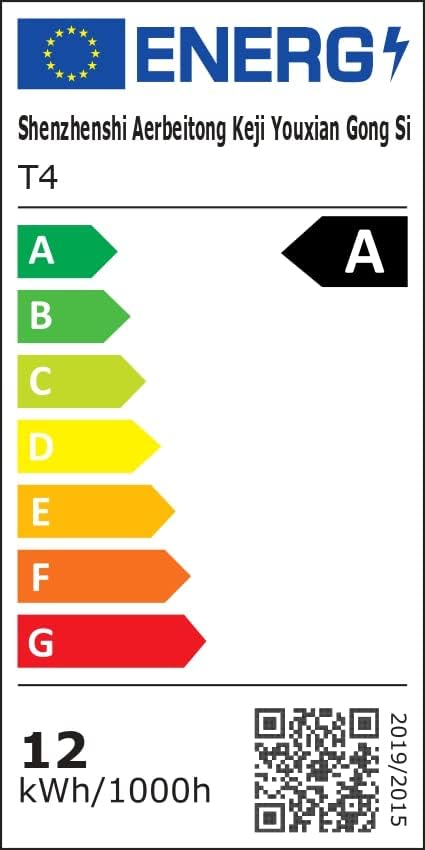 Image: Energy Efficiency Label showing class A for the LED Neon Rope Lights.
5. Kurulum ve Kurulum
Follow these steps to install your LED Neon Rope Lights:
- Tasarımınızı Planlayın: Before mounting, gently lay out the neon rope light to visualize your desired pattern or path on the wall or surface.
 Image: Step 1 - Planning the path for the neon rope light.
 - Install Fixing Clips: Secure the provided fixing clips to the wall or surface along your planned path using screws. Ensure the clips are spaced appropriately to hold the rope light firmly.
 Image: Step 2 - Installing fixing clips onto the wall.
 - Insert Rope Light into Clips: Carefully press the neon rope light into the installed fixing clips.
 Image: Step 3 - Inserting the neon rope light into the clips.
 - Güç Adaptörünü Bağlayın: Connect the power adapter to the neon rope light. Ensure the connection is secure.
- Güce Bağlanın: Plug the power adapter into a suitable electrical outlet. The lights are now ready for operation.
 Image: Final installation example with the neon rope lights connected to power.
Important Note for Outdoor Use: While the rope light itself is IP65 rated, the power adapter and controller are not. For outdoor installations, ensure these components are housed in a waterproof enclosure or protected from direct exposure to rain and moisture.
6. Kullanım Talimatları
Your LETIANPAI LED Neon Rope Lights can be controlled via the included remote control or a mobile application.
6.1 Uzaktan Kumanda İşlemi
The remote control allows for quick adjustments to your lighting. Point the remote directly at the controller unit for optimal response.
 Image: Remote control and mobile app interface.
- Güç Düğmesi: Işıkları Açın/Kapatın.
- RGB Düğmeler: Select specific Red, Green, or Blue colors.
- Renk Seçimi: Choose from a variety of preset colors.
- Parlaklık Ayarı: Işık yoğunluğunu artırın veya azaltın.
- Mod Seçimi: Çeşitli dinamik aydınlatma modları arasında geçiş yapın.
- Hız Ayarı: Dinamik modların hızını ayarlayın.
- Müzik Modu: Activate music synchronization (see section 6.3).
6.2 Mobile Application Control ("Lotus Lantern")
For advanced control and customization, download the "Lotus Lantern" app from your smartphone's app store.
- İndir uygulaması: Arama "Lotus Lantern" on the App Store (iOS) or Google Play Store (Android).
- Bağlamak: Follow the in-app instructions to connect your lights via Bluetooth.
- Özellikler: The app offers a wider range of features including:
- Precise color selection from a color wheel.
- Customizable dynamic modes.
- Music synchronization (using phone's microphone).
- Timer function for scheduled On/Off times.
 Image: Mobile app control interface for LED neon rope lights.
6.3 Müzik Senkronizasyonu
The lights can react to music, changing colors and patterns according to the rhythm.
- Uzaktan kumanda: Press the "Music" button on the remote.
- Mobil Uygulama: Select the music mode within the "Lotus Lantern" app. The app uses your phone's microphone to detect sound.
 Image: Music and Mic Mode in action, with lights changing to the rhythm.
6.4 Zamanlayıcı İşlevi
Set schedules for your lights to turn on or off automatically using the mobile application.
- Open the "Lotus Lantern" app.
- Navigate to the timer settings.
- Set your desired ON and OFF times.
 Image: Timer function setting for automatic on/off.
7. Bakım
To ensure the longevity and optimal performance of your LED Neon Rope Lights:
- Temizlik: Disconnect power before cleaning. Wipe the rope light with a soft, dry cloth. Do not use harsh chemicals or abrasive cleaners.
- Depolamak: If storing for an extended period, coil the rope light loosely and store it in a cool, dry place away from direct sunlight.
- Denetleme: Periodically check the rope light and connections for any signs of damage or wear.
8. Sorun Giderme
| Sorun | Olası Neden | Çözüm |
|---|---|---|
| Işıklar açılmıyor. | Güç yok, bağlantı gevşek, uzaktan kumandanın pili bitmiş. | Check power outlet, ensure all connections are secure, replace remote battery. |
| Uzaktan kumanda çalışmıyor. | Remote battery dead, remote out of range, obstruction. | Replace remote battery, ensure remote is pointed at the controller, remove obstructions. |
| Uygulama ışıklara bağlanamıyor. | Bluetooth kapalı, ışıklar eşleştirme modunda değil, uygulama sorunu. | Ensure Bluetooth is enabled on your phone, restart the app, power cycle the lights. |
| Lights flicker or display incorrect colors. | Loose connection, power fluctuation, damaged rope light. | Check connections, try a different power outlet. If problem persists, contact support. |
| Music sync not working. | Microphone blocked, volume too low, app permissions. | Ensure phone microphone is not blocked and volume is adequate. Check app permissions for microphone access. |
9. Garanti ve Destek
LETIANPAI offers a %100 memnuniyet garantisi. If you encounter any issues with your product, please contact our customer support team. We are committed to resolving any problems within 24 hours.
For assistance, please refer to the contact information provided with your purchase or visit the official LETIANPAI webalan.
Ask a question about this manual
Ask about setup, troubleshooting, compatibility, parts, safety, or missing instructions. Manuals+ will review the question and use this page’s manual context to help answer it.