
1. Giriş ve Üzeriview
Thank you for choosing the SENGBIRCH Keyboard Case for your Lenovo Tab P12 12.7" tablet. This product combines a protective case with a detachable Bluetooth keyboard, enhancing your tablet's functionality for typing, work, and entertainment. This manual provides detailed instructions for setup, operation, maintenance, and troubleshooting to ensure optimal use of your new accessory.
Temel Özellikler:
- Detachable Bluetooth 5.0 keyboard for stable and fast connection.
- Durable protective case with precise cutouts.
- Ayarlanabilir viewRahat kullanım için açılar.
- Integrated stylus holder.
- Uzun ömürlü şarj edilebilir pil.
Uyumluluk: This keyboard case is specifically designed for the Lenovo Tab P12 12.7" (2023) model TB370FU. Please verify your tablet's model number before use to ensure proper fit and functionality.

Image 1.1: Compatibility guide for the keyboard case. Ensure your tablet is the Lenovo Tab P12 12.7" (TB370FU).
2. Kurulum Talimatları
2.1 Klavyeyi Şarj Etme
Before first use, fully charge the keyboard. Connect the provided USB-C charging cable to the keyboard's charging port and a USB power adapter (not included). The charging indicator light will illuminate during charging and turn off when fully charged.
- Şarj Süresi: Yaklaşık 2-3 saat.
- Continuous Use: Up to 48 hours.
- Standby Time: Over 2 months.

Image 2.1: Keyboard charging port (Type-C) and battery indicators.
2.2 Inserting the Tablet into the Case
- Gently align your Lenovo Tab P12 12.7" tablet with the case's frame.
- Press the tablet firmly into the soft inner shell, ensuring all edges are securely seated and cutouts align with ports and buttons.
2.3 Bluetooth Klavyenin Eşleştirilmesi
- Turn on the keyboard by sliding the 'ON/OFF' switch to the 'ON' position. The power indicator light will briefly illuminate.
- Klavyedeki 'Bağlan' düğmesine basın. Bluetooth gösterge ışığı yanıp sönmeye başlayacak ve eşleştirme modunda olduğunu gösterecektir.
- On your Lenovo Tab P12, go to Ayarlar > Bluetooth.
- Bluetooth’u açın ve kullanılabilir cihazları arayın.
- Select "Bluetooth Keyboard" (or a similar name) from the list of devices.
- Eşleştirme işlemini tamamlamak için ekrandaki yönergeleri izleyin. Eşleştirme başarıyla tamamlandığında klavyedeki Bluetooth gösterge ışığı yanıp sönmeyi durduracaktır.
3. Kullanım Talimatları
3.1 Klavyenin Takılması ve Çıkarılması
The keyboard is magnetically attached to the case. To attach, simply place the keyboard onto the designated area within the case. To detach, gently pull the keyboard away from the magnetic surface.

Image 3.1: The keyboard can be magnetically detached from the case.
3.2 Ayarlama ViewAçılar
The case features an adjustable stand that supports three different viewing angles (130°, 125°, 120°). Simply fold the case cover to create a stable triangular stand and adjust it to your preferred angle for typing, viewçizmek veya çizmek.

Image 3.2: Adjustable stand angles for versatile use.
3.3 Klavye İşlevleri
- İşletim Sistemi Değiştirme: The keyboard supports different operating systems. Use Fn + Q iOS için, Fn + W for Android, and Fn + E Windows için.
- Arka Aydınlatma Ayarı: Basmak Fn + Ampul simgesi to cycle through 3 backlight brightness levels. Press Fn + RGB icon to change between 7 backlight colors.
- Özel Karakterler: Kullanın Fn key in combination with other keys to access special characters, such as the Euro symbol (€) or accent marks (ñ).
- Otomatik Uyku Modu: To conserve battery, the keyboard will automatically enter sleep mode after approximately 8 minutes of inactivity. Press any key to wake it up.
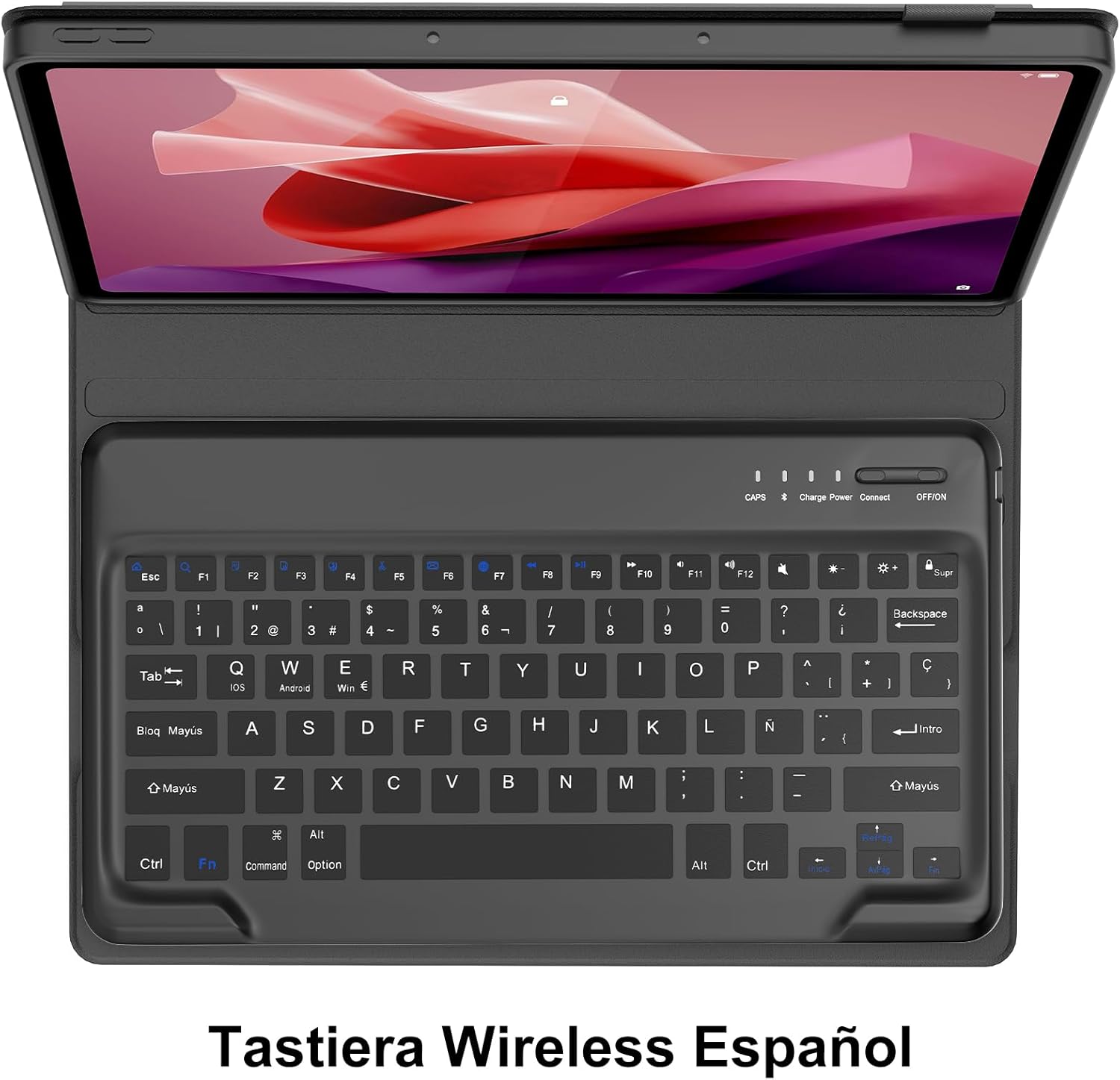
Image 3.3: Keyboard layout with function key combinations for various settings.
3.4 Stylus Holder
The case includes a dedicated slot for your stylus, ensuring it is securely stored and easily accessible.

Image 3.4: Integrated stylus holder for convenience.
4. Bakım
4.1 Kasa ve Klavyenin Temizlenmesi
- Kasanın dışını yumuşak bir bezle silin.amp Bez. Sert kimyasallardan veya aşındırıcı temizleyicilerden kaçının.
- For the keyboard, use a soft, dry cloth or a can of compressed air to remove dust and debris from between the keys.
- Temizlemeden önce klavyenin kapalı olduğundan emin olun.
4.2 Pil Bakımı
- Recharge the keyboard when the low battery indicator appears or when performance degrades.
- Pilinizin ömrünü uzatmak için sık sık tamamen boşaltmaktan kaçının.
- Klavyeyi uzun süre saklayacaksanız, yaklaşık %50 şarj edin ve serin, kuru bir yerde saklayın.
5. Sorun Giderme
If you encounter issues with your SENGBIRCH Keyboard Case, please refer to the following troubleshooting steps:
5.1 Keyboard Not Connecting/Frequent Disconnections
- Pili Kontrol Edin: Ensure the keyboard is sufficiently charged. Low battery can cause connection issues.
- Klavyeyi Onar: Delete the "Bluetooth Keyboard" from your tablet's Bluetooth device list and repeat the pairing steps (Section 2.3).
- Cihazları Yeniden Başlatın: Turn off and on both your tablet and the keyboard.
- Parazit yapmak: Parazite neden olabilecek diğer kablosuz cihazlardan uzaklaşın.
5.2 Keys Not Responding or Sticky Keys
- Pili Kontrol Edin: Ensure the keyboard has enough power.
- Klavyeyi Temizle: Dust or debris under the keys can cause them to stick. Refer to Section 4.1 for cleaning instructions.
- Restart Keyboard: Klavyeyi kapatıp tekrar açın.
5.3 Tablet Not Fitting Correctly
- Modeli Doğrula: Double-check that your tablet is indeed the Lenovo Tab P12 12.7" (2023) model TB370FU. This case is not compatible with other models.
- Doğru Yerleştirme: Ensure the tablet is aligned correctly and gently pressed into all corners of the soft inner shell.
6. Özellikler
| Marka | SENGBİRŞESİ |
| Compatible Tablet Model | Lenovo Tab P12 12.7" (2023) TB370FU |
| Bağlantı Teknolojisi | Bluetooth 5.0 |
| Klavye Düzeni | İspanyolca (QWERTY) |
| Pil Türü | Şarj Edilebilir Lityum Polimer |
| Şarj Süresi | 2-3 saat |
| Sürekli Kullanım Süresi | 48 saate kadar |
| Bekleme Süresi | 2 aydan fazla |
| Malzeme | Plastic (keyboard), Faux Leather (case exterior) |
| Renk | Siyah |
| Ebatlar (Paket) | 31.2x25.1x4.1 cm |
| Ağırlık (Ürün) | 970 gr |
7. Garanti ve Destek
SENGBIRCH products are designed for reliability and performance. For any questions, technical support, or warranty claims, please contact SENGBIRCH customer service through the retailer where you purchased the product or visit the official SENGBIRCH webiletişim bilgileri için site.
Lütfen garanti amaçlı satın alma belgenizi saklayın.