
giriiş
This manual provides comprehensive instructions for the ProtoArc EK01 Plus Ergonomic Wireless Backlit Keyboard. Please read this guide carefully to ensure proper setup, operation, and maintenance of your device. Keep this manual for future reference.
Paket İçeriği
Paketin içinde tüm öğelerin mevcut olduğundan emin olun:
- ProtoArc EK01 Plus Ergonomic Wireless Backlit Keyboard
- Bilek Desteği
- USB-C Şarj Kablosu
- 2.4G USB Alıcı
- Kullanıcı Kılavuzu
Ürün Bittiview
The ProtoArc EK01 Plus is a full-size ergonomic keyboard designed to enhance typing comfort and reduce muscle strain. Its split and curved keyframe design promotes a natural hand and wrist posture.
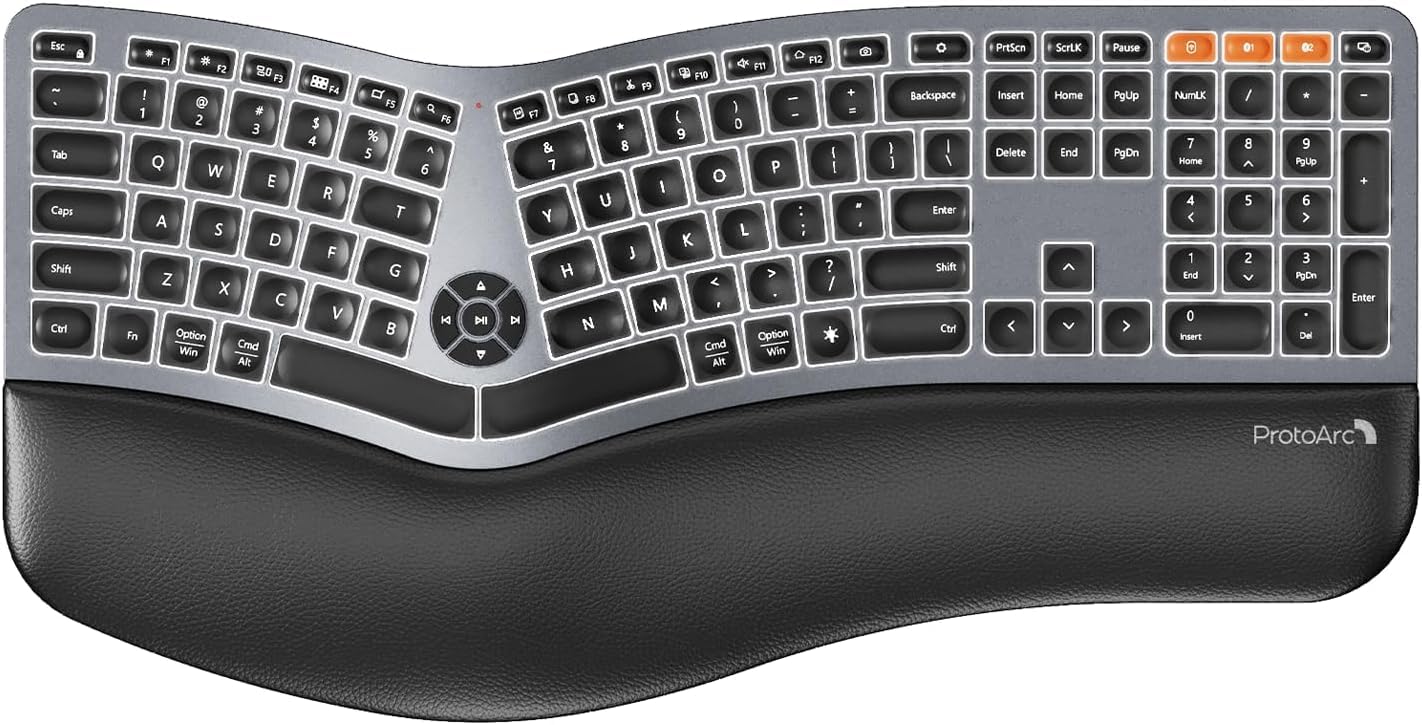
Image 1: ProtoArc EK01 Plus Ergonomic Wireless Backlit Keyboard. This image displays the full keyboard with its split design, integrated wrist rest, and key layout.
Temel Özellikler:
- Ergonomic Full-Size Design: Features a split, curved keyframe and integrated wrist rest to minimize muscle fatigue and promote proper posture.
- Ayarlanabilir Eğimli Ayaklar: Four adjustable tilt feet allow customization of the keyboard angle for optimal comfort.
- Ayarlanabilir Arka Aydınlatma: Soft white LED backlighting with three adjustable brightness levels (low-medium-high) for comfortable typing in various lighting conditions.
- Çoklu Cihaz Bağlantısı: Connects to up to three devices simultaneously via Bluetooth and 2.4G USB. Easily switch between devices with a dedicated key.
- USB-C Şarj Edilebilir: Equipped with a 2000 mAh rechargeable lithium battery for extended use.
- Otomatik Uyku Modu: Enters sleep mode after 60 minutes of inactivity to conserve power, waking up within 3 seconds upon key press.
- Uyumluluk: Widely compatible with Windows 7/8/10, Mac OS X 10.12 or higher, and Android 4.3 or higher.
Kurmak
1. Klavyeyi Şarj Etme
- Klavyenin üzerindeki USB-C şarj bağlantı noktasını bulun.
- Connect the provided USB-C cable to the keyboard and the other end to a USB power source (e.g., computer USB port, wall adapter).
- Şarj gösterge ışığı yanacaktır. Tamamen şarj olduğunda ışık renk değiştirebilir veya sönebilir.
2. Cihazlara Bağlanma
The keyboard supports both 2.4G USB and Bluetooth connectivity.
2.1. 2.4G USB Bağlantısı
- Locate the 2.4G USB receiver (dongle). It is usually stored in a compartment on the keyboard or in the packaging.
- USB alıcısını bilgisayarınızdaki uygun bir USB bağlantı noktasına takın.
- Güç anahtarını kullanarak klavyeyi açın.
- Klavyenin cihazınıza otomatik olarak bağlanması gerekir.
2.2. Bluetooth Bağlantısı (En fazla 3 Cihaz)
- Klavyeyi açın.
- Bluetooth kanal tuşlarından birine basılı tutun (örneğin, BT1, BT2, veya BT3Gösterge ışığı yanıp sönene kadar (eşleştirme modunun aktif olduğunu gösterir) 3-5 saniye basılı tutun.
- Cihazınızda (bilgisayar, tablet, akıllı telefon) Bluetooth'u etkinleştirin ve yeni cihazları arayın.
- Select "ProtoArc EK01 Plus" (or similar name) from the list of available devices.
- Eşleştirme işlemini tamamlamak için ekrandaki yönergeleri izleyin. Bağlantı kurulduktan sonra gösterge ışığı yanıp sönmeyi bırakacaktır.
- Repeat these steps for up to two additional Bluetooth devices using the other Bluetooth channel keys.
Operasyon
1. Cihazlar Arasında Geçiş Yapma
Bağlı cihazlar arasında geçiş yapmak için ilgili bağlantı tuşuna basmanız yeterlidir:
- Basmak 2.4G USB alıcısı aracılığıyla bağlanan cihaza geçmek için.
- Basmak BT1 to switch to the first Bluetooth device.
- Basmak BT2 to switch to the second Bluetooth device.
- Basmak BT3 to switch to the third Bluetooth device.
2. Adjusting Backlight
The keyboard features a soft white LED backlight with three brightness levels.
- To cycle through brightness levels (low, medium, high, off), press the dedicated backlight key (refer to keyboard layout for specific key).
3. Sleep Mode and Power Saving
To conserve battery life, the keyboard will automatically enter sleep mode after 60 minutes of inactivity. To wake the keyboard, press any key. The keyboard will be ready for use within 3 seconds.
4. Ayarlanabilir Eğim
The keyboard includes four adjustable tilt feet. Extend or retract these feet to customize the typing angle to your preference, ensuring comfortable wrist positioning whether sitting or standing.
Bakım
1. Klavyeyi Temizleme
- Temizlemeden önce klavyeyi tüm cihazlardan ve güç kaynaklarından ayırın.
- Yumuşak, tiftiksiz bir bez kullanın ve hafifçe kurulayın.ampKlavyenin yüzeyini silmek için su veya hafif bir temizleme solüsyonu kullanın.
- Klavye yüzeyine zarar verebileceğinden, sert kimyasallar, aşındırıcı temizleyiciler veya çözücüler kullanmaktan kaçının.
- Tuş aralarını temizlemek için basınçlı hava kullanarak toz ve kalıntıları temizleyin.
2. Pil Bakımı
- Pil ömrünü korumak için klavyeyi düzenli olarak şarj edin.
- Pilin sık sık tamamen boşaltılmasından kaçının.
- Klavyeyi uzun süre saklayacaksanız, saklamadan önce yaklaşık %50 oranında şarj edin.
Sorun giderme
| Sorun | Olası Neden | Çözüm |
|---|---|---|
| Klavye yanıt vermiyor | Low battery; Keyboard off; Incorrect connection mode; USB receiver not plugged in (2.4G); Bluetooth not paired. | Charge the keyboard; Turn on the keyboard; Switch to the correct connection mode (2.4G, BT1/2/3); Ensure USB receiver is securely plugged in; Re-pair Bluetooth. |
| Gecikmeli veya gecikmeli giriş | Parazitlenme; Alıcı/cihazdan uzaklık; Düşük pil seviyesi. | Move closer to the receiver/device; Ensure no strong interference sources nearby; Charge the keyboard. |
| Arka ışık çalışmıyor | Arka ışık kapalı; Pil zayıf. | Press the backlight key to adjust brightness; Charge the keyboard. |
| Bluetooth üzerinden bağlanılamıyor | Keyboard not in pairing mode; Device Bluetooth off; Already connected to 3 devices. | Ensure keyboard is in pairing mode (flashing indicator); Enable Bluetooth on your device; Disconnect from an existing Bluetooth device if maximum reached. |
Özellikler
| Marka | Protoarc |
| Model Numarası | EK01 Artı |
| Bağlantı Teknolojisi | Bluetooth, 2.4G USB |
| Klavye Açıklaması | Ergonomic, Full Size, Split Design |
| Özel Özellikler | Ergonomic, Full Size, Wrist Rest, Backlit, Rechargeable |
| Renk | Uzay Grisi |
| Backlight Color Support | Monochromatic (White LED) |
| Malzeme | Plastik |
| Güç Kaynağı | Battery Powered (2000 mAh Lithium Battery) |
| Anahtar Türü | Membran |
| Klavye Düzeni | QWERTY (UK layout for this variant) |
| Anahtar Sayısı | 117 |
| Uyumlu Cihazlar | Laptop, PC, Tablet, Windows/Mac/Android |
| Ürün Ağırlığı | 1.6 Kilogram |
| Boyutlar (Yaklaşık) | 48 cm (Uzunluk) x 25 cm (Genişlik) |
Garanti ve Destek
For warranty information and technical support, please refer to the ProtoArc official website or contact their customer service. Details are typically provided on the product packaging or the official brand store.
ProtoArc Official Store: Visit ProtoArc Store on Amazon