
Mastech MS2101
Mastech MS2101 AC/DC Dijital Kontrol Cihazıamp Sayaç Kullanım Kılavuzu
Model: MS2101 | Marka: Mastech
1. Önemli Güvenlik Bilgileri
Please read and understand all safety information and operating instructions before using this instrument. Improper use may result in electric shock or damage to the meter. Always adhere to local and national safety codes.
- Her fonksiyon için belirtilen maksimum giriş değerlerini aşmayın.
- Ensure the test leads are properly connected and in good condition before making any measurements.
- Ölçüm cihazında hasar varsa veya test uçlarındaki yalıtım bozulmuşsa cihazı kullanmayın.
- vol ile çalışırken çok dikkatli oluntag30V AC RMS, 42V tepe veya 60V DC'nin üzerinde. Bu hacimtagşok tehlikesi yaratabilir.
- Her zaman devre gücünü kesin ve tüm yüksek hacimli akımları boşaltın.tagDirenç, süreklilik, diyot veya kapasitans ölçümü yapmadan önce kapasitörleri kontrol edin.
- Doğru okumalar sağlamak için düşük pil göstergesi göründüğünde pilleri hemen değiştirin.
- This device is rated for CAT III 600V and CAT II 1000V. Adhere to these safety categories.
2. Ürün Bittiview
The Mastech MS2101 is a versatile AC/DC digital clamp meter designed for accurate measurement of current, voltage, resistance, capacitance, frequency, and temperature. It features auto-ranging capabilities and a clear digital display, making it suitable for both domestic and industrial electrical testing.
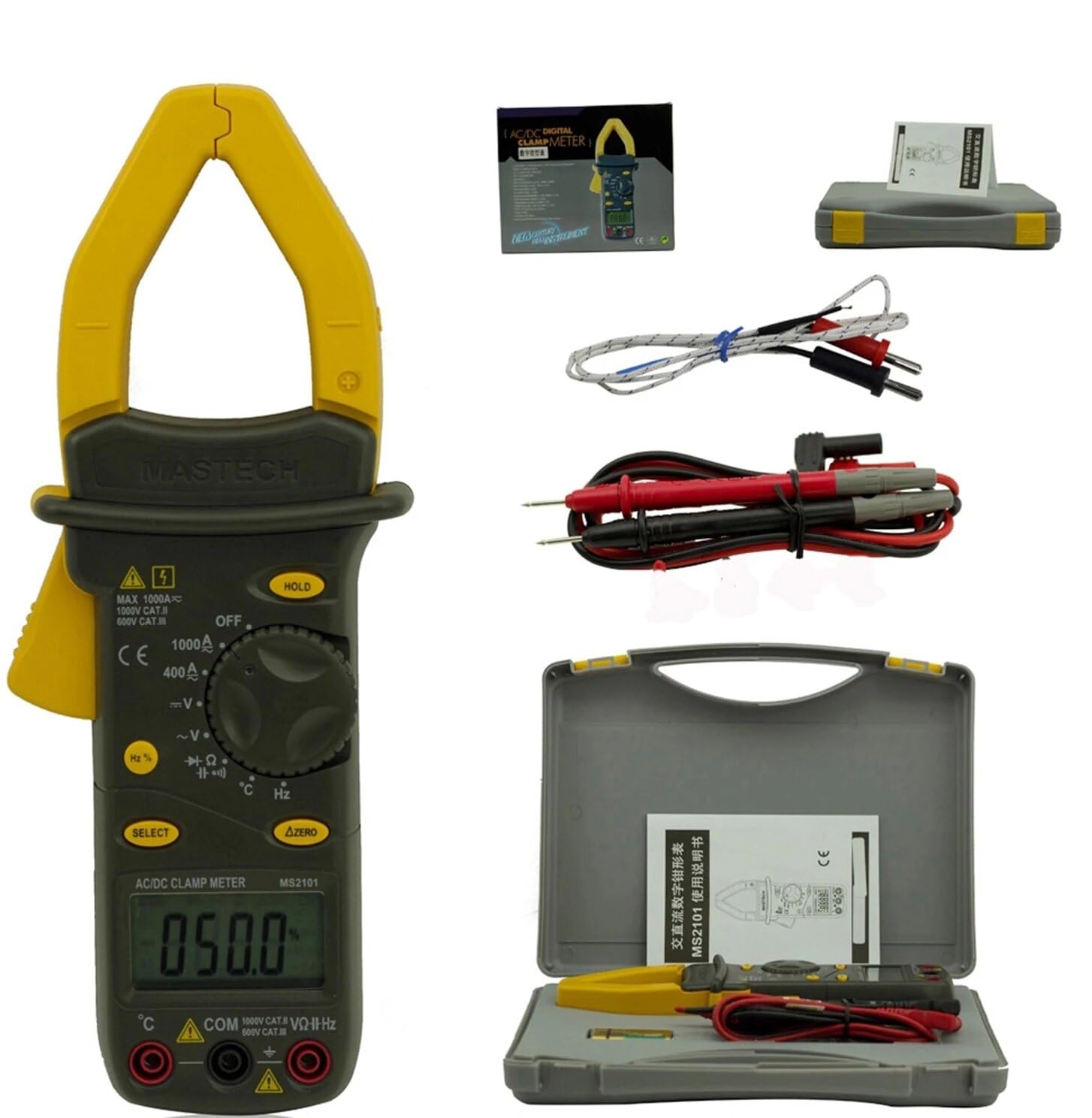
Image: Mastech MS2101 clamp meter with included test leads, temperature probe, and carrying case.
2.1 Temel Özellikler
- Göster: 4000 sayar
- Jaw Opening: Φ42mm / 1.7 inches
- Otomatik ve Manuel Aralık
- Otomatik Kapanma işlevi
- Diyot Açık Voltage: 2.2V
- Continuity Buzzer: Activates at <50±20Ω
- Veri Bekletme işlevi
- Düşük Pil Göstergesi
3. Paket İçeriği
Upon opening the package, verify that all items listed below are present and in good condition.

Image: Contents of the Mastech MS2101 package, including the meter, test leads, and documentation.
- Mastech MS2101 AC/DC Dijital Kontrol Cihazıamp Metre
- Test Kabloları (bir çift)
- K-Type Thermocouple (for temperature measurement)
- Taşıma Çantası
- Kalibrasyon Sertifikası
- Hızlı Başlangıç Kılavuzu
- Piller (2 x LR44, dahil)
4. Cihaz Düzeni ve Kontrolleri
Familiarize yourself with the various parts and controls of your MS2101 clamp metre.

Resim: Ön view of the Mastech MS2101, highlighting the display, rotary switch, and function buttons.
- Mevcut Clamp Çene: Temassız AC/DC akım ölçümü için kullanılır.
- Çene Tetikleyici: Squeeze to open the current clamp çene.
- Döner anahtar: Selects the desired measurement function (OFF, V, A, Ω, Capacitance, Hz, Diode, Continuity, Temperature).
- LCD Ekran: Ölçüm değerlerini, birimleri ve fonksiyon göstergelerini gösterir.
- TUTMA Düğmesi: Ekrandaki mevcut okumayı dondurur.
- SEÇ Düğmesi: Toggles between AC/DC modes or different functions within a rotary switch position (e.g., Diode/Continuity, AC/DC Voltage).
- ΔZERO Button: Used to zero out DC current readings or relative measurements.
- COM Giriş Jakı: Test uçları için ortak (negatif) giriş.
- VΩHz Input Jack: Hacim için pozitif giriştage, direnç, frekans, kapasitans, diyot ve süreklilik ölçümleri.
- Temperature Input Jack: Specific input for the K-type thermocouple.
5. İlk Kurulum
5.1 Pil Kurulumu
The Mastech MS2101 requires two LR44 batteries for operation. These are typically included in the package.

Resim: Arka view of the Mastech MS2101, indicating the location of the battery compartment screws.
- Sayacın KAPALI olduğundan emin olun.
- Ölçüm cihazının arkasındaki pil bölmesini bulun.
- Use a screwdriver to remove the screws securing the battery cover.
- Pil kapağını dikkatlice çıkarın.
- Insert two LR44 batteries, observing the correct polarity (+ and -) as indicated inside the compartment.
- Pil kapağını yerine takın ve vidalarla sabitleyin.
6. Kullanım Talimatları
6.1 Güç Açma/Kapatma
To power on the meter, rotate the rotary switch from the 'OFF' position to any desired measurement function. To power off, rotate the switch back to 'OFF'.
6.2 Fonksiyon Seçimi
Turn the rotary switch to the desired measurement function. For functions with multiple modes (e.g., AC/DC Voltage, Diode/Continuity), press the 'SELECT' button to toggle between them.
6.3 AC/DC Akımının Ölçülmesi
- Rotate the switch to the 'A' (Current) position.
- Press 'SELECT' to choose between AC or DC current measurement.
- CL'yi açmak için çene tetiğine basınamp çene.
- Enclose only one conductor of the circuit within the clamp Çene. Çenenin tamamen kapalı olduğundan emin olun.
- LCD ekranda mevcut değeri okuyun.
- For DC current, use the 'ΔZERO' button to zero the display before measurement if necessary.
6.4 AC/DC Hacim Ölçümütage
- Rotate the switch to the 'V' (Voltage) konum.
- Press 'SELECT' to choose between AC or DC voltage ölçümü.
- Insert the red test lead into the 'VΩHz' jack and the black test lead into the 'COM' jack.
- Ölçüm problarını ölçmek istediğiniz devreye veya bileşene paralel olarak bağlayın.
- Cildi okutagLCD ekranda e değeri.
6.5 Direncin Ölçülmesi
- Rotate the switch to the 'Ω' (Resistance) position.
- Insert the red test lead into the 'VΩHz' jack and the black test lead into the 'COM' jack.
- Ensure the circuit or component is de-energized before connecting the test probes across it.
- LCD ekranda direnç değerini okuyun.
6.6 Kapasitansın Ölçülmesi
- Rotate the switch to the 'Capacitance' position.
- Insert the red test lead into the 'VΩHz' jack and the black test lead into the 'COM' jack.
- Test problarını bağlamadan önce kondansatörün tamamen boşaldığından emin olun.
- Kapasitans değerini LCD ekranda okuyun.
6.7 Measuring Frequency/Duty Cycle
- Rotate the switch to the 'Hz' (Frequency) position.
- Insert the red test lead into the 'VΩHz' jack and the black test lead into the 'COM' jack.
- Test problarını sinyal kaynağına bağlayın.
- Read the frequency or duty cycle value on the LCD display. Press 'SELECT' to toggle between frequency and duty cycle.
6.8 Diyot Testi
- Rotate the switch to the Diode/Continuity position. Press 'SELECT' until the diode symbol appears.
- Insert the red test lead into the 'VΩHz' jack and the black test lead into the 'COM' jack.
- Kırmızı probu diyotun anoduna, siyah probu ise diyotun katoduna bağlayın.
- İleri cildi okuyuntage drop on the display. Reverse the probes to check for open circuit (OL) in reverse bias.
6.9 Süreklilik Testi
- Rotate the switch to the Diode/Continuity position. Press 'SELECT' until the continuity buzzer symbol appears.
- Insert the red test lead into the 'VΩHz' jack and the black test lead into the 'COM' jack.
- Test problarını devreye veya bileşene bağlayın.
- Direnç yaklaşık 50Ω'un altındaysa, sürekliliği gösteren bir buzzer sesi duyulur.
6.10 Sıcaklık Ölçümü
- Rotate the switch to the '°C/°F' (Temperature) position.
- Insert the K-type thermocouple into the dedicated temperature input jacks, observing polarity.
- Place the thermocouple tip on or near the object whose temperature you wish to measure.
- Read the temperature on the LCD display. Press 'SELECT' to toggle between Celsius and Fahrenheit.
6.11 Veri Tutma Fonksiyonu
Ekrandaki mevcut okumayı dondurmak için 'HOLD' düğmesine basın. Dondurma işlemini kaldırmak ve canlı ölçümlere devam etmek için tekrar basın.
6.12 Zeroing (ΔZERO) Function
In DC current mode, press the 'ΔZERO' button to zero the display before making a measurement. This compensates for any residual magnetic fields or offsets, ensuring more accurate DC current readings.
6.13 Otomatik Kapanma
The meter will automatically power off after approximately 15 minutes of inactivity to conserve battery life. To reactivate, turn the rotary switch to 'OFF' and then back to the desired function.
7. Bakım
7.1 Temizlik
Sayaçın c kısmını silin.asing ile reklamamp Bir bez ve hafif bir deterjan kullanın. Aşındırıcı veya çözücü maddeler kullanmayın. Kullanmadan önce ölçüm cihazının tamamen kuru olduğundan emin olun.
7.2 Pil Değişimi
When the low battery indicator appears on the display, replace the batteries as described in Section 5.1. Always use two new LR44 batteries.
7.3 Depolama
Ölçüm cihazı uzun süre kullanılmayacaksa, sızıntıyı ve hasarı önlemek için pilleri çıkarın. Ölçüm cihazını serin, kuru bir yerde, doğrudan güneş ışığından ve aşırı sıcaklıklardan uzakta saklayın.
8. Sorun Giderme
- Sayaç açılmıyor: Pillerin montajını kontrol edin ve pillerin bitmediğinden emin olun.
- No reading or 'OL' displayed: Ensure test leads are properly connected and making good contact. For current measurements, ensure only one conductor is within the clamp jaw. For resistance/continuity, ensure the circuit is de-energized. 'OL' (Overload) indicates the measured value is beyond the meter's range.
- Yanlış okumalar: Check battery level. Ensure the correct function is selected. For DC current, use the 'ΔZERO' function.
- Buzzer not sounding in continuity mode: The resistance may be too high (above 50Ω), or the circuit is open.
9. Teknik Özellikler
Detailed specifications for the Mastech MS2101 clamp meter are provided below.

Image: Table detailing the measurement ranges, resolutions, and accuracies of the Mastech MS2101.
| Ölçüm | Menzil | Çözünürlük | Kesinlik |
|---|---|---|---|
| DC Hacmitage | 400mV/4V/40V/400V 1000V | 0.1mV/1mV/10mV/0.1V 1V | ±(0.7%+1) ±(0.8%+3) |
| AC Hacmitage | 4V/40V/400V 750V | 1mV/10mV/0.1V 1V | ±(0.8%+5) ±(1.0%+10) |
| Doğru Akım | 400A/1000A | 0.1A/1A | ±(3.0%+3) |
| AC Akım | 400A/1000A | 0.1A/1A | ±(3.0%+3) |
| Rezistans | 400Ω/4kΩ/40kΩ/400kΩ/4MΩ 40MΩ | 0.1Ω/1Ω/10Ω/100Ω/1kΩ 10kΩ | ±(1.2%+1) ±(2.0%+3) |
| Kapasitans | 4nF/40nF/400nF 4μF/40μF/100μF | 1pF/10pF/0.1nF 1nF/10nF/100nF | ±(4.0%+10) ±(4.0%+10) |
| Sıklık | 40Hz/400Hz/4kHz/40kHz/100kHz | 0.01Hz/0.1Hz/1Hz/10Hz/0.1kHz | ±(2.0%+1) |
| Görev Döngüsü | %0.1 ~ %99.9 | %0.10 | ±(2.0%+2) |
| Sıcaklık | -40°C ~ 0°C 1°C ~ 400°C 401°C ~ 750°C | 1°C 1°C 1°C | ±(1.0%+6) ±(1.0%+3) ±(1.0%+5) |
| Görüntülemek | 4000 sayım | ||
| Çene Açma | 42 mm / 1.7 inç | ||
| Süreklilik Uyarı Cihazı | <50±20Ω | ||
| Diyot Açık Voltage | 2.2V | ||
| Güç Kaynağı | 2 x LR44 batteries | ||
| Boyutlar (U x G x Y) | 7.87 x 5.91 x 9.84 inç | ||
| Ağırlık | 1 Kilogram (2.2 Pound) | ||
10. Garanti ve Destek
The Mastech MS2101 Digital Clamp Meter comes with a 1-year warranty from the date of purchase, covering manufacturing defects. Please retain your proof of purchase for warranty claims.
For technical support, product information, or warranty inquiries, please visit the official Mastech websiteyi ziyaret edin veya müşteri hizmetleriyle iletişime geçin:
- Resmi Mastech Webalan: www.mastech-group.com
- Destek Sayfası: http://www.mastech-group.com/support.php?n=0
İlgili belgelerMS2101


Ask a question about this manual
Ask about setup, troubleshooting, compatibility, parts, safety, or missing instructions. Manuals+ will review the question and use this page’s manual context to help answer it.