
giriiş
Thank you for choosing the XGP Bluetooth 5.2 Motorcycle Intercom. This device is designed to enhance your riding experience by providing clear communication, music playback, and navigation audio. Please read this manual carefully to ensure proper installation and operation.

Image: The XGP Bluetooth 5.2 Motorcycle Intercom main unit, showcasinŞık tasarımıyla dikkat çekiyor.
Paket İçeriği
Paketinizde tüm öğelerin mevcut olduğundan emin olun:
- XGP Intercom Main Unit
- USB-C Veri Kablosu
- 40mm Hi-Fi Speakers
- Boom Mikrofonu
- Yumuşak Tel Mikrofon
- Metal Clip Bracket
- Adhesive Mount Bracket
- Speaker Sponges
- Kullanıcı Kılavuzu
Ürün Bittiview
The XGP intercom unit is designed for ease of use and integration with most helmets. It features a lightweight and slim profile, weighing approximately 39g and measuring 15mm in thickness, ensuring minimal impact on helmet comfort.
Temel Özellikler:
- Bluetooth 5.2 Teknolojisi: İstikrarlı ve verimli kablosuz bağlantılar için.
- Uzun Menzilli İnterkom: Up to 1200 meters for 2-person communication.
- Yüksek Kapasiteli Pil: 1000mAh, offering up to 35 hours of talk time or 30 hours of music playback.
- IP67 Su Geçirmez: Çeşitli hava koşullarına dayanacak şekilde tasarlanmıştır.
- CVC/DSP Noise Cancellation: Reduces engine and wind noise for clear audio.
- 40mm Hi-Fi Speakers: Zengin bas ve net ses kalitesi sunar.
- Sesli Komut Desteği: Compatible with Google Assistant and Apple Siri.
- Müzik Paylaşımı: Share music with another XGP intercom user.
- Dual Microphone Options: Includes both boom and soft wire microphones for different helmet types.

Image: The XGP intercom highlighting its thin (0.51 inches) and light (0.08 lbs) design, improving wearing comfort.
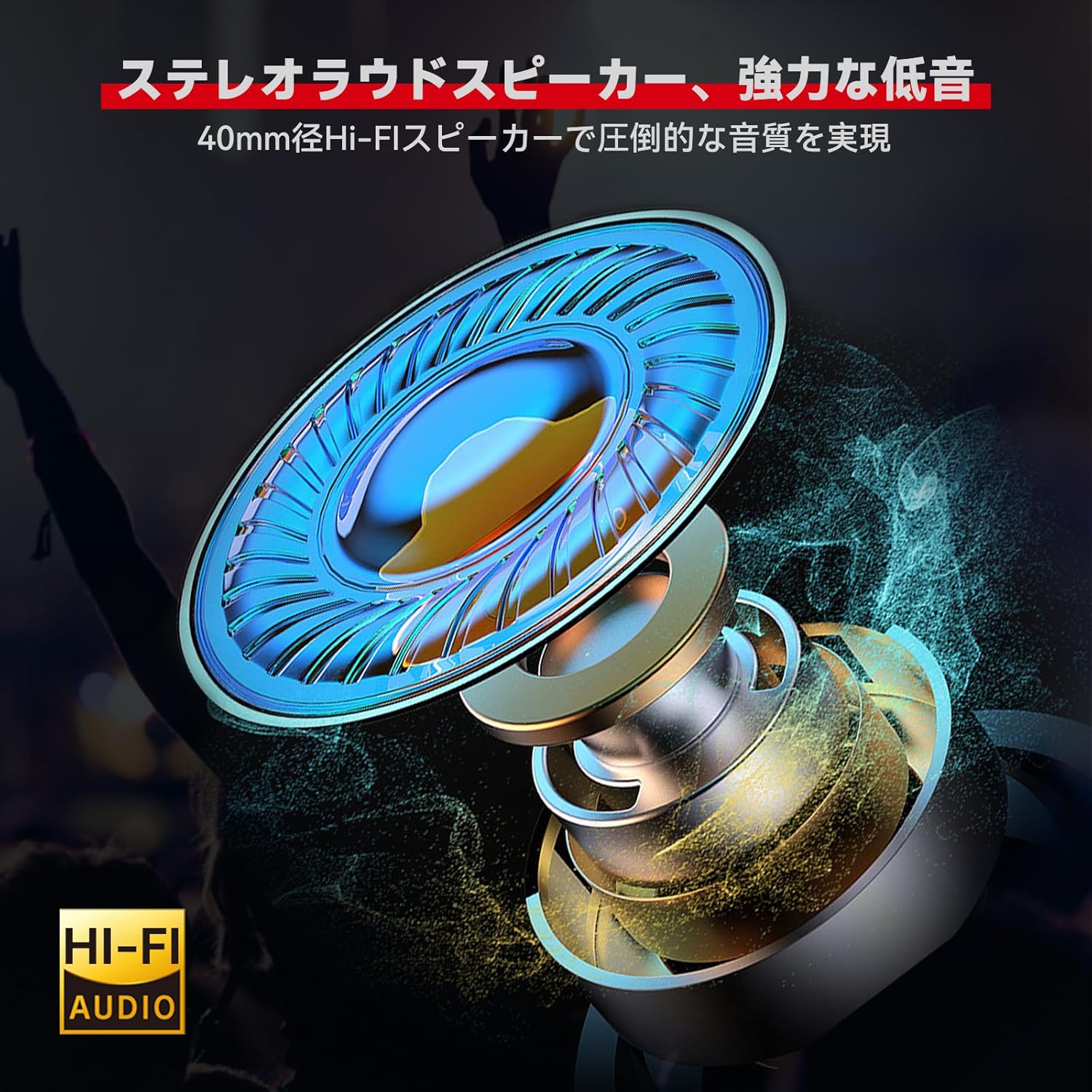
Resim: Ayrıntılı view of the 40mm Hi-Fi speaker, designed for high-quality audio output.

Image: Illustration of the XGP intercom's CVC/DSP noise cancellation technology reducing engine and wind noise for clear vocals.
Kurulum
The XGP intercom offers simple and secure installation without the need for complex tools. Two types of mounting brackets are provided: a metal clip bracket and an adhesive mount bracket.
1. Montaj Yeri Seçimi:
Select a flat surface on the side of your helmet where the intercom unit will not obstruct your vision or movement. Ensure the chosen location allows for easy access to the control buttons.
2. Braketin Takılması:
- Metal Clip Bracket: Slide the metal clip between the helmet shell and the inner padding. Ensure it is securely fastened.
- Adhesive Mount Bracket: Clean the chosen helmet surface thoroughly. Peel off the protective film from the adhesive pad and firmly press the bracket onto the helmet for at least 30 seconds. Allow the adhesive to cure for several hours before attaching the intercom unit.
3. Installing Speakers and Microphone:
- Place the 40mm Hi-Fi speakers inside the helmet's ear pockets. Use the provided speaker sponges to adjust the distance for optimal audio quality and comfort.
- Choose between the boom microphone (for open-face helmets) or the soft wire microphone (for full-face helmets). Attach the microphone close to your mouth for clear voice pickup, ensuring it does not interfere with your helmet's visor.
- Route all cables neatly under the helmet padding to avoid discomfort and ensure they are not exposed to wind or moisture.

Image: The XGP intercom unit securely mounted on the side of a motorcycle helmet.
Kullanım Talimatları
1. Güç Açma/Kapama:
- Güç Açık: Gösterge ışığı yanıp sönene kadar Güç düğmesini yaklaşık 3 saniye basılı tutun.
- Kapat: Gösterge ışığı sönene kadar Güç düğmesini yaklaşık 3 saniye basılı tutun.
2. Bluetooth Pairing with Smartphone:
The XGP intercom can connect to two smartphones simultaneously.
- Ensure the intercom is powered off.
- Eşleştirme modunun aktif olduğunu gösteren kırmızı ve mavi gösterge ışığı dönüşümlü olarak yanıp sönene kadar Güç düğmesini yaklaşık 5-7 saniye basılı tutun.
- On your smartphone, enable Bluetooth and search for "XGP Intercom".
- Select "XGP Intercom" from the list of available devices to connect. A voice prompt will confirm successful pairing.
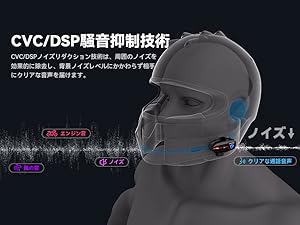
Image: The XGP intercom illustrating its ability to connect to two smartphones simultaneously for navigation, music, and calls.
3. Intercom Pairing (Rider-to-Rider):
The XGP intercom supports 2-person intercom communication up to 1200 meters.
- Ensure both XGP intercom units are powered off.
- On both units, press and hold the Intercom button (often the same as the Power button, refer to specific button layout) for approximately 5-7 seconds until the indicator lights flash red and blue alternately.
- Briefly press the Intercom button on one of the units. The units will search for each other and connect automatically. A voice prompt will confirm successful intercom connection.

Image: Two riders on motorcycles, demonstrating the simple pairing process for the XGP intercom.
4. Müzik Çalma:
- Oynat/Duraklat: Çok işlevli düğmeye bir kez basın.
- Sonraki Parça: Ses açma düğmesine 2 saniye basılı tutun.
- Önceki parça: Sesi Kısma düğmesine 2 saniye boyunca basın.
- Ses Ayarı: Briefly press the Volume Up or Volume Down buttons.
5. Music Sharing:
With two XGP intercoms connected, you can share music. Ensure both units are paired via intercom mode.
- Start music playback on the primary intercom unit (connected to the smartphone).
- On the primary unit, press and hold the Music Sharing button (refer to button layout) for 2 seconds to initiate music sharing.
- The secondary unit will automatically receive and play the shared music.

Image: Two riders enjoying shared music through their XGP intercoms, enhancing the riding experience.
6. Telefon Görüşmeleri:
- Cevap Çağrısı: Çok işlevli düğmeye bir kez basın.
- Çağrı Sonu: Görüşme sırasında Çok Fonksiyonlu düğmeye bir kez basın.
- Çağrıyı Reddet: Çok işlevli düğmeyi 2 saniye basılı tutun.
- Son Numarayı Tekrar Ara: Çok işlevli düğmeye iki kez basın.
7. Voice Commands:
Activate your smartphone's voice assistant (Google Assistant or Apple Siri) directly from the intercom.
- Voice Assistant'ı etkinleştirin: Press the Voice Command button (refer to button layout) once.
- You can then issue commands such as "What's the weather today?", "Start navigation to [destination]", or "Call [contact name]".

Image: A rider using voice commands with the XGP intercom to control navigation, music, and calls.
Bakım
1. Şarj:
Connect the XGP intercom to a 5V/1A (5W) power adapter using the provided USB-C cable. Charging takes approximately 2 hours for a full charge. Using an adapter with higher wattage may damage the battery or shorten its lifespan.

Image: The XGP intercom connected to a USB-C charger, illustrating its 1000mAh battery capacity and charging time.

Image: An illustration showing the XGP intercom being charged via USB-C, with a note on using a 5W adapter.
2. Temizlik:
İnterkom ünitesini yumuşak bir bezle silin.amp cloth. Do not use harsh chemicals or abrasive cleaners. Ensure the USB-C port cover is securely closed to maintain IP67 waterproof rating.
3. Depolama:
Store the intercom in a cool, dry place when not in use. Avoid extreme temperatures and direct sunlight.
Sorun giderme
| Sorun | Olası Neden | Çözüm |
|---|---|---|
| Cihaz açılmıyor. | Pil zayıf. | Cihazı en az 30 dakika şarj edin. |
| Akıllı telefonla eşleştirilemiyor. | Cihaz eşleştirme modunda değil; telefonda Bluetooth kapalı. | Ensure device is in pairing mode (red/blue flashing light). Enable Bluetooth on your phone. |
| Intercom connection unstable or not connecting. | Distance too far; interference; not in intercom pairing mode. | Ensure units are within 1200M range. Re-initiate intercom pairing. Avoid obstacles. |
| Hoparlörlerden ses gelmiyor. | Volume too low; speakers disconnected; incorrect installation. | Increase volume. Check speaker connections. Verify speaker placement. |
| Voice unclear during calls/intercom. | Microphone placement; high ambient noise. | Adjust microphone closer to mouth. Ensure CVC/DSP is active. |
Özellikler
| Özellik | Detay |
|---|---|
| Örnek | XGP |
| Bluetooth Sürümü | 5.2 (Qualcomm Chip) |
| Çalışma Frekansı | 2402 MHz - 2480 MHz |
| Maksimum İnterkom Menzili | 1200 meters (2 riders) |
| Pil Kapasitesi | 1000mAh Lityum Pil |
| Şarj Süresi | Yaklaşık 2 saat |
| Müzik Çalma Süresi | 30 saate kadar |
| Konuşma Zamanı | 35 saate kadar |
| Bekleme Süresi | 360 saate kadar |
| Su Geçirmezlik Derecesi | IP67 |
| Hoparlör Çapı | 40mm |
| Gürültü Önleme | CVC/DSP Technology |
| Ürün Boyutları | 8.3x4.2x1.3 cm |
| Ürün Ağırlığı | 39 g (ana ünite) / 350 g (paket) |
Garanti ve Destek
The XGP Motorcycle Intercom comes with a 2 yıllık garanti from the date of purchase. If you encounter any issues or have questions regarding your product, please contact our customer support. We are committed to providing service until you are satisfied.

Image: A shield icon indicating a 2-year warranty for the XGP product, with text encouraging customers to contact support for any questions.
For support, please refer to the contact information provided with your purchase or visit the official XGP webalan.