
ASD A-SFL-20WH-SC
ASD Security Flood Light Camera Outdoor - Smart Floodlight Camera, Model A-SFL-20WH-SC User Manual
Kurulum, çalıştırma ve bakım için kapsamlı talimatlar.
1. Giriş
Thank you for choosing the ASD Security Flood Light Camera Outdoor. This smart floodlight camera is designed to provide enhanced security and illumination for your outdoor spaces. Featuring a 180° motion sensor, adjustable light heads, and smart app control, it integrates seamlessly with your smart home ecosystem, including Alexa and Google Assistant. This manual provides essential information for safe installation, operation, and maintenance of your device.
2. Önemli Güvenlik Bilgileri
Kurulum ve kullanımdan önce lütfen tüm talimatları dikkatlice okuyun. Bu kılavuzu ileride başvurmak üzere saklayın.
- Elektriksel Güvenlik: Installation must be performed by a qualified electrician or a person with electrical knowledge. Ensure power is turned off at the circuit breaker before installation or servicing.
- Cilttage: This product is designed to operate on 120V circuits.
- Montaj: Mount the fixture securely to a junction box. Ensure the mounting surface can support the weight of the fixture.
- Islak Yerler: This product is Wet Locations rated (IP54), suitable for outdoor use. However, avoid submerging the unit in water.
- Sıcaklık: Do not operate the fixture near flammable materials. Allow the fixture to cool before handling.
- Kamera Lensi: Avoid touching the camera lens directly to prevent smudges or damage.
3. Paket İçeriği
Kuruluma başlamadan önce tüm bileşenlerin mevcut olduğundan emin olun:
- ASD Security Flood Light Camera Outdoor (1 unit)
- Mounting Crossbar
- Montaj Vidaları
- Tel Somunlar
- EVA Pedi
- Kullanım Kılavuzu (bu belge)
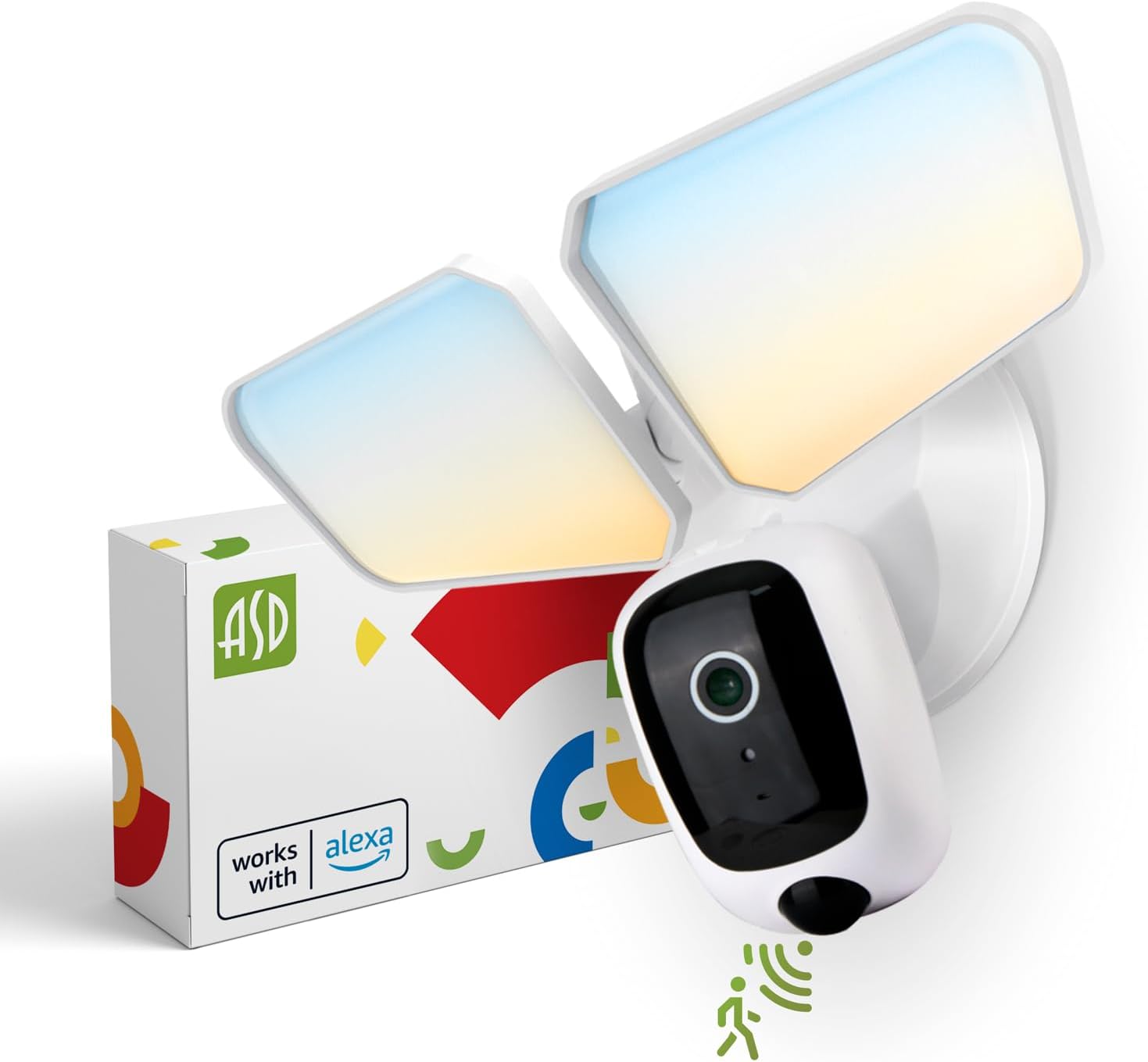
Image 1: ASD Security Flood Light Camera Outdoor and its packaging.
4. Ürün Özellikleri
- Adjustable Light Heads: Side-to-side (150°) and up-and-down (180°) rotatable light heads for directional illumination.
- Integrated Smart Camera: Monitor, record, and engage in two-way audio communication.
- 180° Motion Sensor: Automatically activates light and camera recording upon motion detection.
- Alacakaranlıktan Şafağa Kadar Çalışan Fotosel: Automatically turns the light on at dusk and off at dawn.
- Color Selectable: Choose from 5 color temperatures: 2700K (Soft White), 3000K (Warm White), 3500K (Neutral White), 4000K (Cool White), or 5000K (Daylight).
- Akıllı Ev Entegrasyonu: Sesli kontrol için Amazon Alexa ve Google Assistant ile uyumludur.
- Uygulama Kontrolü: Ayarları yönetin, view live feed, and receive motion-activated push notifications via the dedicated app.
- Depolama Seçenekleri: Records can be stored on a Micro SD card (not included) or in a Cloud service (subscription may be required).
- Dayanıklı Yapı: Made from Aluminum and Polycarbonate.
- Sertifikalar: UL and DLC Premium certified, ensuring quality and safety.

Image 2: Key features of the ASD Security Flood Light Camera.
5. Teknik Özellikler
| Şartname | Detay |
|---|---|
| Model Numarası | A-SFL-20WH-SC |
| Güç Kaynağı | Sabit kablolu |
| Cilttage | 120 Volt |
| Netage | 20 Watt |
| Işık Kaynağı Türü | NEDEN OLMUŞ |
| Renk Sıcaklığı (CCT) | 2700K, 3000K, 3500K, 4000K, 5000K (Seçilebilir) |
| Hareket Sensörü Algılama Açısı | 180° |
| Hareket Sensörü Algılama Mesafesi | 16.4-32.9 fit (5-10 m) |
| Işın Açısı | 100° |
| Malzeme | Alüminyum, Polikarbonat |
| Ürün Boyutları | 10.24"U x 4.45"G x 7.68"Y |
| Ürün Ağırlığı | 1.2 Pound |
| İç/Dış Mekan Kullanımı | Dış mekan |
| Alan Aydınlatma Sınıflandırması | IP54 (Wet Locations Rated) |
| Bağlantı Protokolü | Wifi |
| Denetleyici Türü | Amazon Alexa, Google Asistan, Uygulama |
| Ömür | 145,000 saat |

Resim 3: Ürünün detaylı özellikleri ve boyutları.
6. Kurulum Adımları
Başlamadan önce: Turn off power at the circuit breaker. Ensure you have the necessary tools (screwdriver, wire strippers, etc.).
- Fikstürün Hazırlanması:
Attach the crossbar to the outlet box using two mounting screws. Remove the cover on the top of the camera. Insert a Micro SD card (sold separately) into the slot until it clicks. Place the cover back on. Change the position of the CCT switch on the housing to the desired color temperature (2700K, 3000K, 3500K, 4000K, or 5000K). - Mount and Wire:
Tear off the EVA pad adhesive and stick it on the rear cover (pay attention to the direction of the gap). Thread the fixture wire through the gasket. Connect the wires: Black to Black, White to White, and Green to Green (ground). Secure the connection with wire nuts. - Sabitlemeyi Sabitleyin:
Drive the bracket screw through the center hole of the fixture base to the crossbar and secure it by tightening.

Image 4: Visual guide for the installation process.
7. Kullanım Talimatları
7.1 Hareket Sensörünün Çalışması
The built-in 180° motion sensor detects movement within its range (16.4-32.9 ft or 5-10 m). When motion is detected, the floodlight will illuminate, and the camera will begin recording. You can adjust the sensitivity and duration settings via the ASD SMART app.

Image 5: The built-in motion sensor detects movement.
7.2 Dusk-to-Dawn Photocell
The integrated photocell automatically senses ambient light levels. It will turn the floodlight on when it gets dark and turn it off when daylight returns, ensuring efficient operation without manual intervention.

Image 6: Built-in dusk-to-dawn photocell for automatic operation.
7.3 Color Temperature Selection (CCT)
Before final installation, you can select your preferred color temperature using the switch located on the fixture's housing. Choose from 2700K (Soft White), 3000K (Warm White), 3500K (Neutral White), 4000K (Cool White), or 5000K (Daylight) to match your aesthetic and lighting needs.

Image 7: Selectable color temperature options.
8. App Control and Smart Integration
8.1 ASD SMART App Setup
To unlock the full potential of your floodlight camera, download and set up the ASD SMART app:
- İndir ASD SMART app App Store'dan (iOS) veya Google Play Store'dan (Android).
- Hesabınıza kaydolun veya giriş yapın.
- Select "Add a device" and choose "Camera and lock".
- Follow the on-screen instructions to connect your device to your Wi-Fi network.
- Scan the QR code on your camera when prompted.
For a detailed guide, please refer to the full manual PDF: ASD Security Flood Light Camera Manual PDF
Uygulamayı indirin:
- iOS Uygulama Mağazası: ASD SMART on App Store
- Android Google Play: ASD SMART on Google Play

Image 8: App control interface and smart assistant compatibility.
8.2 Remote Monitoring and Two-Way Audio
Through the ASD SMART app, you can:
- View live video feed from your camera anytime, anywhere.
- Engage in two-way audio communication with visitors or deter intruders.
- Receive instant motion-activated push notifications on your smartphone.
8.3 Recording Storage
Video kayıtları iki şekilde saklanabilir:
- Mikro SD kart: Dahili depolama için, kameradaki belirlenmiş yuvaya bir Micro SD kart (en fazla 128 GB, dahil değildir) takın.
- Bulut hizmeti: Opt for a cloud storage subscription (available through the app) for secure, remote access to your recordings.

Image 9: Remote monitoring and recording storage options.
8.4 Akıllı Asistan Entegrasyonu
Connect your ASD Security Flood Light Camera to Amazon Alexa or Google Assistant for convenient voice control. Follow the instructions within the ASD SMART app to link your accounts and enable features like turning the light on/off or viewKamera görüntüsünü uyumlu akıllı ekranlarda gösterme.
9. Bakım
- Temizlik: Temizlemeden önce elektriğin kapalı olduğundan emin olun. Armatürü yumuşak bir bezle silin.amp bezle silin. Aşındırıcı temizleyiciler veya çözücüler kullanmayın.
- Lens Bakımı: Gently clean the camera lens with a microfiber cloth to maintain clear image quality.
- Düzenli Kontroller: Periodically check for any loose connections or damage to the wiring and housing.
10. Sorun Giderme
| Sorun | Olası Neden | Çözüm |
|---|---|---|
| Işık açılmıyor. | No power, faulty wiring, photocell issue, CCT switch not set. | Check circuit breaker. Verify wiring connections. Ensure photocell is not obstructed. Confirm CCT switch is set. |
| Hareket sensörü algılamıyor. | Incorrect sensitivity settings, obstruction, improper installation height. | Adjust motion sensor sensitivity in the app. Clear any obstructions. Ensure installation height is appropriate (approx. 9.8 ft / 3 m). |
| Kamera Wi-Fi'ye bağlanmıyor. | Yanlış Wi-Fi şifresi, zayıf sinyal, yönlendirici sorunları. | Double-check Wi-Fi password. Move router closer or use a Wi-Fi extender. Restart router. Ensure 2.4GHz Wi-Fi network is used. |
| Kötü video kalitesi. | Dirty lens, poor Wi-Fi signal, low light conditions. | Clean camera lens. Improve Wi-Fi signal strength. Ensure adequate lighting. |
| Çift yönlü ses çalışmıyor. | Microphone/speaker issues, app permissions. | Check app permissions for microphone. Ensure volume is up on your device. |
11. Garanti Bilgileri
ASD sağlar 5 yıllık sınırlı garanti for this Security Flood Light Camera. This warranty covers defects in materials and workmanship under normal use. Please retain your proof of purchase for warranty claims. For full warranty terms and conditions, please refer to the official ASD website veya müşteri desteği ile iletişime geçin.
12. Müşteri Desteği
For additional assistance, technical support, or warranty inquiries, please visit the ASD Lighting Corporation website or refer to the comprehensive manual available online.
- ASD Lighting Corporation Store: Visit ASD Store on Amazon
- Full Product Manual (PDF): PDF indir Manuel
Ask a question about this manual
Ask about setup, troubleshooting, compatibility, parts, safety, or missing instructions. Manuals+ will review the question and use this page’s manual context to help answer it.