
1. Giriş
The FosPower 5-in-1 Bug Zapper is a versatile device designed for both indoor and outdoor use, offering multiple functionalities to enhance your environment. It combines a powerful bug zapper with various lighting options, a power bank, and an SOS signal for emergencies. Its rugged and water-resistant design ensures reliable performance in diverse conditions.
Temel Özellikler:
- Bug Zapper: 3,300V grid with 0.3-inch spaced guards for effective and safe insect elimination.
- El feneri: Integrated side flashlight with multiple brightness settings.
- Okuma lambası: Adjustable top-mounted light for ambient or focused illumination.
- Taşınabilir şarj aleti: High-capacity 29600mWh internal power bank with USB-A output for charging mobile devices.
- SOS Sinyali: Emergency flashing mode for signaling.
- Şarj edilebilir: Supports both USB and solar charging for extended battery life.
- Dayanıklı Tasarım: Rugged build with IPX3 water resistance.

Şekil 1: Üzeriview of the FosPower 5-in-1 Bug Zapper's functionalities.
2. Kurulum
2.1 İlk Şarj
Before first use, fully charge your FosPower 5-in-1 Bug Zapper. The device can be charged via USB-C or its integrated solar panel.
- USB-C Şarjı: Connect the provided USB-C cable to the USB-C input port on the device and to a compatible USB power source (e.g., wall adapter, computer USB port). The power indicator lights will illuminate to show charging progress.
- Güneş Şarjı: Place the device with the solar panel facing direct sunlight. The solar panel is located on the top of the device and can be rotated for optimal sun exposure. The power indicator lights will show charging activity.

Figure 2: Charging ports and solar panel location.
2.2 Pil Göstergesi
The device features LED indicator lights to display the battery level:
- 4 blue lights: Battery level above 75%.
- 3 blue lights: Battery level between 50% and 75%.
- 2 blue lights: Battery level between 25% and 50%.
- 1 blue light: Battery level between 3% and 25%.
- 1 flashing blue light: Battery level below 3%.
3. Operasyon
The FosPower 5-in-1 Bug Zapper features three main control buttons for its various functions.
3.1 Bug Zapper Function
- Locate the button marked with a spider icon.
- Press this button once to activate the bug zapper. The blue UV light grid will illuminate.
- Press the button again to turn off the bug zapper.
Video 1: Demonstrating the bug zapper function and other features of the FosPower 5-in-1 Bug Zapper.
3.2 Flashlight and SOS Signal
- Locate the button marked with a sun icon.
- Press once for low brightness flashlight.
- Press twice for medium brightness flashlight.
- Press three times for high brightness flashlight.
- Press four times to activate the SOS flashing signal.
- Press five times to turn off the flashlight/SOS signal.
3.3 Okuma Işığı
- Locate the button marked with a light bulb icon.
- Press once to activate the reading light at low brightness.
- Press twice for high brightness reading light.
- Press three times to turn off the reading light.
- The reading light panel can be rotated and adjusted to direct illumination as needed.
3.4 Power Bank İşlevselliği
- Connect your mobile device or other electronics to the USB-A output port using a compatible charging cable.
- The internal 29600mWh power bank will begin charging your device.
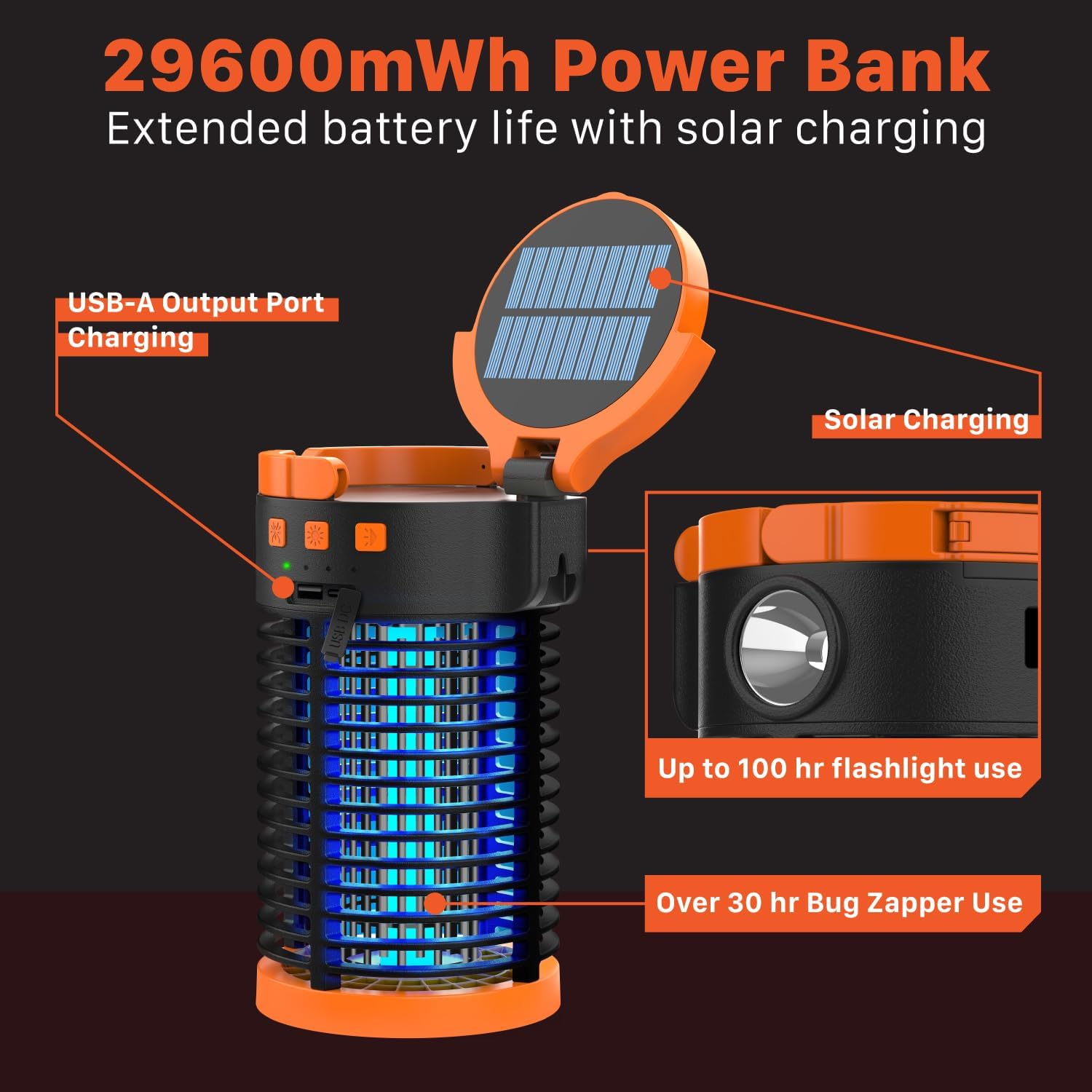
Figure 3: Versatile use of the bug zapper in different environments.
4. Bakım
4.1 Cleaning the Bug Collection Tray
Regular cleaning ensures optimal performance of the bug zapper. Always ensure the device is turned off before cleaning.
- Twist the bottom cover of the device counter-clockwise to unlock and remove the bug collection tray.
- Empty any collected insects from the tray.
- Use the provided cleaning brush to gently remove any debris from the bug zapper grid. Do not use water or liquids directly on the grid.
- Reattach the collection tray by aligning it and twisting clockwise until securely locked.

Figure 4: Safety features and grid spacing of the bug zapper.
5. Sorun Giderme
5.1 Bug Zapper Not Activating or Ineffective
- Pil Seviyesini Kontrol Edin: Ensure the device is sufficiently charged. Refer to section 2.2 for battery indicator details.
- Temiz Izgara: A dirty bug zapper grid can reduce effectiveness. Follow the cleaning instructions in section 4.1.
- Doğru Yerleştirme: For outdoor use, place the zapper away from competing light sources and in areas with high insect activity.
5.2 Işıklar Çalışmıyor
- Pil Seviyesini Kontrol Edin: Ensure the device has enough charge.
- Çevrim Gücü: Turn the device off and on again, and cycle through the light modes to ensure proper function.
5.3 Cihaz Şarj Olmuyor
- USB-C Şarjı: Verify the USB-C cable is securely connected to both the device and the power source. Try a different cable or power adapter.
- Güneş Şarjı: Ensure the solar panel is clean and exposed to direct sunlight. Cloudy conditions or indirect light will significantly reduce charging efficiency.
6. Özellikler
| Özellik | Detay |
|---|---|
| Marka | FosGüç |
| Model Numarası | FOSPWB-2444PX |
| Ürün Ağırlığı | 902 Gram |
| Güç Kaynağı | Battery (Rechargeable USB/Solar) |
| Dahili Batarya Kapasitesi | 29600mWh |
| Bug Zapper Voltage | 3,300V |
| Bug Zapper Coverage Area | 1,200 ft kare |
| Su geçirmezlik seviyesi | IPX3 |
| Önerilen Kullanım | İç/Dış Mekan |
| Hedef Türler | Sivrisinek |
7. Garanti ve Destek
FosPower offers a Sınırlı Ömür Boyu Garanti on this product. For warranty claims, technical support, or any inquiries, please contact FosPower customer service.
You can register your product and find more information about the warranty at: fospower.com/warranty
Join millions of satisfied customers with our limited lifetime warranty, backed by our experienced and dedicated USA based customer service.