
1. Giriş
Satın aldığınız için teşekkür ederizasing the Soundmaster MCD5600 Stereo System. This versatile audio system combines classic and modern audio technologies, including a record player, DAB+ and FM radio, double cassette deck, CD player, USB playback, and Bluetooth connectivity. It also features a digitization function to convert your analog media to MP3 files on a USB drive. This manual provides essential information for safe operation, setup, and maintenance of your device. Please read it thoroughly before use and retain it for future reference.
2. Güvenlik Talimatları
- Güç Kaynağı: Güç kaynağının ses seviyesiyle eşleştiğinden emin oluntage specified on the unit. Disconnect from the power outlet during lightning storms or when unused for long periods.
- Havalandırma: Havalandırma açıklıklarını hiçbir şekilde kapatmayın. Aşırı ısınmayı önlemek için ünitenin etrafında yeterli hava akışı sağlayacak boşluk bırakın.
- Su ve Nem: Cihazı yağmur, nem, damlama veya sıçramaya maruz bırakmayın. Üzerine vazo gibi sıvı dolu nesneler koymayın.
- Sıcaklık: Üniteyi radyatörler, kalorifer ızgaraları, sobalar veya diğer cihazlar (dahil) gibi ısı kaynaklarından uzak tutun. amp(ısı üreten)
- Temizlik: Sadece kuru bir bezle temizleyin. Sıvı ve sprey temizleyici kullanmayın.
- Servis: Bu ürüne kendiniz servis vermeye çalışmayın. Tüm servis işlemleri için kalifiye servis personeline başvurun.
- Atama: Cihazın düşmesini önlemek için onu sağlam, düz bir yüzeye yerleştirin.
3. Paket İçeriği
Lütfen ambalajı açarken tüm ürünlerin eksiksiz olduğundan emin olun:
- Soundmaster MCD5600 Main Unit
- 2 x External Speakers
- Uzaktan kumanda
- Kullanım Kılavuzu (bu belge)
- FM/DAB+ Anteni
- Güç kablosu
4. Ürün Bittiview
Familiarize yourself with the main components and controls of your stereo system.
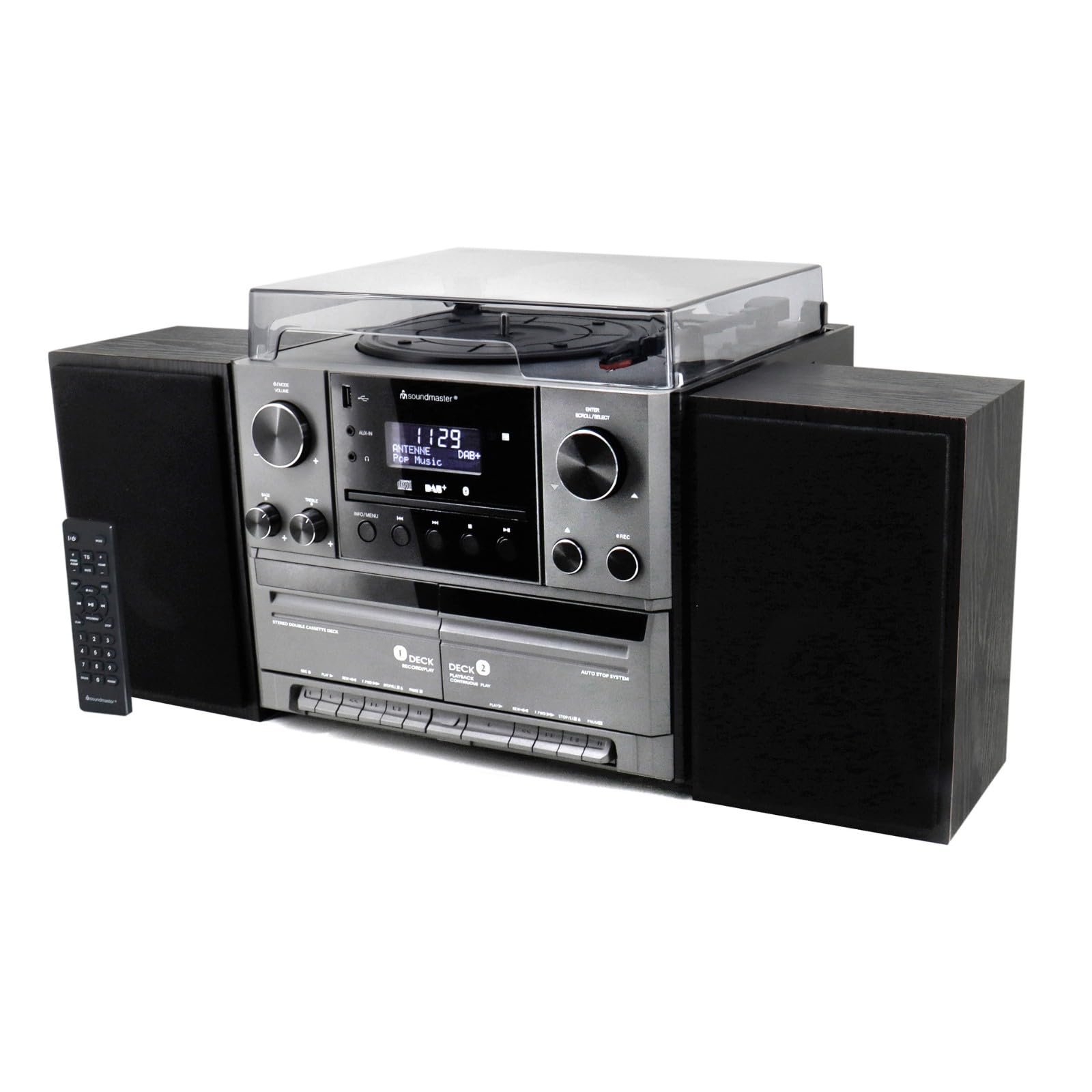
Şekil 4.1: Ön view of the Soundmaster MCD5600 stereo system, showing the main unit flanked by two speakers, with the remote control positioned to the left. The display, control knobs, and various media inputs are visible.

Şekil 4.2: Ön view of the Soundmaster MCD5600 stereo system with the CD tray open and a cassette tape inserted into one of the two cassette decks. This image highlights the multi-media capabilities of the unit.
5. Kurulum
5.1 Hoparlörleri Bağlama
Connect the included speakers to the speaker terminals on the rear of the main unit. Ensure correct polarity (red to red, black to black) for optimal sound quality. Place speakers equidistant from the listening position for the best stereo effect.
5.2 Anten Bağlantısı
Connect the supplied 75 Ohm antenna to the FM/DAB+ antenna input on the rear panel. Extend the antenna fully and position it for the best possible radio reception.
5.3 Güç Bağlantısı
Plug the power cable into the AC inlet on the rear of the unit, then connect the other end to a standard wall outlet.
6. Kullanım Talimatları
6.1 Genel Kontroller
- Güç Düğmesi: Üniteyi AÇMAK veya KAPATMAK için basın.
- Ses Düğmesi: Rotate to adjust the overall sound volume.
- Kaynak/Fonksiyon Düğmesi: Press repeatedly to cycle through available audio sources (CD, Phono, Tape, FM, DAB+, Bluetooth, USB).
- Görüntülemek: Shows current mode, track information, radio frequency, and time.
6.2 CD Çaların Çalışması
- Basın CD source button.
- Basın AÇIK/KAPALI CD tepsisini açmak için düğmesine basın.
- Place a CD (CD/CD-MP3/CD-R/CD-RW/WMA compatible) with the label side up into the tray.
- Basmak AÇIK/KAPALI Tepsiyi tekrar kapatın. Cihaz diski okuyacaktır.
- Basmak OYNAT/DURDUR oynatmayı başlatmak veya duraklatmak için.
- Kullanmak İLERİ/GERİ ATLA Parçalar arasında gezinmek için düğmeler.
- The PROGRAM Ve TEKRARLAMAK functions allow for customized playback sequences and continuous repetition.
6.3 Record Player Operation
- Basın KULAKLIK source button.
- Select the appropriate speed (33, 45, or 78 RPM) using the speed selector switch based on your record type.
- Place a record on the turntable platter. For 45 RPM singles, use the included adapter.
- Carefully lift the tonearm using the cueing lever and position it over the desired track on the record.
- Lower the tonearm gently onto the record. Playback will begin automatically.
- At the end of the record, lift the tonearm and return it to its rest.
6.4 Kaset Çalar Kullanımı
The unit features two cassette decks: Deck 1 (Record/Play) and Deck 2 (Continuous Play).
- Basın BANT source button.
- Basın DUR/ÇIKAR button on the desired deck to open the cassette door.
- Insert a cassette tape with the open edge facing upwards. Close the door.
- Basmak OYNAMAK oynatmayı başlatmak için.
- Kullanmak HIZLI İLERLEME Ve GERİ SARMA Bant üzerinde gezinmek için düğmeler.
- To record, ensure Deck 1 is selected, insert a blank tape, select your desired input source (e.g., Phono, CD, Radio), and press the KAYIT düğme.
6.5 Radio (FM/DAB+) Operation
- Basın FM or DAB+ source button.
- For FM radio, use the AYARLAMA knob or buttons to manually tune or auto-scan for stations.
- For DAB+ radio, the unit will automatically scan for available digital stations. Use the KAYDIR/SEÇ knob to browse and select stations.
- To save a station as a preset, refer to the specific instructions in the full manual for your model.
6.6 Bluetooth Çalışması
- Basın Bluetooth source button. The display will show "PAIRING" or similar.
- Harici cihazınızda (akıllı telefon, tablet vb.) Bluetooth'u etkinleştirin.
- Arama "MCD5600" (or similar device name) in your device's Bluetooth settings and select it to pair.
- Once paired, you can play audio from your device through the stereo system.
6.7 USB Oynatma
- Ön paneldeki USB bağlantı noktasına bir USB flash sürücü takın.
- Basın USB source button.
- The unit will read the contents of the USB drive. Use the navigation buttons to browse folders and select MP3 files oynatma için.
6.8 Digitization (Encoding)
The MCD5600 allows you to convert audio from vinyl records, cassette tapes, or radio broadcasts directly to MP3 filebağlı bir USB sürücüsündedir.
- USB flash sürücüyü USB bağlantı noktasına takın.
- Select the desired audio source (Phono, Tape, FM, DAB+).
- Start playback of your chosen source (e.g., start a record, play a cassette, tune to a radio station).
- Basın KAYIT button on the main unit. The display will indicate recording is in progress.
- Basmak DURMAK when you wish to end the recording. The audio will be saved as an MP3 file USB belleğinizde.
7. Bakım
- Ünite Temizliği: Dış yüzeyleri yumuşak, kuru ve tüy bırakmayan bir bezle silin. Aşındırıcı temizleyiciler veya çözücüler kullanmayın.
- Record Player Stylus: Periodically check the stylus for dust and debris. Clean gently with a soft brush designed for styli, brushing from back to front. Replace the stylus if sound quality deteriorates significantly.
- Cassette Heads: After extended use, clean the cassette heads, pinch rollers, and capstans with a cotton swab lightly dampİzopropil alkol ile yıkandı.
- CD Lens: Avoid touching the CD lens. If cleaning is necessary, use a specialized CD lens cleaner disc.
8. Sorun Giderme
| Sorun | Olası Neden | Çözüm |
|---|---|---|
| Güç yok | Güç kablosu bağlı değil; Elektrik prizi arızalı. | Güç kablosu bağlantısını kontrol edin; farklı bir priz deneyin. |
| Ses yok | Ses seviyesi çok düşük; Yanlış kaynak seçildi; Hoparlörler bağlı değil. | Increase volume; Select correct source; Check speaker connections |
| CD skips or doesn't play | CD dirty or scratched; CD inserted incorrectly | Clean CD; Insert CD label-side up |
| Zayıf radyo alımı | Anten doğru şekilde uzatılmamış veya konumlandırılmamış. | Extend and reposition antenna; Try auto-scan for DAB+ |
| Bluetooth eşleştirme başarısız oldu | Device too far; Bluetooth not enabled on external device | Move device closer; Ensure Bluetooth is enabled and in pairing mode |
9. Özellikler
- Model Numarası: MCD5600SW
- Marka: Ses ustası
- Renk: Siyah
- CD Çalar: CD, CD-MP3, CD-R, CD-RW, WMA compatible; Program/Repeat functions
- Plak Çalar: 33/45/78 RPM speeds
- Kaset Destesi: Double cassette (Deck 1: Record/Play, Deck 2: Continuous Play)
- Radyo: FM-PLL with preset stations, DAB+ Digital Radio (75 Ohm antenna connection)
- Bağlantı: USB portu, Bluetooth
- Özel Özellikler: Digitization (CD, cassette, radio to USB-MP3 encoding)
10. Garanti Bilgileri
This Soundmaster MCD5600 Stereo System comes with a manufacturer's warranty. Spare parts availability is guaranteed for 1 year from the date of purchase. For detailed warranty terms and conditions, please refer to the warranty card included with your product or contact your retailer. Keep your proof of purchase for any warranty claims.
11. Destek
If you encounter any issues not covered in the troubleshooting section or require further assistance, please contact your retailer or the Soundmaster customer support. Contact details can typically be found on the manufacturer's websitenizde veya ürün ambalajınızda.