
giriiş
This manual provides detailed instructions for the GAMFAMI TERIOS Wireless Controller. Please read this manual carefully before using the product to ensure proper operation and to maximize your gaming experience. This controller is designed for use with PlayStation 4, PS4 Pro, and PS4 Slim consoles.
Ürün Özellikleri
- Hall Etkili Joystickler: Equipped with Hall joysticks to prevent drift and ensure a longer lifespan with smooth, precise control.
- Makro Programlama: Two programmable back buttons (M1, M2) allow mapping of various inputs (X, O, Triangle, Square, Up, Down, Left, Right, L3, R3, L1, R1, L2, R2) for enhanced gameplay.
- Kablosuz bağlantı: Enjoy a seamless wireless gaming experience with Bluetooth technology.
- Çift Amortisörlü Titreşim: Enhanced dual shock motors provide immersive haptic feedback for a realistic gaming experience.
- Turbo Fonksiyonu: Activate the Turbo feature for rapid, repeated button presses, offering a competitive advantage.
- Uzun Ömürlü Pil: Features a 1000mAh rechargeable battery for extended play sessions.
- Ergonomik Tasarım: Lightweight and durable ABS construction with textured grips for comfortable handling.
- Built-in Speaker & 3.5mm Audio Jack: Provides high-quality audio directly from the controller and supports headset connection.
Paket İçeriği
Lütfen kutuyu açtığınızda paket içeriğini kontrol edin:
- GAMFAMI TERIOS Wireless Controller
- USB Şarj Kablosu
- Kullanım Kılavuzu
Kontrolör Düzeni
Familiarize yourself with the buttons and features of your GAMFAMI TERIOS Wireless Controller.
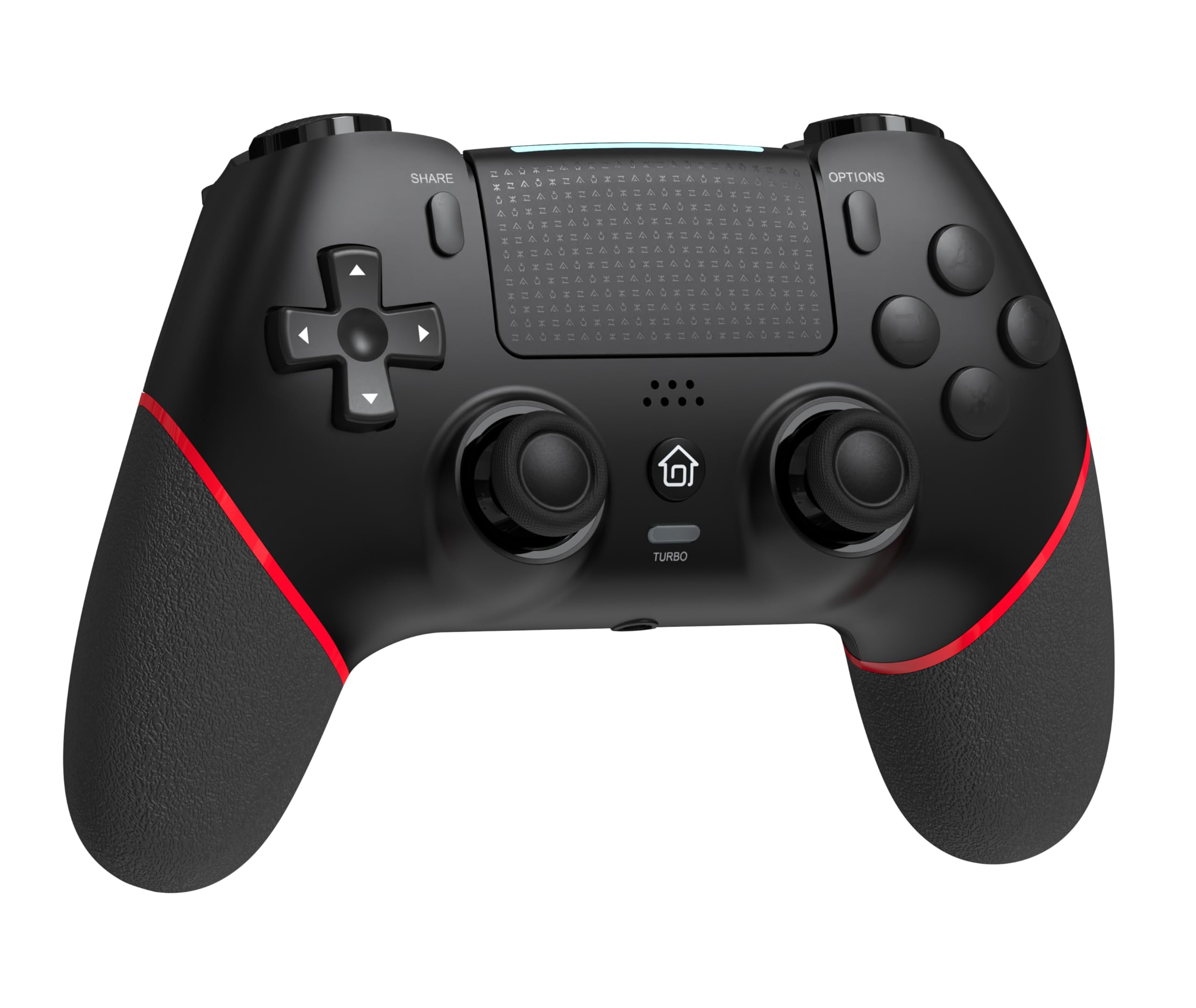
Ön view of the GAMFAMI TERIOS Wireless Controller, showing the joysticks, D-pad, action buttons, Share, Options, Home, and Turbo buttons, and the touchpad.
- Yön Tuş Takımı (D-Pad): Yönlü giriş için.
- Eylem Düğmeleri (Üçgen, Daire, Çarpı, Kare): Standard PlayStation action buttons.
- Sol/Sağ Analog Çubuklar: For precise movement and camera control. Features Hall Effect technology.
- PAYLAŞ düğmesi: Oyun içi içerikleri paylaşmak için.
- SEÇENEKLER düğmesi: For in-game menus and options.
- PS Düğmesi (Ana Ekran Düğmesi): To access the PS4 system menu.
- L1/R1 Düğmeleri: Omuz düğmeleri.
- L2/R2 Tetikleyicileri: Analog tetikleyiciler.
- Dokunmatik yüzey: Multi-touch input area.
- M1/M2 Düğmeleri: Programlanabilir geri düğmeleri.
- TURBO Düğmesi: Activates/deactivates turbo function.
- 3.5 mm Kulaklık Girişi: Uyumlu bir kulaklığı bağlamak için.
- USB-C Bağlantı Noktası: Şarj ve kablolu bağlantı için.

Geri view of the controller, highlighting the M1 and M2 programmable buttons and product information.
Kurulum ve Bağlantı
Pairing with PS4/PS4 Pro/PS4 Slim
- PS4 konsolunuzun açık olduğundan emin olun.
- Connect the controller to your PS4 console using the included USB charging cable.
- Press the PS button on the controller. The light bar will flash, indicating it is pairing.
- Once the light bar turns solid, the controller is successfully paired and ready for use.
- You can now disconnect the USB cable for wireless play.
Reconnecting to PS4
After initial pairing, simply press the PS button on the controller to reconnect wirelessly to your PS4 console.
Kullanım Talimatları
Turbo İşlevini Kullanma
- Basılı tutun TURBO düğme.
- Tutarken TURBO, press the action button (e.g., Cross, Circle, Square, Triangle, L1, R1, L2, R2) you wish to apply the turbo function to.
- Release both buttons. The selected action button will now rapidly repeat its input when held down.
- To disable turbo for a specific button, repeat the process: hold TURBO and press the turbo-enabled action button.
- To disable turbo for all buttons, press and hold the TURBO 5 saniye boyunca düğmeye basın.
Macro Programming (M1/M2 Buttons)
The M1 and M2 buttons on the back of the controller can be programmed to replicate other button inputs.
- Basılı tutun PAYLAŞMAK düğme ve M1 or M2 button simultaneously for 3 seconds until the light bar flashes rapidly. This indicates macro programming mode.
- Press the button(s) you wish to map to M1 or M2 (e.g., X, O, Triangle, Square, Up, Down, Left, Right, L3, R3, L1, R1, L2, R2). You can map a single button or a sequence of buttons.
- Basın M1 or M2 button again to save the macro. The light bar will stop flashing rapidly and return to its normal state.
- To clear a macro, repeat step 1, then press the M1 or M2 button twice without pressing any other buttons.

Illustration of the advanced buttons and their programming capabilities.
Şarj ve Pil Yönetimi
The controller is equipped with a 1000mAh rechargeable battery.
Kontrol Ünitesini Şarj Etme
- Connect the included USB charging cable to the USB-C port on the controller.
- Connect the other end of the cable to a USB port on your PS4 console (when powered on or in rest mode) or a compatible USB wall adapter (5V/1A recommended).
- The light bar on the controller will slowly pulse orange while charging.
- Once fully charged, the light bar will turn off.
Pil Seviyesi Göstergesi
The controller's light bar will indicate battery status. A low battery will cause the light bar to flash red. It is recommended to charge the controller when this occurs.
Bakım
- Temizlik: Kumanda ünitesini temizlemek için yumuşak, kuru bir bez kullanın. Sert kimyasallar veya aşındırıcı malzemeler kullanmayın.
- Depolamak: Kontrol cihazını serin, kuru ve doğrudan güneş ışığından ve aşırı sıcaklıklardan uzak bir yerde saklayın.
- Damlalardan Kaçının: Kumanda cihazını düşmelere ve darbelere karşı koruyun; bu tür önlemler iç bileşenlere zarar verebilir.
Sorun giderme
| Sorun | Çözüm |
|---|---|
| Kontrol cihazı bağlanmıyor/eşleşmiyor. |
|
| Controller experiences input lag or disconnection. |
|
| Joysticks exhibit drift. |

Illustration of Hall Effect joystick technology, designed to prevent drift. |
| Kumanda şarj olmuyor. |
|
Özellikler
| Model Adı | TERIOLAR |
| Marka | GAMFAMI |
| Uyumlu Cihazlar | PS4, PS4 Pro, PS4 Slim |
| Denetleyici Türü | Oyun kumandası |
| Bağlantı Teknolojisi | Bluetooth (Kablosuz) |
| Güç Kaynağı | Pil ile çalışır |
| Pil Kapasitesi | 1000mAh |
| Ürün Ağırlığı | 0.37 Kilogram |
| Renk | Siyah Kırmızı |
Garanti ve Destek
For warranty information and technical support, please refer to the documentation included with your purchase or visit the official GAMFAMI website. Herhangi bir garanti talebi için satın alma belgeniz olarak satın alma makbuzunuzu saklayın.
For further assistance, please contact GAMFAMI customer service through their official channels.