
Ürün Bittiview
The CREWORKS 180 PPD Commercial Dehumidifier is designed for effective humidity control in large spaces, ranging from 600 to 1600 square feet. This unit features a robust design with upgraded components for efficient moisture removal and durability. Key features include automatic defrost, a user-friendly control panel, and portability for flexible placement.

Resim: Ön view of the CREWORKS 180 PPD Commercial Dehumidifier, highlighting its compact and robust design.
- Effective Dehumidification: Capable of removing up to 180 PPD (Pints Per Day) at saturation, suitable for areas up to 1600 sq. ft.
- Otomatik Defrost: Prevents frost buildup on coils, ensuring continuous operation and efficiency.
- Dayanıklı Yapı: Features upgraded copper coils for enhanced heat dissipation and longevity.
- Kullanıcı Dostu Kontroller: An intuitive display panel allows for easy adjustment of humidity levels and timer settings.
- Taşınabilir Tasarım: Equipped with large rear wheels and a convenient handle for easy movement.
Kurulum Talimatları
Follow these steps to properly set up your CREWORKS 180 PPD Commercial Dehumidifier.
1. Paketin Açılması ve Yerleştirilmesi
- Nem alma cihazını ambalajından dikkatlice çıkarın. Nakliye sırasında oluşabilecek herhangi bir hasar olup olmadığını kontrol edin.
- Place the unit on a level, stable surface in the desired location. Ensure there is at least 12 inches (30 cm) of clear space around all sides for proper airflow.
- Consider the dimensions of the unit for optimal placement.

Image: Diagram showing the dimensions of the dehumidifier (23.11"D x 17.32"W x 34.13"H).

Resim: Eskiamples of suitable environments for the dehumidifier, including warehouses, garages, basements, and fitness centers.
2. Drenaj Bağlantısı
The unit includes a drain hose for continuous drainage. This eliminates the need for manual emptying of a water tank.
- Ünite üzerindeki tahliye çıkışını bulun.
- Connect the provided drain hose securely to the drain outlet.
- Route the other end of the hose to a suitable drain point, such as a floor drain, sink, or large container. Ensure the hose is sloped downwards to allow for gravity drainage and is free from kinks or obstructions.

Image: Illustration of the drain hose connection and the overflow alarm feature, which notifies users if drainage is improper.
3. Güç Bağlantısı
Güç kablosunu topraklı bir elektrik prizine takın. Ses seviyesinin düşük olduğundan emin olun.tage ünitenin gereksinimlerine uygundur.
Kullanım Talimatları
This section details how to operate your dehumidifier using the control panel.
Kontrol Paneli Bittiview
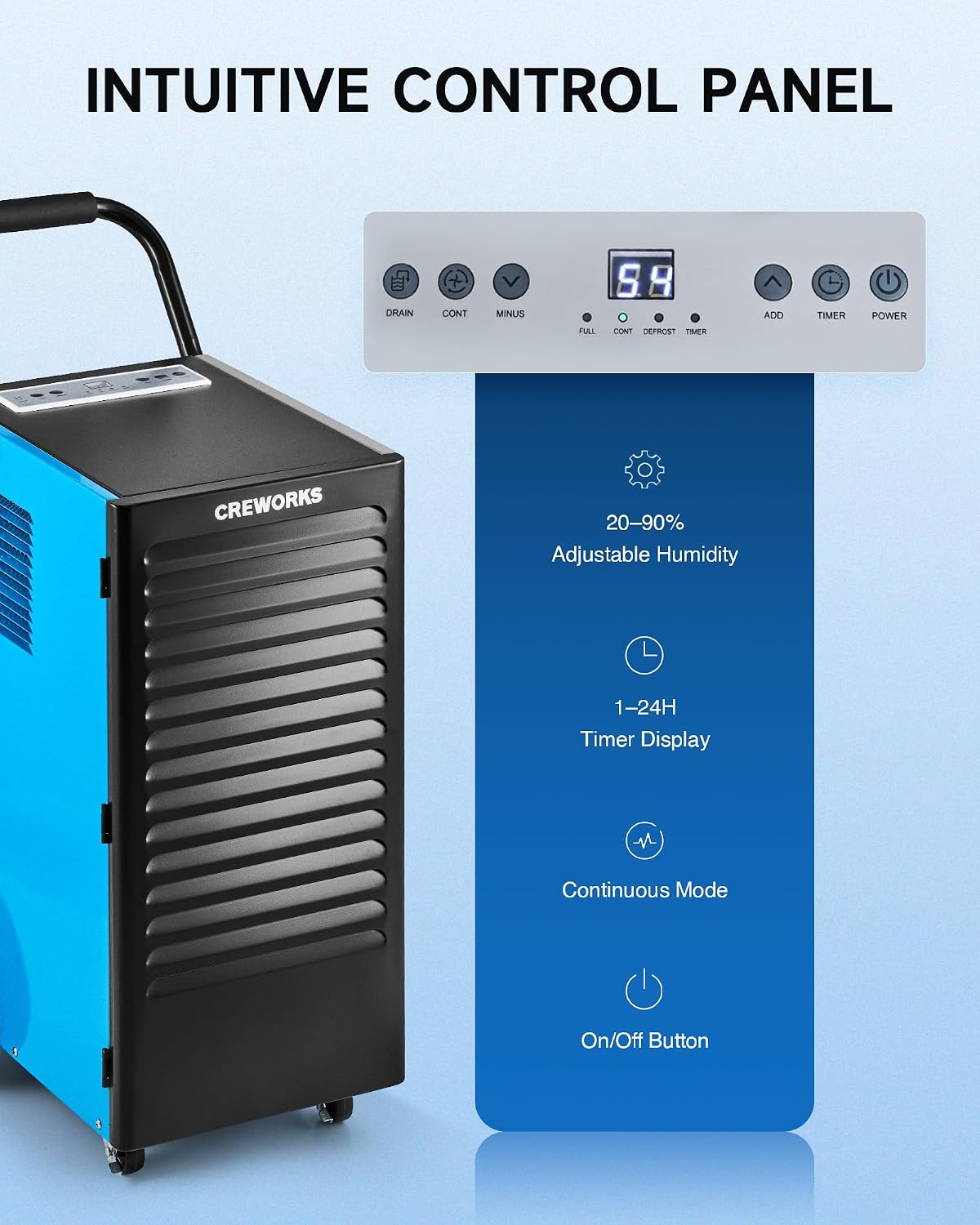
Resim: Yakın çekim view of the dehumidifier's intuitive control panel with various buttons and a digital display.
Kontrol panelinde dijital bir ekran ve nem alma cihazının fonksiyonlarını yönetmek için çeşitli düğmeler bulunur:
- Güç Düğmesi: Üniteyi AÇIK veya KAPALI konuma getirir.
- ADD / MINUS Buttons: Adjusts the desired humidity level (20-90%) or timer setting (1-24 hours).
- Zamanlayıcı Düğmesi: Çalışma zamanlayıcısını ayarlar.
- CONT (Continuous) Button: Activates or deactivates continuous dehumidification mode.
- Tahliye Düğmesi: Activates or deactivates the drain pump (if applicable to the model).
- Ekran Göstergeleri: Shows current humidity, timer, and status indicators for FULL, CONT, DEFROST, and TIMER.
Temel İşlemler
- Güç Açık: Basın GÜÇ Nem alma cihazını açmak için düğmeye basın. Ekran, odanın mevcut nem seviyesini gösterecektir.
- İstenilen Nem Seviyesini Ayarlayın: Kullanın EKLEMEK or EKSİ buttons to set your desired humidity level between 20% and 90% Relative Humidity (RH). The unit will operate until the set humidity is reached, then cycle on and off to maintain it.
- Sürekli Mod: Basın DEVAMI button for continuous operation, where the unit will run constantly regardless of the humidity level. This is useful for very damp conditions or for faster drying.
- Zamanlayıcı Fonksiyonu: Basın ZAMANLAYICI button to set an auto-on or auto-off time (1-24 hours).
Video: Demonstration of setting the desired humidity level and activating continuous mode on the dehumidifier's control panel.
Otomatik Buz Çözme
The dehumidifier is equipped with an automatic defrost function. If frost builds up on the evaporator coils, the compressor will temporarily shut off, and the fan will continue to run to melt the frost. The DEFROST indicator light will illuminate during this cycle. Once defrosted, the unit will resume normal dehumidification.

Image: Illustration showing the automatic defrost function, where the dehumidifier temporarily halts the compressor to prevent frosting.
Bakım
Düzenli bakım, nem alma cihazınızın optimum performansını sağlar ve kullanım ömrünü uzatır.
1. Hava Filtresinin Temizlenmesi
The dehumidifier is equipped with a washable air filter. A dirty filter can reduce efficiency and airflow.
- Nem alma cihazınızı kapatın ve fişini prizden çekin.
- Locate and remove the air filter from the unit. Refer to the product diagram for filter location.
- Filtreyi ılık sabunlu suyla yıkayın. İyice durulayın ve tekrar takmadan önce tamamen kurumasını bekleyin. Bulaşık makinesi veya sert kimyasallar kullanmayın.
- Kuru filtreyi tekrar üniteye takın.
Tavsiye: Clean the air filter every 2-4 weeks, or more frequently depending on usage and air quality.

Image: Illustration showing the removable and reusable air filter for easy cleaning.
2. Dış Cephenin Temizlenmesi
Ünitenin dışını yumuşak bir bezle silin.amp bezle silin. Aşındırıcı temizleyiciler veya çözücüler kullanmayın.
3. Depolama
If storing the unit for an extended period, ensure it is clean and dry. Coil the power cord and store the unit in a cool, dry place.
Sorun giderme kılavuzu
Sık karşılaşılan sorunlar ve çözümleri için bu kılavuza bakın.
| Sorun | Olası Neden | Çözüm |
|---|---|---|
| Nem alma cihazı çalışmıyor. | No power, power cord loose, unit not plugged in. | Ensure the unit is properly plugged into a working outlet. Check circuit breaker. |
| Cihaz çalışıyor ancak su toplamıyor. | Humidity setting too high, room temperature too low, air filter clogged, unit in defrost mode. | Lower the desired humidity setting. Ensure room temperature is above 41°F (5°C). Clean the air filter. Wait for defrost cycle to complete. |
| Unit is freezing up (frost on coils). | Low room temperature, refrigerant issue. | The unit has an automatic defrost function. If freezing persists, ensure room temperature is within operating range. If problem continues, contact support. |
| Su sızdırıyor. | Drain hose not connected properly, drain hose kinked or blocked, unit not level. | Check drain hose connection and ensure it is secure. Clear any kinks or blockages in the hose. Ensure the unit is on a level surface. |
| Birim gürültülü. | Gevşek parçalar, ünitenin düz durmaması, fanın tıkanması. | Ensure the unit is on a stable, level surface. Check for any loose components. Inspect fan for obstructions. |
Ürün Özellikleri
Detailed technical specifications for the CREWORKS 180 PPD Commercial Dehumidifier.
| Özellik | Detay |
|---|---|
| Marka | CREWORKS |
| Model Adı | 180PPD |
| Nem Alma Kapasitesi (Doygunluk) | Günde 180 Pint |
| Nem Alma Kapasitesi (AHAM) | Günde 85 Pint |
| Önerilen Kapsama Alanı | 600 - 1600 Metrekare |
| Ürün Boyutları (D x G x Y) | 23.11" x 17.32" x 34.13" |
| Hava Akış Kapasitesi | Dakikada 350 Santimetre Küp |
| Çalışma Modu | Sürekli |
| Özel Özellikler | Automatic Defrost, Portable, Timer, Wheels, Drain Hose, Display Panel |
| Malzeme | Metal |
| Soğutucu | R32 (Low-Impact) |
Garanti ve Destek
Garanti Bilgileri
CREWORKS products typically come with a manufacturer's warranty. Specific warranty terms, including duration and coverage, may vary. Please refer to the warranty card included with your product or contact CREWORKS customer service for detailed information. Keep your purchase receipt as proof of purchase for warranty claims.
Not: Some customer reviews indicate a potential for issues after approximately one year of use. Regular maintenance and proper operation as outlined in this manual can help ensure product longevity.
Müşteri Desteği
For technical assistance, troubleshooting beyond this guide, or warranty inquiries, please contact CREWORKS customer support. Contact information can typically be found on the manufacturer's official webSitede veya ürün ambalajında.
When contacting support, please have your product model number (180PPD) and purchase date available.