
Ürün Bittiview
The MONODEAL MD08 Air Conduction Headphones are designed for comfort and clear communication, featuring an open-ear design, Bluetooth 5.1 connectivity, and a noise-canceling microphone with a mute function. These headphones transmit sound through air conduction, providing an alternative to traditional in-ear or bone conduction devices, aiming to reduce pressure and discomfort during extended use.

Image: MONODEAL MD08 Air Conduction Headphones, showcasing the open-ear design and boom microphone.
Kutuda Neler Var?
- Air Conduction Headphones (1 unit)
- USB-C Şarj Kablosu (1 adet)
- Kullanım Kılavuzu (1 adet)
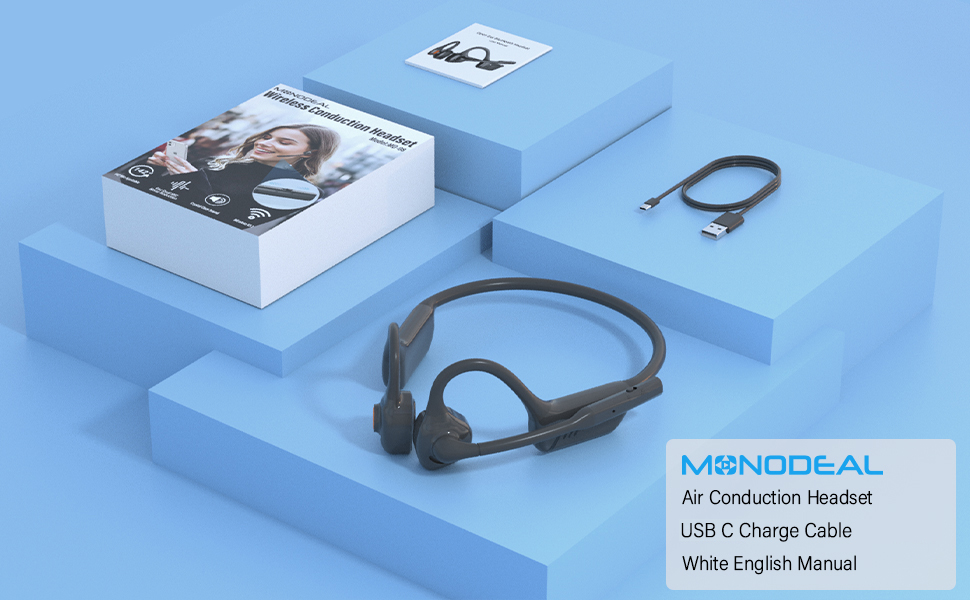
Image: The MONODEAL MD08 headphones, USB-C charging cable, and user manual laid out, representing the package contents.
Kurmak
1. Kulaklıkları Şarj Etme
Before initial use, fully charge the headphones. Connect the provided USB-C charging cable to the charging port on the headphones and plug the other end into a compatible USB power source. A full charge typically takes approximately 2 hours.

Image: Diagram illustrating the charging process and battery life indicators: 8 hours usage, 36 hours standby, 2 hours charging time.
2. Bluetooth Eşleştirme
To connect your MONODEAL MD08 headphones to a device:
- Kulaklıkların kapalı olduğundan emin olun.
- Press and hold the multi-function button until the indicator light flashes red and blue, indicating pairing mode.
- Cihazınızda (akıllı telefon, tablet, bilgisayar) Bluetooth'u etkinleştirin ve kullanılabilir cihazları arayın.
- Select "MD08" from the list of found devices to connect. A voice prompt will confirm successful pairing.
3. Multi-Point Connection (Connecting to Two Devices Simultaneously)
The MD08 headphones support connecting to two Bluetooth devices at the same time. This allows you to seamlessly switch between audio sources, for example, listening to music on your tablet and answering calls on your phone.
- Adım 1: Pair the headphones with the first device (e.g., your phone) as described in the Bluetooth Pairing section.
- Adım 2: Once connected to the first device, turn off Bluetooth on the first device. This will put the headphones back into pairing mode.
- Adım 3: Pair the headphones with the second device (e.g., your tablet).
- Adım 4: Turn Bluetooth back on for the first device. The headphones should automatically reconnect to both devices.
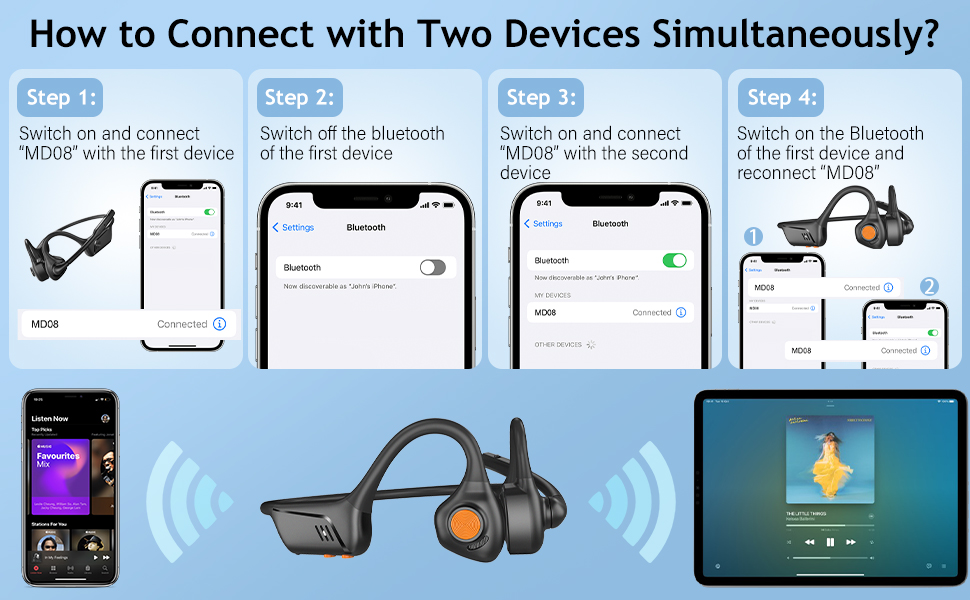
Image: Visual guide demonstrating the four steps to connect the MD08 headphones to two devices simultaneously, showing a phone and a tablet.
Kullanım Talimatları
1. Kulaklık Takmak
Position the headphones with the speakers resting gently in front of your ears, allowing the sound to be transmitted through air conduction. The flexible band should rest comfortably around the back of your head. The open-ear design ensures you remain aware of your surroundings.

Image: A man wearing the MD08 headphones, illustrating the open-ear design and comfortable fit, emphasizing its lightweight nature (40g) and stable design.
2. Temel Kontroller
The headphones feature a multi-functional button and volume controls for easy operation:
- Güç Açma/Kapatma: Çok fonksiyonlu düğmeye basılı tutun.
- Oynat/Duraklat: Çok fonksiyonlu düğmeye bir kez basın.
- Çağrıyı Cevapla/Sonlandır: Gelen bir arama sırasında veya aktif bir arama esnasında çok fonksiyonlu düğmeye bir kez basın.
- Çağrıyı Reddet: Gelen arama sırasında çok fonksiyonlu tuşa basılı tutun.
- Sesi Aç/Kapat: Ses seviyesi için özel olarak ayrılmış düğmeleri kullanın.
- Sonraki Parça: Çok fonksiyonlu düğmeye iki kez basın.
- Önceki parça: Çok fonksiyonlu düğmeye üç kez basın.
- Sesli Asistanı (Siri/Google Asistan) Etkinleştirin: Çok işlevli düğmeyi 2 saniye basılı tutun.

Image: A user demonstrating the controls of the MD08 headphones, with icons indicating functions like Play/Pause, Skip Track, Control Calls, Volume+/-, and Voice Assistant.
3. Mikrofon Sessize Alma Fonksiyonu
The MD08 headphones feature a dedicated mute button on the microphone boom. During a call, you can easily touch this button to mute or unmute your microphone, providing privacy when needed.

Image: A woman using the MD08 headphones, highlighting the microphone mute function and environmental noise reduction technology, showing 96% noise filtered during calls.
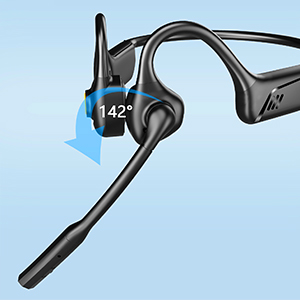
Image: Close-up of the MD08 microphone, showing its 142-degree rotation capability for optimal positioning.
Bakım
- Temizlik: Kulaklıkları temizlemek için yumuşak, kuru bir bez kullanın. Sert kimyasallar veya aşındırıcı malzemeler kullanmaktan kaçının.
- Depolamak: Kulaklığınızı serin, kuru ve doğrudan güneş ışığından ve aşırı sıcaklıklardan uzak bir yerde saklayın.
- Şarj: Pil ömrünü uzatmak için pili sık sık tamamen boşaltmaktan kaçının. Kulaklığınızı, uzun süre kullanmasanız bile düzenli olarak şarj edin.
- Suya Dayanıklılık: While designed for active use, avoid submerging the headphones in water.
Sorun giderme
| Sorun | Çözüm |
|---|---|
| Kulaklık açılmıyor. | Kulaklıkların tamamen şarj olduğundan emin olun. Bir güç kaynağına bağlayın ve tekrar deneyin. |
| Cihazla eşleştirme yapılamıyor. |
|
| Ses yok veya ses seviyesi düşük. |
|
| Mikrofon çalışmıyor. |
|
| Bağlantı kesintisi. |
|
Özellikler
| Özellik | Detay |
|---|---|
| Model Adı | MD08 |
| Bağlantı Teknolojisi | Kablosuz (Bluetooth) |
| Bluetooth Sürümü | 5.1 |
| Bluetooth Menzili | 10 metreye (33 feet) kadar |
| Ses Sürücüsü Türü | Air Conduction Driver |
| Pil Ömrü (Müzik/Konuşma Süresi) | 8 saate kadar |
| Bekleme Süresi | 36 saate kadar |
| Şarj Süresi | Yaklaşık 2 saat |
| Şarj Portu | USB-C |
| Ağırlık | 1.41 ons (yaklaşık 40g) |
| Kulak Yerleşimi | Açık Kulak |
| Gürültü Kontrolü | Aktif Gürültü Engelleme (mikrofon için) |
| Özel Özellikler | Microphone Included, Multipoint Pairing, Rechargeable Battery, Volume Control, Mute Function |
Garanti ve Destek
MONODEAL products are designed and manufactured to high-quality standards. For warranty information, technical support, or customer service inquiries, please refer to the contact information provided with your purchase or visit the official MONODEAL webalan.
Manufacturer: MONODEAL