
giriiş
Thank you for choosing the Lepulse F4 Pro Smart Scale. This device is designed to provide comprehensive body composition analysis, helping you monitor your health and fitness progress. Please read this manual carefully before use to ensure proper operation and to maximize the benefits of your new scale. Keep this manual for future reference.
Güvenlik Bilgileri
- Do not use this device if you are pregnant, have a pacemaker, or other internal medical devices.
- The scale is intended for household use only. It is not a medical device and should not be used for diagnosis or treatment of any medical condition.
- Ölçeği her zaman sert ve düz bir yüzeye yerleştirin. Halı gibi yumuşak yüzeylerde kullanmak doğruluğu etkileyebilir.
- Yüzey ıslakken kaygan olabilir. Üzerine basmadan önce yüzeyin kuru olduğundan emin olun.
- Do not jump on the scale or use it for purposes other than weighing.
- Teraziyi aşırı sıcaklıklardan, doğrudan güneş ışığından ve yüksek nemden uzak tutun.
- Children should use the scale under adult supervision.
Paket İçeriği
- Lepulse F4 Pro Smart Scale
- C Tipi Şarj Kablosu
- Kullanım Kılavuzu
Ürün Bittiview
The Lepulse F4 Pro Smart Scale is designed with user convenience and accuracy in mind. It features a large color display and advanced ITO sensor technology for precise measurements.
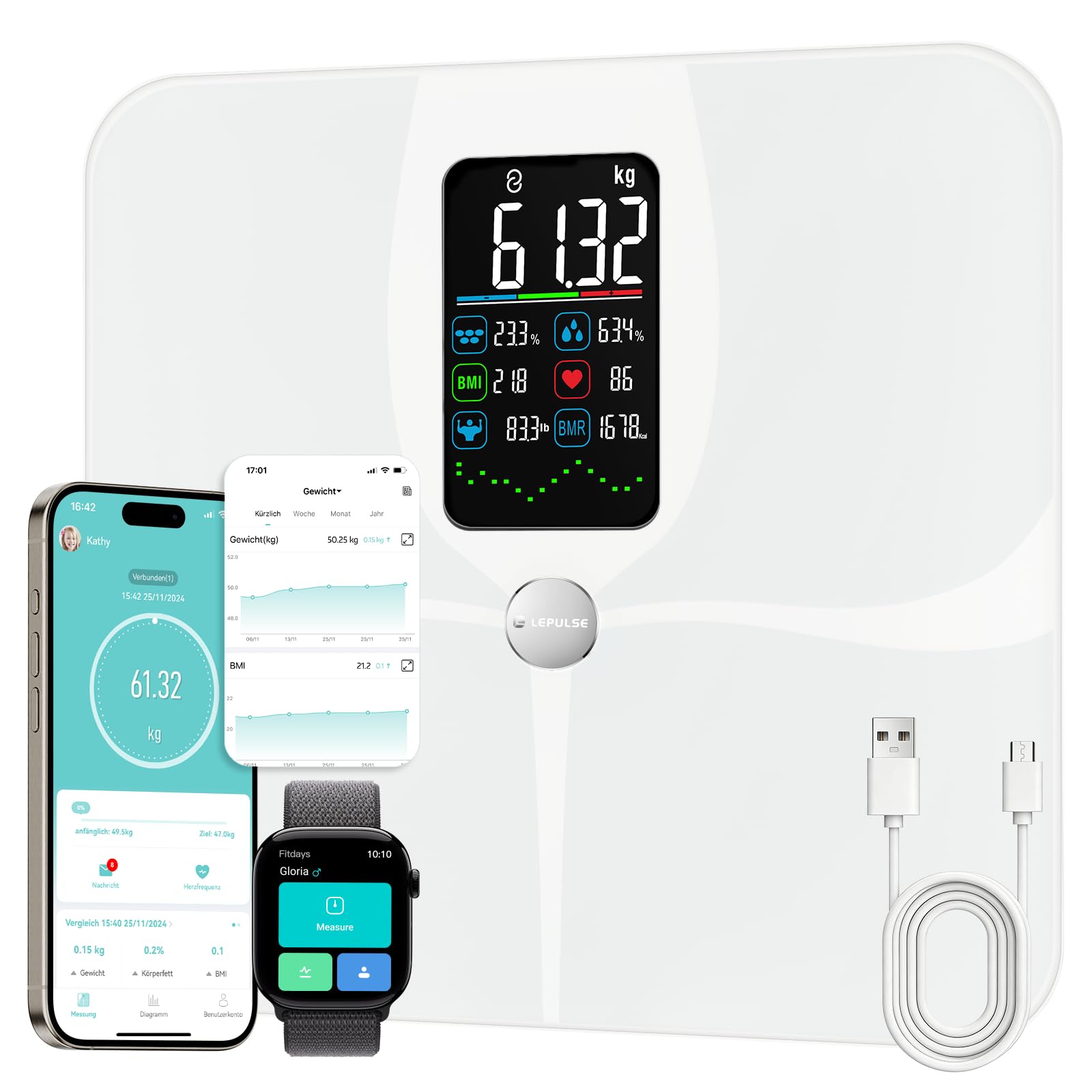
Image: The Lepulse F4 Pro Smart Scale, showcasinşık tasarımı ve geniş ekranıyla.
Temel Özellikler
- 22 Vücut Kompozisyonu Ölçümü: Measures weight, body fat, muscle mass, BMI, body water, bone mass, BMR, skeletal muscle, visceral fat, fat-free body weight, protein, heart rate, water content, fat mass, obesity level, body type, protein mass, body age, cardiac index, and more.
- Büyük Renkli Ekran: Directly shows 8 key data points and 7-day trend graphs for weight, body fat, and muscle mass.
- Yüksek Hassasiyet: Utilizes ITO membrane electrodes for accurate measurements across various foot sizes, with a weighing range of 3 to 180 kg.
- Şarj Edilebilir Pil: Equipped with a Lithium-polymer battery, rechargeable via the included Type-C cable.
- Akıllı Uygulama Entegrasyonu: Connects with the Fitdays app to track progress over days, weeks, months, and years. Syncs with Apple Health, Google Fit, and Samsung Health.
- Çoklu Kullanıcı Desteği: 24 kullanıcıya kadar destekler.files with automatic recognition and a dedicated Baby Mode.

Image: The scale supports up to 24 users and features Standard, Athlete, and Baby modes, integrating with the Fitdays app and other health platforms.
Tasarım Özellikleri
- Anti-slip Mat: Ensures stability and safety during use.
- Yuvarlak Köşeler: Enhances safety and aesthetics.
- Temperli Cam: Dayanıklı ve kolay temizlenebilir yüzey.
- Birim Değişimi: Easily switch between kg, lb, and st via the app.

Image: Visual representation of the scale's user-friendly design, including anti-slip mat, rounded corners, tempered glass, and unit conversion options.
Kurmak
1. İlk Ücret
- Before first use, ensure the scale is fully charged. Connect the provided Type-C cable to the charging port on the scale and to a USB power source.
- The display will indicate charging status. Charge until the battery indicator shows full.
2. Uygulama Yükleme ve Eşleştirme
- İndir Fit günler Apple App Store veya Google Play Store'dan uygulama.
- Akıllı telefonunuzda Bluetooth’u etkinleştirin.
- Open the Fitdays app and follow the on-screen instructions to create an account or log in.
- Step onto the scale to activate it. The app should automatically detect and pair with the scale. If not, manually add the device within the app's settings.
3. Kullanıcı Uzmanıfile Yaratılış
- Within the Fitdays app, create your personal profile by entering your gender, height, and age. This information is crucial for accurate body composition analysis.
- For additional users, create separate profiles within the app. The scale can store data for up to 24 users.
Kullanım Talimatları
1. Ölçüm Alma
- Teraziyi sert ve düz bir zemine yerleştirin.
- Step onto the scale barefoot with dry feet, ensuring your feet are centered on the ITO electrodes.
- Stand still until your weight is displayed and stabilized. The scale will then proceed to measure other body composition metrics.
- The measurements will be displayed on the scale's screen and automatically synchronized with the Fitdays app if your phone is nearby with Bluetooth enabled.

Image: The scale's full ITO sensor technology ensures high precision and adapts to all foot sizes for accurate body composition analysis.
2. Ekran Okumalarını Anlamak
The large color display on the F4 Pro scale shows key metrics directly. After a measurement, you will see your weight, body fat percentage, vücut su yüzdesitage, BMI, BMR, and heart rate. The display also shows a 7-day trend graph for weight, body fat, and muscle mass.

Image: A close-up of the scale's display, showing weight, body fat, BMI, body water, muscle mass, BMR, heart rate, and weight trend at a glance.
3. Using the Fitdays App
The Fitdays app provides a detailed breakdown of all 22 body composition metrics and allows for long-term tracking of your health data.
- Detailed Analysis: View all 22 metrics, including those not shown on the scale's display.
- İlerleme Takibi: Monitor trends over days, weeks, months, and years with intuitive graphs.
- Veri Senkronizasyonu: Sync your data with Apple Health, Google Fit, and Samsung Health for a comprehensive health overview.
- Birim dönüştürme: Change measurement units (kg/lb/st) directly within the app.

Image: The Fitdays app interface demonstrating smart tracking of unlimited data, showing trends for body fat, weight, and BMI over time (week, month, year).
4. Multiple Users & Baby Mode
- Birden Fazla Kullanıcı: The app automatically recognizes and assigns measurements to individual profiles based on weight similarity. Ensure each user has a profile set up in the app.
- Bebek Modu: To weigh a baby or pet, first weigh yourself, then hold the baby/pet and step on the scale again. The app will calculate the baby's/pet's weight by subtracting your initial weight.
Bakım
Temizlik
Yumuşak bir bezle ölçek yüzeyini silin.amp Bezle temizleyin. Aşındırıcı temizleyiciler kullanmayın veya teraziyi suya batırmayın.
Depolamak
Tartıyı serin ve kuru bir yerde saklayın. Kullanılmadığı zamanlarda üzerine ağır nesneler koymaktan kaçının.
Pil Şarjı
When the scale displays a "LO" or low battery indicator, recharge it using the provided Type-C cable. A full charge typically lasts for several months depending on usage.
Sorun giderme
- Terazi açılmıyor: Ensure the scale is charged. Connect it to a power source using the Type-C cable.
- Yanlış okumalar:
- Ensure the scale is on a hard, flat surface, not carpet.
- Step on the scale barefoot with dry feet.
- Profesyonelinizden emin olunfile information (gender, height, age) in the app is correct.
- Calibrate the scale by stepping on it briefly, then stepping off, and waiting for it to display "0.0" before taking a measurement.
- App not connecting to scale:
- Akıllı telefonunuzda Bluetooth'un etkinleştirildiğinden emin olun.
- Make sure the Fitdays app has Bluetooth permissions.
- Step on the scale to activate it before opening the app.
- Try restarting your phone and the scale.
- "ERR" message on display: This usually indicates an overload. The maximum weight capacity is 180 kg (396 lbs).
Özellikler
| Model Numarası | F4 PRO |
| Ağırlık Kapasitesi | 3 kg - 180 kg (6.6 lbs - 396 lbs) |
| Birimler | kg / lb / st |
| Boyutlar (U x G x Y) | 19.71 x 9.91 x 3.73 cm (7.76 x 3.90 x 1.47 inç) |
| Ürün Ağırlığı | 1.9 kg (4.19 lbs) |
| Malzeme | Acrylonitrile Butadiene Styrene (ABS), Tempered Glass |
| Görüntü Türü | Digital Color Display |
| Pil Türü | 1 Lityum-polimer (dahil) |
| Şarj Portu | Tip-C |
| Bağlantı | Bluetooth |
Garanti ve Destek
Lepulse products are manufactured with high-quality standards. For warranty information, technical support, or customer service inquiries, please refer to the contact information provided on the product packaging or visit the official Lepulse website. Please have your model number (F4 PRO) and purchase details ready when contacting support.