
1. Giriş
This manual provides comprehensive instructions for the safe and efficient operation, setup, and maintenance of the GBHJJ IR6500 BGA Infrared Rework Station. This equipment is designed for precise soldering, desoldering, and repair of various packaged devices, including BGA, PBGA, CSP, multi-layer substrates, EMI metal shielding products, and lead-free re-soldering applications.
Temel Özellikler:
- Gelişmiş Sıcaklık Kontrolü: Features 8 heating sections and 8 constant temperature sections, allowing for precise control. Up to 10 sets of temperature curves can be saved.
- Innovative Airflow Management: Designed to minimize the impact of airflow on temperature accuracy, facilitating lead-free soldering rework.
- Secure PCB Fixture: Equipped with a linear rail-type bracket and special-shaped rod for easy and secure locking and adjustment, preventing PCB deformation.
- Entegre Tasarım: Compact and integrated system design reduces workbench area requirements and cable clutter.
- Wide Application Scope: Suitable for BGA rework on various motherboards, including laptops, desktops, servers, industrial computers, game consoles, communication equipment, and LCD TVs.
2. Güvenlik Bilgileri
UYARI: Bu güvenlik talimatlarına uyulmaması elektrik çarpmasına, yangına veya ciddi yaralanmaya neden olabilir.
- Always connect the rework station to a grounded power outlet with the correct voltag(220V).
- Do not operate the equipment in damp veya ıslak koşullar.
- Ensure adequate ventilation in the work area to dissipate fumes and heat.
- The heating elements reach high temperatures. Avoid direct contact with hot surfaces. Use appropriate heat-resistant gloves.
- Herhangi bir bakım veya temizlik yapmadan önce elektrik bağlantısını kesin.
- Çocukları ve yetkisiz kişileri çalışan ekipmanlardan uzak tutun.
- Do not modify the equipment. Use only manufacturer-approved replacement parts.
- Always wear appropriate personal protective equipment (PPE), including safety glasses.
3. Paket İçeriği
Aşağıda listelenen tüm öğelerin paketinizde mevcut olduğundan emin olun. Herhangi bir öğe eksik veya hasarlıysa, derhal tedarikçinizle iletişime geçin.

Resim 3.1: Üzerindeview of the GBHJJ IR6500 BGA Infrared Rework Station and included accessories. This image displays the main rework station unit, power cable, USB cable, aluminum foil tape, and a thermocouple.
- GBHJJ IR6500 BGA Infrared Rework Station Unit
- Power Cable (AC220V compatible)
- USB kablosu
- Alüminyum Folyo Bant
- Termokupl
- Kullanım Kılavuzu (bu belge)
4. Kurulum Talimatları
- Paketten Çıkarma ve Yerleştirme:
Carefully remove all components from the packaging. Place the rework station on a stable, level, and heat-resistant workbench. Ensure there is sufficient space around the unit for ventilation and operation.
- Güç Bağlantısı:
Connect the provided power cable to the AC220V power inlet on the rear of the rework station. Ensure the power switch (circuit breaker) is in the OFF position before plugging the other end into a grounded 220V power outlet.
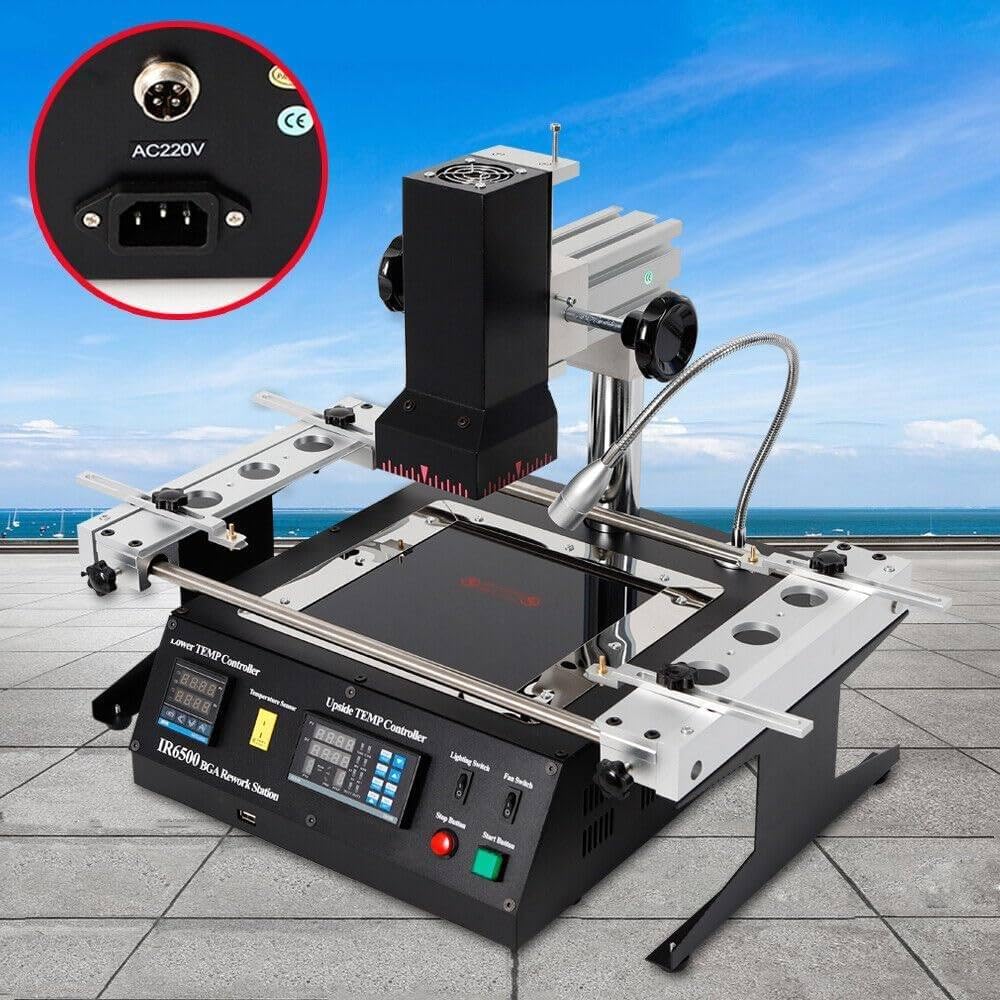
Resim 4.1: Rear panel of the IR6500, highlighting the AC220V power input connector and the CE marking.

Resim 4.2: Bir diğer view of the rear panel, showing the cooling fan on the left and the power input with an integrated circuit breaker on the right.

Resim 4.3: Ayrıntılı view of the integrated circuit breaker, labeled "ADVANCON LZ47-63", which serves as the main power switch for the unit.
- PCB Board Mounting:
Utilize the linear rail-type bracket system to securely hold the PCB board. Adjust the special-shaped rod and rotate the handles to lock the PCB in place, ensuring it is stable and flat to prevent deformation during the rework process.
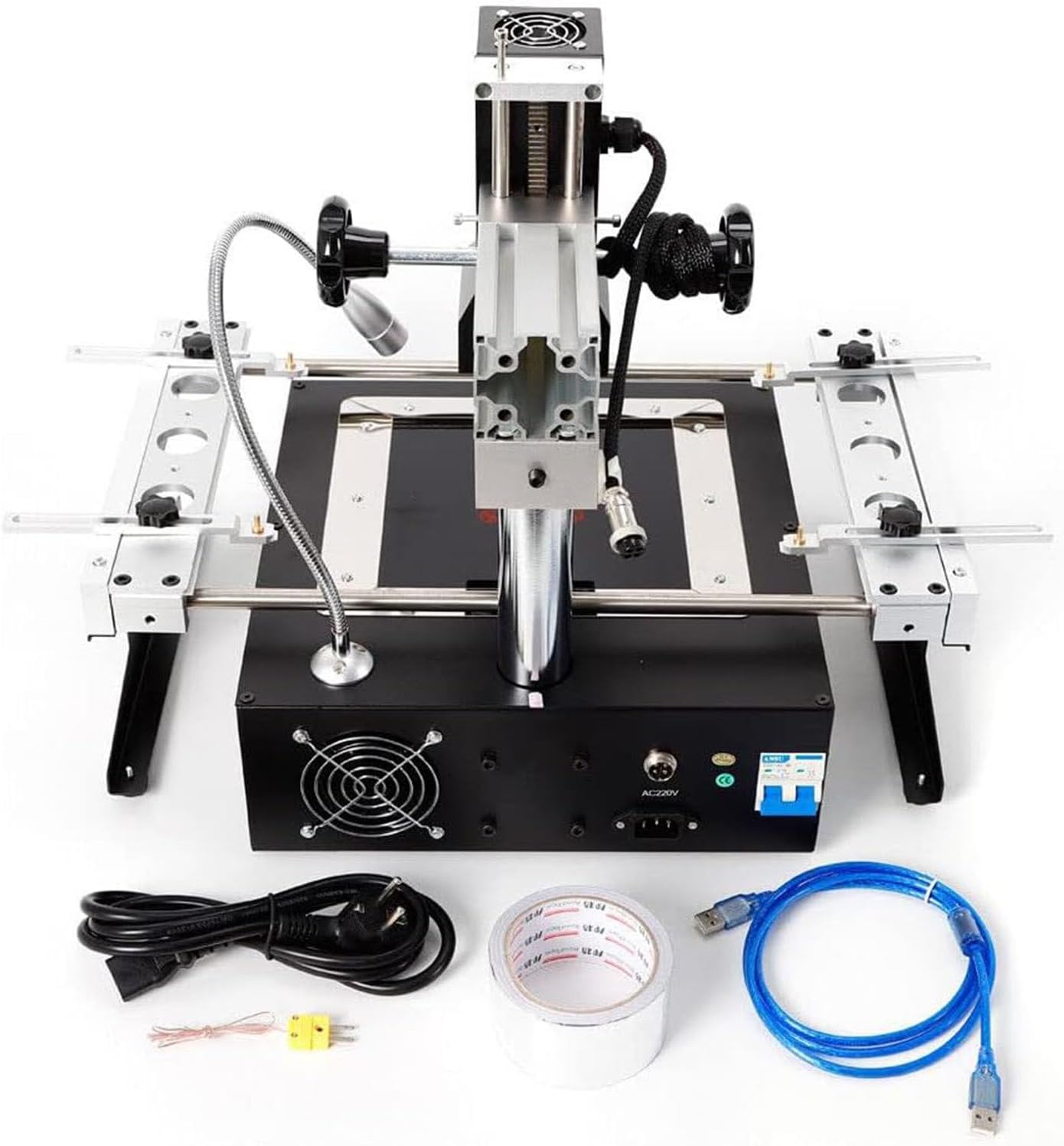
Resim 4.4: Yukarıdan aşağıya view of the IR6500, illustrating the adjustable PCB mounting rails and the upper heating element assembly.
- Thermocouple Placement:
Connect the thermocouple to the designated input on the control panel. Position the thermocouple tip as close as possible to the component being reworked, ideally under the component or on an adjacent test point, to accurately monitor the temperature.
5. Kullanım Talimatları
The IR6500 features a user-friendly control panel for precise temperature management.

Resim 5.1: Close-up of the control panel, showing the "Lower TEMP Controller" and "Upside TEMP Controller" displays, along with various buttons for programming, manual control, and start/stop functions. Also visible are the Lighting Switch and Fan Switch.
- Güç Açık:
After completing the setup, switch the main circuit breaker (Image 4.3) to the ON position. The digital displays on the control panel will illuminate.
- Sıcaklık Profile Ayar:
The rework station allows for setting 8 heating sections and 8 constant temperature sections. Use the "PROG" button and navigation keys on the "Upside TEMP Controller" to access and modify temperature profiles. You can save up to 10 distinct temperature curves for different applications.
- PV (Süreç Değeri): Mevcut sıcaklığı görüntüler.
- SV (Değer Ayarla): Hedef sıcaklığı görüntüler.
- Refer to the detailed programming guide in the full manual for specific steps on creating and saving temperature profiles.
- Manuel kontrol:
For quick adjustments or specific tasks, the "MAN" (Manual) mode can be engaged. This allows direct control over heater power output. Exercise caution when using manual mode to avoid overheating components.
- Starting the Rework Process:
Once the desired temperature profile is selected or manual settings are configured, press the Başlat Düğmesi to initiate the heating cycle. Monitor the temperature displays and the component being reworked.
- Stopping the Rework Process:
To stop the heating cycle at any time, press the Durdurma Düğmesi. The heaters will turn off, and the cooling fan may activate to dissipate residual heat.
- Lighting and Fan Switches:
Kullanın Işık anahtarı to turn on the integrated work light for better visibility. The Fan Anahtarı controls the auxiliary cooling fan, which can be used to accelerate cooling after a rework cycle or for general ventilation.
6. Bakım
Regular maintenance ensures the longevity and optimal performance of your IR6500 BGA Infrared Rework Station.
- Temizlik:
After each use, allow the unit to cool completely. Use a soft, dry cloth to wipe down the exterior surfaces. For stubborn residues, a mild, non-abrasive cleaner can be used sparingly. Do not use solvents or harsh chemicals. Keep the heating elements and sensors free from dust and debris.
- Fan ve Havalandırma:
Periodically inspect the cooling fan vents on the rear of the unit (Image 4.2) and clean any accumulated dust to ensure proper airflow.
- Depolamak:
When not in use, store the rework station in a clean, dry environment, away from direct sunlight and extreme temperatures.
- Kablo Denetimi:
Regularly check the power cable and other connections for any signs of wear, cuts, or damage. Replace damaged cables immediately.
7. Sorun Giderme
This section addresses common issues you might encounter with your IR6500 BGA Infrared Rework Station.
| Sorun | Olası Neden | Çözüm |
|---|---|---|
| Ünite açılmıyor. |
|
|
| Heaters not reaching set temperature. |
|
|
| PCB board is deforming. |
|
|
If you encounter issues not covered in this section, or if troubleshooting steps do not resolve the problem, please contact customer support.
8. Özellikler
| Parametre | Değer |
|---|---|
| Örnek | IR6500 |
| Isıtıcı Tipi | Kızılötesi (IR) |
| Boyutlar (U x G x Y) | 475 x 480 x 420 mm (18.7 x 18.9 x 16.54 inç) |
| Ağırlık | 15 kg (41.8 pound) |
| Güç Kaynağı | 220V |
| Universal Power Consumption | 1250W |
| Üst Isıtıcı Gücü | 400W |
| Top Heater Dimensions | 80 mm x 80 mm |
| Bottom Heater Power | 800W |
| Bottom Heater Dimensions | 120 mm x 120 mm |
| Sıcaklık Kontrol Doğruluğu | ±%0.5 |
| Applicable Chip Size | ≤70mm × 70mm |
| Applicable PCB Size | ≤400mm × 305mm |
| Görüntü Türü | LED Dijital Ekran |
| Malzeme | Metal |
9. Garanti ve Destek
GBHJJ provides a standard manufacturer's warranty for this product. For specific warranty terms and conditions, please refer to the documentation included with your purchase or contact your retailer.
For technical support, troubleshooting assistance, or inquiries regarding parts and service, please contact GBHJJ customer service through your purchase platform or the official GBHJJ webalan.