
giriiş
Thank you for choosing the Mastech MS8233D Digital Multimeter. This manual provides essential information for the safe and effective operation, maintenance, and troubleshooting of your device. Please read this manual thoroughly before use and keep it for future reference.
Güvenlik Bilgileri
UYARI: Elektrik çarpmasını veya kişisel yaralanmayı önlemek için, bu ürünü kullanmadan önce tüm güvenlik bilgilerini okuyun ve anlayın.
- Ölçüm yapmadan önce multimetrenin doğru fonksiyonda ve aralıkta olduğundan emin olun.
- Nominal hacimden fazlasını uygulamayıntage, as marked on the meter, between terminals or between any terminal and earth ground. The MS8233D has a Safety Rating of CATII 600V.
- Vol ile çalışırken dikkatli oluntag30V AC RMS, 42V tepe veya 60V DC'nin üzerinde. Bu hacimtagşok tehlikesi yaratabilir.
- Keep your fingers behind the probe barriers during measurements.
- Do not use the meter if it is damaged or if the case is open. Inspect the meter and test leads before use.
- Doğru okumalar sağlamak için düşük pil göstergesi göründüğünde pili hemen değiştirin.
- Ölçüm cihazını patlayıcı gaz, buhar veya toz ortamlarında çalıştırmayın.
Temel Özellikler
The Mastech MS8233D Digital Multimeter offers a range of functionalities for various electrical measurements:
- Görüntülemek: Hassas okumalar için 2000 sayım.
- Sıralama: Auto and Manual Ranging capabilities.
- Diyot Testi: Features a Diode Open Voltag1.5V'un e'si.
- Süreklilik Testi: Audible buzzer for resistance less than 60Ω.
- Veri tutma: Görüntülenen okumayı kolaylık sağlamak amacıyla dondurur.
- Otomatik Kapanma: Pil ömrünü korur.
- Temassız Sestage Tespiti (NCV): Canlı telleri doğrudan temas etmeden tespit etmek için.
- Maksimum Ölçüm: Records the highest value measured.
- Ekran Arka Işığı: Düşük ışık koşullarında görünürlük için.
- Düşük Pil Göstergesi: Pilin değiştirilmesi gerektiğini gösterir.
- Güç Kaynağı: Operates on 1x 9V 6F22 Battery.
- Sertifikalar: RoHS uyumludur.
- Güvenlik Derecelendirmesi: CATII 600V.
Şekil 1: Ön view of the Mastech MS8233D Digital Multimeter, highlighting the display, rotary function switch, and input terminals.
Ürün Bittiview ve Bileşenler
The MS8233D multimeter is designed for ease of use and durability. Familiarize yourself with its main parts:

Şekil 2: Üzeriview of the MS8233D Digital Multimeter, illustrating its physical dimensions, power supply, and typical applications in domestic, industrial, and electronics settings.
- LCD Ekran: Ölçüm değerlerini, birimleri ve fonksiyon göstergelerini gösterir.
- Fonksiyon Döner Anahtarı: Used to select the desired measurement function (e.g., ACV, DCV, Resistance, Diode, Continuity, Temperature, NCV).
- Giriş Jakları: Terminals for connecting test leads.
- COM Jakı: Tüm ölçümler için ortak (negatif) giriş terminali.
- VΩmA Jack: Hacim için pozitif giriş terminalitage, resistance, diode, continuity, and small current measurements.
- 10A Jak: Positive input terminal for high current (up to 10A) measurements.
- Fonksiyon Düğmeleri: For features like Data Hold, Backlight, and Range selection.
Kurmak
Pil Kurulumu
The MS8233D requires one 9V 6F22 battery for operation. To install or replace the battery:
- Ensure the multimeter is turned off and disconnect all test leads from the input terminals.
- Ölçüm cihazının arkasındaki pil bölmesi kapağını bulun.
- Pil kapağındaki vidayı/vidaları gevşetmek için bir tornavida kullanın ve kapağı çıkarın.
- Connect the new 9V battery to the battery clips, observing the correct polarity.
- Pili bölmeye yerleştirin ve kapağı vida(lar)la sabitleyerek yerine takın.
Not: The meter includes a low battery indicator. Replace the battery promptly when this indicator appears to maintain measurement accuracy.
Kullanım Talimatları
Before making any measurement, ensure the test leads are properly connected and the function switch is set to the desired range.
DC Hacmi Ölçümütage (DCV)
- Insert the red test lead into the VΩmA jack and the black test lead into the COM jack.
- Set the rotary switch to the desired DCV range (e.g., 200mV, 2V, 20V, 200V, 600V). If unsure, start with the highest range or use auto-ranging if available.
- Ölçülecek bileşen veya devrenin uçlarına, kutuplara dikkat ederek test problarını bağlayın.
- Cildi okutagLCD ekranda e değeri.
AC Hacmi Ölçümütage (ACV)
- Insert the red test lead into the VΩmA jack and the black test lead into the COM jack.
- Set the rotary switch to the desired ACV range (e.g., 2V, 20V, 200V, 600V).
- Ölçüm yapılacak bileşen veya devre uçlarını birbirine bağlayın.
- Cildi okutagLCD ekranda e değeri.
Measuring DC/AC Current (DCA/ACA)
CAUTION: Never connect the meter in parallel to a voltagAkımı ölçerken e kaynağına temas etmek, ölçüm cihazına ve devreye zarar verebilir.
- For currents up to 200mA, insert the red test lead into the VΩmA jack. For currents up to 10A, insert the red test lead into the 10A jack. Insert the black test lead into the COM jack.
- Set the rotary switch to the desired DC or AC current range (e.g., 200µA, 2000µA, 20mA, 200mA, 10A).
- Akım ölçülecek devreyi açın ve ölçüm cihazını yüke seri bağlayın.
- LCD ekranda mevcut değeri okuyun.
Direnç Ölçümü (Ω)
- Insert the red test lead into the VΩmA jack and the black test lead into the COM jack.
- Döner anahtarı istediğiniz Direnç aralığına ayarlayın (örneğin, 200Ω, 2kΩ, 20kΩ, 200kΩ, 2MΩ, 20MΩ).
- Direnci ölçmeden önce devrenin veya bileşenin enerjisinin kesildiğinden emin olun.
- Test problarını bileşen boyunca bağlayın.
- LCD ekranda direnç değerini okuyun.
Diyot Testi
- Insert the red test lead into the VΩmA jack and the black test lead into the COM jack.
- Set the rotary switch to the Diode symbol (usually shared with Continuity).
- Kırmızı probu diyotun anoduna, siyah probu ise diyotun katoduna bağlayın.
- Ekranda ileri volüm gösterilecektirtage drop. Probları ters çevirin; iyi bir diyot için ekranda 'OL' (Açık Döngü) yazısı görünmelidir.
Süreklilik Testi
- Insert the red test lead into the VΩmA jack and the black test lead into the COM jack.
- Set the rotary switch to the Continuity symbol (usually shared with Diode).
- Test problarını devreye veya bileşene bağlayın.
- If the resistance is below approximately 60Ω, the buzzer will sound, indicating continuity. The display will also show the resistance value.
Temassız Hacimtage (NCV) Tespiti
- Döner anahtarı NCV fonksiyonuna ayarlayın.
- Move the top part of the meter (NCV sensor area) close to the conductor suspected of having AC voltage.
- The meter will emit an audible beep and the NCV indicator will light up if AC voltage tespit edildi.
Veri Bekletme İşlevi
Ekrandaki mevcut okumayı dondurmak için 'HOLD' düğmesine basın. Dondurma işlemini kaldırmak ve canlı ölçümlere devam etmek için tekrar basın.
Arka Işık İşlevi
Press the 'LIGHT' button to turn on the display backlight. Press it again to turn it off. The backlight may automatically turn off after a short period to conserve battery.
Bakım
Temizlik
Sayacın kasasını reklamla silinamp Bir bez ve hafif bir deterjan kullanın. Aşındırıcı veya çözücü maddeler kullanmayın. Kullanmadan önce ölçüm cihazının tamamen kuru olduğundan emin olun.
Pil Değişimi
Refer to the 'Battery Installation' section under 'Setup' for instructions on replacing the 9V battery. Always replace the battery when the low battery indicator is displayed to ensure accurate readings and proper operation.
Sigorta Değişimi
The MS8233D is equipped with internal fuses to protect against overcurrent. If the current measurement function stops working, the fuse may need replacement. Fuse replacement should only be performed by qualified personnel. Use only fuses of the specified type and rating (e.g., F200mA/250V for mA range, F10A/250V for 10A range).
Sorun giderme
| Sorun | Olası Neden | Çözüm |
|---|---|---|
| Ekran yok veya soluk ekran | Pil bitmiş veya düşük | 9V pili değiştirin. |
| Yanlış okumalar | Incorrect function/range selected; poor test lead connection; low battery | Verify function and range; check test lead connections; replace battery. |
| Mevcut ölçüm çalışmıyor | Sigorta atmış | Replace the appropriate fuse (refer to Maintenance section). |
| 'OL' (Aşırı Yük) görüntülendi | Ölçüm seçilen aralığı aşıyor; açık devre (süreklilik/direnç için) | Daha yüksek bir aralık seçin; açık devre olup olmadığını kontrol edin. |
| Süreklilik bip sesi yok | Direnç çok yüksek; açık devre | Check for continuity; ensure resistance is below 60Ω. |
Özellikler
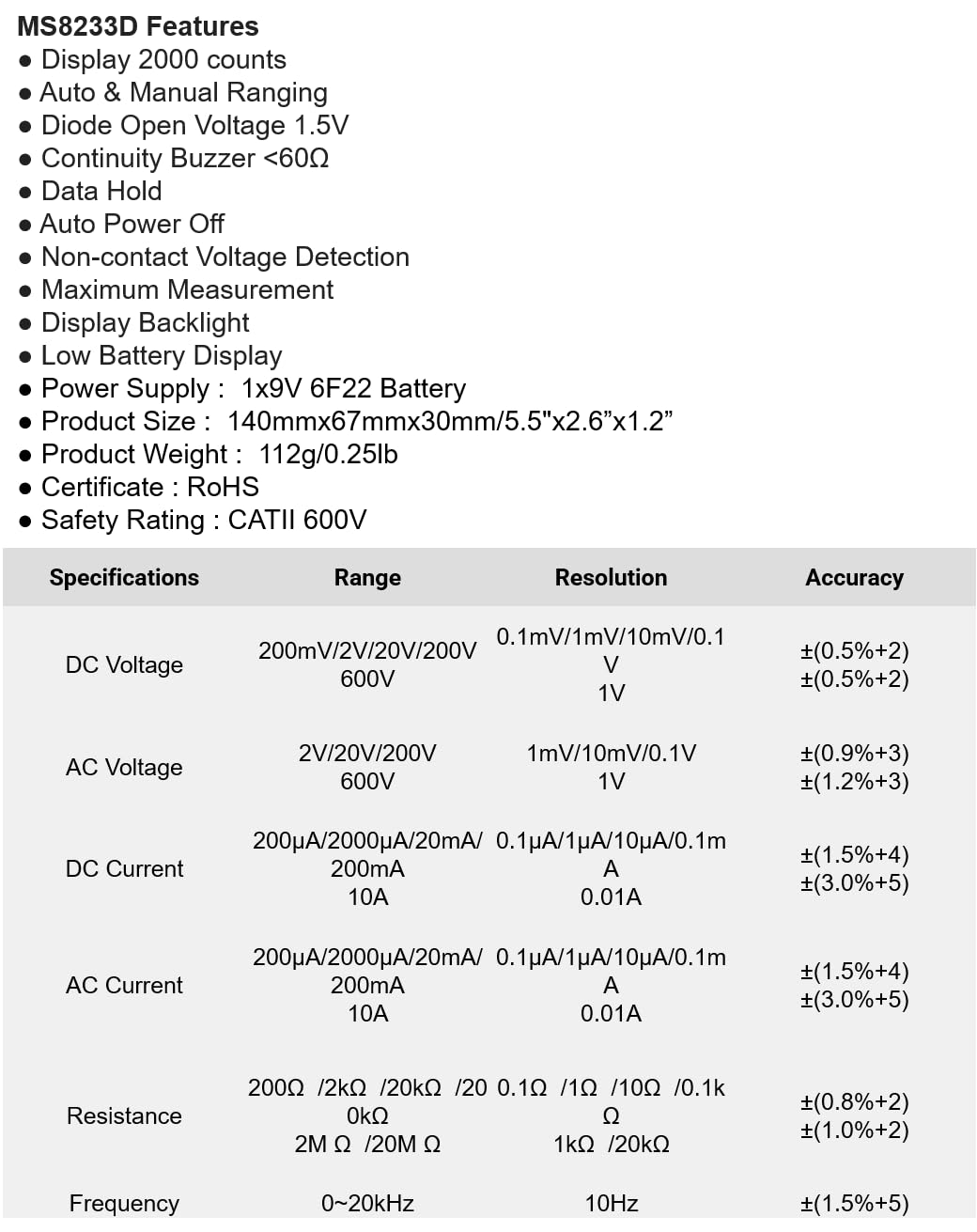
The following table details the measurement ranges, resolutions, and accuracies for the Mastech MS8233D Digital Multimeter:

Figure 3: Comprehensive specifications for the MS8233D, outlining measurement capabilities and precision.
| Özellik | Şartname |
|---|---|
| Görüntülemek | 2000 sayım |
| DC Hacmitage | 200mV / 2V / 20V / 200V / 600V |
| AC Hacmitage | 2V / 20V / 200V / 600V |
| Doğru Akım | 200µA / 2000µA / 20mA / 200mA / 10A |
| AC Akım | 200µA / 2000µA / 20mA / 200mA / 10A |
| Rezistans | 200Ω / 2kΩ / 20kΩ / 200kΩ / 2MΩ / 20MΩ |
| Sıklık | 0-20kHz |
| Diyot Açık Voltage | 1.5V |
| Süreklilik Uyarı Cihazı | <60Ω |
| Güç Kaynağı | 1x 9V 6F22 Pil |
| Ürün Boyutları | Xnumxmm x xnumxmm x xnumxmm (xnumx "x xnumx" x xnumx ") |
| Ürün Ağırlığı | 112g (0.25lb) |
| Güvenlik Derecelendirmesi | CATII 600V |
| Sertifikalar | CE, RoHS |
Garanti ve Destek
For warranty information and technical support, please refer to the documentation provided with your purchase or contact the seller/manufacturer directly. Keep your purchase receipt as proof of purchase for any warranty claims.


