1. Ürün Bittiview
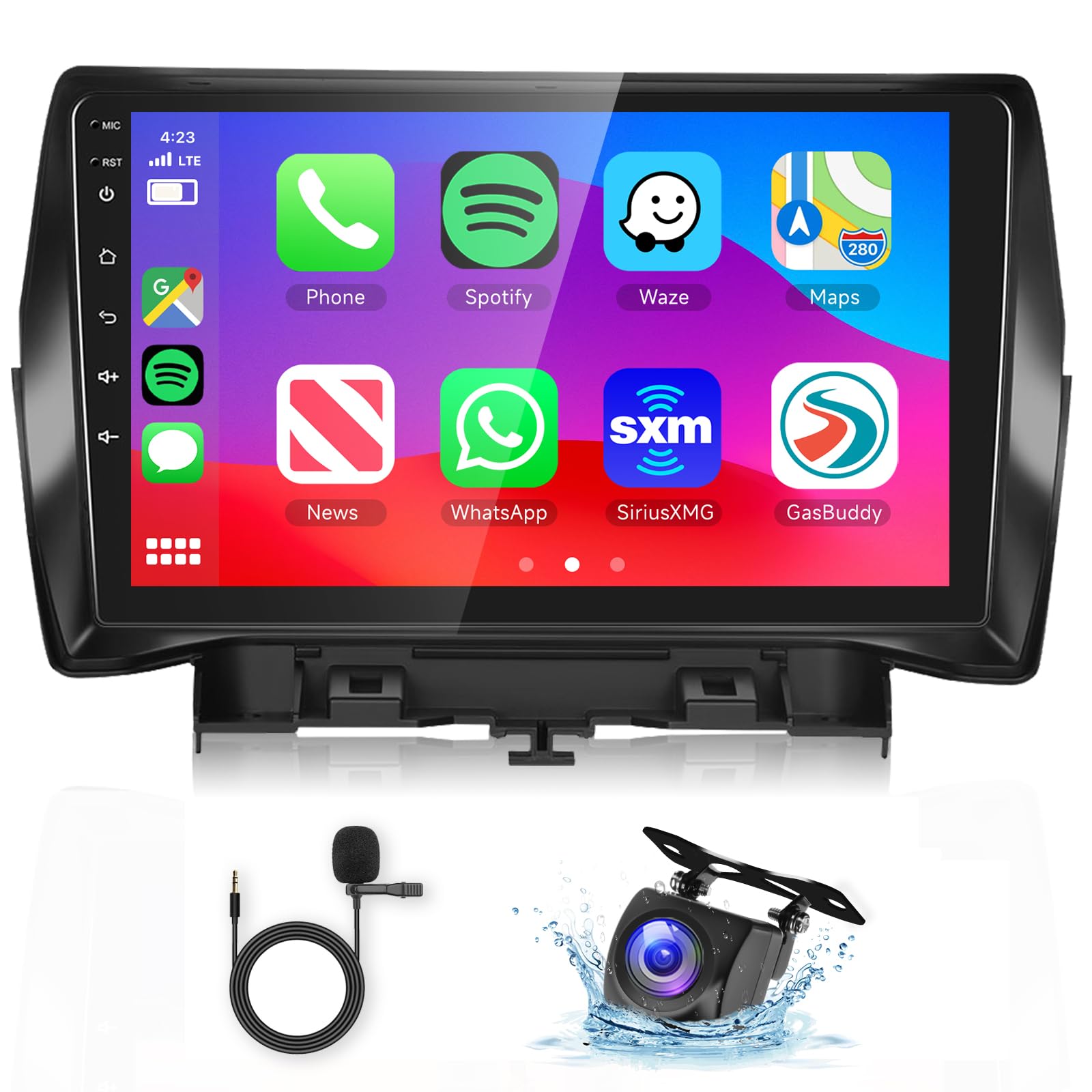
This manual provides instructions for the podofo 9-inch Android Car Stereo, designed specifically for Ford Kuga and Ford Escape models manufactured between 2013 and 2019. This unit features Wireless Carplay, Android Auto, GPS navigation, Wi-Fi connectivity, HiFi audio, Bluetooth, FM radio, steering wheel control compatibility, and includes an HD backup camera.
Uygulanabilir Modeller
This 9-inch touchscreen car stereo is compatible with Ford Kuga Escape models from 2013, 2014, 2015, 2016, 2017, 2018, and 2019. It includes a Plug and Play wiring harness for simplified installation.
Kutuda Neler Var?
- HD Yedekleme Kamerası
- Harici Mikrofon
- GPS Anteni
- Kullanım Kılavuzu
- Orijinal USB Kablosu
- RCA Kablosu
- Arka Kamera Giriş Kablosu
- Güç kablosu
- canbus
- Radyo Anteni
- Kurulum Aracı
- Ek Aksesuarlar (resimde görüldüğü gibi)

Figure 1: Package contents and dimensions of the podofo Android Car Stereo.
2. Kurulum Kılavuzu
2.1 Uyumluluk Kontrolü
Before installation, verify your vehicle's central control panel matches the supported configuration. This product is designed for vehicles with a central control panel similar to Option A shown below. If your vehicle has a central control panel like Option B, please contact customer support for alternative solutions.
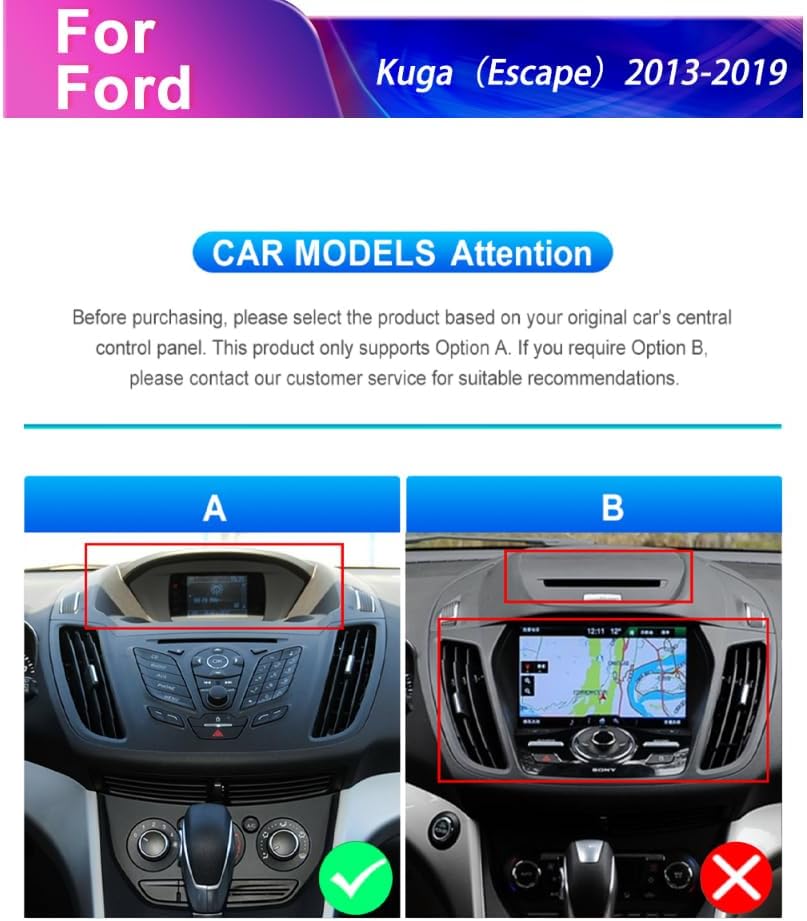
Figure 2: Car model compatibility check for Ford Kuga Escape (2013-2019) central control panels.
2.2 Genel Kurulum Adımları
- Orijinal araç teyp ünitesini ve trim panellerini dikkatlice çıkarın.
- Connect the provided Plug and Play wiring harness to the vehicle's existing wiring.
- Connect the GPS antenna and external microphone to the new head unit.
- Install the HD backup camera (refer to section 2.3 for camera wiring).
- Mount the new podofo Android Car Stereo into the dashboard opening.
- Secure all connections and reassemble the trim panels.
- Cihazı açın ve ilk kurulumu gerçekleştirin.
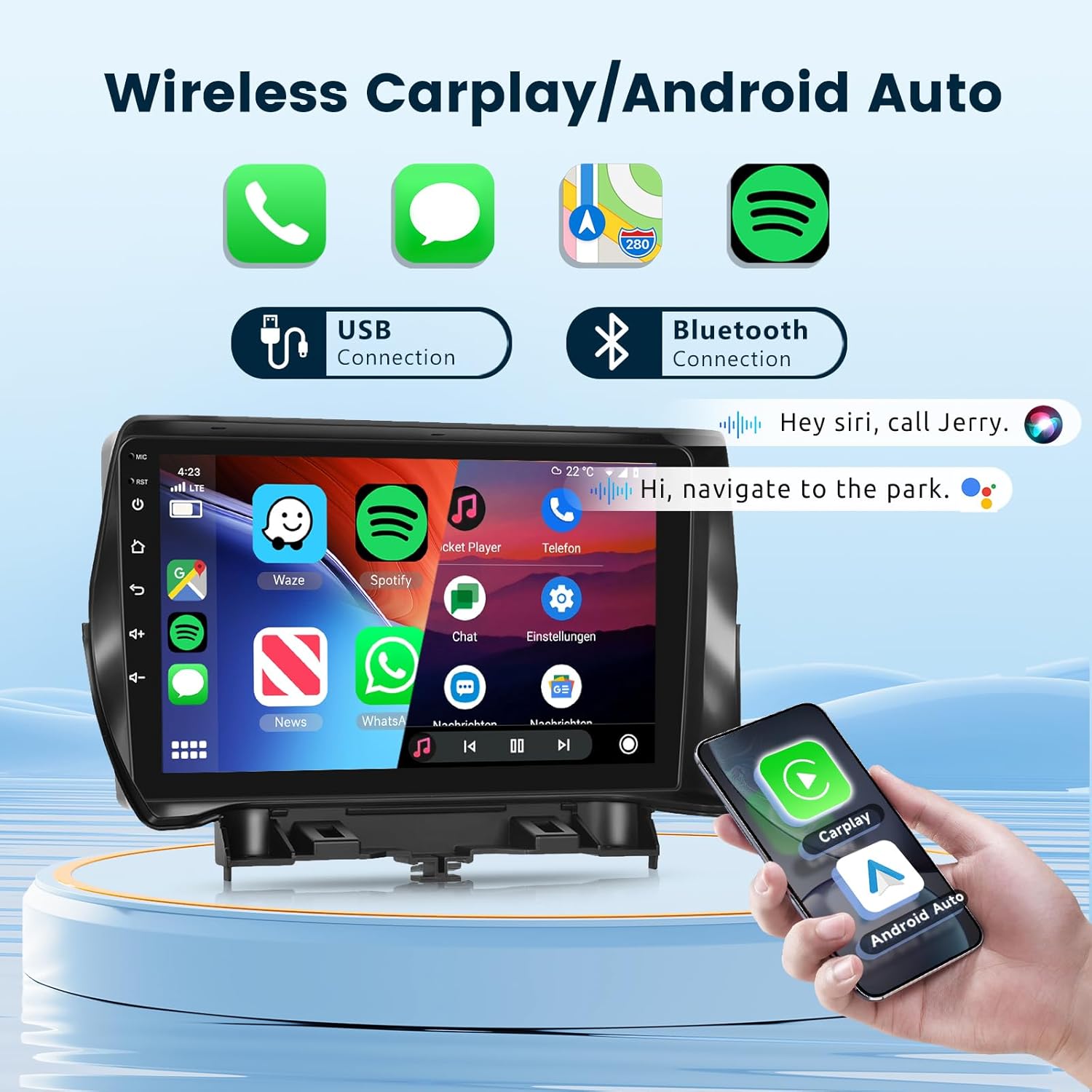
Figure 3: Visual comparison of the dashboard before and after installing the podofo car stereo.
2.3 HD Backup Camera Wiring
Follow these steps to correctly wire the HD backup camera:
- Red wire (+12V in): Connect to the car's reversing light positive terminal.
- Black wire (GND in): Connect to the car's reversing light negative terminal.
- The yellow RCA video cable connects the camera to the head unit's "CAM IN" port.
- The reverse trigger wire (labeled "Reverse/Back") connects to the vehicle's reverse light positive. If this wire is not present in your vehicle's harness, it may not be needed.

Figure 4: Detailed camera wiring diagram.
3. Kullanım Talimatları
3.1 Sistem Bittiview
The unit operates on Android 13 OS with 2GB RAM and 64GB storage, providing a responsive user experience. It features a 9-inch 1080P 2.5D glass capacitive touchscreen for clear visuals and sensitive touch control.

Figure 5: Smart Android System interface with key specifications.

Figure 6: The 9-inch 1080P 2.5D Glass Touchscreen for enhanced visual experience.
3.2 Kablosuz CarPlay ve Android Auto
Connect your smartphone wirelessly via Bluetooth or USB to access Carplay or Android Auto. This allows for seamless integration of navigation, phone contacts, email, music, and voice control features directly on the car stereo display.
Şekil 7: Kablosuz Carplay ve Android Auto arayüzü.
3.3 GPS Navigasyon ve Wi-Fi
The unit includes GPS for both offline and online mapping. Connect to Wi-Fi or a mobile hotspot to access the Play Store, stream online videos, and use real-time navigation services.
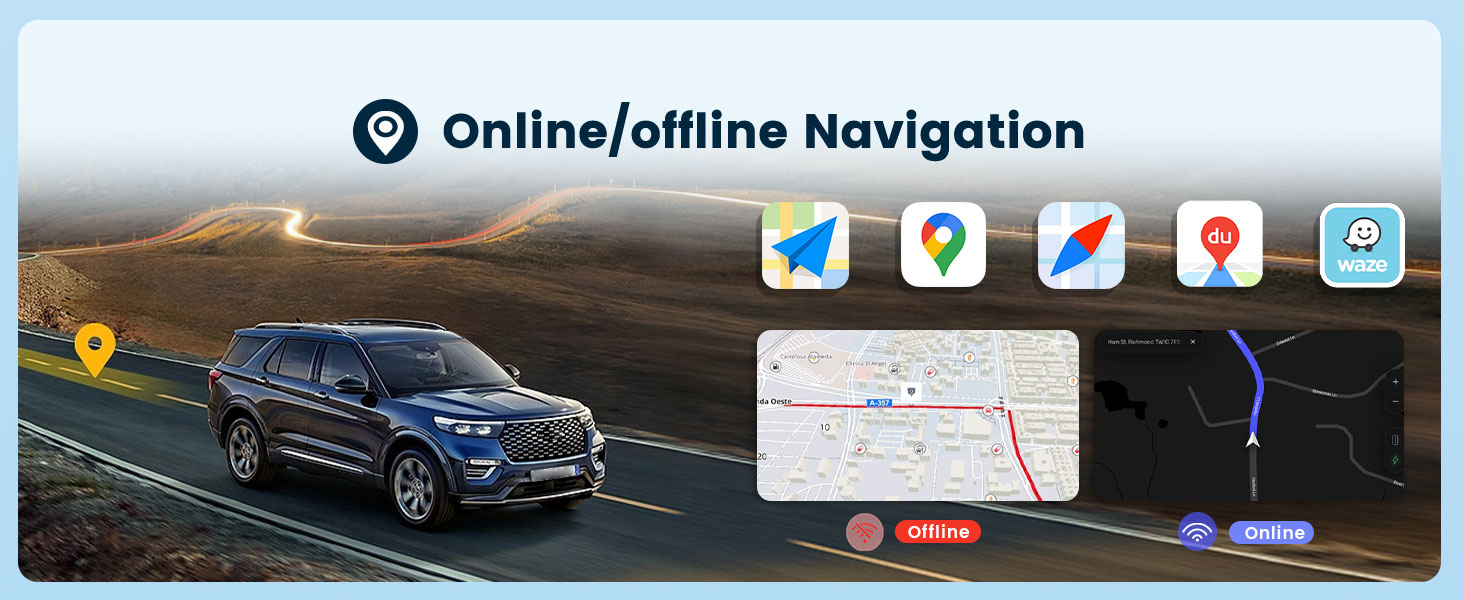
Figure 8: Online/Offline GPS Navigation interface.

Şekil 9: Dahili Wi-Fi işlevi.
3.4 HiFi Audio
Experience high-fidelity audio with 16-band EQ options. This technology aims to reproduce sound with exceptional clarity and accuracy, providing an immersive listening experience.

Figure 10: HiFi Audio settings with 16-band equalizer.
3.5 Bluetooth Hands-Free Calling & Music
Connect your phone via Bluetooth for hands-free calls and wireless music streaming. The unit supports A2DP for high-quality audio playback and AVRCP for remote control of music.

Figure 11: Bluetooth Call & Music functionality.
3.6 Direksiyon Kontrolü (SWC)
The unit supports your vehicle's original steering wheel controls, allowing you to manage audio, calls, and other functions without taking your hands off the wheel. Configuration may be required in the system settings.

Şekil 12: Direksiyon Kontrolü entegrasyonu.
3.7 Mirror Link (Screen Casting)
Mirror Link allows you to cast your smartphone's screen (both iOS and Android) onto the car stereo display via USB or Bluetooth connection. This enables viewing content like videos from YouTube or other apps on the larger screen.

Figure 13: Mirror Link (Screen Casting) feature.
3.8 FM/RDS Radyo
Tune into your favorite FM radio stations. The unit supports RDS (Radio Data System) for displaying station information, road conditions, and news where available.

Şekil 14: FM/RDS Radyo arayüzü.
3.9 Diğer Fonksiyonlar
- Bölünmüş Ekran: Allows running two applications side-by-side on the display.
- Customize UI Interface: Personalize the user interface to your preferences.
- Çift USB Bağlantı Noktaları: For connecting USB devices and charging.
- Subwoofer Çıkışı: For enhanced bass audio.
4. Bakım
To ensure the longevity and optimal performance of your podofo car stereo, follow these maintenance guidelines:
- Ekran Temizleme: Dokunmatik ekranı nazikçe silmek için yumuşak, tiftiksiz bir bez kullanın. Aşındırıcı temizleyiciler veya çözücülerden kaçının.
- Yazılım Güncellemeleri: Periodically check for and install system software updates to ensure optimal performance and access to new features.
- Çevresel Koşullar: Üniteyi aşırı sıcaklıklara, uzun süre doğrudan güneş ışığına veya aşırı neme maruz bırakmaktan kaçının.
- Kablo Bağlantıları: Tüm kabloların sağlam bir şekilde bağlı olduğundan emin olun. Gevşek bağlantılar aralıklı sorunlara yol açabilir.
5. Sorun Giderme
Araç müzik sisteminizde sorun yaşıyorsanız, aşağıdaki yaygın sorun giderme adımlarına bakın:
- Güç Yok:
- Tüm güç bağlantılarını ve sigortaları kontrol edin.
- Aracın kontak anahtarının açık olduğundan emin olun.
- Ses Yok:
- Hoparlör bağlantılarını doğrulayın.
- Ses seviyelerini ve sessize alma ayarlarını kontrol edin.
- Doğru ses kaynağının seçildiğinden emin olun.
- GPS Çalışmıyor:
- GPS anteninin düzgün bir şekilde takıldığından ve net bir görüş alanına sahip olduğundan emin olun view gökyüzünün.
- Sistem menüsünden GPS ayarlarını kontrol edin.
- Bluetooth Bağlantı Sorunları:
- Hem müzik çalarınızda hem de akıllı telefonunuzda Bluetooth'un etkinleştirildiğinden emin olun.
- Önceki eşleştirmeleri silin ve cihazları yeniden eşleştirin.
- Hem müzik setinizi hem de akıllı telefonunuzu yeniden başlatın.
- Geri Görüş Kamerası Görüntü Vermiyor:
- Check all camera wiring connections, especially the reverse trigger wire.
- Aracın geri viteste olduğundan emin olun.
- Dokunmatik Ekran Tepki Vermiyor:
- Üniteyi tekrar başlatın.
- Ekranın temiz ve tozdan arındırılmış olduğundan emin olun.
For persistent issues or complex problems, please contact podofo professional tech support.
6. Özellikler
| Özellik | Şartname |
|---|---|
| Marka | podofo |
| Araç Servis Tipi | Araba |
| Ekran Boyutu | 9 inç |
| Özel Özellikler | Bluetooth, Wireless Android Auto, Wireless CarPlay |
| Bağlantı Teknolojisi | Wi-Fi, Bluetooth, Carplay, Android Auto |
| Harita türü | Worldwide (Offline/Online) |
| Ses Çıkışı Modu | Stereo |
| Çözünürlük | 1024x600 |
| İşletim Sistemi | Android 13 |
| Bellek Depolama Kapasitesi | 64 GB |
| Veri deposu | 2 GB |
| Dokunmatik Ekran Türü | Kapasitif |
| Görüntü Türü | LCD |
| İnsan Arayüzü Girişi | Dokunmatik ekran |
| Desteklenen Uydu Navigasyon Sistemi | Küresel Konumlama Sistemi |
| Ürün Boyutları U x G x Y | 9"U x 9"G x 9"Y |
7. Garanti ve Destek
7.1 Garanti Bilgileri
The podofo Android Car Stereo comes with a 1 Yıllık Garanti Satın alma tarihinden itibaren geçerlidir. Bu garanti, üretim hatalarını ve normal kullanımdaki arızaları kapsar. Garanti talepleriniz için lütfen satın alma belgenizi saklayın.
7.2 Profesyonel Teknik Destek
podofo offers professional technical support for any concerns regarding installation, operation, or troubleshooting. If you have questions or require assistance, please reach out to us directly via Amazon. To help us provide suitable recommendations, especially for compatibility, please share your car's model, year, and a photo of the center console.


Figure 15: podofo's commitment to professional support and assistance for wiring harness issues.