
giriiş
This manual provides detailed instructions for the installation, operation, and maintenance of your DELLA 6000 BTU Window Air Conditioner. Please read this manual thoroughly before using the appliance and retain it for future reference.
Güvenlik Bilgileri
Yangın, elektrik çarpması ve kişilerin yaralanma riskini azaltmak için elektrikli aletleri kullanırken her zaman temel güvenlik önlemlerine uyun.
- Ünitenin uygun şekilde topraklandığından emin olun.
- Üniteyi hasarlı bir kablo veya fişle çalıştırmayın.
- Hava giriş/çıkış deliklerine parmaklarınızı veya yabancı cisimleri sokmayın.
- Herhangi bir temizlik veya bakım işlemi yapmadan önce cihazın fişini çekin.
- Yanıcı malzemeleri üniteden uzak tutun.
Ürün Bittiview
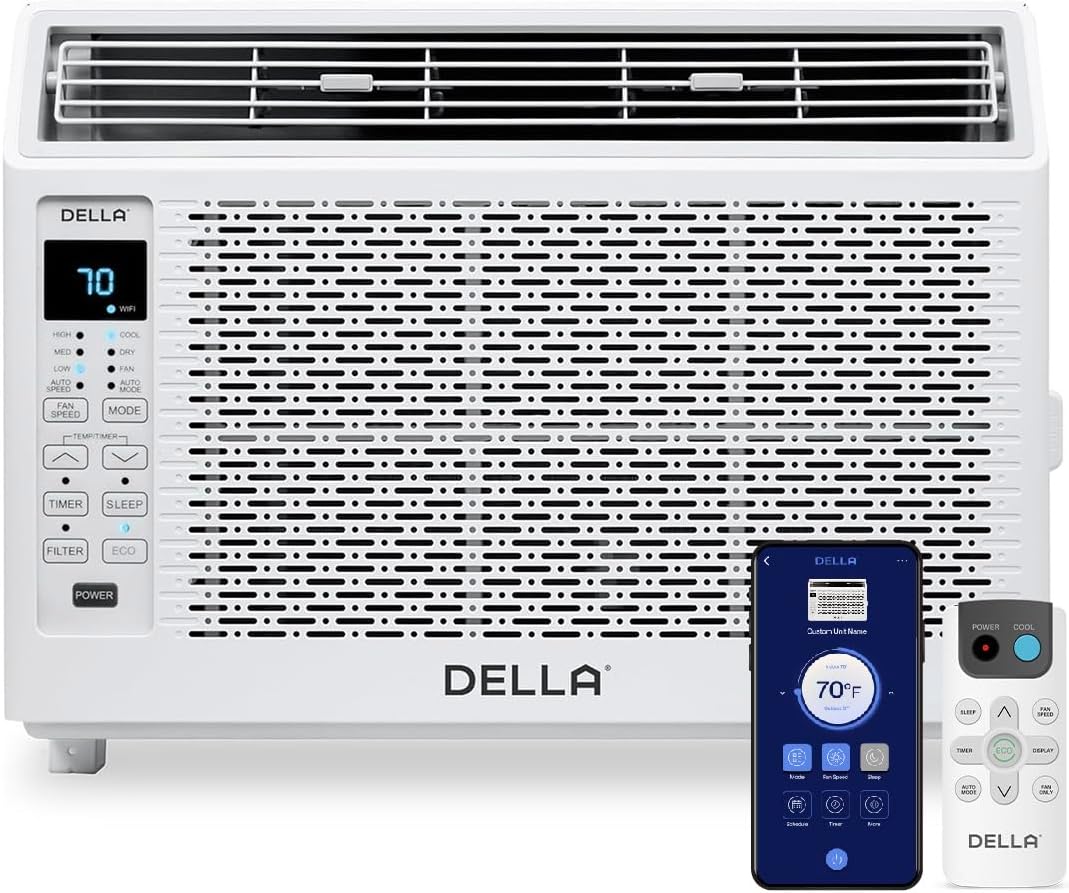
Figure 1: DELLA 6000 BTU Window Air Conditioner Unit, Remote Control, and Smartphone App Interface.
Kontrol Paneli
The unit features an intuitive control panel with various buttons and indicator lights for easy operation.
- Güç Düğmesi: Üniteyi açar veya kapatır.
- Mod Düğmesi: Cycles through Cool, Dry (Dehumidifier), Fan, Auto Mode, and ECO Mode.
- Fan Hızı Düğmesi: Adjusts fan speed (High, Med, Low, Auto Speed).
- Temp/Timer Buttons: Adjusts temperature settings or sets timer.
- Uyku Düğmesi: Gece boyunca sessiz ve enerji tasarruflu çalışma için uyku modunu etkinleştirir.
- Filtre Düğmesi: Filtrenin temizlenmesi gerektiğinde bunu gösterir.
- WiFi Göstergesi: Shows Wi-Fi connectivity status.
Uzaktan kumanda

Figure 2: Remote Control for the DELLA Air Conditioner.
The remote control allows for convenient operation of all unit functions from a distance. Ensure batteries are correctly installed.
Kurulum
The DELLA 6000 BTU Window Air Conditioner features a T-design for simplified installation.
Kurulum Adımları

Figure 3: T-design installation allows for flexible window opening.

Figure 4: Simplified 3-step installation process.
- Step 1: Secure into window frame. Place the unit into the window opening, ensuring it is securely seated.
- Step 2: Mount with four screws. Fasten the unit to the window frame using the provided screws for stability.
- Step 3: Extend side panels into wall. Extend the accordion side panels to fill the gap between the unit and the window frame, providing insulation and reducing air leaks.
Kurulum Kiti Bileşenleri

Figure 5: Included installation kit components.
The installation kit includes filler panels, insulation strips, lock frame & sash lock, screws, window sash seal, and a top mounting rail to ensure a secure and efficient installation.
Ürün Boyutları

Figure 6: Unit dimensions and recommended window opening.
The unit dimensions are approximately 15.94"D x 16.02"W x 12.05"H. It is designed for window widths between 23"-34" and requires at least 14.5" vertical clearance.
Kullanım Talimatları
Modlar ve Fan Hızları

Figure 7: Available operating modes and fan speeds.
The unit offers 5 operating modes (Cool, Auto, Dehumidify, Fan Only, ECO Mode) and 4 fan speeds (Auto, Low, Mid, High) to suit various comfort needs. Use the 'Mode' and 'Fan Speed' buttons on the control panel or remote to select your desired settings.
Sıcaklık Kontrolü
Use the up and down arrow buttons on the control panel or remote to set your desired temperature. The digital display will show the current setting.
Smart Features (Wi-Fi Control)

Figure 8: Control your unit wirelessly with the Della+ APP.

Figure 9: Della+ app supports Google Assistant and Alexa for voice control.
Download the free Della+ app to control your unit from anywhere. The app allows for remote control, scheduling, and integration with smart home systems like Google Assistant and Alexa.
Coğrafi Konum Fonksiyonu

Figure 10: Smart Geo Location feature for automatic operation.
The Geo Location feature allows the unit to automatically turn on or off based on your proximity to your home. This feature can be configured via the Della+ app.
Video 1: Demonstration of the Geo Location Function setup and customization within the Della+ app.
Uyku Modu

Figure 11: Intelligent sleep mode adjusts temperature for optimal comfort.
Intelligent sleep mode automatically adjusts the temperature overnight to maintain comfort and save energy. Activate it using the 'Sleep' button.
Zamanlayıcı Fonksiyonu
The 24-hour auto on/off timer allows you to program the unit to turn on or off at specific times, enhancing convenience and energy efficiency.
Bakım
Yeniden Kullanılabilir Filtre Temizleme

Figure 12: The unit features a washable and reusable filter.
The unit is equipped with a washable and reusable filter. A clean filter helps maintain optimal cooling performance and air quality. When the 'Filter' indicator light illuminates, it's time to clean the filter.
- Klimayı kapatıp fişini çekin.
- Remove the front panel and slide out the air filter.
- Filtreyi ılık sabunlu suyla yıkayın. İyice durulayın.
- Filtreyi tekrar takmadan önce tamamen kurumasını bekleyin.
- Ön paneli değiştirin.
Genel Bakım
- Ünitenin dışını yumuşak bir bezle temizleyin.amp Kumaş.
- Sert kimyasallar veya aşındırıcı temizleyiciler kullanmayın.
- Drenaj alanının tıkanıklıklardan arındırılmış olduğundan emin olun.
Sorun giderme
If you experience issues with your air conditioner, refer to the following common problems and solutions:
| Sorun | Olası Neden | Çözüm |
|---|---|---|
| Ünite açılmıyor | Elektrik yok; devre kesici atmış; cihaz fişten çekilmiş. | Güç kaynağını kontrol edin; devre kesiciyi sıfırlayın; fişin tam olarak takılı olduğundan emin olun. |
| Ünite etkili bir şekilde soğutmuyor | Kirli hava filtresi; tıkalı hava giriş/çıkışı; oda çok büyük; pencereler/kapılar açık. | Clean air filter; clear obstructions; ensure unit is sized correctly for room; close windows/doors. |
| Gürültülü çalışma | Gevşek parçalar; ünitenin düz durmaması; fanın tıkanması. | Check for loose components; ensure unit is level; remove any fan obstructions. |
| Dışarıda su damlıyor | Normal çalışma (yoğuşma). | This is normal during cooling. Ensure proper drainage. |
Özellikler
| Özellik | Detay |
|---|---|
| Marka Adı | Della |
| Model Bilgisi | 048-TL-W6KWD |
| Ürün Boyutları | 15.94 x 16.02 x 12.05 inç |
| Ürün model numarası | 048-TL-W6KWD |
| Yeterlik | Enerji Verimliliği |
| Kapasite | 0.5 Ton |
| Gürültü | 51 dB |
| Kurulum Türü | Pencere |
| Parça Numarası | 048-TL-W6KW_2 |
| Form Faktörü | Pencere Kliması |
| Özel Özellikler | Uzaktan kumanda |
| Cilttage | 115 Volt (AC) |
| Netage | 517.5 watt |
| Piller Dahil Mi? | HAYIR |
| Kat Alanı | 250 Metrekare |
| Soğutma Gücü | 6000 İngiliz Isı Birimi |
| BEE Yıldız Derecelendirmesi | Evet |
| Mevsimsel Enerji Verimliliği Oranı (SEER) | 11 |
| Güç Kaynağı | Kablolu Elektrik |
Garanti ve Destek
Your DELLA 6000 BTU Window Air Conditioner comes with a 1 Yıl Garanti. For any inquiries or technical assistance, Della provides 24/7 Müşteri Desteği.
Lütfen ziyaret edin Della Store on Amazon Daha fazla bilgi için veya destek ekibiyle iletişime geçmek için.