
giriiş
Thank you for choosing the CUORY Ergonomic Gaming Chair. This manual provides essential information for the safe assembly, proper operation, and effective maintenance of your new chair. Please read these instructions thoroughly before assembly and use to ensure optimal performance and longevity of the product.
Güvenlik Bilgileri
- Ağırlık sınırı: Ensure the chair is stable and do not exceed the maximum weight capacity. The specific weight limit is not provided, but general ergonomic chair limits are typically around 250-300 lbs (113-136 kg).
- Toplantı: Follow all assembly instructions carefully. Do not use power tools for assembly unless explicitly stated, as this may damage components.
- Kararlılık: Always ensure all bolts and screws are securely tightened before using the chair. Periodically check and re-tighten fasteners.
- Hareket: Avoid standing on the chair or using it as a step stool. Do not lean excessively to one side while seated, especially when reclining, to prevent tipping.
- Çocuklar: Keep small children and pets away from the assembly area. Small parts can be a choking hazard.
- Çevre: Use the chair on a flat, stable surface. Avoid exposure to direct sunlight or extreme temperatures to prevent material degradation.
Paket İçeriği
Montaj işlemine başlamadan önce, tüm bileşenlerin eksiksiz ve hasarsız olduğundan emin olun. Herhangi bir parça eksik veya hasarlıysa, lütfen müşteri hizmetleriyle iletişime geçin.
- arkalık
- Seat Cushion with Armrests and Footrest mechanism
- Yıldız Tabanı
- Tekerlekler (5 adet)
- Gaz Kaldırma Silindiri
- Gaz Kaldırma Kapağı
- Mekanizma Plakası
- Bel Destek Yastığı (masaj fonksiyonlu)
- Kafalık Yastığı
- Donanım Paketi (vidalar, rondelalar, Allen anahtarı)
- Kullanım Kılavuzu

Image: All components of the CUORY Gaming Chair laid out for assembly. This includes the backrest, seat, base, wheels, and various hardware pieces.
Kurulum ve Montaj
Assembly is required for this chair. Please follow the included instructions carefully. A general overview Montaj sürecine ilişkin bilgiler aşağıda verilmiştir:
- Tekerlekleri Tabana Takın: Yıldız tabanın her ayağının ucundaki deliklere beş tekerleği yerleştirin. Yerlerine oturana kadar sıkıca bastırın.
- Gazlı Asansörün Montajı: Gaz kaldırma silindirini yıldız tabanın orta deliğine yerleştirin. Üzerini gaz kaldırma kapağıyla kapatın.
- Mekanizma Plakasını Koltuğa Takın: Align the mechanism plate with the pre-drilled holes on the underside of the seat cushion. Secure it with the provided screws and Allen wrench. Ensure the front of the mechanism faces the front of the seat.
- Koltuğu Gazlı Kaldırma Mekanizmasına Bağlayın: Carefully place the assembled seat onto the gas lift cylinder, ensuring the tapered end of the gas lift fits securely into the mechanism plate.
- Sırtlığı Koltuğa Takın: Align the backrest with the mounting brackets on the seat cushion. Secure it using the provided screws.
- Install Pillows: Attach the headrest pillow and lumbar support pillow to the backrest using their integrated straps. The lumbar pillow may have a USB cable for its massage function.
- Son Kontrol: Kullanmadan önce tüm vidaların sıkı olduğundan ve sandalyenin sabit durduğundan emin olun.
Kullanım Talimatları
Your CUORY Gaming Chair offers several adjustable features for personalized comfort:
- Yükseklik Ayarı: To adjust the chair's height, pull the lever located on the right side of the seat upwards. While seated, lift your weight to raise the chair; to lower it, remain seated and pull the lever. Release the lever at the desired height.
- Yatırma Fonksiyonu: The chair features a reclining backrest with two positions. Pull the lever on the left side of the seat upwards to unlock the recline. Lean back to your desired angle and release the lever to lock it in place. To return to an upright position, lean forward slightly and pull the lever again.
- Reclining Tension Adjustment: A knob located underneath the seat allows you to adjust the tension required to recline the chair. Turn clockwise to increase tension (making it harder to recline) or counter-clockwise to decrease tension (making it easier to recline).
- Geri Çekilebilir Ayak Dayanağı: To use the footrest, pull it out from underneath the seat. Extend it to your desired length. To retract, push it back under the seat until it is fully hidden.
- Bel Masajı Fonksiyonu: The lumbar support pillow includes a massage function. Connect the USB cable from the pillow to a compatible USB power source (e.g., computer, power bank, USB wall adapter). The massage function will activate.
- 360 Derece Dönme: The chair base allows for full 360-degree rotation.
- Katlanabilir Kolçaklar: The armrests can be flipped up to allow for closer access to a desk or for easier storage.

Resim: Yan view of the chair demonstrating the reclining mechanism and the levers for height and recline adjustment.
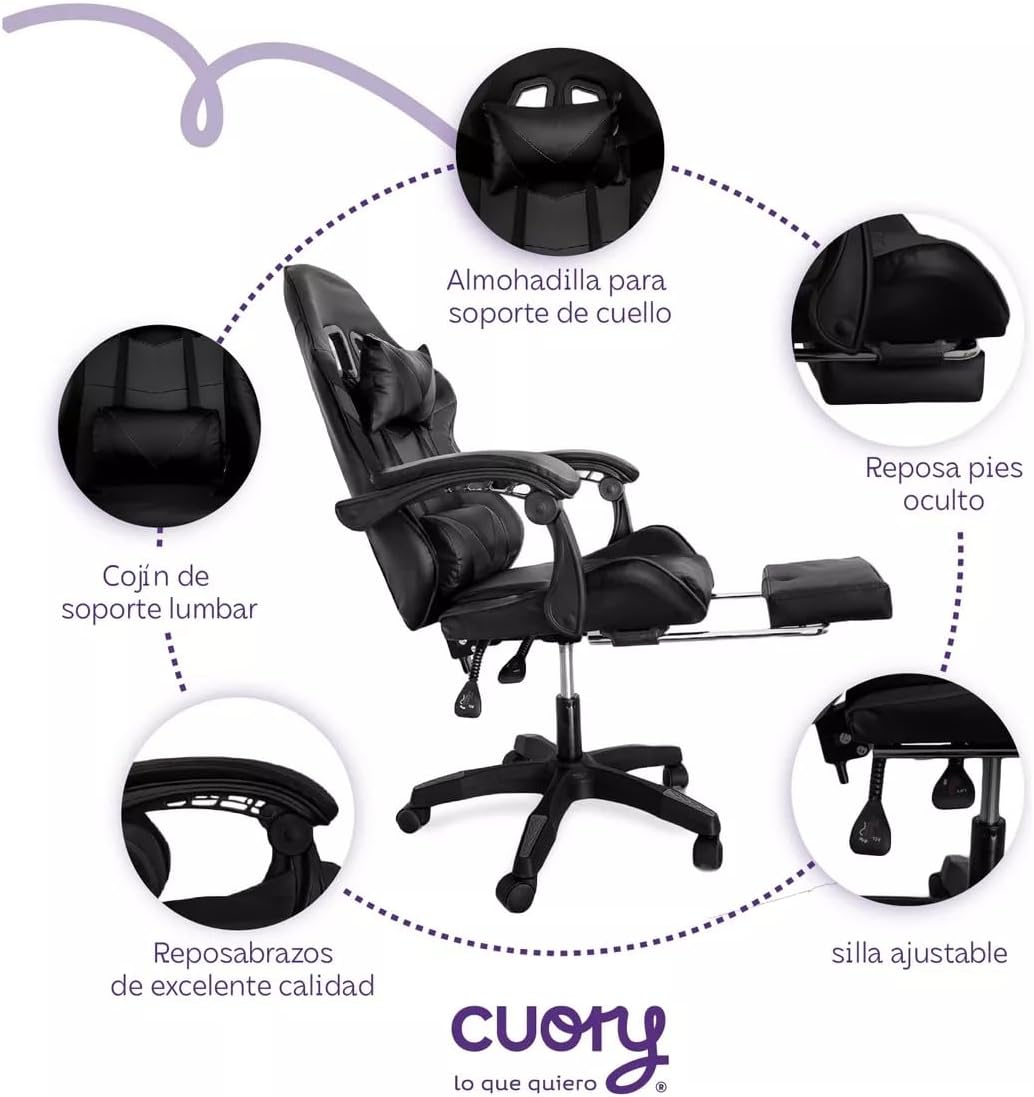
Resim: Ayrıntılı view highlighting the neck support pillow, hidden footrest, lumbar support cushion, quality armrests, and adjustable chair controls.
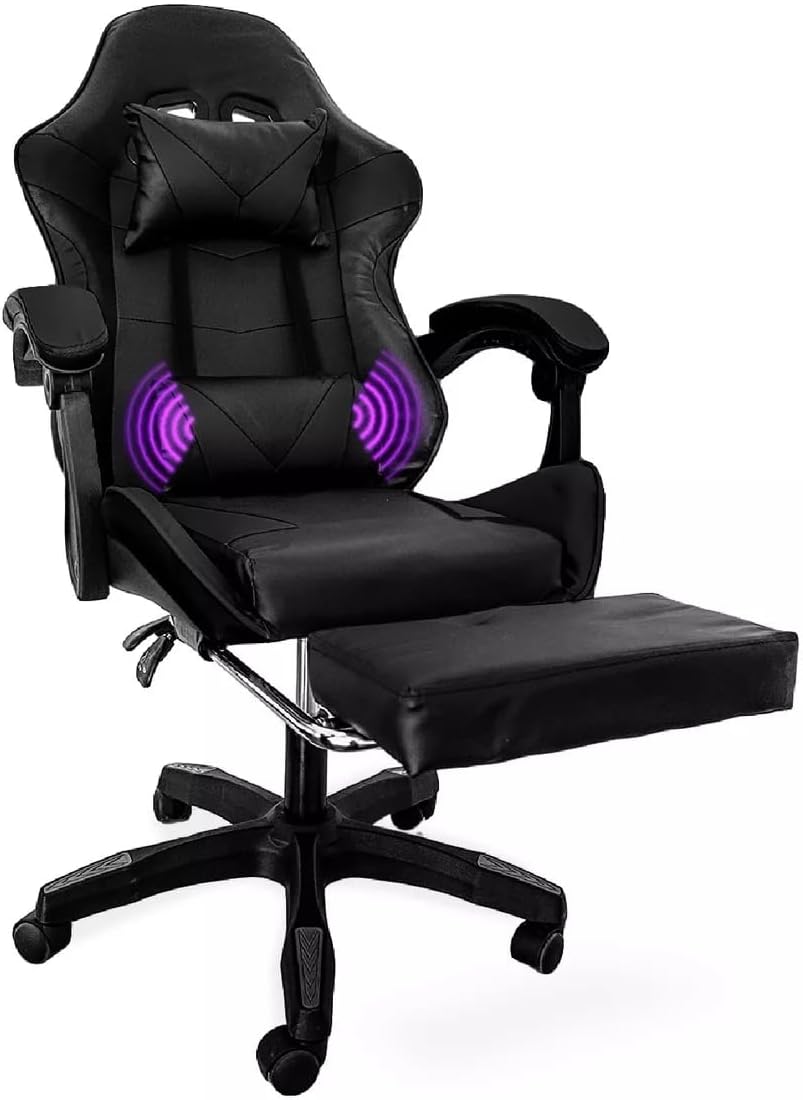
Image: The gaming chair with its footrest fully extended and visual representation of the lumbar massage function active.
Bakım
- Temizlik: Wipe the chair surfaces with a soft, damp cloth. For synthetic leather, use a mild soap solution if necessary, then wipe with a clean, damp Bezle silin ve iyice kurulayın. Sert kimyasallardan veya aşındırıcı temizleyicilerden kaçının.
- Bağlantı Elemanları: Periodically check all screws and bolts to ensure they are tight. Re-tighten as needed to maintain stability and safety.
- Tekerlekler: Clean any hair or debris from the casters regularly to ensure smooth movement.
- Gaz Kaldırma: Do not attempt to disassemble or repair the gas lift cylinder. If it malfunctions, contact customer support for replacement.
Sorun giderme
| Sorun | Olası Neden | Çözüm |
|---|---|---|
| Sandalye sallanıyor veya dengesiz hissettiriyor. | Gevşek vidalar veya düz olmayan zemin. | Tüm montaj vidalarını kontrol edin ve sıkın. Sandalyenin düz bir yüzeyde olduğundan emin olun. |
| Sandalyenin yüksekliği ayarlanmıyor. | Gazlı kaldırma mekanizması arızalı veya kol devreye girmemiş. | Yükseklik ayar kolunun tamamen çekildiğinden emin olun. Sorun devam ederse, gazlı kaldırma mekanizmasının değiştirilmesi gerekebilir. Destek ekibiyle iletişime geçin. |
| Sırtlık geriye doğru yatırılamaz veya kilitlenemez. | Recline mechanism locked or damaged. | Ensure the recline lever is pulled to unlock. Check if the tension knob is too tight. If damaged, contact support. |
| Tekerlekler düzgün dönmüyor. | Tekerleklere sıkışan döküntüler. | Tekerleklerin üzerindeki saç, toz veya diğer kalıntıları temizleyin. |
| Lumbar massage function not working. | USB power issue or cable disconnected. | Ensure the USB cable is securely connected to a working power source. Try a different USB port or adapter. Note: The USB cable for the massage function may be short, requiring an extension or nearby power source. |
Özellikler
| Özellik | Detay |
|---|---|
| Marka | CUORY |
| Model Adı | Silla Gamer (Gaming Chair) |
| Model Numarası | CUO2-MN-VAR |
| Renk | Siyah |
| Malzeme | Synthetic Leather (Seat, Backrest), Metal (Frame) |
| Ürün Boyutları (D x G x Y) | 48 cm x 48 cm x 100 cm (18.9 x 18.9 x 39.4 inç) |
| Ürün Ağırlığı | 15 Kilogram (33 lbs) |
| Oturma derinliği | 35 cm (13.8 inç) |
| Chair Back Width | 34 cm (13.4 inç) |
| Özellikler | Retractable Footrest, Height Adjustment, Reclining Backrest (2 positions), 360-Degree Swivel, Flip-up Armrests, Lumbar Support Pillow with Massage, Headrest Pillow |
| Önerilen Kullanımlar | Oyun, Ofis |
| Montaj Gerekli | Yes (Instructions included) |
| Bakım Talimatları | Wipe with a cloth |

Image: Diagram illustrating the key dimensions of the CUORY Gaming Chair, including height, width, and depth measurements for various components.
Garanti ve Destek
CUORY products are designed for quality and durability. While specific warranty details are not provided in this manual, please refer to your purchase documentation or the seller's policy for warranty information.
For technical support, missing parts, or warranty claims, please contact CUORY customer service through the retailer where you purchased the product or visit the official CUORY store page:
Ek koruma planları ayrıca satın alınabilir. Ayrıntılar için lütfen satıcınızla iletişime geçin.
Resmi Ürün Videoları
No official product videos from the seller were found to embed in this manual. Please check the product page on the retailer's webMevcut tüm video içerikleri için site.