
1. Giriş
Thank you for choosing the MONODEAL DV68 Bone Conduction Headphones. These headphones are designed to provide a comfortable and safe listening experience, especially during sports and outdoor activities. Utilizing advanced bone conduction technology and Bluetooth 5.3, they deliver clear audio while keeping your ears open to ambient sounds. The integrated smart light enhances visibility and safety during nighttime use.
2. Paket İçeriği
Lütfen paketi aşağıdaki öğeler açısından kontrol edin:
- MONODEAL DV68 Bone Conduction Headphones
- Manyetik Şarj Kablosu
- Kullanıcı Kılavuzu
- Earplugs (optional, for enhanced sound isolation)
3. Ürün Bittiview
Familiarize yourself with the components of your MONODEAL DV68 headphones.
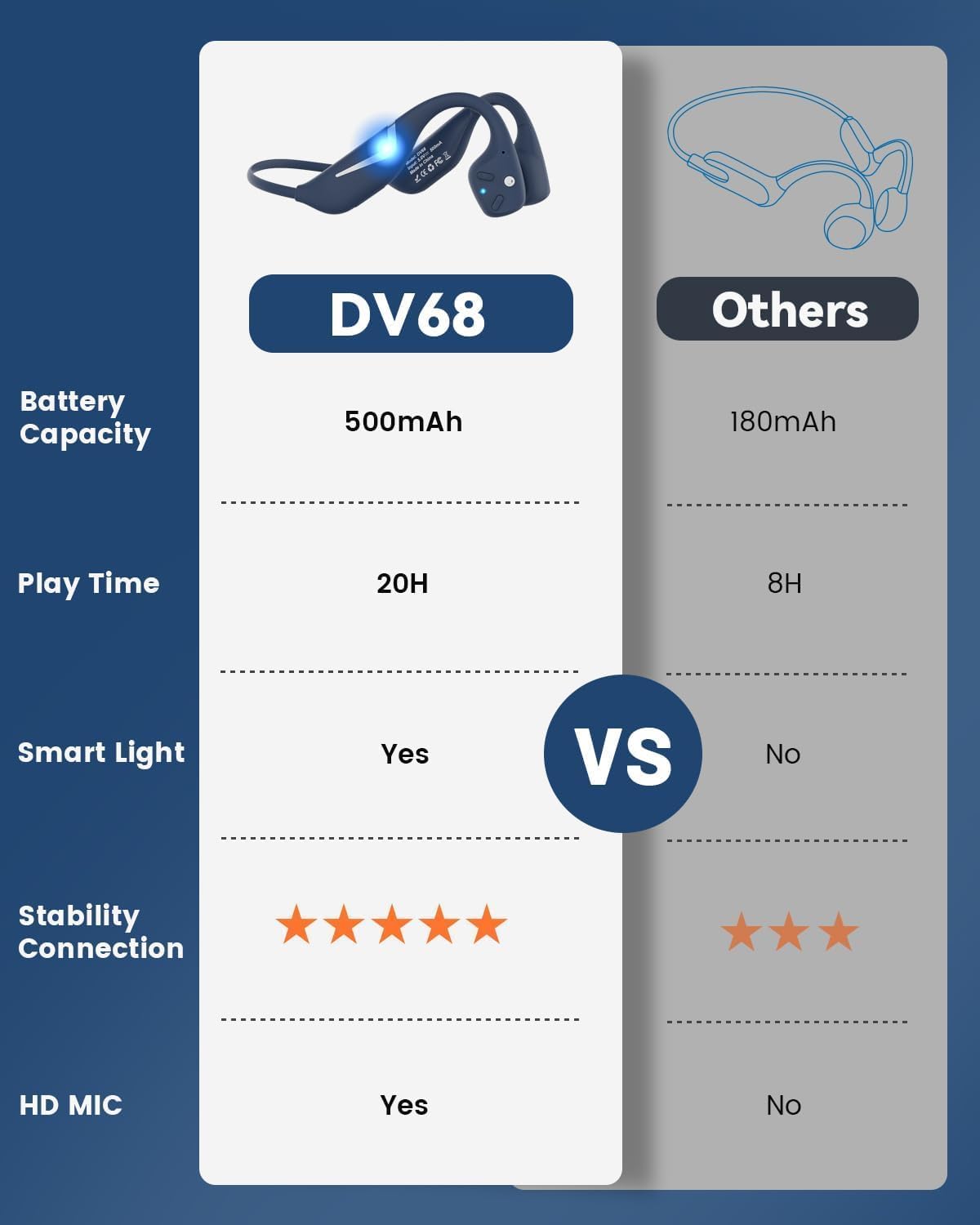
Figure 3.1: MONODEAL DV68 Bone Conduction Headphones, showing the overall design.

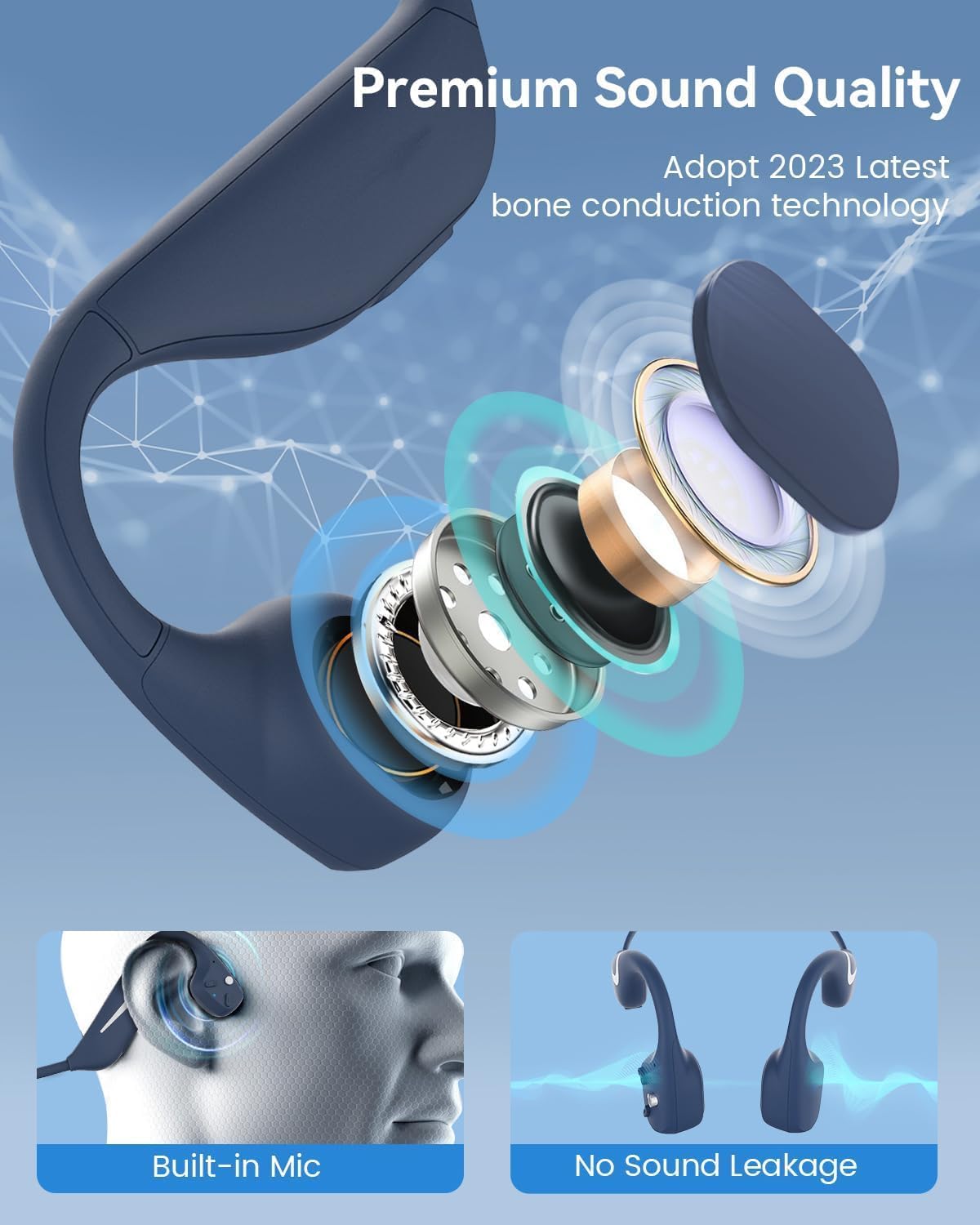
Şekil 3.2: Patlatılmış view illustrating the bone conduction transducer and built-in microphone.
3.1 Kontroller ve Bağlantı Noktaları
Şekil 3.3: Yan view of the headphones highlighting the control buttons.

Şekil 3.4: Yakın çekim view of the magnetic charging port.
The headphones feature physical buttons for power, volume, and playback control. The magnetic charging port is located on one of the ear pieces for convenient charging.
4. Özellikler
| Özellik | Şartname |
|---|---|
| Model Numarası | DV68 |
| Bluetooth Sürümü | 5.3 |
| Pil Kapasitesi | 500 mAh |
| Oyun zamanı | 20 saate kadar |
| Suya Dayanıklılık Derecesi | IP67 (Sweat, rain, and splash resistant) |
| Ağırlık | 34 gram |
| Frekans Aralığı | 20 Hz - 20,000 Hz |
| Bağlantı Teknolojisi | Kablosuz (Bluetooth) |
| Ses Sürücüsü Türü | Kemik iletimi |
| Özel Özellikler | Smart LED Light, Built-in Microphone, Multipoint Pairing |

Şekil 4.1: Üzeriview of key features including Open-Ear design, IP67 Waterproofing, 500mAh Battery, Bluetooth V5.3, Lightweight, HD Microphone, Multipoint Pairing, and RGB Light.
5. Kurulum
5.1 Kulaklıkların Şarj Edilmesi
İlk kullanımdan önce kulaklıklarınızı tamamen şarj edin.
- Manyetik şarj kablosunu kulaklıktaki şarj portuna bağlayın.
- Kablonun diğer ucunu bir USB güç adaptörüne (dahil değildir) veya bir bilgisayarın USB portuna bağlayın.
- LED göstergesi şarj durumunu gösterecektir. Tam şarj genellikle yaklaşık 2 saat sürer.

Figure 5.1: Illustration of 20-hour battery life and quick charge feature (10 minutes charging for 2 hours playtime).
5.2 Bluetooth Eşleştirme
Kulaklıklarınızı bir cihaza bağlamak için:
- Kulaklıkların kapalı olduğundan emin olun.
- Güç düğmesini basılı tutun, LED göstergesi kırmızı ve mavi yanıp sönene kadar bekleyin; bu, eşleştirme modunun aktif olduğunu gösterir.
- Cihazınızda (akıllı telefon, tablet, bilgisayar) Bluetooth'u etkinleştirin ve kullanılabilir cihazları arayın.
- Select "MONODEAL DV68" from the list of found devices.
- Bağlantı sağlandığında LED göstergesi sabit mavi renge dönecek veya yavaşça mavi renkte yanıp sönecektir.
The headphones support multipoint pairing, allowing connection to two devices simultaneously. Refer to your device's Bluetooth settings for managing multiple connections.
6. Kullanım Talimatları
6.1 Güç Açma/Kapatma
- Güç Açık: Güç düğmesini 3 saniye basılı tutun.
- Kapat: Güç düğmesini 5 saniye basılı tutun.
6.2 Müzik Oynatma
- Oynat/Duraklat: Çok işlevli düğmeye bir kez basın.
- Sonraki Parça: Ses açma (+) düğmesine 2 saniye boyunca basılı tutun.
- Önceki parça: Ses açma (-) düğmesine 2 saniye boyunca basılı tutun.
- Sesi aç: Ses + düğmesine basın.
- Sesi kıs: Ses kısma düğmesine (-) basın.
6.3 Çağrı Yönetimi
- Çağrıyı Cevapla/Sonlandır: Çok işlevli düğmeye bir kez basın.
- Çağrıyı Reddet: Çok işlevli düğmeyi 2 saniye basılı tutun.
- Sesli Asistan: Çok işlevli düğmeye iki kez basın.
6.4 Smart LED Light
The headphones feature a smart LED light for enhanced visibility during nighttime activities.
- Işığı Açma/Kapatma: Refer to the specific button combination in your quick start guide (usually a dedicated light button or a long press of a volume button).
- The light can cycle through different colors (e.g., blue, green, red) to increase your safety and visibility.

Figure 6.1: A runner demonstrating the smart LED light feature for night safety.
7. Bakım
7.1 Temizlik
To maintain hygiene and product longevity:
- After sweating or intense workouts, gently wipe the headphones with a damp bez veya ıslak mendil.
- Sert kimyasallar veya aşındırıcı temizleyiciler kullanmaktan kaçının.
7.2 Depolama
- Kulaklığınızı serin, kuru, doğrudan güneş ışığından ve aşırı sıcaklıklardan uzak bir yerde saklayın.
- When not in use, it is recommended to store them in their original packaging or a protective case.
7.3 Suya Dayanıklılık
The MONODEAL DV68 headphones are IP67 rated, meaning they are resistant to sweat, rain, and splashes. However, they are not suitable for swimming or submersion in water.

Figure 7.1: A person exercising with the headphones, demonstrating their IP67 water resistance against sweat and rain. Note: Not for swimming.
8. Sorun Giderme
Kulaklıklarınızla ilgili sorun yaşıyorsanız, lütfen aşağıdaki yaygın çözümlere bakın:
- Güç Yok:
Kulaklıkların tamamen şarj olduğundan emin olun. Şarj kablosuna ve güç kaynağına bağlayın. - Eşleştirilemiyor:
Make sure the headphones are in pairing mode (LED flashing red and blue). Turn off Bluetooth on other nearby devices that may have previously connected. Try restarting both the headphones and your device. - Ses Yok/Düşük Ses:
Check the volume levels on both the headphones and your connected device. Ensure the headphones are properly positioned on your cheekbones. If using earplugs, ensure they are correctly inserted. - Aralıklı Bağlantı:
Ensure your device is within the Bluetooth range (up to 15 meters) and there are no significant obstacles between the headphones and your device. Avoid strong electromagnetic interference. - Kötü Arama Kalitesi:
Ensure the microphone is not obstructed. Move to an area with better network reception for your phone.
9. Garanti ve Destek
9.1 Garanti Bilgileri
MONODEAL provides a 2 yıllık garanti for the DV68 Bone Conduction Headphones from the date of purchase. This warranty covers manufacturing defects and ensures the product meets its specified performance. Please retain your proof of purchase for warranty claims.
9.2 Müşteri Desteği
For further assistance, technical support, or warranty inquiries, please contact MONODEAL customer service through the retailer where you purchased the product or visit the official MONODEAL webiletişim bilgileri için site.


