
1. Ürün Bittiview
The WEILAILIFE Wireless Security Camera System provides comprehensive surveillance for your property. This system features 5-megapixel cameras with a 130-degree ultra-wide-angle lens, ensuring clear and broad coverage. Equipped with two-way audio, you can communicate with visitors or deter intruders directly through the camera. Enhanced WiFi signal strength via dual antennas ensures stable video transmission. Advanced PIR and dual detection technology accurately identifies human movement, reducing false alarms from environmental factors. The system supports a free mobile application for remote monitoring without any monthly fees. It includes a 3TB hard drive for continuous recording and offers flexible storage options.

Resim: Üzeriview of the WEILAILIFE Wireless Security Camera System components.
2. Paket İçeriği
Lütfen aşağıda listelenen tüm öğelerin paketinizde yer aldığından emin olun:
- 5-megapixel Wireless Cameras x 4
- Camera Antennas 3DB x 8
- Network Video Recorder (NVR) Power Supply 12V2A x 1
- Kullanım Kılavuzu x 1
- Warning Labels x 1
- Camera Mounting Screws Pack x 4
- Wireless 5-megapixel 10-channel Network Video Recorder with 3TB Hard Disk Drive (HDD) built-in x 1
- Wireless Camera Power Supply 12V1A x 4
- Camera Extension Antenna 3 meters x 1
- HDMI Connection Cable 1 meter x 1
- Uzaktan Kumanda x 1
Kutudan Çıkarma Videosu
Video: Unboxing the OHWOAI 5MP 4-camera mini NVR security system. This video demonstrates the contents and initial presentation of a similar WEILAILIFE security camera system.
3. Kurulum
3.1 NVR and Monitor Connection
Connect the Network Video Recorder (NVR) to your router using an Ethernet cable. Then, connect a monitor to the NVR via the HDMI or VGA port. Plug in the USB mouse to the NVR's rear panel. Finally, connect the NVR to a power source.
3.2 Kamera Bağlantısı
Connect each camera to its respective power supply. Ensure the antennas are securely tightened to the cameras for optimal wireless signal reception.
3.3 Mobil Uygulama Kurulumu
Download the 'Honestview' or 'Eseecloud' app from your smartphone's App Store (iOS) or Play Store (Android). Register a new account using your email address or phone number. Follow the prompts to set a password. To add your device, tap the '+' icon in the app and scan the QR code displayed on your NVR's monitor. Alternatively, you can manually input the device's cloud ID. Once added, you can name your device and begin remote monitoring.

Image: Plug-and-play setup illustration, showing easy connection of NVR and camera, and monitoring via the Honestview app on multiple devices.

Image: Remote access via smartphone, desktop, and tablet, showing live feeds from multiple cameras.
Setup and App Connection Video
Video: Demonstrates how to add a device using the EseeCloud app, including account registration and scanning the QR code.
Video: A guide on the connection methods and operation for a 5MP security camera system.
4. Kullanım Talimatları
4.1 İki Yönlü Konuşma
Utilize the dedicated app on your smartphone, tablet, or computer to engage in two-way communication with individuals near the camera. This feature allows you to speak and listen, providing real-time interaction.

Image: Two-way talk in action, demonstrating communication between a smartphone user and a person at the camera's location.
4.2 Hareket Algılama ve Uyarılar
The system employs advanced recognition algorithms and infrared detection (PIR) to send real-time notifications to your device when unusual activity is detected. This dual detection minimizes false alarms from non-human movements like leaves or animals, significantly improving performance over traditional motion sensors.
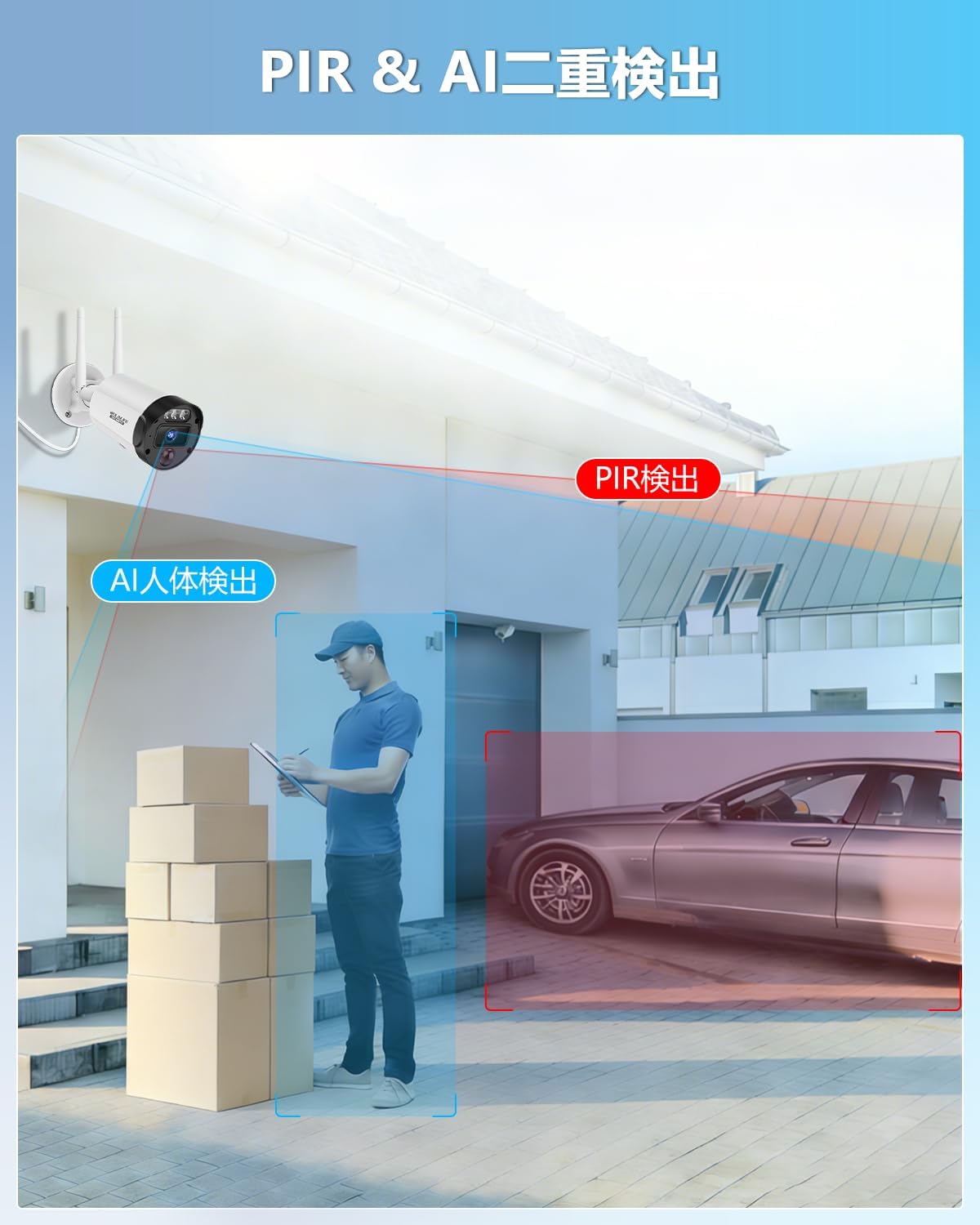
Image: PIR and AI dual detection system, showing how it distinguishes between humans and other objects to reduce false alarms.
4.3 Uzaktan Kumanda
The system can be controlled remotely using the included remote control or through the mobile application. This allows for convenient management of your surveillance system from anywhere.

Image: Remote control functionality, showing a user managing multiple camera views on a television.
4.4 Gece Görüş Modları
The cameras feature super night vision with 845nm 3 infrared dot matrix lamps, allowing visibility up to 24 meters in darkness. The IR-LED system automatically activates infrared mode in low-light conditions, ensuring continuous 24/7 security.
4.5 Kayıt Modları
The system supports various recording modes including scheduled recording and manual recording. The built-in 3TB hard drive allows for extensive storage of footage.

Image: Illustration of continuous recording, scheduled recording, and motion detection recording modes.
Operating Functions Video
Video: Demonstrates various functions of a 4-camera security camera set, including live view ve oynatma.
5. Özellikler
- 3K 5-Megapixel Ultra HD: Provides 2592 x 1944 high-resolution images for clear 24/7 surveillance.
- 130° Ultra Geniş Açılı Lens: Geniş bir yelpazeyi kapsar view, minimizing blind spots and enhancing monitoring capabilities.
- Dual Antenna for Enhanced WiFi: Improves wireless signal strength by approximately 50%, ensuring smoother and clearer video transmission.
- PIR & Dual Detection: Utilizes advanced recognition algorithms and infrared detection to send real-time notifications for abnormal activity, effectively filtering out non-human movements.
- Free APP & No Monthly Fees: Access live feeds and recordings via the 'Honestview' or 'Eseecloud' app without any subscription costs.
- IP66 Su Geçirmez: Designed for outdoor use, providing reliable surveillance in various weather conditions, from hot to cold.
- Esnek Depolama: Features a built-in 3TB hard drive and H.265+ compression technology, reducing required storage capacity by 50% while maintaining clear images.
- AI WDR Function: Adjusts the balance between bright and dark parts of surveillance footage to improve image clarity.
- Expandable up to 10 Channels: The system supports expansion to up to 10 cameras, suitable for various indoor and outdoor settings like offices, shops, and villas.

Image: Visual comparison demonstrating the expanded coverage of a 130-degree ultra-wide-angle lens.

Image: IP66 waterproof camera operating effectively in rainy outdoor conditions, highlighting its durability across temperatures.
6. Bakım
To ensure optimal performance and longevity of your WEILAILIFE Wireless Security Camera System, regular maintenance is recommended:
- Lensleri Temizleyin: Periodically clean camera lenses with a soft, lint-free cloth to prevent dust and smudges from affecting image clarity.
- Bağlantıları Kontrol Edin: Ensure all power and network cables are securely connected to the NVR and cameras.
- Donanım Yazılımı Güncellemeleri: Check for and install any available firmware updates for the NVR and cameras to benefit from improved features and security patches.
- Review Kayıtlar: Düzenli olarak tekrarview kaydedilmiş footage to ensure the system is capturing events as expected and to identify any potential issues.
- Güç Döngüsü: If you experience any issues, try power cycling the NVR and cameras by disconnecting them from power for a few minutes and then reconnecting.
7. Sorun Giderme
If you encounter problems with your WEILAILIFE Wireless Security Camera System, please refer to the following common troubleshooting steps:
- Video yayını yok:
- Ensure all cameras and the NVR are powered on and connected.
- Check network cables and Wi-Fi connection for stability.
- Verify that the cameras are properly paired with the NVR.
- Kötü Görüntü Kalitesi:
- Kamera lenslerini temizleyin.
- Ensure cameras are within optimal range of the NVR for strong signal.
- Adjust camera position to avoid glare or obstructions.
- Uygulama Bağlantı Sorunları:
- Akıllı telefonunuzun istikrarlı bir internet bağlantısına sahip olduğundan emin olun.
- Verify the NVR is connected to the internet.
- Restart the app or reinstall it if problems persist.
- Check if the device's cloud ID is correctly entered in the app.
- Yanlış Hareket Uyarıları:
- NVR cihazında veya uygulamada hareket algılama hassasiyeti ayarlarını yapın.
- Define specific detection zones to exclude areas with frequent non-human movement.
- HDD Issues (e.g., not recording):
- Check the HDD status in the NVR settings.
- Ensure the HDD is properly installed and recognized.
- If the HDD is old or showing errors, consider replacing it.
Bu adımlar sorunu çözmezse lütfen daha fazla yardım için müşteri desteğiyle iletişime geçin.
8. Özellikler
| Özellik | Şartname |
|---|---|
| Marka | WEILAILFE |
| Model Numarası | 日CSWL-07SW5MP03-4ch+3.5"3TB-BW |
| Bağlantı Teknolojisi | Wired IEEE802.11a/n/f, Wireless Wi-Fi 2.4G/5.8G |
| Video Yakalama Çözünürlüğü | 1920p, 2.7K 1920P (5 Megapixel) |
| Özel Özellikler | 130° Ultra-Wide Angle, PIR & Dual Detection, Dual Antenna for Enhanced WiFi, Two-Way Audio, Free APP & No Monthly Fees |
| Kanal Sayısı | 10 |
| Maksimum Bellek Kapasitesi | 3 TB (Built-in HDD) |
| Güç Türü | Kablolu Elektrik |
| İşletim Sistemi | Linux |
| Uyumlu Cihazlar | Camera, Smartphone, Tablet, TV, Desktop PC |
| Sinyal Biçimi | Dijital |
| Gece Görüşü | 845nm 3 Infrared Dot Matrix Lamp Süper Gece Görüşü |
| Gece Görüş Aralığı | 20 metre |
| Anten Tipi | Sabit |
| Kare Hızı | 15 kare/saniye |
| Kayıt Modu | Scheduled, Manual |
| Optik Sensör Teknolojisi | CMOS |
| USB Bağlantı Noktaları | 2 |
| Donanım Arayüzü | HDMI, USB, VGA |
| Lens Türü | Geniş Açı |
| Video Girişi | Network Camera, Wireless Digital Video Camera |
| Alanı View | 130 derece |
| Önerilen Kullanımlar | Açık Hava, Kapalı Alan |
| Ürün Ağırlığı | 3.9 kilogram |
| Ürün Boyutları | 18x30x26 cm |
9. Garanti ve Destek
WEILAILIFE is committed to providing high-quality products and excellent customer service. Our products undergo strict quality control during manufacturing and inspection.
- Garanti: This product comes with a 12-month quality guarantee.
- Müşteri Hizmetleri Merkezi: We have a service center located in Chiba, Chiba City, Inage Ward, Tendai 5-8-9 Rose Avenue Inage Tendai 1F, Japan.
- Destek Ekibiyle İletişime Geçin: If you have any questions during consideration or use, or if you encounter any issues, please feel free to contact us. Our Japanese-speaking support team is available via email and aims to respond within 24 hours.
- E-posta: info-jp@weilailifetech.com
- LINE Service: For quick support and updates, you can also connect with us via LINE.

Image: QR code for accessing WEILAILIFE's LINE service for customer support.