
1. Kurulum ve İlk Kurulum
Before operating your new Candy Smart Pro Inverter washing machine, it is crucial to follow these installation steps carefully to ensure proper function and safety.
Paket açma
- Polistiren taban ve koruyucu film de dahil olmak üzere tüm ambalaj malzemelerini dikkatlice çıkarın.
- Remove the transit bolts located at the rear of the machine. These bolts secure the drum during transport and must be removed before use. Keep them for future transport if needed.
Konumlandırma
- Çamaşır makinesini sağlam ve düz bir yüzeye yerleştirin. Makinenin etrafında havalandırma ve erişim için yeterli alan olduğundan emin olun.
- Adjust the leveling feet at the bottom of the machine to ensure it is perfectly stable and does not wobble. Use a spirit level for accuracy.
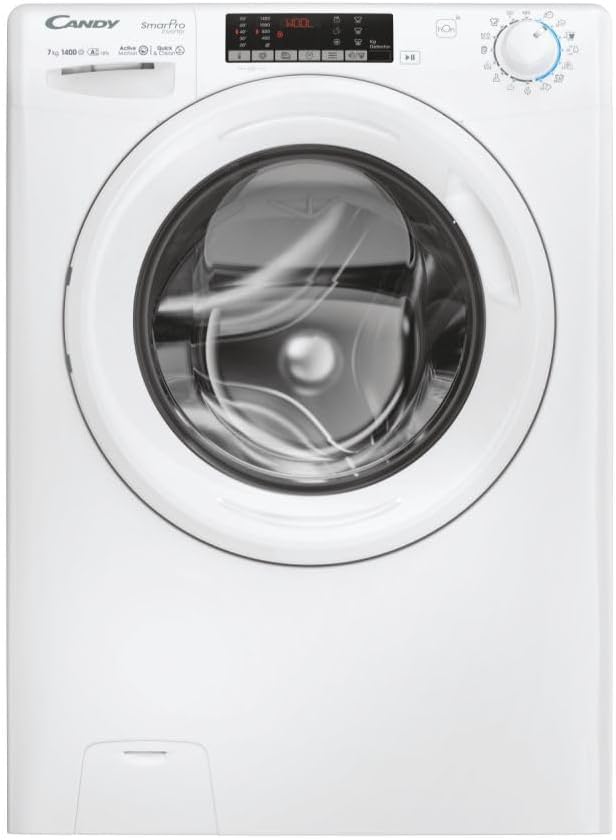
Şekil 1.1: Ön view of the Candy Smart Pro Inverter washing machine. This image shows the overall design of the appliance, including the control panel, detergent drawer, and main door.
Su Bağlantısı
- Su giriş hortumunu 3/4 inç dişli soğuk su musluğuna bağlayın. Sızıntıyı önlemek için bağlantının sıkı olduğundan emin olun.
- Position the drain hose into a suitable standpipe or sink, ensuring it is securely fixed to prevent displacement during operation.

Figure 1.2: The washing machine with its front-loading door open, revealing the stainless steel drum. This view is useful for checking the drum and ensuring no packing materials remain inside.
Elektriksel bağlantı
- Güç kablosunu topraklı bir elektrik prizine takın. Ses seviyesinin düşük olduğundan emin olun.tage and frequency match the specifications on the machine's rating plate.
- Uzatma kablosu veya adaptör kullanmayın.
2. Kullanım Talimatları
This section provides a guide on how to use your Candy Smart Pro Inverter washing machine for optimal performance.
Kontrol Paneli Bittiview
The control panel allows you to select wash programs, adjust settings, and monitor the wash cycle.

Şekil 2.1: Ayrıntılı view of the washing machine's control panel, showing the program selector dial, digital display, and various function buttons.
Çamaşır Yükleme
- Çamaşır makinesinin kapısını açın.
- Load laundry loosely into the drum, ensuring not to overload the machine. Refer to the maximum load capacity (7 kg) for different programs.
- Kapıyı tık sesi gelene kadar sıkıca kapatın.

Şekil 2.2: View of laundry placed inside the stainless steel drum of the washing machine, illustrating a typical load.
Deterjan ve Katkı Maddelerinin Eklenmesi
The detergent dispenser has compartments for pre-wash, main wash, and fabric softener.
- Deterjan çekmecesini dışarı çekin.
- Ana yıkama bölmesine (II) uygun miktarda deterjan ekleyin.
- If using, add fabric softener to the designated compartment (flower symbol).
- Deterjan çekmecesini tamamen içeri itin.

Figure 2.3: The detergent dispenser drawer pulled out, showing the different compartments for detergent and fabric softener.
Program Seçimi
- Turn the program selector dial to choose the desired wash program (e.g., Cotton, Synthetics, Delicates, Eco).
- Ekranda seçilen program için varsayılan sıcaklık ve sıkma hızı gösterilecektir.
Ayarların Düzenlenmesi
- Use the temperature button to adjust the wash temperature.
- Use the spin speed button to modify the spin speed.
- Select any additional functions (e.g., pre-wash, extra rinse) using the corresponding buttons.
Yıkama Döngüsü Başlatma
- Yıkama programını başlatmak için 'Başlat/Duraklat' düğmesine basın.
- Makine otomatik olarak kapağını kilitleyecek ve su doldurmaya başlayacaktır.
3. Bakım ve Özen
Düzenli bakım, çamaşır makinenizin uzun ömürlü olmasını ve verimli çalışmasını sağlar.
Deterjan Bölmesinin Temizlenmesi
- Remove the detergent drawer by pressing the release lever (if present) and pulling it out.
- Rinse the drawer under running water to remove any detergent residue.
- Clean the housing of the drawer with a brush to remove any build-up.
- Çekmeceyi yerine takın.
Tamburun Temizlenmesi
- Periodically run a maintenance wash cycle (e.g., a hot wash with no laundry and a descaling agent or washing machine cleaner) to prevent odors and limescale build-up.
- Leave the door slightly ajar after each wash to allow the drum to air dry and prevent mildew.
Filtre Temizliği
- Tahliye pompası filtresini, genellikle makinenin alt ön tarafında bulun.
- Filtrenin altına, kalan suyu toplamak için sığ bir kap yerleştirin.
- Filtreyi dikkatlice söküp çıkarın. İçindeki tüy, toz veya yab cisimleri temizleyin.
- Filtreyi iyice yerine vidalayın.
Dış Temizlik
- Makinenin dış yüzeylerini yumuşak bir bezle silin.amp Kumaş.
- Aşındırıcı temizleyiciler veya çözücüler kullanmayınız.
4. Sorun Giderme Kılavuzu
This section provides solutions to common issues you might encounter with your washing machine.
| Sorun | Olası Neden | Çözüm |
|---|---|---|
| Makine başlamıyor | Elektrik yok; Kapı düzgün kapatılmamış; Program seçilmemiş. | Check power plug and fuse; Ensure door is firmly closed; Select a wash program and press 'Start'. |
| Su dolmuyor | Su musluğu kapalı; Su giriş hortumu bükülmüş veya tıkanmış; Su basıncı çok düşük. | Open water tap; Straighten hose and check for blockages; Check household water pressure. |
| Makine suyu boşaltmıyor. | Tahliye hortumu kıvrılmış veya tıkanmış; tahliye pompası filtresi tıkalı. | Straighten drain hose and check for blockages; Clean the drain pump filter. |
| Aşırı titreşim/gürültü | Transit bolts not removed; Machine not level; Uneven laundry load. | Taşıma cıvatalarını çıkarın; Dengeleme ayaklarını ayarlayın; Çamaşırları tamburun içine yeniden yerleştirin. |
| Dağıtıcıda deterjan kalıntısı | Insufficient water pressure; Detergent drawer blocked. | Check water pressure; Clean the detergent drawer and its housing. |
5. Teknik Özellikler
Detailed specifications for the Candy Smart Pro Inverter CO 474TWM6/1-S washing machine.
| Özellik | Şartname |
|---|---|
| Marka | Şeker |
| Model Adı | CO 474TWM6/1-S |
| Kapasite | 7 Kilogram |
| Konum Erişimi | Ön Yükleme |
| Renk | Siyah |
| Çalışma Modu | Yarı otomatik |
| Dahil Bileşenler | 1 paket |
| Kurulum Türü | Solo |
| Davul Malzemesi | Paslanmaz çelik |
| Üretici | Şeker |
6. Garanti ve Müşteri Desteği
For warranty information, please refer to the warranty card included with your appliance or visit the official Candy webSite. Satın alma belgenizi herhangi bir garanti talebi için saklayın.
If you require technical assistance or have questions not covered in this manual, please contact Candy customer support. Contact details can typically be found on the manufacturer's websitenizde veya ürün dokümanlarınızda.
Daha fazla yardım için lütfen şu adresi ziyaret edin: Official Candy Webalan.