
1. Giriş
The Antennas Direct DAX8 is an 8-output distribution amplifier designed to boost and distribute TV signals from your indoor or outdoor antenna or CATV system to up to eight televisions. This amplifier helps overcome signal loss that can occur when distributing signals to multiple TVs or using long coaxial cables, ensuring clear and consistent picture quality and reception. It is compatible with HDTV, analog, and digital antenna installations, as well as legacy CATV systems, supporting ATSC 3.0 NEXTGEN TV, 4K, and 8K UHD signals.
The DAX8 features a precision machine-sealed zinc diecast housing, providing protection against dust, water droplets, and electrostatic discharge. It also offers excellent surge protection on all ports. While primarily recommended for indoor use, it can be installed outdoors when equipped with 75 Ohm F-termination caps, watertight F-connectors, and weather boots. For outdoor installations, a power inserter (not included) is required to supply power through the coaxial cable.
2. Ürün Bittiview
2.1 Dahil Bileşenler
- Antennas Direct DAX8 8-Output HDTV Distribution Ampcankurtaran
- 12V DC Power Adapter (for indoor use)
- 40-inch High-performance coaxial cable
- 2 x Duvar vidaları
- 2 x Grounding screws
- Kurulum talimatları
2.2 Temel Özellikler
- 8-Output Distribution: Distributes amplified signal to up to eight televisions.
- Sinyal Güçlendirme: Strengthens weak TV signals to improve reception and picture quality.
- Geniş Frekans Aralığı: Operates within 54-1000 MHz.
- Düşük Gürültü Şekil: Less than 3 dB for minimal signal degradation.
- Yüksek kazanç: Provides 6.5 dB gain per port.
- Dayanıklı Yapı: Zinc diecast housing with excellent surge protection.
- Çok Yönlü Kullanım: Suitable for indoor and outdoor (with proper weatherproofing) installations.
2.3 Ampkaldırıcı diyagramı
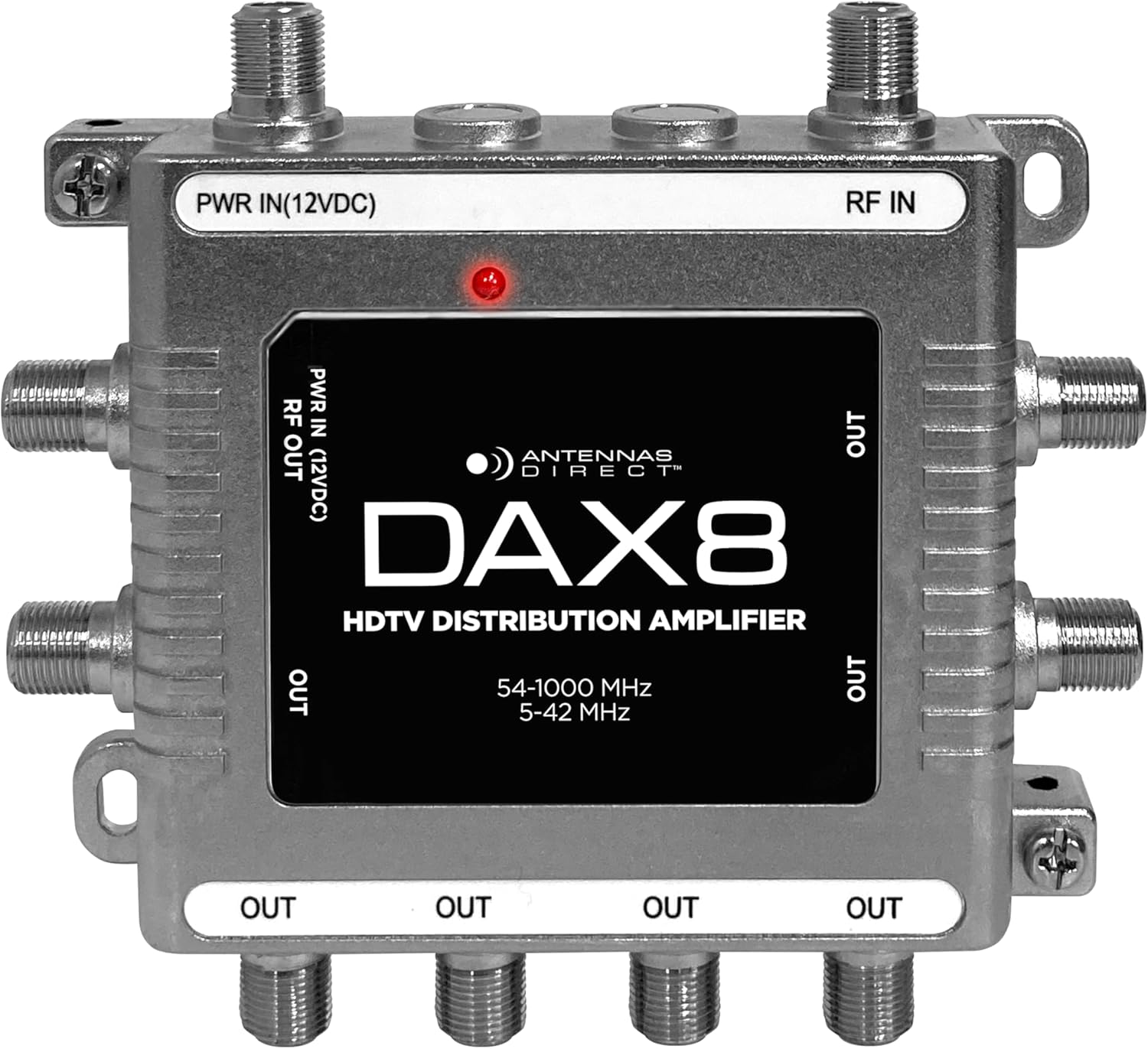
3. Kurulum ve Kurulum
Before beginning installation, ensure all equipment is powered off. Handle coaxial cables carefully to avoid bending or damaging the center conductor.
3.1 Bina İçi Kurulum
- Montaj: Choose a dry, protected location near your antenna's main coaxial cable entry point and a power outlet. Mount the amplifier to a solid vertical or horizontal surface using the provided wall screws.
- Connect Antenna/CATV: Connect the coaxial cable from your TV antenna or CATV system to the RF GİRİŞİ limanda ampcankurtaran.
- Connect TVs: Connect coaxial cables from each television or digital converter box to the RF OUT üzerindeki bağlantı noktaları amplifier. You can use up to 8 outputs.
- Gücü bağlayın: Birlikte verilen 12V DC güç adaptörünü şuraya bağlayın: PWR IN (12VDC) limanda amplifier. Plug the power adapter into a standard electrical outlet. The LED light on the amplifier will illuminate red when power is connected.
- Topraklama (Önerilir): For added protection, connect a grounded copper wire (not included) to the grounding screws on the amplifier and to a suitable ground point (e.g., a cold water pipe or electrical ground rod).
3.2 Outdoor Installation (Under an Eave)
The DAX8 can be used outdoors under an eave, provided specific weatherproofing measures are taken. A power inserter (not included) is required for outdoor power delivery.
- Hava koşullarına dayanıklılık: Ensure all unused RF OUT ports are sealed with 75 Ohm F-termination caps. Use coaxial cables with watertight F-connectors and weather boots for all connections to prevent moisture ingress.
- Montaj: Binmek amplifier in a sheltered outdoor location, such as under an eave, to minimize direct exposure to elements.
- Connect Antenna/CATV: Connect the coaxial cable from your TV antenna or CATV system to the RF GİRİŞİ liman.
- Connect TVs: Connect coaxial cables from each television to the RF OUT limanlar.
- Power with Inserter: Connect a power inserter (not included) to one of the coaxial cables leading from a designated output of the amplifier to an indoor location. The included 12V DC power adapter will then connect to the power inserter indoors, which will send power through the coaxial cable to the ampcankurtaran.
- Topraklama: Always connect a grounded copper wire to the grounding screws on the amplifier and to a suitable outdoor ground point for protection against lightning and static discharge.
4. Kullanım Talimatları
Once the DAX8 amplifier is installed and powered, it operates automatically to boost and distribute your TV signal.
- Güç Açık: Ensure the 12V DC power adapter is securely connected to the amplifier and plugged into a live electrical outlet. The red LED light on the amplifier indicates that it is receiving power.
- Kanalları Tara: On each connected television, perform a channel scan (also known as auto-tune or auto-program) to detect available broadcast channels. Refer to your TV's instruction manual for specific steps.
- Sinyal Optimizasyonu: If you experience issues with certain channels, consider adjusting the orientation of your outdoor antenna (if applicable) and re-scanning for channels.
5. Bakım
The Antennas Direct DAX8 amplifier minimum bakım gerektirir.
- Düzenli Muayene: Periodically check all coaxial cable connections to ensure they are tight and free from corrosion, especially in outdoor installations.
- Temizlik: If necessary, gently wipe the amplifier's housing with a dry, soft cloth. Do not use liquid cleaners or solvents.
- Dış Mekan Koruması: For outdoor installations, regularly inspect the 75 Ohm F-termination caps, watertight F-connectors, and weather boots for any signs of wear or damage. Replace them if necessary to maintain weatherproofing.
6. Sorun Giderme
If you encounter issues with your DAX8 amplifier, aşağıdaki sorun giderme adımlarına bakın:
- No Power / LED Off:
- Ensure the 12V DC power adapter is securely plugged into the ampBir asansör ve çalışan bir elektrik prizi.
- If using an outdoor power inserter, verify its connection and power supply.
- Sinyal Yok / Görüntü Kalitesi Düşük:
- Verify all coaxial cable connections are tight at the amplifier, antenna, and televisions.
- Confirm your antenna is properly aimed towards broadcast towers. Obstructions like trees and building materials can affect reception.
- Perform a channel scan on all connected televisions after installation or any adjustments.
- Check if the issue persists on all TVs or only specific ones. If only one TV, the issue might be with that TV's cable or tuner.
- Sağlamak amplifier is receiving power (red LED should be on).
- Kesintili Sinyal:
- Check for loose connections or damaged coaxial cables.
- In outdoor installations, ensure weatherproofing is intact to prevent moisture from affecting connections.
7. Özellikler
| Özellik | Şartname |
|---|---|
| Model Numarası | DAX8 |
| Çıktı Sayısı | 8 |
| Frekans Aralığı | 54-1000 MHz |
| Gain per Port | 6.5 dB |
| Gürültü Figürü | <3 dB |
| Empedans | 75 Ohm |
| Güç Kaynağı | 12V DC Adaptör (dahil) |
| Boyutlar (U x G x Y) | 4.53" x 4.25" x 1" |
| Ağırlık | 9.1 ons |
| Konut Malzemesi | Çinko Döküm |
| Aşırı Gerilim Koruması | IEEE 6KV on all ports |
| Uyumluluk | HDTV, Analog, Digital Antenna, Legacy CATV, ATSC 3.0, 4K, 8K UHD |
8. Garanti ve Destek
8.1 Garanti Bilgileri
The Antennas Direct DAX8 8-Output TV Antenna Distribution AmpLifier aşağıdakilerle birlikte gelir: 90 günlük üretici garantisi for accessories. This warranty covers defects in materials and workmanship under normal use. Please retain your proof of purchase for warranty claims.
8.2 Müşteri Desteği
For technical assistance, troubleshooting, or warranty inquiries, please contact Antennas Direct customer support. Visit the official Antennas Direct webİletişim bilgileri ve ek kaynaklar için siteyi ziyaret edin.