
1. Giriş
The OSD Audio DAC-X200 is a powerful 2-channel Class D stereo amplifier designed to deliver high-fidelity audio. It features a built-in Hi-Res 24bit/192khz DAC, offering superior digital audio conversion. With versatile input options including USB, Optical, and RCA, and A/B speaker switching, this amplifier is suitable for various home audio setups, from driving bookshelf speakers to powering floorstanding units.
2. Güvenlik Talimatları
- Güç Kaynağı: Cihazı yalnızca belirtilen güç kaynağına bağlayın.tage.
- Havalandırma: Yeterli havalandırma sağlayın. Havalandırma açıklıklarını kapatmayın.
- Su ve Nem: Cihazı yağmura, neme veya aşırı rutubete maruz bırakmayın.
- Isı Kaynakları: Cihazı radyatörler, ısıtma petekleri, sobalar veya diğer ısı üreten cihazlar gibi ısı kaynaklarından uzak tutun.
- Temizlik: Sadece kuru bezle temizleyin.
- Servis: Bu ürüne kendiniz servis vermeye çalışmayın. Tüm servis işlemleri için kalifiye servis personeline başvurun.
- Atama: Place the unit on a stable, flat surface. Avoid placing heavy objects on top of the ampcankurtaran.
3. Paket İçeriği
Paketin içinde tüm öğelerin mevcut olduğundan emin olun:
- OSD Audio DAC-X200 Ampcankurtaran
- Hızlı Başlangıç Kılavuzu
- Güç kablosu
- Uzaktan Kumanda (modelinizle birlikte verilmişse)
4. Ürün Bittiview
4.1 Ön Panel
Ön panel, günlük kullanım için gerekli kontrollere erişim sağlar.

Şekil 4.1: Ön view of the DAC-X200 amplifier, showing the power button, speaker selectors, balance, and volume controls.

Şekil 4.2: Detail of the front panel, highlighting the Power button and Speaker A/B selection buttons.

Şekil 4.3: Detail of the front panel, showing the Balance and Volume control knobs.
4.2 Arka Panel
The rear panel houses all input and output connections for audio sources and speakers.
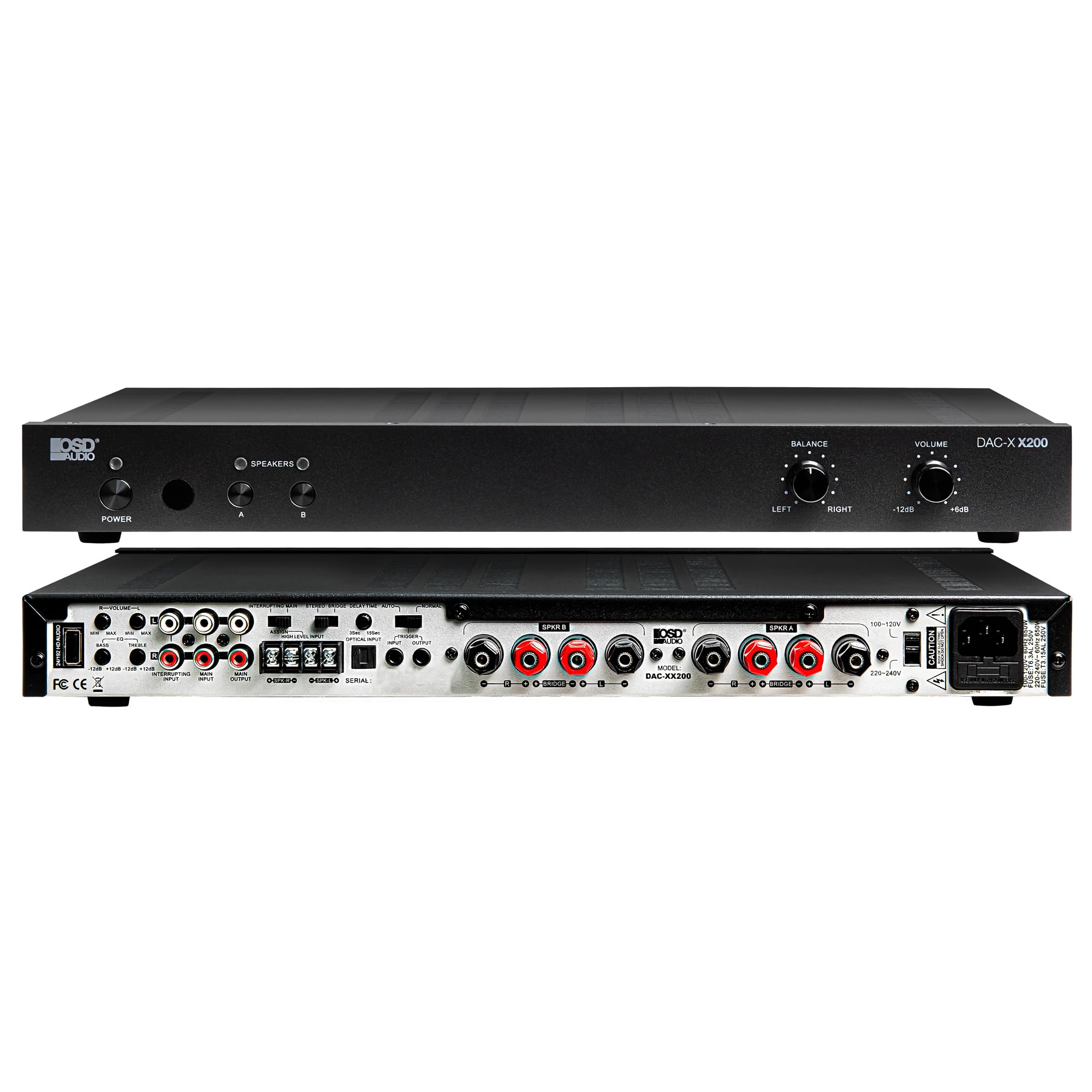
Şekil 4.4: Arka view of the DAC-X200 amplifier, displaying various audio inputs (USB, Optical, RCA), speaker outputs, and power input.

Şekil 4.5: Detail of the rear panel inputs, including USB, Optical, and RCA connections.

Şekil 4.6: Detail of the rear panel speaker output terminals for Speaker A and Speaker B.
5. Kurulum
5.1 Yerleştirme
Place the DAC-X200 on a flat, stable surface with adequate space around it for ventilation. Avoid enclosed cabinets or areas with poor airflow to prevent overheating.
5.2 Hoparlörleri Bağlama
- Sağlamak amplifier kapalı ve fişi çekilmiş durumda.
- Pasif hoparlörlerinizi KONUŞMACI A ve/veya KONUŞMACI B terminals on the rear panel. Observe correct polarity (+ to + and - to -).
- For optimal performance, use high-quality speaker wire.
5.3 Ses Kaynaklarını Bağlama
The DAC-X200 supports multiple input types:
- USB Girişi: Connect a computer or other USB audio source using a Type A to Type A USB 2.0 cable.
- Optik Giriş: Optik kablo kullanarak televizyon veya CD çalar gibi dijital ses kaynaklarını bağlayın.
- RCA Girişleri: Connect analog audio sources such as music streamers, turntables (with a pre-amp), or other devices using RCA cables.
5.4 Güç Bağlantısı
After all audio and speaker connections are made, connect the supplied power cable to the amplifier's power inlet and then to a suitable AC power outlet.
6. Kullanım Talimatları
6.1 Güç Açma/Kapatma
Basın GÜÇ Ön paneldeki düğmeyi açıp kapatmak için ampAmplifikatör açık veya kapalı. Cihaz açık olduğunda güç gösterge ışığı yanacaktır.
6.2 Giriş Seçimi
The DAC-X200 features smart source switching, automatically detecting and switching to an active input. If multiple inputs are active, you may need to manually select the desired input using the remote control (if applicable) or by cycling through inputs.
6.3 Ses Kontrolü
Genel çıkış ses seviyesini aşağıdaki komutu kullanarak ayarlayın. HACİM knob on the front panel. Rotate clockwise to increase volume and counter-clockwise to decrease it.
6.4 Ses Kontrolleri
Kullanın DENGE knob to adjust the left/right channel balance. The DAC-X200 also includes bass and treble adjustment knobs (located on the rear panel or accessible via remote, depending on model variation) to fine-tune the sound to your preference or room acoustics.
6.5 A/B Speaker Switching
Basın A or B buttons on the front panel to select which set of speakers (Speaker A, Speaker B, or both) are active. This allows for multi-room audio configurations.
7. Bakım
- Temizlik: Cihazın dış yüzeyini temizlemek için yumuşak ve kuru bir bez kullanın. ampLifier. Sıvı temizleyiciler veya aerosoller kullanmayın.
- Havalandırma: Havalandırma açıklıklarının toz ve kirden arındırılmış olduğundan düzenli aralıklarla emin olun.
- Depolamak: Cihazı uzun süre saklayacaksanız, elektrik prizinden çıkarın ve serin, kuru bir yerde saklayın.
8. Sorun Giderme
| Sorun | Olası Neden | Çözüm |
|---|---|---|
| Güç yok | Power cable not connected; Power outlet not active; Ampkaldırıcı kapalı. | Check power cable connection; Test power outlet; Press the Power button. |
| Ses yok | Incorrect input selected; Speaker cables loose; Volume too low; Speakers A/B not selected. | Select correct input; Check speaker connections; Increase volume; Ensure Speaker A or B is active. |
| Bozuk ses | Input signal too high; Speaker impedance mismatch; Faulty cable. | Reduce source volume; Verify speaker impedance (8̣ or 4̣); Replace audio cables. |
| Input not switching automatically | Multiple active sources; Specific source not detected. | Manually select input; Ensure only one source is playing if auto-switching is desired. |
9. Özellikler
- Modeli: DAC-X200
- Çıkış Gücü: 100W RMS per channel at 8̣; 225W RMS per channel at 4̣; 450W bridged mono
- Kanal Sayısı: 2
- DAK: Hi-Res 24bit/192khz, DSD formats supported
- Girişler: USB, Optical, RCA
- Speaker Zones: A/B Switching
- Boyutlar (U x G x Y): 16.7 x 10 x 2 inç
- Malzeme Türü: Plastik
- UPC: 810074881173
10. Garanti Bilgileri
OSD Audio products are designed for reliability and performance. This product is covered by a limited warranty against defects in materials and workmanship. Please refer to the official OSD Audio website or your purchase documentation for specific warranty terms and conditions, including duration and coverage details. Keep your proof of purchase for warranty claims.
11. Destek
For technical assistance, troubleshooting not covered in this manual, or service inquiries, please contact OSD Audio customer support. You can find contact information, FAQs, and additional resources on the official OSD Audio webalan.
Webalan: www.osdaudio.com