
1. Giriş
This manual provides essential information for the safe and efficient operation of your Sharp GX-BT190 Portable Bluetooth Speaker. Please read it thoroughly before using the device and retain it for future reference.
2. Güvenlik Bilgileri
- Hoparlörü aşırı sıcaklıklara, doğrudan güneş ışığına veya yüksek neme maruz bırakmayın.
- Hoparlörü sökmeyin, tamir etmeyin veya üzerinde değişiklik yapmayın. Bu, garantiyi geçersiz kılabilir ve güvenlik riskleri oluşturabilir.
- Ensure the charging port cover is securely closed when using the speaker near water to maintain its IP67 rating.
- Yalnızca verilen şarj kablosunu veya sertifikalı bir eşdeğerini kullanın.
- Hoparlörü çocuklardan ve evcil hayvanlardan uzak tutun.
- İşitme hasarını önlemek için uzun süre yüksek ses seviyesinde dinlemekten kaçının.
3. Paket İçeriği
- Sharp GX-BT190 Portable Bluetooth Speaker
- USB Şarj Kablosu
- Kordon
- Kullanım Kılavuzu
4. Ürün Bittiview

Ön view of the Sharp GX-BT190 speaker, showing the central speaker grille with the Sharp logo and the LED light ring.

Taraf view of the Sharp GX-BT190 speaker, highlighting the textured speaker grille and the integrated lanyard.
Arka view of the Sharp GX-BT190 speaker, showing the control buttons and the sealed charging port cover.
Kontroller ve Göstergeler:
- Güç Düğmesi: Açmak/kapatmak için basılı tutun.
- Sesi Aç / Sonraki Parça Düğmesi (+): Kısa basışla sesi açabilir, uzun basışla bir sonraki parçaya geçebilirsin.
- Sesi Azaltma / Önceki Parça Düğmesi (-): Kısa basışta ses kısılır, uzun basışta önceki parçaya geçilir.
- Oynat/Duraklat/Ara Düğmesi (►||): Short press to play/pause, answer/end calls. Long press to reject calls.
- Mode / Light Button (M): Short press to cycle through LED light modes. Long press to turn off LED lights.
- USB-C Şarj Portu: For charging the speaker. Ensure the rubber cover is sealed when not charging.
- LED Göstergesi: Şarj durumunu ve Bluetooth eşleştirme durumunu gösterir.
5. Kurulum
5.1 Hoparlörü Şarj Etme
- Open the rubber cover on the back of the speaker to access the USB-C charging port.
- Connect the provided USB charging cable to the speaker's USB-C port.
- USB kablosunun diğer ucunu bir USB güç adaptörüne (dahil değildir) veya bir bilgisayarın USB portuna bağlayın.
- The LED indicator will illuminate during charging and turn off once fully charged.
- Close the rubber cover securely after charging to maintain the speaker's waterproof rating.
5.2 Açma/Kapatma
- Açmak İçin: Güç düğmesini yaklaşık 3 saniye basılı tutun. Sesli bir uyarı duyacaksınız ve LED göstergesi yanıp sönecektir.
- Kapatmak İçin: Güç düğmesini yaklaşık 3 saniye basılı tutun. Sesli bir uyarı duyacaksınız ve LED göstergesi sönecektir.
5.3 Bluetooth Eşleştirme
- Ensure the speaker is powered on and the LED indicator is flashing, indicating it is in pairing mode.
- Mobil cihazınızda Bluetooth'u etkinleştirin ve mevcut cihazları arayın.
- Select "GX-BT190" from the list of devices.
- Eşleştirme işlemi tamamlandığında, LED göstergesi yanıp sönmeyi bırakacak ve sabit kalacaktır; ayrıca bir onay sesi duyacaksınız.
- Hoparlör açıldığında, cihaz menzil dahilindeyse ve Bluetooth etkinse, son eşleştirilen cihaza otomatik olarak yeniden bağlanacaktır.
5.4 Gerçek Kablosuz Stereo (TWS) Eşleştirme
TWS allows you to pair two GX-BT190 speakers together for a stereo audio experience.

Two Sharp GX-BT190 speakers, one red and one blue, positioned together, illustrating the True Wireless Stereo (TWS) pairing feature.
- Her iki GX-BT190 hoparlörün de açık olduğundan ve herhangi bir Bluetooth cihazına bağlı olmadığından emin olun.
- Hoparlörlerden birinde (bu, ana hoparlör olacaktır), Güç düğmesine iki kez basın. Hoparlör TWS eşleştirme moduna girecektir.
- İki hoparlör otomatik olarak birbirini arayacak ve birbirine bağlanacaktır. TWS eşleştirmesi başarılı olduğunda bir onay sesi duyacaksınız.
- Once TWS paired, connect your mobile device to the primary speaker via Bluetooth as described in section 5.3.
- To disconnect TWS, double-press the Power button on either speaker.
6. Çalıştırma
6.1 Ses Çalma
- Oynat/Duraklat: Oynat/Duraklat düğmesine kısa basın.
- Sesi aç: '+' düğmesine kısa süre basın.
- Sesi kıs: '-' düğmesine kısa süre basın.
- Sonraki Parça: '+' düğmesine uzun süre basın.
- Önceki parça: '-' düğmesine uzun süre basın.
6.2 Eller Serbest Arama
- Cevap Çağrısı: Gelen arama çaldığında Oynat/Duraklat düğmesine kısa süre basın.
- Çağrı Sonu: Görüşme sırasında Oynat/Duraklat düğmesine kısa süre basın.
- Çağrıyı Reddet: Gelen arama çaldığında Oynat/Duraklat düğmesine uzun basın.
6.3 LED Mood Lights
- Short press the 'M' (Mode/Light) button to cycle through the 6 available LED mood light modes.
- Long press the 'M' button to turn off the LED lights.
6.4 Su Geçirmez ve Toz Geçirmez Kullanım (IP67)

The Sharp GX-BT190 speaker partially submerged in water, demonstrating its IP67 waterproof and dustproof capabilities.
The GX-BT190 speaker is rated IP67, meaning it is protected from dust ingress and can withstand immersion in water up to 1 meter for 30 minutes. To ensure this protection:
- Always ensure the rubber cover for the charging port is fully and securely sealed before exposing the speaker to water or dust.
- Hoparlörü kasıtlı olarak uzun süre veya belirtilen derinliğin ötesinde suya batırmayın.
- Suya maruz kaldıktan sonra, şarj etmeden önce hoparlörü yumuşak bir bezle kurulayın.
7. Bakım
7.1 Temizlik
- Hoparlörü yumuşak bir bezle silin.amp Kumaş.
- Aşındırıcı temizleyiciler, alkol veya kimyasal çözücüler kullanmayın.
- Şarj etmeden veya saklamadan önce hoparlörün kuru olduğundan emin olun.
7.2 Depolama
- Hoparlörü serin, kuru ve doğrudan güneş ışığından ve aşırı sıcaklıklardan uzak bir yerde saklayın.
- Uzun süre saklayacaksanız, pilin sağlığını korumak için pili düzenli olarak (örneğin, her 3 ayda bir) şarj edin.
8. Sorun Giderme
| Sorun | Çözüm |
|---|---|
| Hoparlör açılmıyor. | Pilin şarjlı olduğundan emin olun. Hoparlörü USB kablosuyla bir güç kaynağına bağlayın. |
| Bluetooth üzerinden eşleştirme yapılamıyor. | Ensure the speaker is in pairing mode (LED flashing). Turn off and on Bluetooth on your device. Move the speaker closer to your device. Clear previous Bluetooth connections on your device. |
| Ses yok veya ses seviyesi düşük. | Hem hoparlörün hem de bağlı cihazınızın ses seviyesini artırın. Hoparlörün doğru şekilde eşleştirildiğinden emin olun. |
| Kötü ses kalitesi. | Move the speaker closer to your device. Ensure there are no obstructions between the speaker and your device. Try playing a different audio source. |
| TWS eşleştirmesi başarısız. | Ensure both speakers are GX-BT190 models and are not connected to any other Bluetooth device. Try powering both speakers off and on, then re-attempt TWS pairing. |
9. Özellikler

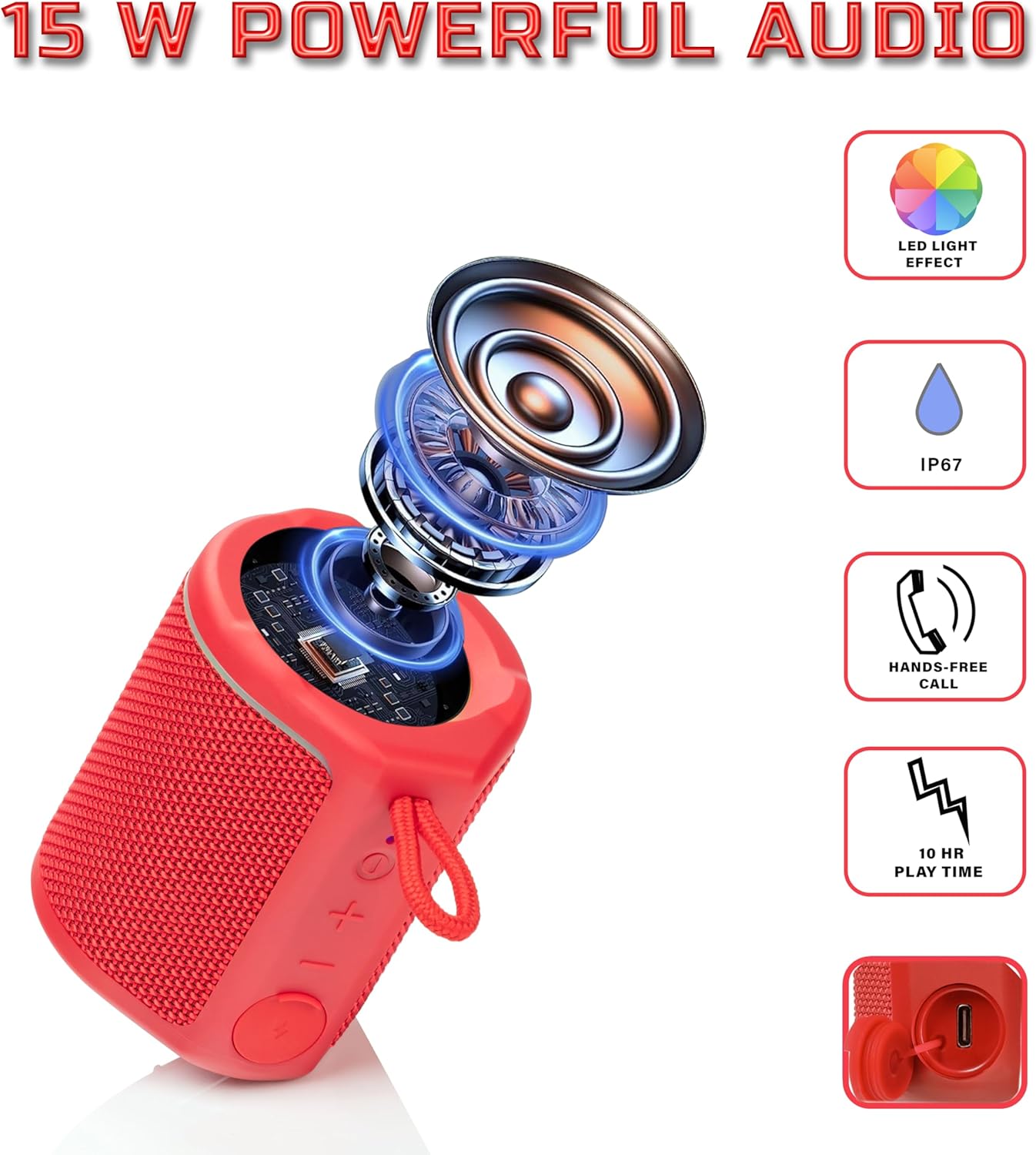
Diagram illustrating the internal components of the Sharp GX-BT190 speaker, including the speaker driver, and highlighting features like LED light effect, IP67 rating, hands-free call function, and battery life.
| Özellik | Detay |
|---|---|
| Model Numarası | GX-BT190 |
| Bağlantı Teknolojisi | Bluetooth |
| Hoparlör Maksimum Çıkış Gücü | 10 Watt |
| Su Geçirmezlik Derecesi | IP67 |
| Pil Ömrü | 15 Saate Kadar |
| Pil Türü | 1 Lityum İyon (dahil) |
| Pil Kapasitesi | 1200 mAh |
| Ürün Boyutları (D x G x Y) | 7.5 x 7.5 x 7.5 cm (yaklaşık) |
| Ürün Ağırlığı | 226.8 g (8 ons) |
| kablosuz Menzil | 33 Feet'e Kadar |
| Ek Özellikler | LED Light, True Wireless Stereo (TWS), Hands-Free Calling |
10. Garanti
The Sharp GX-BT190 Portable Bluetooth Speaker comes with a 1-Year Limited Warranty from the date of purchase. This warranty covers manufacturing defects under normal use. It does not cover damage caused by misuse, accidents, unauthorized modifications, or normal wear and tear. Please retain your proof of purchase for warranty claims.
11. Destek
For technical assistance, warranty inquiries, or further information regarding your Sharp GX-BT190 speaker, please contact Sharp Inc. customer support:
- Üretici iletişim: Sharp Inc
- Telefon: 1-800-BE-KAPALI