
1. Giriş
Thank you for choosing the EasySMX T37 Wireless Switch Pro Controller. This manual provides detailed instructions for setting up, operating, maintaining, and troubleshooting your controller. Please read this manual carefully before use to ensure optimal performance and longevity of your device. This controller is compatible with Nintendo Switch, Switch Lite, and Switch OLED consoles.
2. Ürün Bittiview
The EasySMX T37 is a wireless gamepad designed for an enhanced gaming experience on Nintendo Switch systems. It features an ergonomic design, dual turbo vibration, and 6-axis gyro motion control.

Resim 2.1: Ön view of the EasySMX T37 Wireless Switch Pro Controller, showcasing its ergonomic shape and button layout.
3. Kurulum
3.1 Pairing with Nintendo Switch
- Nintendo Switch konsolunuzu açın.
- HOME Menüsünden, seçin Kontrolörler > Tutma Yerini/Sırayı Değiştir.
- On the EasySMX T37 controller, press and hold the SENKRONİZASYON düğmesi (located on the top edge of the controller) for 3 seconds until the LED indicators start flashing rapidly.
- Kumanda başarıyla eşleştirildikten sonra, kumandanın altındaki oyuncu LED'leri sürekli yanacaktır.
3.2 Kontrol Ünitesinin Şarj Edilmesi
Connect the provided USB-C charging cable to the USB-C port on the controller and the other end to a USB power source (e.g., Switch dock, USB wall adapter, computer USB port). The LED indicators will show charging status and turn off when fully charged.
4. Kullanım Talimatları
4.1 Temel Kontroller
The controller features standard button layouts for Nintendo Switch compatibility:
- A/B/X/Y Düğmeleri: Eylem düğmeleri.
- Yön Düğmesi: Yönlü giriş.
- Sol/Sağ Analog Çubuklar: Hareket ve kamera kontrolü.
- L/R/ZL/ZR Düğmeleri: Omuz ve tetik düğmeleri.
- Ana menü tuşu: Returns to the Switch HOME Menu.
- CAPTURE Button: Ekran görüntüleri alır.
- PLUS (+) / MINUS (-) Buttons: Başlat/Seç fonksiyonları.

Image 4.1: A user holding the EasySMX T37 controller, demonstrating the comfortable grip and accessible button placement during gameplay.
4.2 Turbo Fonksiyonu
The Turbo function allows for rapid, automatic pressing of a button, useful in action or arcade games.
- Turbo'yu etkinleştirin: Press and hold the desired action button (A/B/X/Y/L/R/ZL/ZR), then press the Turbo düğmesi (T button). The button will now auto-fire.
- Turbo Hızını Ayarla: Tutarken Turbo düğmesi, taşı Right Analog Stick Up or Down to cycle through three speeds: 5 shots/s, 12 shots/s, and 20 shots/s.
- Turbo özelliğini devre dışı bırakın: Repeat the activation step (hold the action button, then press the Turbo button) or press and hold the Turbo düğmesi for 5 seconds to clear all Turbo settings.
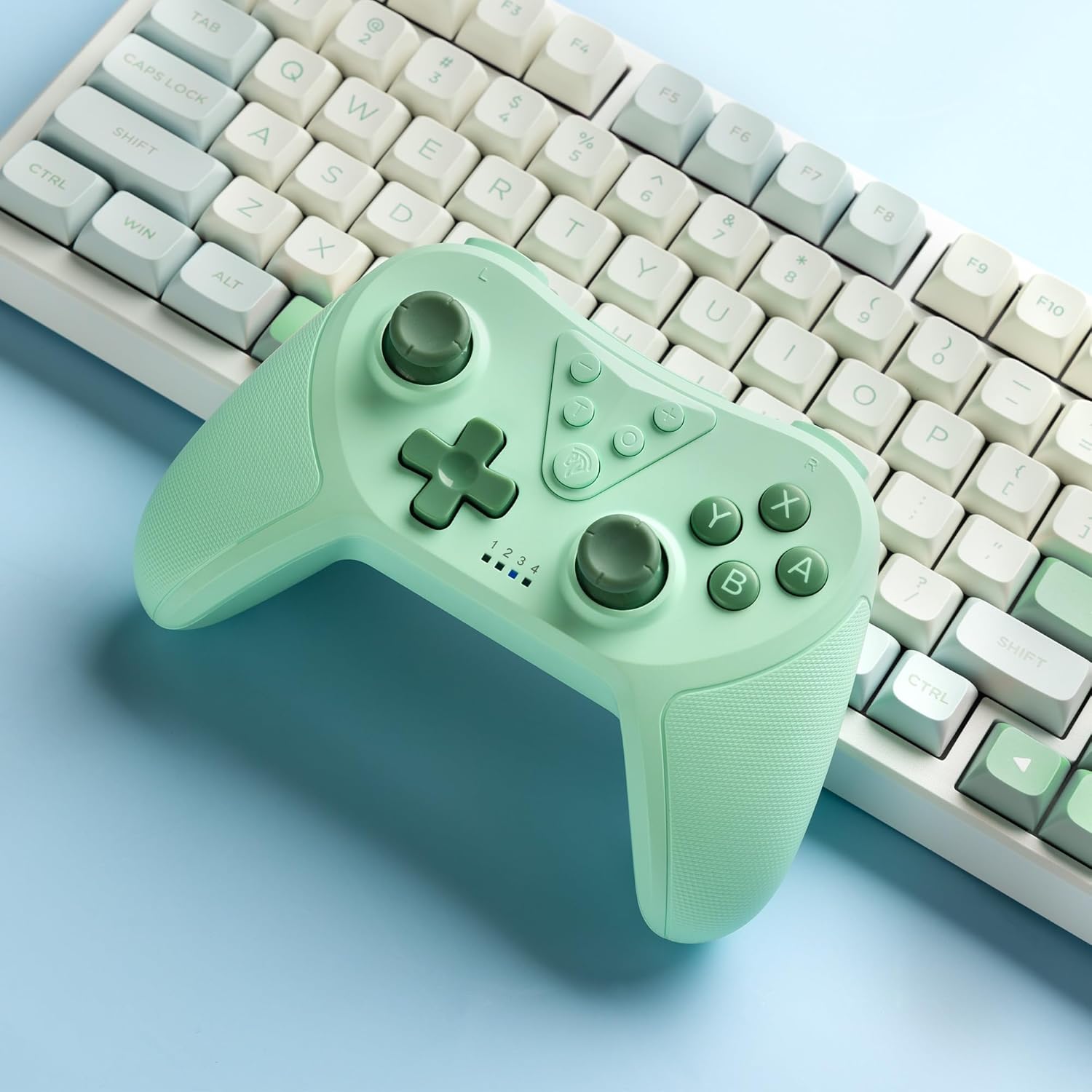
Image 4.2: Illustration of the Turbo function on the EasySMX T37 controller, showing the three adjustable speeds: 5, 12, and 20 shots per second.
4.3 Titreşim Ayarı
The controller features dual motors for adjustable vibration feedback, enhancing immersion in games.
- Titreşim Yoğunluğunu Ayarla: Basılı tutun Turbo düğmesi, sonra taşıyın Left Analog Stick Up or Down to cycle through four vibration levels: 0% (off), 30%, 70%, and 100%.

Image 4.3: Visual representation of the Dual Vibration feature on the EasySMX T37 controller, indicating four intensity levels from 0% to 100%.
4.4 6-Axis Gyro Motion Control
The built-in 6-axis gyroscope provides precise motion sensing, allowing for intuitive control in games that support motion input.

Image 4.4: Illustration depicting the 6-Axis Gyro Motion Control feature of the EasySMX T37 controller, showing how it interacts with a game on the Nintendo Switch screen.
5. Bakım
- Temizlik: Kumandayı temizlemek için yumuşak ve kuru bir bez kullanın. Sert kimyasallar veya aşındırıcı malzemeler kullanmaktan kaçının.
- Depolamak: Kontrol cihazını serin, kuru ve doğrudan güneş ışığından ve aşırı sıcaklıklardan uzak bir yerde saklayın.
- Pil Bakım: Pil ömrünü uzatmak için, kontrol cihazını sık sık tamamen boşaltmaktan kaçının. Uzun süre kullanılmasa bile düzenli olarak şarj edin.
- Damlalardan Kaçının: Kumanda cihazını düşmelere ve darbelere karşı koruyun; bu tür önlemler iç bileşenlere zarar verebilir.
6. Sorun Giderme
6.1 Denetleyici Bağlanmıyor
- Kontrol cihazının şarjlı olduğundan emin olun.
- Verify the Switch console is updated to the latest system version.
- Try re-pairing the controller by following the steps in Section 3.1.
- If issues persist, try resetting the controller by inserting a thin object into the small reset hole (if present, usually on the back) for a few seconds.
6.2 Buttons Unresponsive or Lagging
- Kontrol cihazının tam şarjlı olduğundan emin olun.
- Move closer to the Switch console to ensure a strong wireless connection.
- Düğmelerin etrafında herhangi bir fiziksel engel veya kalıntı olup olmadığını kontrol edin.
- Re-pair the controller.
6.3 Kumanda Şarj Olmuyor
- Ensure the USB-C cable is securely connected to both the controller and the power source.
- Farklı bir USB-C kablosu veya güç adaptörü kullanmayı deneyin.
- Güç kaynağının çalışır durumda olduğundan emin olun.
7. Özellikler
- Modeli: T37
- Bağlantı: Kablosuz (Bluetooth)
- Uyumluluk: Nintendo Switch, Switch Lite, Switch OLED
- Özellikler: Dual Turbo Function, Adjustable Vibration, 6-Axis Gyro Motion Control, Ergonomic Design
- Product Identifier (ASIN): B0CTTWN84L
8. Garanti ve Destek
Garanti bilgileri, teknik destek veya daha fazla yardım için lütfen resmi EasySMX kılavuzuna bakın. webSite üzerinden satın alabilir veya doğrudan müşteri hizmetleriyle iletişime geçebilirsiniz. Garanti talepleriniz için satın alma fişinizi saklayın.