
1. Giriş
This manual provides comprehensive instructions for the setup, operation, and maintenance of your Lecoo WS208 Wireless Mouse. Please read this manual carefully before using the product to ensure proper function and longevity. Keep this manual for future reference.
2. Ürün Bittiview
The Lecoo WS208 is a wireless optical mouse designed for comfort and efficiency. It features a 1200 DPI sensor for precise tracking and a silent click mechanism for a quiet user experience.
Temel Özellikler:
- 1200 DPI Optik Sensör: Provides accurate and responsive cursor control.
- 3 Düğmeli Tasarım: Standard left, right, and scroll wheel buttons for essential functions.
- Sessiz Tıklama: Daha sessiz bir çalışma ortamı için tıklama sesini azaltır.
- Kablosuz bağlantı: Operates via a 2.4GHz USB receiver, offering a range of up to 10 meters.
- Ergonomik ve Kompakt Tasarım: Lightweight (54g) and shaped for comfortable use over extended periods.
- Uzun Pil Ömrü: Powered by one AA battery, providing up to 6 months of usage depending on conditions.
- Evrensel Uyumluluk: Supports Windows XP/7/8/10/11, Mac OS X 10.4+, Linux Kernel 2.6+, and Android devices.
Paket İçeriği:
- Lecoo WS208 Wireless Mouse
- USB Mini Receiver
- Kullanıcı Kılavuzu
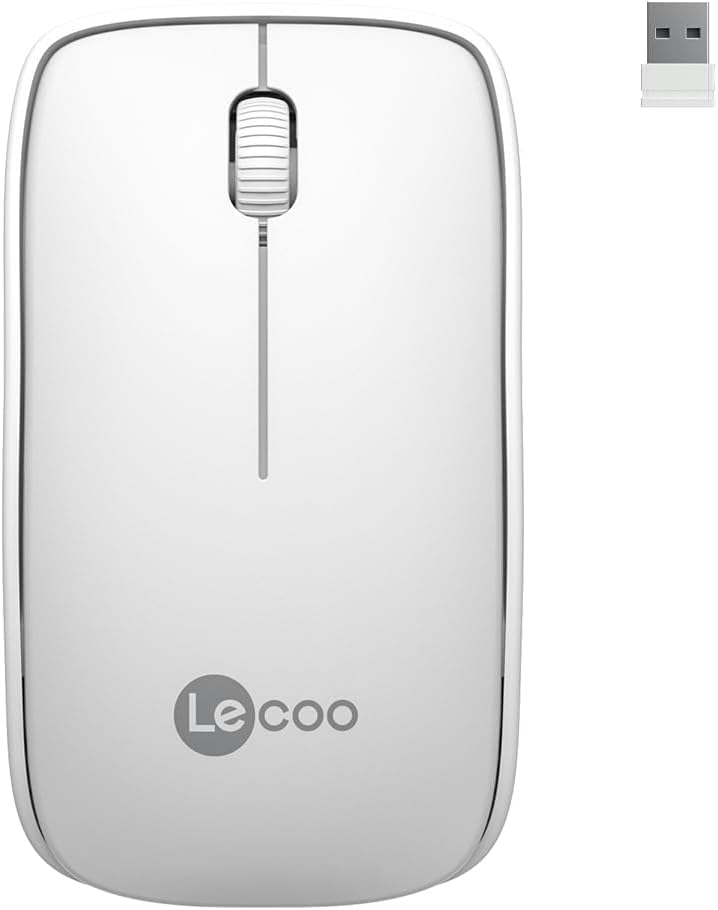
Image: Lecoo WS208 Wireless Mouse and its USB receiver.

Image: Diagram illustrating the components of the Lecoo WS208 mouse. Key features include the scroll wheel, left and right buttons, optical sensor, and USB dongle storage slot.
3. Kurulum
3.1 Pil Kurulumu
- Farenin alt kısmında bulunan pil bölmesi kapağını bulun.
- Bölmeyi açmak için kapağı yavaşça kaydırın veya kaldırın.
- Insert one AA battery (not included) into the compartment, ensuring the positive (+) and negative (-) terminals align correctly with the indicators.
- Pil bölmesi kapağını yerine tam oturana kadar kapatın.
3.2 USB Alıcısını Bağlama
- Remove the USB mini receiver from its storage slot, usually located inside the battery compartment or on the bottom of the mouse.
- Plug the USB receiver into an available USB port on your computer (PC, Mac, Laptop) or compatible device.
- İşletim sisteminiz gerekli sürücüleri otomatik olarak algılayıp yükleyecektir. Bu işlem birkaç dakika sürebilir.
3.3 Powering On the Mouse
After installing the battery and plugging in the receiver, the mouse should automatically power on. Some models may have a power switch on the bottom; ensure it is in the 'ON' position if present.
4. Kullanım Talimatları
4.1 Temel Fonksiyonlar
- Sol Tuş: Primary click function (e.g., select items, open links).
- Sağ Buton: Secondary click function (e.g., open context menus).
- Kaydırma tekerleği: Belgeler arasında yukarı veya aşağı kaydırın ve web pages. The scroll wheel also functions as a middle button when pressed.
4.2 DPI Sensitivity
The Lecoo WS208 operates at a fixed 1200 DPI (Dots Per Inch) sensitivity, providing a balanced speed and precision for most daily tasks. No manual DPI adjustment is available on this model.
4.3 Çalışma Aralığı
The mouse maintains a stable connection within a 10-meter range from the USB receiver. Performance may vary depending on environmental factors and obstacles.

Image: Icons representing universal compatibility with Android, Apple (macOS), Windows, Linux, and ChromeOS.
5. Bakım
5.1 Temizlik
- Temizlemeden önce farenin kapalı olduğundan emin olun.
- Fare yüzeyini silmek için yumuşak, kuru ve tüy bırakmayan bir bez kullanın.
- İnatçı kirler için hafifçeampBezi su veya aşındırıcı olmayan yumuşak bir temizleyici ile silin. Aşırı nemden kaçının.
- Fare yüzeyine zarar verebileceğinden, sert kimyasallar, çözücüler veya aşındırıcı malzemeler kullanmayın.
5.2 Pil Değişimi
When the mouse's performance degrades or it stops responding, it may be time to replace the AA battery. Follow the battery installation steps in Section 3.1.
6. Sorun Giderme
Yaygın Sorunlar ve Çözümleri:
- Fare yanıt vermiyor:
- Pilinin doğru takıldığından ve yeterli şarjı olduğundan emin olun. Gerekirse değiştirin.
- USB alıcısının çalışan bir USB bağlantı noktasına güvenli bir şekilde takılı olduğundan emin olun. Farklı bir USB bağlantı noktası deneyin.
- Farenin alıcının 10 metrelik çalışma menzili içinde olduğundan emin olun.
- Bilgisayarınızı yeniden başlatın.
- Erratic or jumpy cursor movement:
- Farenin alt kısmındaki optik sensörü yumuşak ve kuru bir bezle temizleyin.
- Fareyi uygun bir yüzeyde kullandığınızdan emin olun. Çok yansıtıcı veya şeffaf yüzeylerden kaçının.
- Diğer kablosuz cihazlardan kaynaklanan paraziti kontrol edin.
- Bağlantı sorunları:
- USB alıcısını çıkarıp tekrar takın.
- Fareyi USB alıcısına yaklaştırın.
7. Özellikler
| Marka | Lecoo |
| Örnek | WS208 |
| Bağlantı Teknolojisi | Kablosuz (2.4GHz USB Alıcı) |
| Hareket Algılama | Optik |
| DPI Hassasiyeti | 1200 DPI |
| Düğme Sayısı | 3 (Sol, Sağ, Kaydırma Tekerleği/Orta) |
| Çalışma Aralığı | 10 metreye kadar |
| Pil Türü | 1 x AA Pil (dahil değildir) |
| Pil Ömrü | 6 aya kadar (kullanıma bağlı olarak) |
| Boyutlar (U x G x Y) | 95mm x 54mm x 31mm |
| Ağırlık | 54g (mouse only) |
| Uyumluluk | Windows XP/7/8/10/11, Mac OS X 10.4+, Linux Kernel 2.6+, Android |

Image: Visual representation of the Lecoo WS208 mouse dimensions (95mm length, 54mm width, 31mm height) and weight (54g).
8. Garanti ve Destek
Lecoo products are designed for reliability and performance. For warranty information or technical support, please refer to the warranty card included with your product or visit the official Lecoo webSite. Satın alma fişinizi, garanti talepleriniz için satın alma belgeniz olarak saklayın.