
1. Giriş
Thank you for choosing the PNI Voyager S2600 WiFi 4K Ultra HD Car DVR Camera. This device is designed to record high-quality video footage of your journeys, providing security and evidence in case of incidents. It features 4K Ultra HD recording, Wi-Fi connectivity for smartphone control, parking monitoring, and a G-sensor for automatic incident detection.

Image 1.1: PNI Voyager S2600 Dash Cam installed in a vehicle, showcasing its key features: 4K Ultra HD recording, Wi-Fi connectivity, and Parking Monitoring.
2. Güvenlik Bilgileri
Cihazın düzgün çalışmasını sağlamak ve hasar görmesini veya yaralanmayı önlemek için lütfen bu güvenlik yönergelerini okuyun ve uygulayın.
- Cihazı aşırı sıcaklıklara, uzun süre doğrudan güneş ışığına veya yüksek neme maruz bırakmayın.
- Cihazın güvenli bir şekilde monte edildiğinden ve sürücünün hareketini engellemediğinden emin olun. view veya araç kontrollerine müdahale etmeyin.
- Yalnızca ürünle birlikte verilen güç kablosunu ve aksesuarları kullanın. Yetkisiz aksesuarların kullanılması cihaza zarar verebilir ve garantiyi geçersiz kılabilir.
- Cihazı kendiniz sökmeye veya onarmaya çalışmayın. Yardım için yetkili servis personeliyle iletişime geçin.
- Net video kaydı için lensi temiz tutun.
- Always format the microSD card regularly to maintain optimal recording performance.
3. Paket İçeriği
Paketin içinde tüm öğelerin mevcut olduğundan emin olun:
- PNI Voyager S2600 Car DVR Camera
- Power cord with cigarette lighter plug (12V/24V compatible)
- Ön cam montajı
- Kullanıcı Kılavuzu

Image 3.1: The PNI Voyager S2600 dash cam, its magnetic mount, and the power cable with a cigarette lighter adapter.
4. Ürün Bittiview
Familiarize yourself with the components of your PNI Voyager S2600 dash cam.
4.1. Cihaz Düzeni
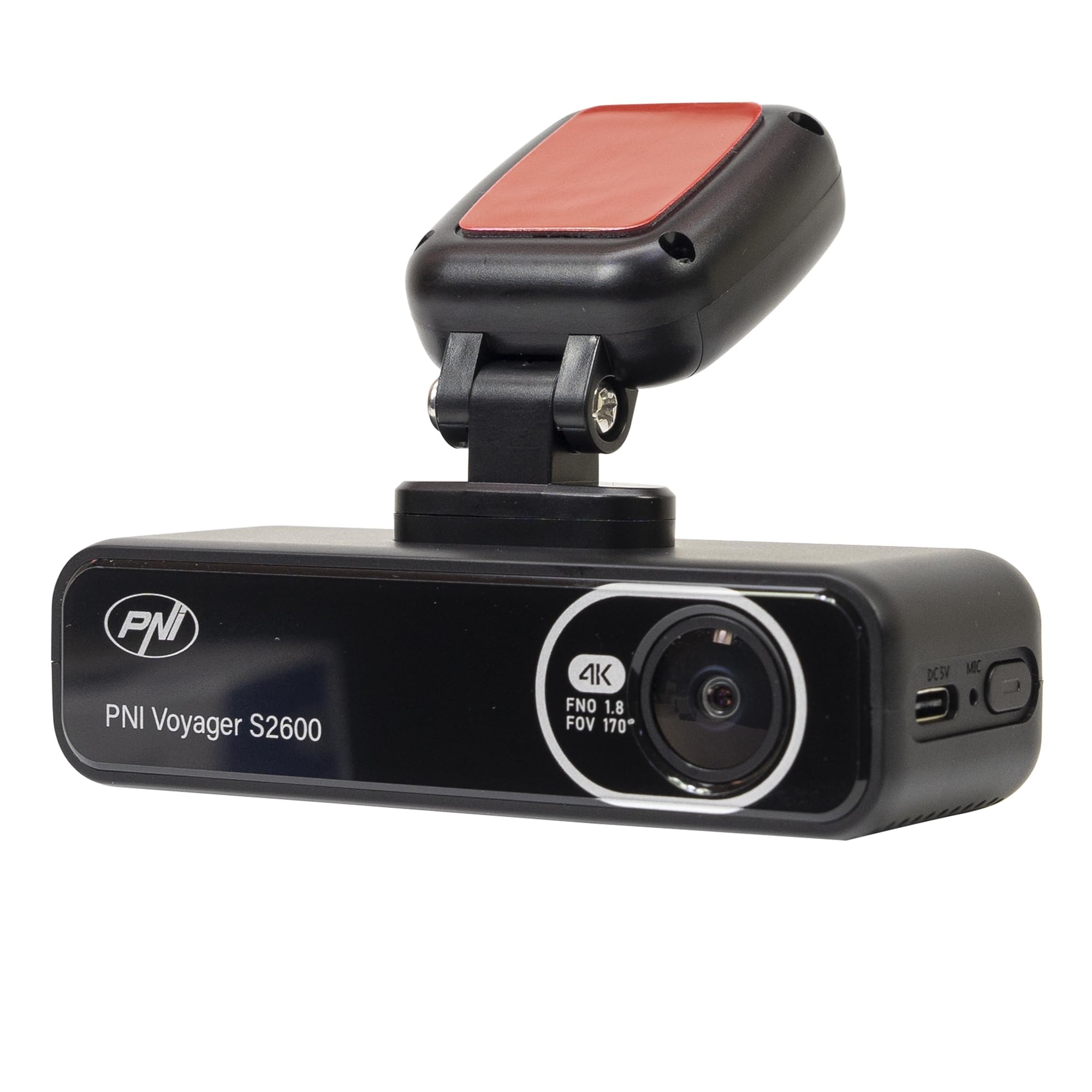
Resim 4.1: Ön view of the PNI Voyager S2600, displaying the camera lens with 4K FNO 1.8 FOV 170° markings, the PNI brand logo, and the model name.

Resim 4.2: Ayrıntılı view of the side of the dash cam, highlighting the USB-C power input (DC 5V) and the microphone opening.
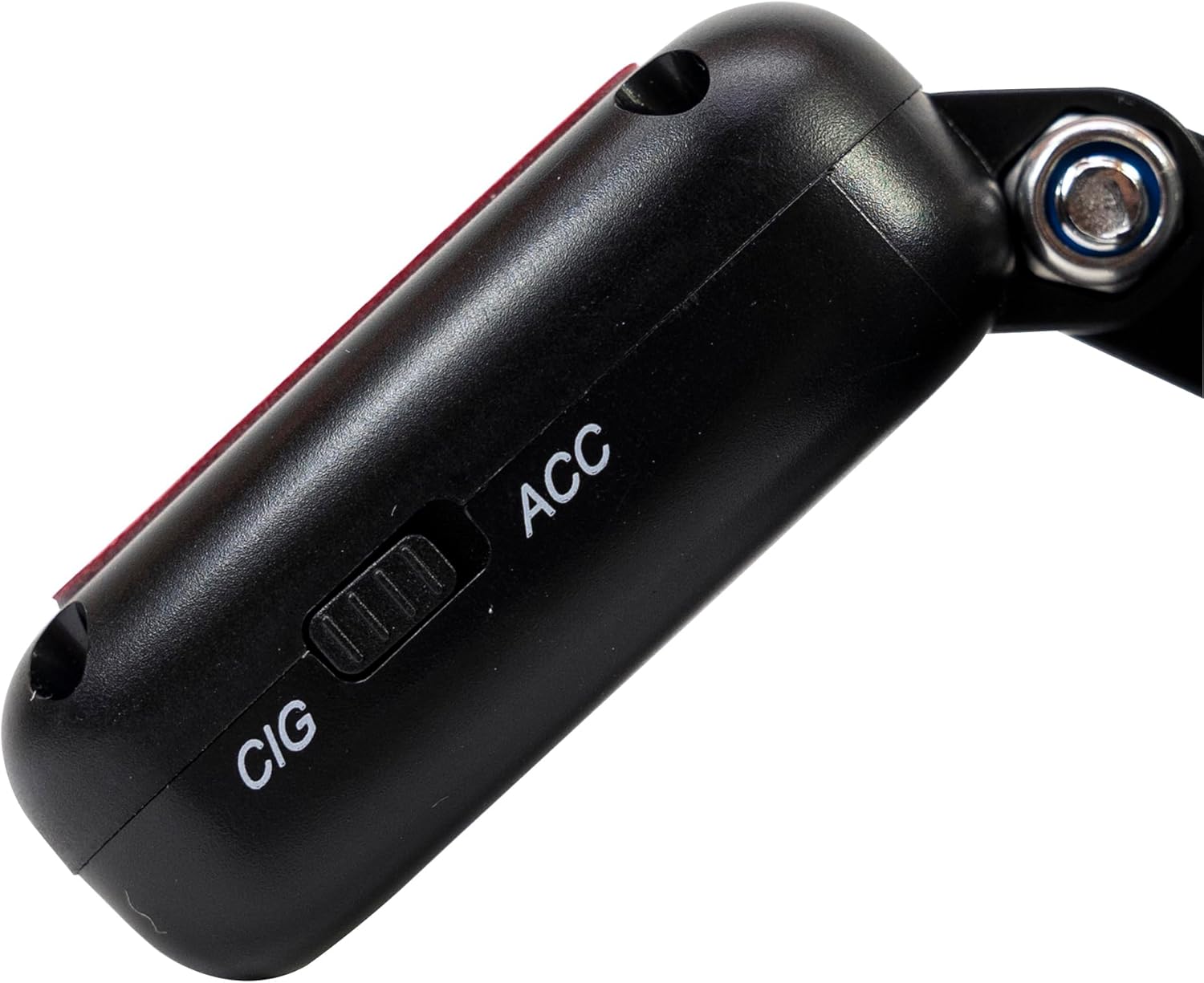
Resim 4.3: Yan view of the magnetic mount, featuring a switch to select between 'CIG' (cigarette lighter power) and 'ACC' (accessory power) modes.
4.2. Temel Özellikler
- 4K Ultra HD Video Kaydı: Captures video at 3840x2160 resolution at 30FPS, or 2560x1440 at 30FPS, and 1920x1080 at 60FPS/30FPS.
- Wi-Fi Bağlantısı: Connects to your smartphone via the Viidure-Dashcam Viewer app for live view, video download, and settings adjustment.
- Park İzleme: Activates the camera to record when vibration or movement is detected while the vehicle is parked.
- G-Sensörü: Geçerli videoyu otomatik olarak kilitler. file in case of a collision to prevent overwriting.
- Geniş açılı lens: 170 derece viewing angle to capture a broad perspective of the road.
- Döngü Kaydı: En eski foo dosyasının üzerine yazar.tagHafıza kartı dolduğunda, kesintisiz kayıt sağlanması için e harfi kullanılır.
- Entegre GPS: Records speed and coordinates, which can be displayed on recorded videos.
5. Kurulum
5.1. MicroSD Kart Takma
- Araç içi kameranın kapalı olduğundan emin olun.
- Cihazdaki microSD kart yuvasını bulun.
- Insert a high-speed (Class 10 or higher) microSD card (up to 512GB) into the slot until it clicks into place.
- To remove, gently push the card in until it clicks, then release. The card will eject.
Önemli: Format the microSD card within the app or on a computer before first use and periodically thereafter to ensure stable recording.
5.2. Kurulum ve Güç Bağlantısı
- Araç içi kamerayı monte etmeyi düşündüğünüz ön cam bölgesini temizleyin. Görüşünüzü engellemediğinden emin olun. view.
- Attach the windshield mount to the dash cam. The mount is magnetic for easy attachment.
- Peel off the protective film from the adhesive pad on the mount and firmly press it onto the chosen spot on your windshield for at least 30 seconds.
- Connect the power cable to the USB-C port on the mount.
- Route the power cable neatly along the windshield and dashboard to the vehicle's cigarette lighter socket.
- Plug the cigarette lighter adapter into the vehicle's 12V/24V power outlet.
- Select the appropriate power mode on the mount's switch: 'CIG' for continuous power from the cigarette lighter, or 'ACC' for power only when the vehicle's ignition is on.

Image 5.1: The PNI Voyager S2600 dash cam detached from its magnetic mount, illustrating the contact points for secure attachment.
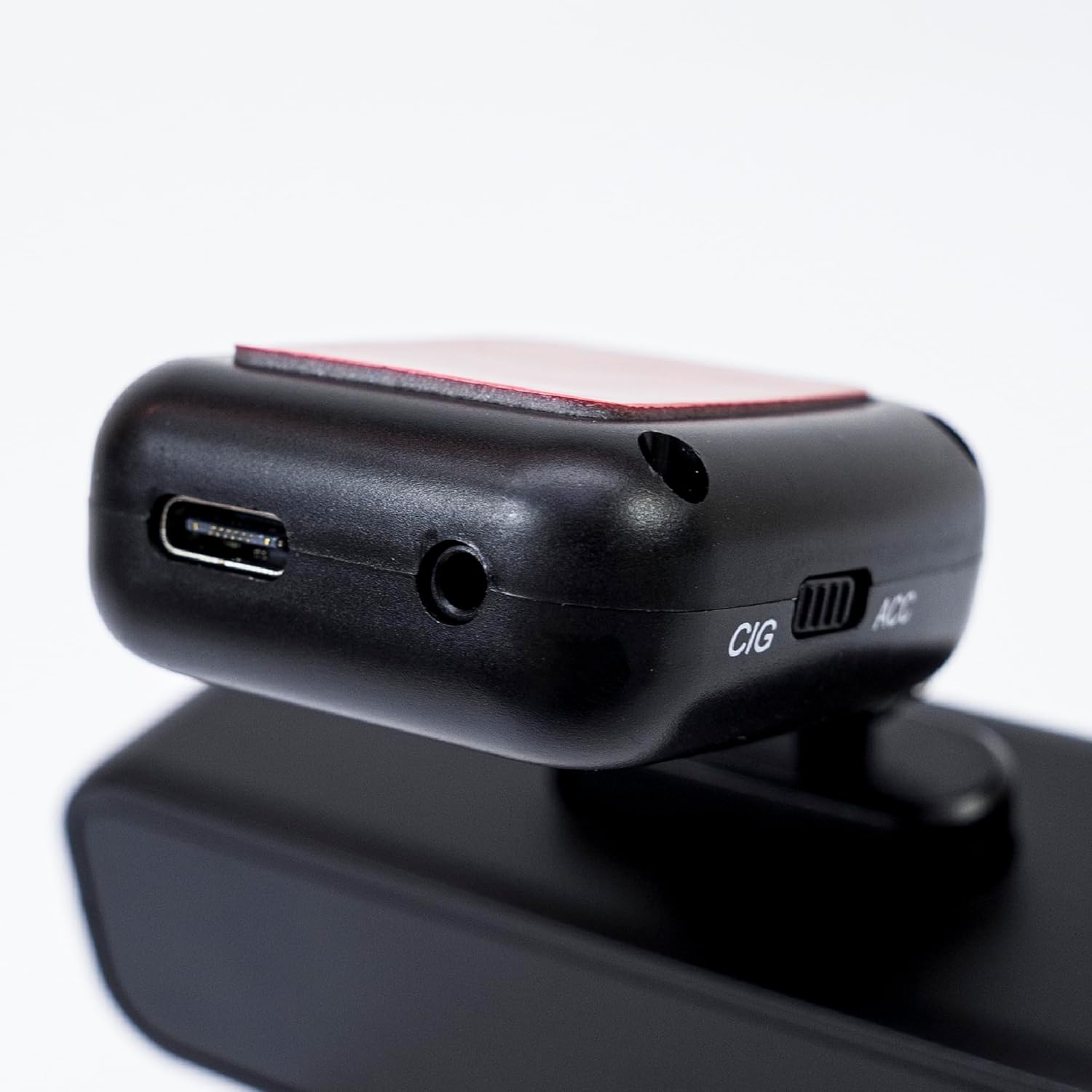
Image 5.2: The top of the dash cam mount, featuring the USB-C port for power input and the CIG/ACC switch for power mode selection.
5.3. Uygulama Yükleme ve Wi-Fi Bağlantısı
- İndir Viidure-Dashcam Viewer App Store (iOS) veya Google Play Store (Android) uygulamasını indirin.
- Araç içi kamerayı açın.
- On your smartphone, go to Wi-Fi settings and connect to the dash cam's Wi-Fi network. The network name (SSID) and password can usually be found in the dash cam's settings (if it has a screen) or in the manual.
- Open the Viidure-Dashcam Viewer app. The app should automatically detect and connect to the dash cam.
- Uygulama aracılığıyla şunları yapabilirsiniz: view canlı footage, adjust settings, download recorded videos, and format the microSD card.

Image 5.3: A smartphone showing the Viidure-Dashcam Viewer application, demonstrating the wireless connection and control over the PNI Voyager S2600 dash cam.
6. Kullanım Talimatları
6.1. Otomatik Kayıt
Once powered on and with a valid microSD card inserted, the PNI Voyager S2600 will automatically begin loop recording. Video files are saved in segments (e.g., 1, 3, or 5 minutes) to the microSD card.
6.2. G-Sensörü (Acil Durum Kaydı)
Dahili G-sensörü, ani darbeleri veya hızlı ivmelenme/yavaşlamayı algılar. Tetiklendiğinde, mevcut video bölümünü otomatik olarak kilitler ve döngüsel kayıt tarafından üzerine yazılmasını önler. Bu acil durum sensörü, ani darbeleri veya hızlı ivmelenme/yavaşlamayı algılar. Tetiklendiğinde, mevcut video bölümünü otomatik olarak kilitler ve döngüsel kayıt tarafından üzerine yazılmasını engeller. files are stored in a separate folder on the microSD card.
6.3. Otopark İzleme
When the vehicle is parked and the dash cam is powered (either continuously via CIG mode or with a hardwire kit), the parking monitor function activates. If the G-sensor detects a collision or motion detection is enabled and detects movement, the dash cam will automatically power on and record a short video segment. This feature helps protect your vehicle when unattended.

Image 6.1: Visual representation of the Parking Monitor feature, showing the dash cam detecting an impact while the car is parked.
6.4. Wi-Fi and App Usage
The Viidure-Dashcam Viewer app allows you to:
- Canlı View: See what the camera is recording in real-time on your smartphone.
- Video Oynatma: Review recorded videos directly from the microSD card.
- Download Videos: Transfer important video files from the dash cam to your smartphone.
- Ayarlar Düzenlemesi: Configure various dash cam settings, such as video resolution, G-sensor sensitivity, loop recording duration, and parking monitor options.
- SD Kartı Biçimlendir: Erase all data on the microSD card.
6.5. GPS İşlevselliği
The integrated GPS receiver records your vehicle's speed and location data. This information can be overlaid on the video footage during playback via the app or compatible desktop software, providing additional context for your recordings.
7. Bakım
7.1. Cihazın Temizlenmesi
Use a soft, dry cloth to clean the dash cam body. For the lens, use a specialized lens cleaning cloth to avoid scratches. Do not use chemical cleaners or abrasive materials.
7.2. MicroSD Card Formatting
It is recommended to format the microSD card every 2-4 weeks to prevent data corruption and ensure optimal recording performance. This can be done through the Viidure-Dashcam Viewer uygulama.
7.3. Ürün Yazılımı Güncellemeleri
Periodically check the PNI website or the Viidure-Dashcam Viewer app for available firmware updates. Firmware updates can improve performance, add new features, or fix bugs. Follow the instructions provided with the update carefully.
8. Sorun Giderme
If you encounter issues with your PNI Voyager S2600, refer to the following common problems and solutions:
| Sorun | Olası Neden | Çözüm |
|---|---|---|
| Araç kamerası açılmıyor. | No power supply; faulty cable; incorrect power mode. | Check power cable connection; ensure cigarette lighter socket is active; verify CIG/ACC switch setting. |
| Kayıt duruyor veya donuyor. | MicroSD card error; card full; low-speed card. | Format microSD card; replace with a high-speed (Class 10 U3) card; ensure sufficient storage. |
| Wi-Fi bağlantısı不稳定 veya başarısız oluyor. | Parazitlenme; yanlış parola; uygulama sorunu. | Ensure dash cam Wi-Fi is enabled; re-enter password; restart app and dash cam; try connecting in a different location. |
| Kötü video kalitesi. | Dirty lens; incorrect resolution setting. | Clean the camera lens; check video resolution settings in the app. |
| Park izleme sistemi çalışmıyor. | Incorrect power mode; feature disabled. | Ensure dash cam is receiving continuous power (CIG mode or hardwire kit); enable parking monitor in app settings. |
If the problem persists, please contact PNI customer support.
9. Özellikler
Detailed technical specifications for the PNI Voyager S2600 Car DVR Camera:
| Özellik | Tanım |
|---|---|
| Model Numarası | PNI-S2600 |
| Video Çözünürlüğü | 4K (3840x2160@30FPS), 2K (2560x1440@30FPS), FHD (1920x1080@60FPS/30FPS) |
| Görüntü Sensörü | SONY335 (5MP, 2592x1944px) |
| ViewAçı | 170 Derece |
| Video Format | MP4, H.264 |
| Fotoğraf Formatı | JPEG |
| Maksimum Fotoğraf Çözünürlüğü | 8 MP (3264x2448) |
| Depolamak | MicroSD card slot, up to 512GB (Class 10 or higher recommended) |
| Bağlantı | Wi-Fi, GPS (integrated) |
| Özel Özellikler | G-Sensor, Parking Monitoring, Motion Detection, Loop Recording |
| Güç Kaynağı | 5V/2A (via 12V/24V car adapter) |
| Pil | Super capacitor 1.5 UF |
| Çalışma Sıcaklığı | -26°C ~ +80°C |
| Boyutlar (U x G x Y) | 105mm x 35mm x 27mm |
| Ağırlık | 88 Gram |
| USB Tipi | C tipi |
10. Garanti ve Destek
10.1. Garanti Bilgileri
The PNI Voyager S2600 Car DVR Camera comes with a 24 ay garanti from the date of purchase. This warranty covers manufacturing defects under normal use. It does not cover damage caused by misuse, accidents, unauthorized modifications, or improper installation. Please retain your proof of purchase for warranty claims.
10.2. Müşteri Desteği
For technical assistance, troubleshooting, or warranty inquiries, please contact PNI customer support. You can find more information and support resources on the official PNI webalan:
Üretici: ONLINESHOP SRL
Address: Olteniei 26A, Piatra Neamt, Neamt, 610206, Romania