
1. Ürün Bittiview
The CAMMUS DDWB 15Nm Direct Drive Wheelbase is a high-performance racing simulator component designed to deliver a realistic and immersive racing experience. It features a powerful servo motor and a direct drive system for precise force feedback and responsive steering.
- Unmatched Torque Power: Provides a maximum torque of 15Nm for superior strength and performance, enhancing the feel of sharp turns and acceleration.
- Direct Drive System: Offers sensitive and direct steering response, making force feedback immediate and realistic.
- Servo Motor Technology: Ensures fixed angle, speed, and torque output with high accuracy and delicate control. Features an aluminum outer shell and an active cooling fan.
- Real Racing Experience: Designed to mirror the intensity of a race track through sensitive steering and direct force feedback.
- Tak ve Çalıştır: Facilitates easy installation and removal, supporting various peripherals. Includes 4 buttons, 2 rotary buttons, 1 momentary two-way switch, and 1 three-way switch.
- APP Adjustment for Ultimate Control: Allows remote fine-tuning of settings via a mobile application for a personalized racing experience.
Important Note: The CAMMUS Wheelbase Direct Drive system operates exclusively on PC hardware and is not compatible with Xbox or PlayStation systems. A Windows 7 or newer operating system is required for optimal performance.
2. Kurulum Talimatları
2.1 Paketin Açılması ve Bileşen Tanımlaması
Kutudaki tüm bileşenleri dikkatlice açın. Aşağıdaki parçaların mevcut olduğundan emin olun:
- CAMMUS DDWB 15Nm Wheelbase Unit
- Güç Kaynağı Ünitesi
- Güç kablosu
- USB kablosu
- Montaj Donanımı (vidalar, rondelalar)

Figure 2.1: Included components of the CAMMUS DDWB 15Nm Wheelbase.
2.2 Fiziksel Kurulum
- Mount the Wheelbase: Securely attach the wheelbase to your racing cockpit or desk using the provided mounting hardware. Ensure it is stable and does not wobble during use.
- Çevre Birimlerini Bağlayın: Attach your steering wheel, pedals, shifter, and handbrake to the appropriate ports on the rear of the wheelbase.
- Gücü bağlayın: Connect the power supply unit to the wheelbase's power input, then plug the power cable into a wall outlet.
- Bilgisayara bağlanın: Connect the USB cable from the wheelbase to an available USB port on your PC.

Figure 2.2: Rear panel connections for the CAMMUS DDWB 15Nm Wheelbase.

Figure 2.3: Wheelbase with an attached steering wheel.
2.3 Yazılım Kurulumu
After connecting the wheelbase to your PC, Windows should automatically detect the device. If drivers are not automatically installed, please visit the official CAMMUS website for the latest drivers and software. Install any necessary software or applications for calibration and settings adjustment.
3. Kullanım Talimatları
3.1 Açma ve Kapatma
- Güç Açık: Ensure all connections are secure. The wheelbase will power on automatically when connected to power and detected by the PC.
- Kapat: Disconnect the power cable from the wall outlet to power off the unit.
3.2 Using the Control Buttons and Switches
The wheelbase features various controls for quick adjustments:
- 4 Düğme: Customizable for in-game functions.
- 2 Rotary Buttons: Typically used for fine-tuning settings like brake bias or traction control.
- 1 Momentary Two-Way Switch: For functions requiring a temporary input.
- 1 Three-Way Switch: For selecting different modes or profiles.
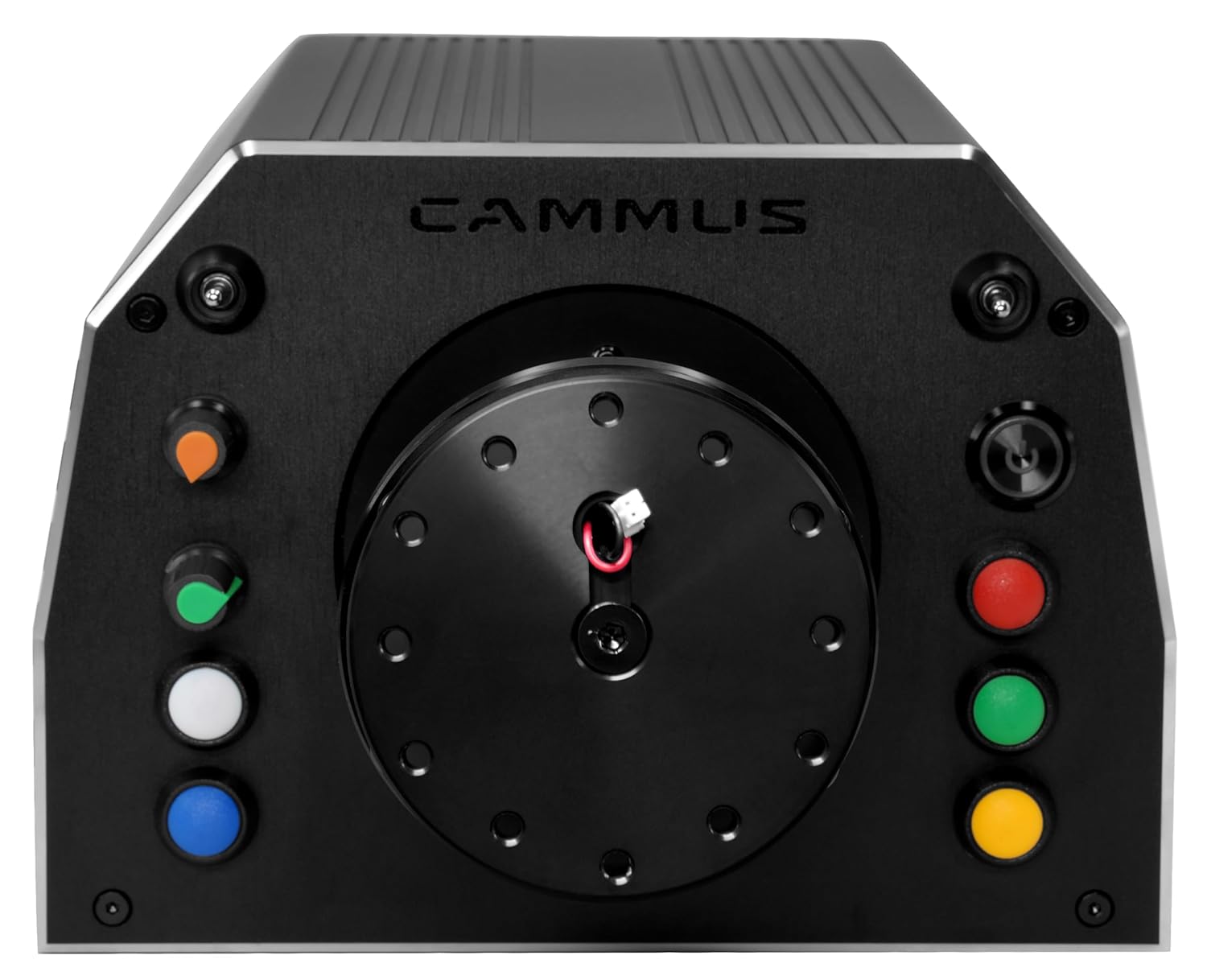
Figure 3.1: Front panel controls of the CAMMUS DDWB 15Nm Wheelbase.
3.3 APP Adjustment
Utilize the intelligent mobile application to remotely adjust wheelbase settings. This allows for personalized force feedback, steering sensitivity, and other parameters to optimize your racing experience. Refer to the app's specific instructions for detailed usage.
4. Bakım
To ensure the longevity and optimal performance of your CAMMUS DDWB 15Nm Wheelbase, follow these maintenance guidelines:
- Temizlik: Regularly wipe the aluminum outer shell with a soft, dry cloth to remove dust and debris. Avoid using abrasive cleaners or solvents.
- Havalandırma: Ensure the active cooling fan in the rear of the unit is not obstructed. Proper airflow is crucial for maintaining optimal operating temperatures.
- Kablo yönetimi: Keep all cables organized and free from kinks or excessive tension to prevent damage.
- Depolamak: When not in use for extended periods, store the wheelbase in a clean, dry environment away from direct sunlight and extreme temperatures.
5. Sorun Giderme
If you encounter issues with your CAMMUS DDWB 15Nm Wheelbase, refer to the following common problems and solutions:
| Sorun | Olası Neden | Çözüm |
|---|---|---|
| Wheelbase not detected by PC | Loose USB connection, outdated drivers, incompatible OS. | Ensure USB cable is securely connected. Try a different USB port. Update drivers from the official CAMMUS website. Verify your PC runs Windows 7 or newer. |
| No force feedback | Software settings, game settings, wheelbase not powered on. | Check force feedback settings in the CAMMUS app and in your racing game. Ensure the wheelbase is powered on. Reinstall drivers if necessary. |
| Buttons/switches not responding | Software calibration, faulty connection. | Calibrate controls through the CAMMUS app. Ensure the steering wheel (if detachable) is properly seated. |
| Aşırı ısınma | Obstructed fan, prolonged heavy use. | Ensure the rear cooling fan is clear of obstructions. Allow the unit to cool down if used for extended periods at high force feedback settings. |
If the problem persists after attempting these solutions, please contact CAMMUS customer support for further assistance.
6. Özellikler
Detailed specifications for the CAMMUS DDWB 15Nm Wheelbase:
| Özellik | Detay |
|---|---|
| Marka Adı | KAMUS |
| Model Adı | WB15 DDbase |
| Model Numarası | 901 |
| Uyumlu Cihazlar | PC (Windows 7 or newer) |
| Donanım Platformu | PC/Mac/Linux/Unix |
| Denetleyici Türü | APP ayarlaması |
| Bağlantı Teknolojisi | Wireless/Adjustable |
| Maksimum Tork | 15Nm |
| Düğme Miktarı | 15 (4 buttons, 2 rotary, 1 momentary two-way, 1 three-way) |
| Güç Kaynağı | Kablolu Elektrik |
| Ürün Ağırlığı | 24.3 Pound (yaklaşık 11 kg) |
| Ürün Boyutları (U x G x Y) | 8.9 x 7.65 x 5.5 inç (yaklaşık 226 x 195 x 140 mm) |
| Renk | Siyah |
| Ek Özellikler | Aluminum outer shell, active cooling fan in rear. |
| Üretici | Shenzhen CAMMUS Electronic Technology Co., Ltd |
| ASIN | B0CTMYWT2R |
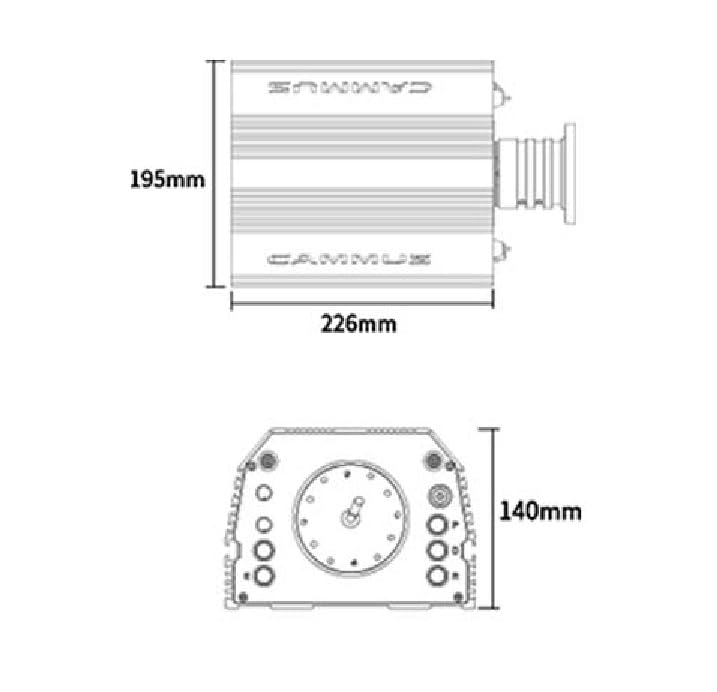
Figure 6.1: Dimensions of the CAMMUS DDWB 15Nm Wheelbase.
7. Garanti ve Destek
7.1 Garanti Bilgileri
The CAMMUS DDWB 15Nm Wheelbase comes with a 1 yıllık üretici garantisiBu garanti, normal kullanım koşullarındaki malzeme ve işçilik kusurlarını kapsar. Garanti talepleriniz için lütfen satın alma belgenizi saklayın.
7.2 Müşteri Desteği
For technical assistance, troubleshooting not covered in this manual, or warranty inquiries, please contact CAMMUS customer support through their official website or the retailer from whom you purchased the product. Provide your model number (WB15 DDbase or 901) and ASIN (B0CTMYWT2R) when contacting support.