
SHARP XL-B530(BK)
SHARP XL-B530 Mikro Bileşen Sistemi
Kullanıcı Talimat Kılavuzu
giriiş
Satın aldığınız için teşekkür ederizasing the SHARP XL-B530 Micro Component System. This system is designed to provide high-quality audio playback from various sources, including Bluetooth wireless streaming, CD, USB, AM/FM radio, and auxiliary input. This manual provides detailed instructions for setting up, operating, and maintaining your new audio system to ensure optimal performance and longevity.
Önemli Güvenlik Bilgileri
- Kullanmadan önce tüm talimatları dikkatlice okuyunuz.
- Bu kılavuzu ileride başvurmak üzere saklayın.
- Üniteyi yağmura veya neme maruz bırakmayın.
- Ünitenin çevresinde yeterli havalandırma olduğundan emin olun. Havalandırma açıklıklarını kapatmayın.
- Üniteyi radyatör, kalorifer ızgarası, soba veya diğer cihazlar (dahil) gibi ısı kaynaklarının yakınına yerleştirmeyin. amp(ısı üreten)
- Güç kablosunun üzerine basılmasını veya sıkışmasını önleyin.
- Sadece üretici tarafından belirtilen aparatları/aksesuarları kullanın.
- Yıldırımlı havalarda veya uzun süre kullanılmayacaksa bu cihazın fişini çekin.
- Tüm bakımları yetkili servis personeline yaptırın.
Paket İçeriği
Lütfen paketinizde aşağıdaki tüm öğelerin bulunduğundan emin olun:
- Ana Ünite (Mikro Bileşen Sistemi)
- Speaker Units (x2)
- Uzaktan kumanda
- Güç Kablosu
- FM Anteni
- AM Döngü Anteni
- Kullanım Kılavuzu (bu belge)
Ürün Bittiview
Familiarize yourself with the components and controls of your SHARP XL-B530 system.
Main Unit and Speakers

Etraflı view of the SHARP XL-B530 Micro Component System, including the main unit, two speakers, and the remote control.
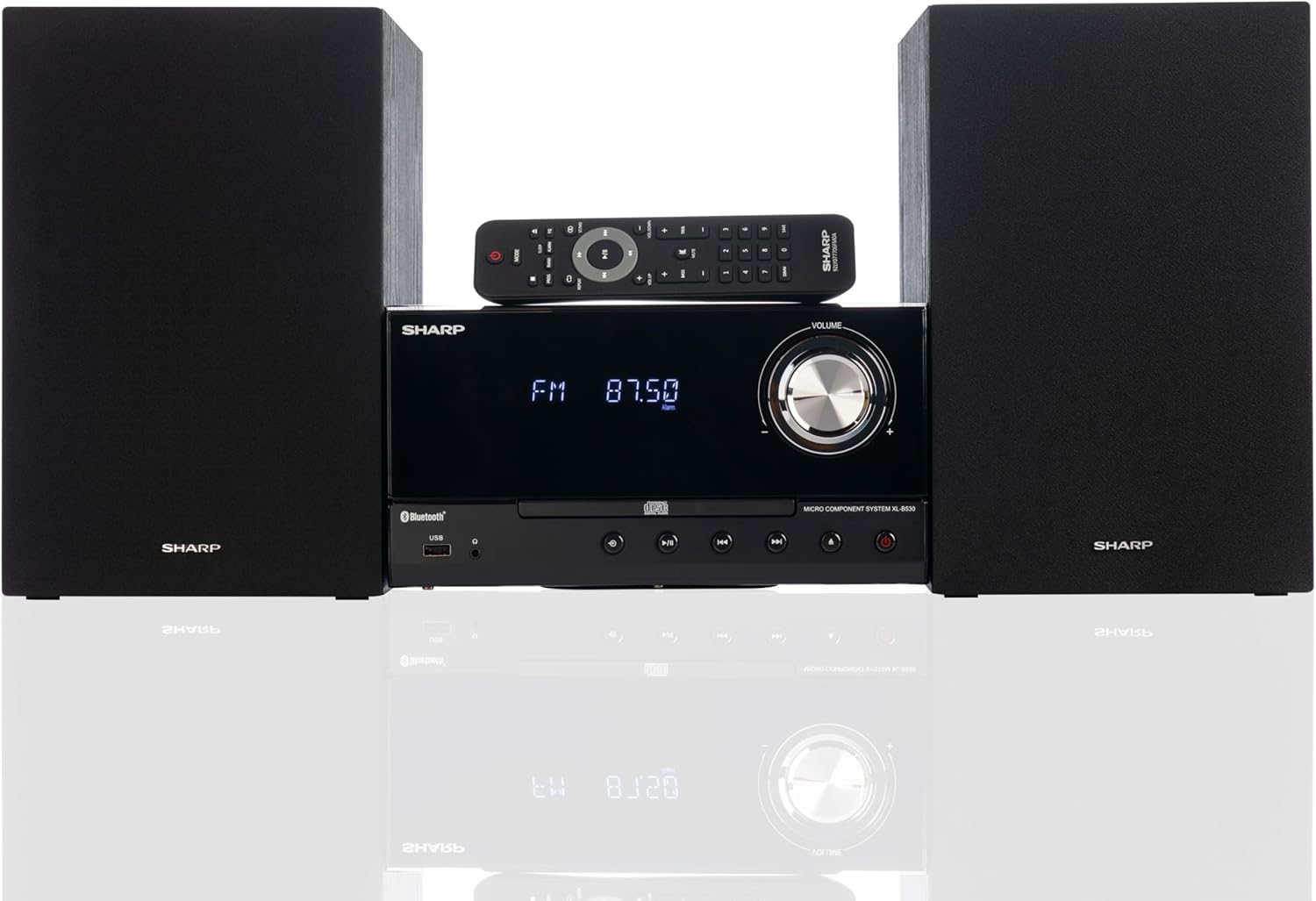
Front panel of the main unit, showing the LCD display, volume knob, CD tray, and control buttons.
Arka Panel Bağlantıları

The rear panel of the main unit, featuring speaker terminals, FM antenna input, AM antenna input, and auxiliary input ports.
Uzaktan kumanda
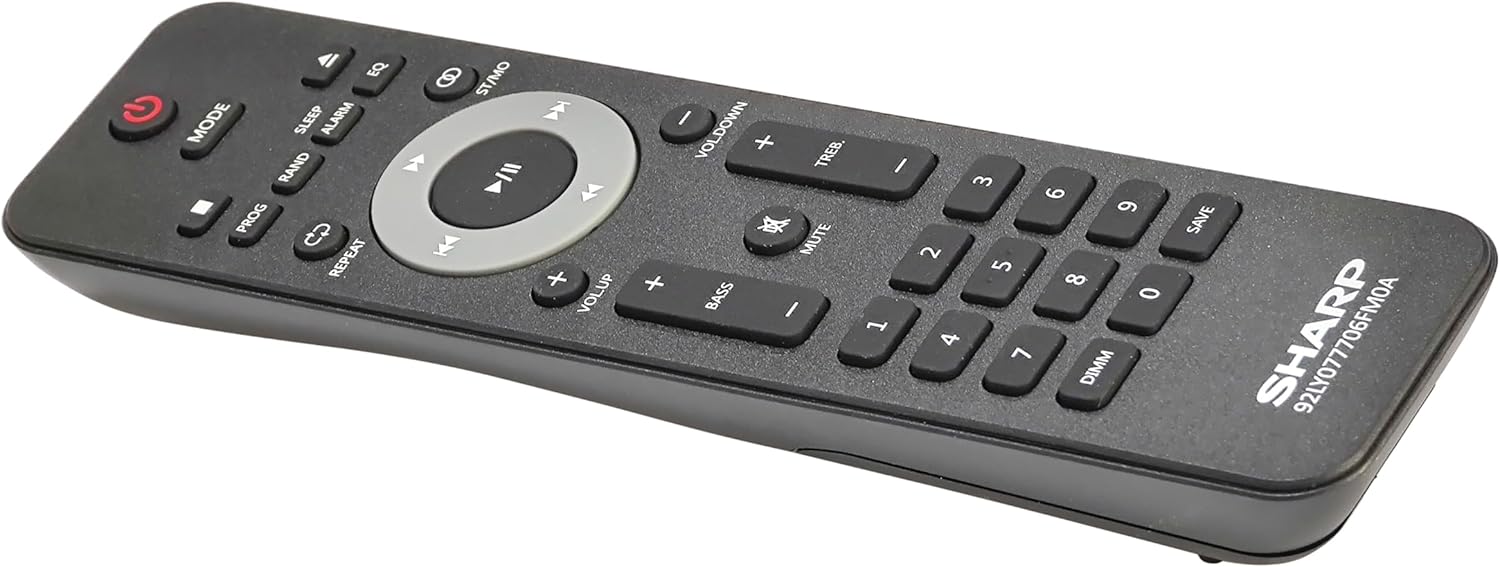
Ayrıntılı view of the remote control, showing various function buttons for power, mode, playback, volume, and sound adjustments.
Kurmak
Follow these steps to set up your micro component system.
1. Hoparlör Bağlantısı
- Identify the left and right speaker cables.
- Connect the red (+) wire from each speaker to the red (+) terminal on the main unit's rear panel.
- Connect the black (-) wire from each speaker to the black (-) terminal on the main unit's rear panel.
- Ensure a secure connection for both speakers.
2. Anten Bağlantısı
- FM Anteni: Connect the supplied FM wire antenna to the FM antenna jack on the rear panel. Extend the wire fully for best reception.
- AM Anteni: Assemble the AM loop antenna and connect its wires to the AM antenna terminals on the rear panel. Rotate the antenna for optimal AM reception.
3. Güç Bağlantısı
- Ensure all other connections are made.
- Plug the power cord into the AC IN jack on the rear of the main unit.
- Güç kablosunun diğer ucunu duvardaki prize takın.
Kullanım Talimatları
This section details how to use the various functions of your SHARP XL-B530 system.
Güç Açık/Kapalı
- Basın GÜÇ Ana ünitedeki veya uzaktan kumandadaki düğme ile sistemi açıp kapatabilirsiniz.
Kaynak Seçimi
- Basın MOD button on the main unit or remote control repeatedly to cycle through available sources: CD, Bluetooth, USB, FM, AM, AUX.
CD Çalma
- Basın MOD 'CD' modunu seçmek için kullanılan düğme.
- Basın AÇIK/KAPALI CD tepsisini açmak için düğmesine basın.
- Place a CD (CD/MP3/WMA/CD-R/CD-RW) with the label side up into the tray.
- Basın AÇIK/KAPALI Tepsiyi kapatmak için düğmeye tekrar basın. Oynatma otomatik olarak başlayacaktır.
- Kullanmak OYNAT/DURDUR, DURMAK, ATLAMAK (forward/backward), and ARAMAK kontrol düğmeleri.
Bluetooth Eşleştirme
- Basın MOD button to select 'Bluetooth' mode. The display will show 'BT' and flash, indicating it's ready for pairing.
- Bluetooth özellikli cihazınızda (akıllı telefon, tablet vb.) Bluetooth'u etkinleştirin ve kullanılabilir cihazları arayın.
- Select 'SHARP XL-B530' from the list.
- Once paired, the display will stop flashing and show 'BT CONNECTED'. You can now stream audio from your device.
USB Oynatma
- Ön paneldeki USB bağlantı noktasına bir USB flash sürücü takın.
- Basın MOD 'USB' modunu seçmek için kullanılan düğme.
- Sistem, uyumlu ses dosyalarını otomatik olarak algılayacak ve çalmaya başlayacaktır. file(MP3/WMA).
- Use playback controls similar to CD mode.
AM/FM Radyo

The SHARP XL-B530 system displaying an FM radio frequency, highlighting its digital tuner capabilities.
- Basın MOD button to select 'FM' or 'AM' mode.
- Otomatik tarama: Basılı tutun OYNAT/DURDUR Mevcut istasyonları otomatik olarak taramak ve kaydetmek için düğme.
- Manuel Ayarlama: Kullanın ATLAMAK İstenilen frekanslara manuel olarak ayarlama yapmak için düğmeler.
- Önceden Ayarlanmış İstasyonlar: Use the number buttons on the remote to directly select saved preset stations.
Volume and Sound Adjustment

A close-up of one of the SHARP XL-B530 speakers, illustrating the adjustable bass and treble sound output.
- Hacim: Döndür HACİM ana ünitedeki düğmeyi kullanın veya VOL + / VOL- Uzaktan kumandadaki düğmeler.
- Bas tiz: Kullanın BAS+ / BAS- Ve TREB+ / TREB- buttons on the remote control to adjust sound characteristics.
- Ses Yüksekliği: Basın SES Uzaktan kumandadaki düğme, düşük ses seviyelerinde bas ve tiz sesleri artırmaya yarar.
- EQ: Basın EQ button on the remote to cycle through preset equalizer modes.
Bakım
Doğru bakım, sisteminizin uzun ömürlü olmasını sağlayacaktır.
- Temizlik: Use a soft, dry cloth to clean the exterior of the unit. For stubborn stains, dampen the cloth lightly with water. Do not use abrasive cleaners or solvents.
- CD Bakımı: CD'leri kenarlarından tutarak taşıyın. Kirli CD'leri yumuşak, tüy bırakmayan bir bezle, merkezden dışa doğru silerek temizleyin.
- Havalandırma: Havalandırma açıklıklarının toz veya döküntülerle tıkanmadığından emin olun.
- Depolamak: Cihazı uzun süre saklayacaksanız, elektrik prizinden çıkarın ve serin, kuru bir yerde saklayın.
Sorun giderme
If you encounter issues with your system, refer to the following common problems and solutions.
| Sorun | Olası Neden | Çözüm |
|---|---|---|
| Güç yok | Güç kablosu bağlı değil; Elektrik prizi aktif değil. | Ensure power cord is securely plugged in; Try a different outlet |
| Ses yok | Ses seviyesi çok düşük; Hoparlörler bağlı değil; Yanlış kaynak seçildi. | Sesi artırın; Hoparlör bağlantılarını kontrol edin; Doğru giriş kaynağını seçin. |
| CD çalmıyor | CD inserted incorrectly; CD is dirty or scratched; Incorrect mode | Insert CD correctly (label side up); Clean or replace CD; Select CD mode |
| Bluetooth eşleştirmiyor | Bluetooth mode not selected; Device too far; Device already paired to another unit | Select Bluetooth mode; Move device closer; Disconnect from other devices and try again |
| Zayıf radyo alımı | Antenna not connected or positioned poorly; Interference | Connect and adjust antenna position; Move unit away from other electronic devices |
| Uzaktan kumanda çalışmıyor | Batteries are dead or inserted incorrectly; Obstruction between remote and unit | Replace batteries, check polarity; Remove any obstructions; Ensure remote is pointed at the unit's sensor |
Özellikler
| Özellik | Şartname |
|---|---|
| Model Numarası | XL-B530(BK) |
| Çıkış Gücü | 200W Maks (100W RMS) |
| Bağlantı | Bluetooth, USB, Aux Girişi |
| Disk Uyumluluğu | CD, CD-R/RW, MP3, WMA |
| Ayarlayıcı | AM/FM Stereo Digital Tuner (50 station presets) |
| Hoparlör Tipi | Stereo |
| Ürün Boyutları (U x G x Y) | 25 x 11 x 9.6 inç |
| Ürün Ağırlığı | 18 pound |
| Renk | Kara Meşe |
Garanti ve Destek
For warranty information and technical support, please refer to the warranty card included with your product or visit the official SHARP website. Herhangi bir garanti talebi için satın alma belgeniz olarak satın alma makbuzunuzu saklayın.
For further assistance, you may contact SHARP customer service through their official channels.
Ask a question about this manual
Ask about setup, troubleshooting, compatibility, parts, safety, or missing instructions. Manuals+ will review the question and use this page’s manual context to help answer it.