
1. Giriş
Welcome to the user manual for your AWEI T58 Wireless Bluetooth Earbuds. These earbuds are designed to provide a high-quality audio experience with advanced features such as Bluetooth 5.3 connectivity, active noise cancellation for calls, and an IPX6 waterproof rating. This manual will guide you through the setup, operation, and maintenance of your new device to ensure optimal performance and longevity.
2. Paket İçeriği
Lütfen paketi aşağıdaki öğeler açısından kontrol edin:
- AWEI T58 Wireless Bluetooth Earbuds (Left and Right)
- Şarj Kutusu
- USB-C Şarj Kablosu
- User Instructions (This manual)
3. Ürün Bittiview
The AWEI T58 earbuds feature an ergonomic in-ear design for comfortable wear and sensitive touch controls for easy operation. The charging case provides extended battery life and includes LED indicators for charging status.
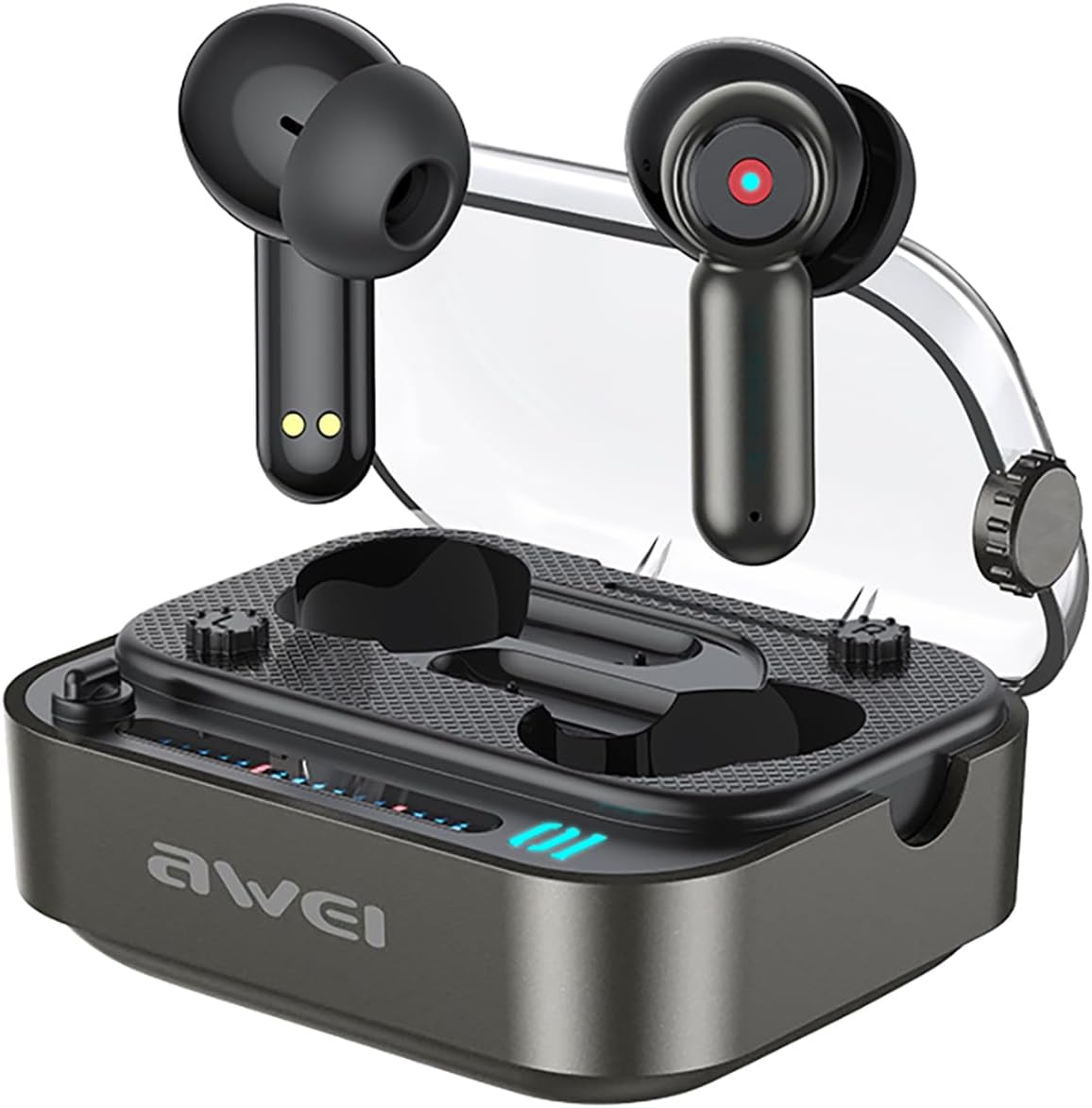
Image: The AWEI T58 Wireless Bluetooth Earbuds resting in their charging case with the lid open.

Image: A diagram illustrating the touch-sensitive area on the earbud for various controls.
4. Kurulum
4.1 Kulaklıkları ve Kutuyu Şarj Etme
Before first use, fully charge the charging case and earbuds. Connect the provided USB-C charging cable to the charging port on the case and a power source. The LED indicators on the case will show the charging status. A full charge for the case takes approximately 1.5 hours.
Image: The AWEI T58 charging case displaying its LED ambient lights, which indicate charging status.
4.2 Cihazınızla Eşleştirme
- Kulaklıkların şarj edildiğinden emin olun.
- Şarj kutusunu açın. Kulaklıklar otomatik olarak açılacak ve eşleştirme moduna girecektir.
- Cihazınızda (akıllı telefon, tablet, dizüstü bilgisayar) Bluetooth'u etkinleştirin.
- Arama Bluetooth özellikli cihazları bulun ve listeden "AWEI T58"i seçin.
- Bağlantı sağlandıktan sonra onay sesini duyacaksınız ve kulaklıklarınız kullanıma hazır hale gelecektir.
The AWEI T58 utilizes Bluetooth 5.3 technology for a stable and efficient connection with a range of up to 10 meters.

Image: A visual representation of the AWEI T58 earbuds wirelessly connecting to a smartphone, highlighting Bluetooth 5.3 technology.
5. Kullanım Talimatları
5.1 Güç Açma/Kapatma
- Güç Açık: Şarj kutusunu açın, kulaklıklar otomatik olarak açılacaktır.
- Kapat: Kulaklıkları şarj kutusuna geri yerleştirin ve kapağı kapatın. Kulaklıklar otomatik olarak kapanacak ve şarj olmaya başlayacaktır.
5.2 Müzik Kontrolü
- Oynat/Duraklat: Her iki kulaklığa da bir kez dokunun.
- Sonraki Şarkı: Sağ kulaklığa üç kez dokunun.
- Önceki Şarkı: Sol kulaklığa üç kez dokunun.
- Sesi aç: Sağ kulaklığa iki kez dokunun.
- Sesi kıs: Sol kulaklığa iki kez dokunun.
5.3 Çağrı Kontrolü
- Çağrıyı Cevapla/Sonlandır: Her iki kulaklığa da bir kez dokunun.
- Çağrıyı Reddet: Kulaklıklardan birini 2 saniye basılı tutun.
5.4 Sesli Asistan
- Voice Assistant'ı etkinleştirin: Arama yapmadığınız zamanlarda kulaklığınızın herhangi birini 2 saniye basılı tutun.
5.5 Active Noise Cancellation (ANC) for Calls
The AWEI T58 earbuds feature ANC calling noise cancellation technology to ensure clearer voice transmission during calls.
6. Bakım
6.1 Su Geçirmezlik (IPX6)
The earbuds are rated IPX6 waterproof, meaning they are protected against high-pressure water jets from any direction. This makes them suitable for use during workouts or in light rain. However, they are not designed for submersion in water.

Image: The AWEI T58 earbuds and charging case depicted with water splashes, demonstrating their IPX6 waterproof capability.
6.2 Temizlik ve Depolama
- Kulaklıklarınızı ve şarj kutusunu yumuşak, kuru ve tiftiksiz bir bezle düzenli olarak temizleyin.
- Aşındırıcı temizleyiciler veya solventler kullanmaktan kaçının.
- Şarj etmeden önce hem kulaklıktaki hem de kutudaki şarj temas noktalarının temiz ve kuru olduğundan emin olun.
- Kulaklıkları kullanmadığınız zamanlarda şarj kutusunda saklayarak hem koruyun hem de pil ömrünü uzatın.
6.3 Pil Ömrü Yönetimi
The earbuds provide approximately 7 hours of continuous playback on a single charge. The 300mAh charging case extends the total playtime to about 35 hours in dual-ear mode. By alternating between single-ear use, the total playtime can reach up to 70 hours.
7. Sorun Giderme
AWEI T58 kulaklıklarınızla ilgili herhangi bir sorunla karşılaşırsanız, lütfen aşağıdaki yaygın çözümlere bakın:
- Ses Yok: Ensure the earbuds are properly paired and connected to your device. Check the volume level on both the earbuds and your device.
- Eşleştirme Hatası: Make sure the earbuds are charged and within range of your device. Turn off Bluetooth on your device, then turn it back on and try pairing again. If issues persist, try resetting the earbuds (refer to manufacturer's web(Gerekirse belirli sıfırlama talimatları için siteye bakın).
- Şarj Sorunları: Verify that the USB-C cable is securely connected to both the charging case and the power source. Ensure the charging contacts on the earbuds and case are clean.
- Aralıklı Bağlantı: Ensure there are no obstructions between the earbuds and your device. Move closer to your device to reduce interference.
For further assistance, please contact customer support or refer to the official Awei webalan.
8. Özellikler
| Özellik | Şartname |
|---|---|
| Örnek | T58 |
| Marka | Awei |
| Bağlantı Teknolojisi | Kablosuz (Bluetooth 5.3) |
| Kulak Yerleşimi | Kulakta |
| Form Faktörü | Kulakta |
| Gürültü Kontrolü | Active Noise Cancellation (ANC) for calls |
| Su Direnç Seviyesi | IPX6 Su Geçirmez |
| Hoparlör Boyutu | 13mm |
| Kulaklık Pil Ömrü | 7 Saat (sürekli kullanım) |
| Toplam Oynanma Süresi (Kılıflı) | 35 Hours (dual-ear mode), 70 Hours (single-ear alternating) |
| Şarj Kutusu Bataryası | 300mAh |
| Şarj Süresi (Kılıf) | 1.5 Saat |
| Şarj Portu | Tip-C |
| kablosuz Menzil | 10 metreye kadar |
| Kontrol Türü | Dokunmatik Kontrol |
| Malzeme | Plastic with Silicone/Rubber Ear Caps |
| Ürün Ağırlığı | 150 gr |
| Dahil Bileşenler | Wireless Bluetooth Headset, Charging Case, USB-C Charging Cable, User Instructions |
9. Garanti ve Destek
For warranty information and customer support, please refer to the documentation provided with your purchase or visit the official Awei webSite. Satın alma belgenizi herhangi bir garanti talebi için saklayın.