
MOVE SPEED YSPBZ70Pro-100
MOVE SPEED Power Bank User Manual
Model: YSPBZ70Pro-100
High Capacity Laptop Portable Charger with Flash Light
1. Giriş
The MOVE SPEED 70,000mAh 100W Power Bank is a high-capacity portable charging solution designed to keep your devices powered on the go. With its robust battery and versatile output options, it is ideal for various scenarios, from daily use to outdoor adventures.

Figure 1: MOVE SPEED 70,000mAh 100W Power Bank
2. Temel Özellikler
- 70000mAh Mega Capacity: Provides extensive power, capable of charging an iPhone 16 up to 15 times or a MacBook Air 5 times.
- 100W Fast Charging & 65W Recharge: Delivers rapid power output for devices and quick recharge times for the power bank itself.
- 4 Outputs + 2 Inputs: Equipped with multiple USB-C and USB-A ports for simultaneous charging of up to four devices.
- Emergency Light & SOS Mode: Features a built-in light with three adjustable brightness levels (High/Medium/Low) and an instant SOS strobe flash for emergencies.
- Akıllı Dijital Ekran: A precision digital screen shows real-time battery percentage, akım ve voltage çıktı.
- Pass-Through Functionality: Allows you to power your devices while simultaneously recharging the power bank.
- Dayanıklı Tasarım: Built with car-grade batteries and a convenient hand strap for easy carrying.

Şekil 2: Üzeriview of Power Bank Features

Figure 3: High Capacity for Multiple Charges
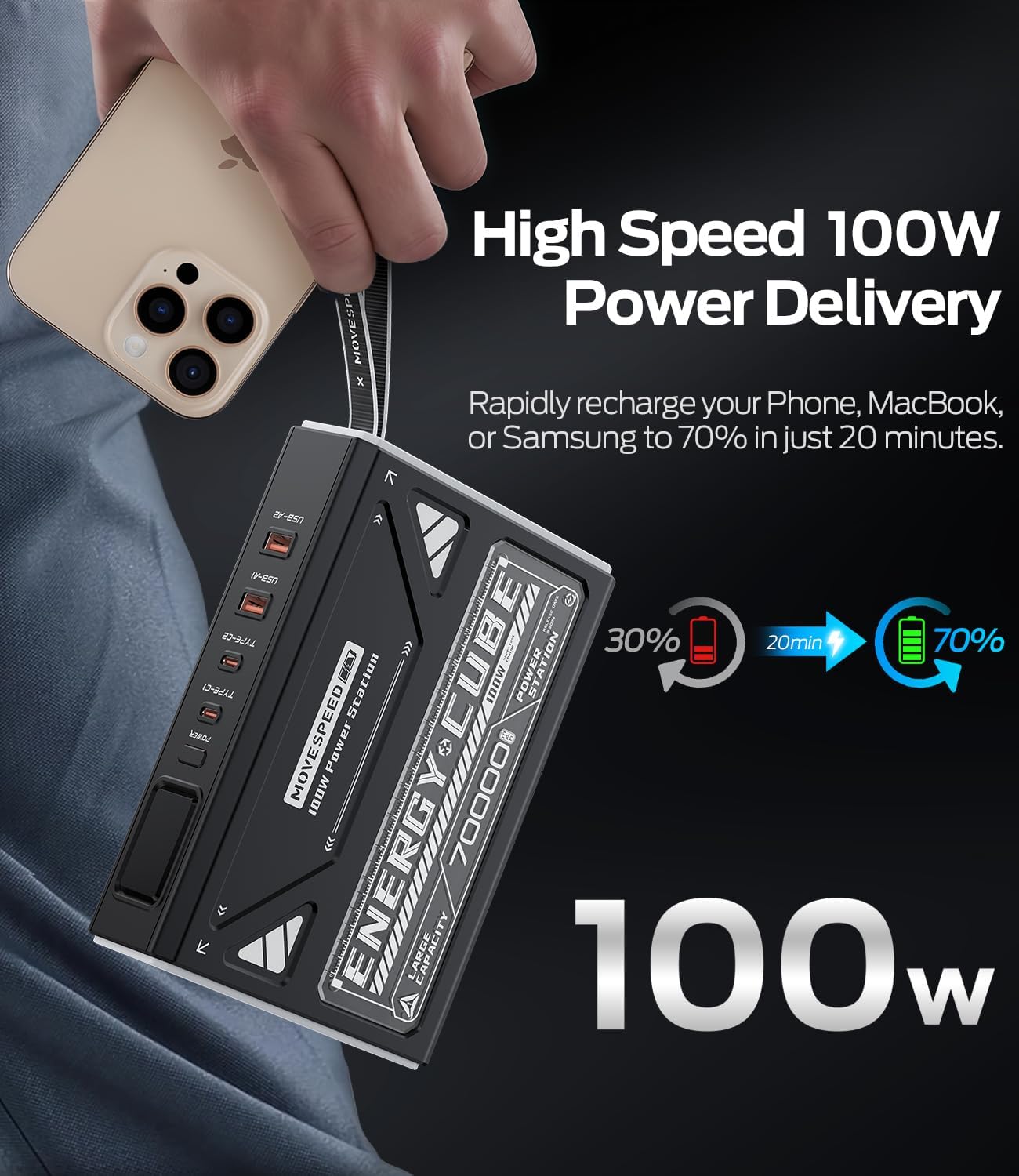
Figure 4: 100W Power Delivery Speed
3. İlk Kurulum ve Şarj Etme
Before first use, it is recommended to fully charge the power bank. For optimal performance, fully charge and discharge the unit 3-4 times. This process helps calibrate the battery for best performance.
- Connect the provided USB-C to USB-C cable to one of the Type-C input ports (Type-C1 or Type-C2) on the power bank.
- Connect the other end of the cable to a compatible 65W (or higher) USB-C power adapter (not included).
- Dijital ekran şarj durumunu ve pil yüzdesini gösterecektir.tage. A green lightning bolt symbol indicates fast charging.
- Charging time to 100% is approximately 5 hours with a 65W input.

Figure 5: Input and Output Ports
4. Kullanım Talimatları
4.1. Cihazlarınızı Şarj Etme
To charge your devices, connect them to the appropriate output ports on the power bank using compatible cables. The power bank features two USB-C output ports (Type-C1, Type-C2) and two USB-A output ports (USB-A1, USB-A2).
- Tip-C1 Çıkışı: Up to 100W (5V=3A, 9V=3A, 12V=3A, 15V=3A, 20V=5A)
- Tip-C2 Çıkışı: Up to 45W (5V=3A, 9V=3A, 12V=3A, 15V=3A, 20V=2.25A)
- USB-A1/A2 Çıkışı: Up to 22.5W (5V=3A, 9V=2A, 10V=2.25A, 12V=1.5A)
- Eşzamanlı Şarj: The power bank can intelligently distribute power when multiple devices are connected. For example, Type-C1 + Type-C2 can provide 65W + 35W.

Figure 6: Simultaneous Charging Capability
4.2. Dijital Ekran
Press the power button once to activate the digital display. It shows the remaining battery percentage, and when charging or discharging, it will show the input/output voltage ve akım.
4.3. Emergency Light & SOS Mode
The power bank includes a powerful LED light with multiple modes for various situations.
- Işığı Etkinleştir: Double-press the power button quickly to turn on the light at High Level.
- Döngü Modları: Press the power button once to cycle through brightness levels: High > Medium > Low > SOS Flashing Mode.
- Işığı Kapat: Double-press the power button quickly to turn off the light from any mode.

Figure 7: Emergency Light with 4 Modes
Video 1: Demonstrating Lighting and SOS Mode Operating Instructions
5. Özellikler
| Bağlanmak | Detay |
|---|---|
| Model Numarası | YSPBZ70Pro-100 |
| Pil Türü | Li-polimer |
| Pil Kapasitesi | 70000mAh / 259Wh |
| Nominal Kapasite | 42000mAh (5V=3A) |
| Tip-C1 Girişi | 5V=3A, 9V=3A, 12V=3A, 15V=3A, 20V=3.25A (Maks 65W) |
| Tip-C2 Girişi | 5V=3A, 9V=3A, 12V=3A, 15V=3A, 20V=2.25A (Maks 45W) |
| Type-C1 Çıkışı | 5V=3A, 9V=3A, 12V=3A, 15V=3A, 20V=5A (Maks 100W) |
| Type-C2 Çıkışı | 5V=3A, 9V=3A, 12V=3A, 15V=3A, 20V=2.25A (Maks 45W) |
| USB-A1/A2 Çıkışı | 5V=3A, 9V=2A, 10V=2.25A, 12V=1.5A (Max 22.5W) |
| Ürün Boyutları | 7.41 x 1.95 x 5.46 inç |
| Ürün Ağırlığı | 3.42 pound |
6. Bakım
- Depolamak: Store the power bank in a cool, dry environment (temperature range of 5-35°C) and avoid direct sunlight.
- Düzenli Kullanım: If the power bank is not used for more than three weeks, it is recommended to fully charge and discharge it at least once a month to prolong its service life.
- Fiziksel Hasardan Kaçının: Protect the device from strong impacts, drops, or collisions.
- Çevresel Koşullar: Avoid using this product in environments with high temperature, low air pressure, low temperature, moisture, dust, strong magnetic fields, and long-term exposure to sunlight.
- Suya Maruz Kalma: Do not expose the product to water droplets or splashes. It is prohibited to use after being soaked in water.
- Temizlik: Cihazı temizlemek için yumuşak ve kuru bir bez kullanın. Sert kimyasallar veya aşındırıcı malzemeler kullanmayın.
7. Sorun Giderme
- Power Bank Şarj Olmuyor: Ensure you are using a compatible USB-C power adapter (65W or higher recommended) and the provided USB-C cable. Check all connections.
- Cihazların Yavaş Şarj Olması: Verify that your device supports fast charging protocols (PD, QC) and that you are using the correct port (Type-C1 for 100W, Type-C2 for 45W, USB-A for 22.5W). Ensure your cable is also rated for high wattage.
- Digital Display is Dim: The display may appear dim in bright daylight. Try viewing it in a shaded area.
- Light Activates Accidentally: Be mindful of the power button when storing the power bank, as a double-press will activate the light.
- Cihaz Power Bank'ten Şarj Olmuyor: Ensure the power bank has sufficient charge. Press the power button to activate output if it's in standby mode.
- Aşırı Isınma: If the power bank feels excessively hot during use or charging, disconnect all devices and allow it to cool down. Avoid placing it on soft surfaces that can block ventilation.
8. Garanti ve Destek
MOVE SPEED offers comprehensive support for its products:
- Ömür Boyu Destek: Contact MOVE SPEED customer service anytime online for assistance.
- Garanti Güvencesi: A 12-month warranty is provided on all products. Select storage devices may have extended coverage up to 60 months (refer to the warranty card for specific details).
For any inquiries or support needs, please refer to the contact information provided on your product packaging or the official MOVE SPEED webalan.
İlgili Belgeler - YSPBZ70Pro-100
 |
MOVE SPEED S80 80,000mAh 130W Taşınabilir Güç İstasyonu Kullanım Kılavuzu MOVE SPEED S80 taşınabilir güç istasyonu için kapsamlı kullanım kılavuzu. 80,000 mAh kapasitesi, 130 W çıkışı, dijital ekranı, USB-C bağlantı noktaları ve güneş enerjisiyle şarj etme özelliklerini nasıl kullanacağınızı öğrenin.amping, laptops, and emergency backup. |
 |
MOVESPEED GD10 Portable SSD Quick Start Guide Quick start guide for the MOVESPEED GD10 Portable SSD, covering device connection, UI navigation, password setup, locking/unlocking, warranty terms, and hazardous substance information. |
 |
MOVE SPEED MoveSpeedDrivePro USB Flash Sürücü Kullanım Kılavuzu User manual for the MOVE SPEED MoveSpeedDrivePro USB flash drive. This guide covers PC software download and installation, setting up AES256 and fingerprint encryption, data backup procedures, and restoring factory settings. Features USB3.2, Type C, and 520MB/s speeds. |
 |
Move Speed Drive Kullanım Kılavuzu: Yedekleme, Şifreleme ve Parmak İzi Özellikleri Move Speed Drive'ın yazılımının veri yedekleme, telefon yedekleme, geri yükleme işlemleri ve parola ve parmak izi şifreleme gibi güvenlik özelliklerinin nasıl kullanılacağını ayrıntılarıyla anlatan kapsamlı bir kılavuz. |
 |
Laser PB-PD100W-491 20,000mAh 100W Powerbank User Manual Comprehensive user manual for the Laser PB-PD100W-491 20,000mAh 100W Powerbank. Learn about its features, ports, charging instructions, optimal combinations, specifications, and warranty information. |
 |
ALOGIC Roam 21,000mAh Power Bank User Manual and Specifications Comprehensive user manual and specifications for the ALOGIC Roam 21,000mAh Power Bank, detailing features, charging capabilities, safety instructions, and FCC compliance. |
Ask a question about this manual
Ask about setup, troubleshooting, compatibility, parts, safety, or missing instructions. Manuals+ will review the question and use this page’s manual context to help answer it.