
1. Giriş
This manual provides detailed instructions for the installation, operation, and maintenance of your TAFFIO TXH6701-4 Android Head Unit. This device integrates advanced navigation, communication, and entertainment features into your Porsche Macan, enhancing your driving experience.
2. Ürün Bittiview
The TAFFIO TXH6701-4 is a 12.3-inch touchscreen Android head unit designed to seamlessly integrate with Porsche Macan vehicles equipped with PCM 4.0. It offers a high-resolution display and a comprehensive suite of features.
Temel Özellikler:
- 1920 x 720 Full HD Video Resolution Capacitive Touchscreen Display
- Intuitive 3D User Interface
- Powered by a Snapdragon Qualcomm 668s 8-core processor (2.0 GHz) with 8 GB RAM and 128 GB internal storage
- Integrated Wireless Apple CarPlay and Android Auto functionality
- Built-in Wi-Fi for direct connection to hotspots
- 4G LTE SIM card slot for mobile internet connectivity
- FM/AM radio tuner with RDS
- USB slots for media playback
- Bluetooth A2DP for music streaming
- Supports original car functions including rearview camera and parking distance control (PDC)
- Automatic screen brightness adjustment (Day & Night Display function)
- Subwoofer output, 4x audio output, 2x video out, 1x AUX video in

Figure 2.1: The TAFFIO TXH6701-4 Android Head Unit displaying its main interface with various application icons.
3. Uyumluluk
This head unit is compatible with Porsche Macan models from 2017 onwards that are equipped with the PCM 4.0 system. It is crucial to verify your vehicle's current system to ensure proper functionality.
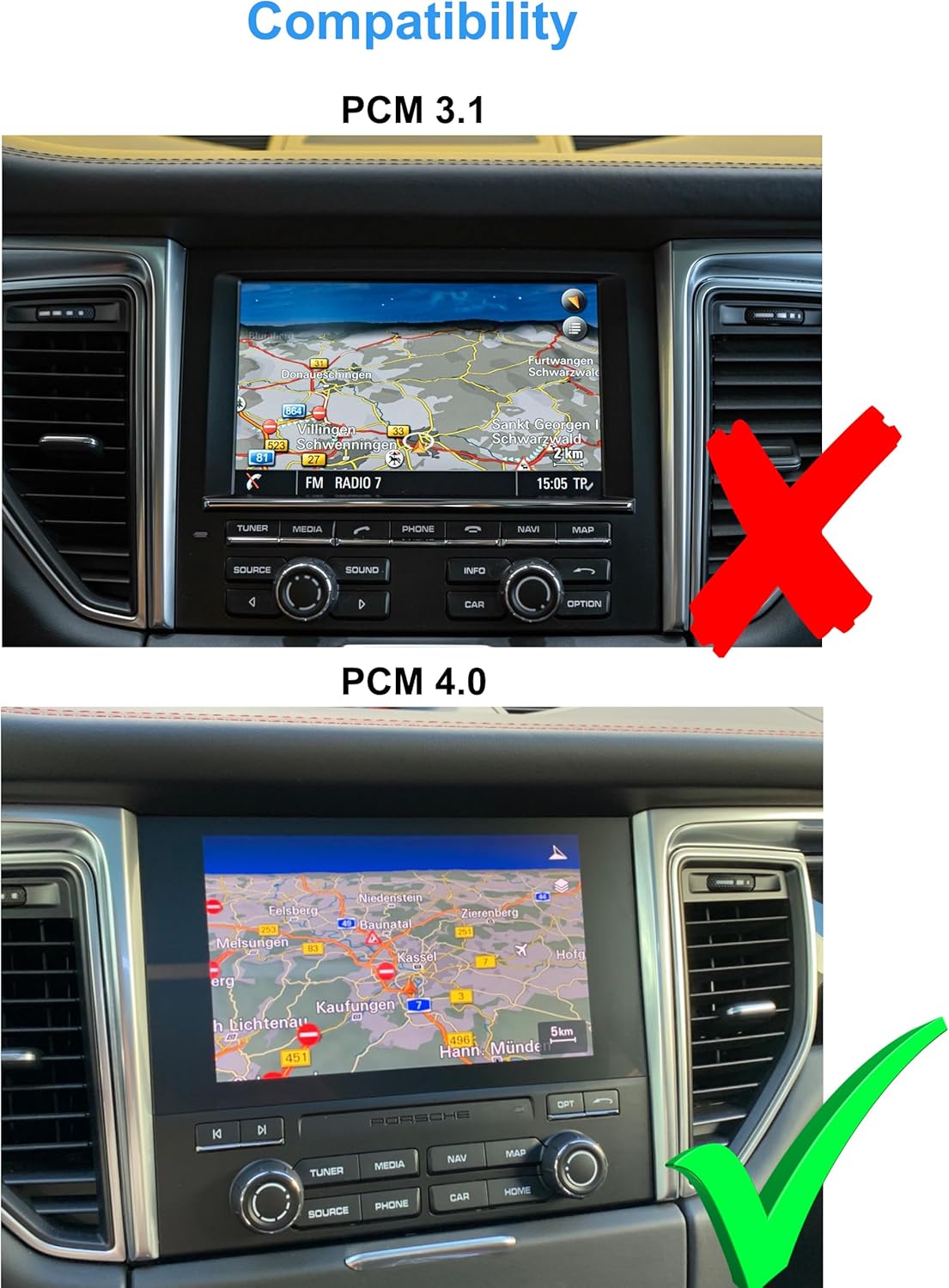
Figure 3.1: Visual guide for identifying PCM 3.1 (incompatible, marked with a red X) versus PCM 4.0 (compatible, marked with a green checkmark) in a Porsche Macan dashboard.
4. Paket İçeriği
Please ensure all items listed below are present in your package before proceeding with installation.
- 1x Multimedia Display
- Panels and mounting accessories
- 1x Power cable with Canbus decoder
- 2x USB kabloları
- 2x Radio antenna adapters
- 1x Audio/Video cable
- 1x GPS anteni
- 2x 4G antennas
- 1x PDF manual (available for download)
- 1x Invoice and 24 months warranty information

Şekil 4.1: Bir aşırıview of all components included in the TAFFIO TXH6701-4 package, including the multimedia display, power cables, antennas, and various adapters.
5. Kurulum ve Kurulum
The TAFFIO TXH6701-4 is designed for a Plug & Play installation, minimizing the need for additional adapters or mounting frames. However, professional installation is recommended to ensure correct wiring and functionality.
Kurulum Adımları (Genel Kılavuz):
- Hazırlık: Ensure the vehicle's ignition is off and the battery is disconnected before starting.
- Orijinal Üniteyi Çıkarın: Carefully remove the existing PCM unit and associated trim panels from the dashboard. Refer to your vehicle's service manual for specific instructions on panel removal.
- Kablolamayı Bağlayın: Connect the provided power cable with the Canbus decoder to the vehicle's wiring harness. Connect the GPS antenna, 4G antennas, USB cables, and audio/video cables as indicated in the wiring diagram.
- Yeni Üniteyi Dağıtın: Secure the TAFFIO multimedia display using the provided mounting plates and frames. Ensure all connections are firm and properly routed to avoid pinching.
- Test İşlevselliği: Reconnect the battery and turn on the ignition. Test all functions of the new head unit, including touch response, audio, navigation, radio, and connectivity features.
- Yeniden birleştirme: Once all functions are verified, carefully reassemble the dashboard trim panels.

Figure 5.1: The Porsche Macan dashboard showing the original PCM unit before the installation of the TAFFIO Android Head Unit.
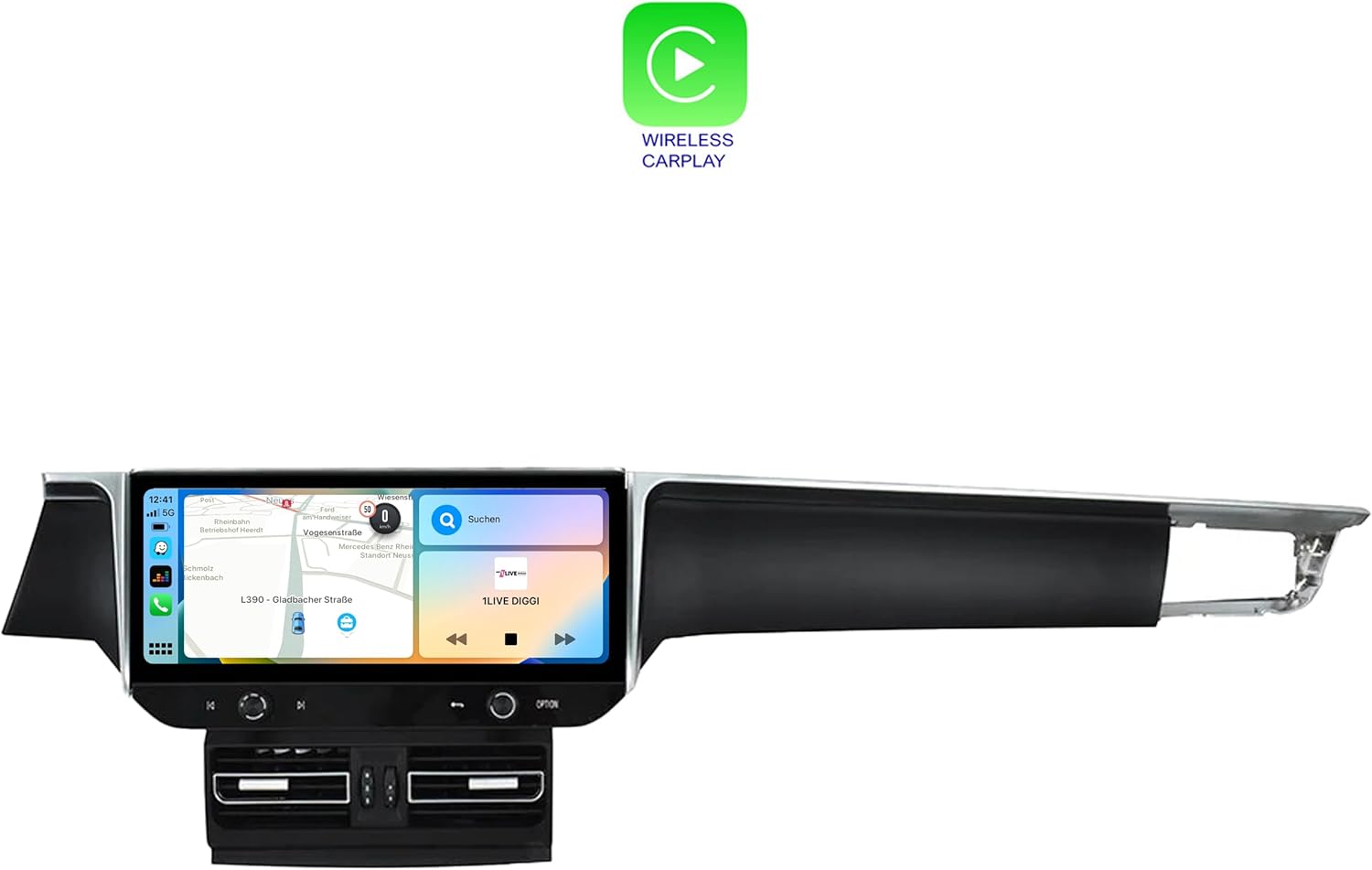
Figure 5.2: The Porsche Macan dashboard after the successful installation of the TAFFIO Android Head Unit, showcasing bütünleşik görünümü.

Figure 5.3: Detailed wiring diagram illustrating the connections for the TAFFIO TXH6701-4 head unit, including connections to the radio, GPS, 4G antennas, USB, and RCA plugs.
6. Kullanım Talimatları
The TAFFIO Android Head Unit features a user-friendly touchscreen interface. Navigate through menus by tapping icons and swiping across the screen.
6.1. Temel Gezinme
- Ana Ekran: Access primary functions like Navigation, Radio, Music, and Setup directly from the home screen.
- Uygulama Çekmecesi: Swipe up or tap the app icon to view tüm yüklü uygulamalar.
- Ayarlar: Access system settings for display, sound, network, and vehicle-specific configurations.

Figure 6.1: The application menu of the TAFFIO Android Head Unit, showing various pre-installed and user-installed apps such as Chrome, Android Settings, Phone Link, and navigation applications.
6.2. Apple CarPlay ve Android Auto
The unit supports integrated Wireless Apple CarPlay and Android Auto. Connect your smartphone wirelessly to access navigation, music, messages, and other compatible apps directly on the head unit's display.
- Etkinleştirme: Akıllı telefonunuzda Bluetooth ve Wi-Fi'nin etkinleştirildiğinden emin olun. Cihazınızı eşleştirmek için araç içi bilgi ekranındaki yönergeleri izleyin.
- İşlevsellik: Once connected, your phone's compatible apps will appear on the head unit's screen, allowing for voice control and touch interaction.

Figure 6.2: The Wireless Apple CarPlay interface displayed on the TAFFIO head unit, showing navigation, communication, and media applications.

Figure 6.3: The Android Auto interface displayed on the TAFFIO head unit, featuring navigation and media controls.
6.3. Radyo
The unit includes an FM/AM radio tuner with RDS. Access the radio application from the home screen to tune into stations.
- Tarama: Use the on-screen controls to scan for available stations.
- Ön ayarlar: Favori istasyonlarınızı hızlı erişim için kaydedin.

Figure 6.4: The radio interface of the TAFFIO head unit, showing frequency display and controls for tuning and saving favorite stations.
6.4. Gezinme
The unit comes with current GPS navigation map material and offers free lifetime updates. Access the navigation application from the home screen.
- Varış Noktası Girişi: Input destinations via the touchscreen or voice command.
- Harita Güncellemeleri: Information on map updates will be provided by the manufacturer.
6.5. Connectivity (Wi-Fi & 4G LTE)
- Wifi: Connect to available Wi-Fi hotspots or your smartphone's hotspot for internet access.
- 4G LTE: Insert a 4G LTE SIM card into the designated slot for mobile internet connectivity without relying on Wi-Fi.
7. Bakım
To ensure the longevity and optimal performance of your TAFFIO Android Head Unit, follow these maintenance guidelines:
- Ekran Temizleme: Use a soft, lint-free cloth specifically designed for electronic screens. Dampen the cloth slightly with water or a screen-cleaning solution if necessary. Avoid harsh chemicals or abrasive materials.
- Yazılım Güncellemeleri: Periodically check for software updates provided by TAFFIO to ensure you have the latest features and security patches.
- Çevresel Koşullar: Üniteyi aşırı sıcaklıklara, uzun süre doğrudan güneş ışığına veya aşırı neme maruz bırakmaktan kaçının.
- Kablo Bağlantıları: Ensure all cables remain securely connected. Avoid pulling on cables forcefully.
8. Sorun Giderme
If you encounter issues with your TAFFIO Android Head Unit, refer to the following common troubleshooting steps. If the problem persists, contact customer support.
Yaygın Sorunlar ve Çözümleri:
- Ünite Açılmıyor:
- Check all power connections and ensure they are securely plugged in.
- Verify the vehicle's battery is charged and connected.
- Check for blown fuses in the vehicle's fuse box related to the infotainment system.
- Ses Yok:
- Sesin kapalı olmadığından veya çok düşük bir seviyeye ayarlanmadığından emin olun.
- Ses kablosu bağlantılarını kontrol edin.
- Verify the correct audio output source is selected in the settings.
- Dokunmatik Ekran Tepki Vermiyor:
- Restart the unit by turning off the vehicle's ignition and restarting after a few minutes.
- Ekranın temiz ve kalıntılardan arınmış olduğundan emin olun.
- GPS Sinyali Kayboldu/Yanlış:
- GPS anteninin düzgün bir şekilde takıldığından ve net bir görüş alanına sahip olduğundan emin olun view gökyüzünün.
- GPS anteninin araçtaki bilgi-eğlence sistemine olan bağlantısını kontrol edin.
- CarPlay/Android Auto Bağlanmıyor:
- Ensure Bluetooth and Wi-Fi are enabled on your smartphone and the head unit.
- Forget the device on both the phone and head unit, then attempt to re-pair.
- Akıllı telefonunuzun işletim sistemini en son sürüme güncelleyin.
9. Özellikler
| Model Adı | TXH6701-4 |
| Ekran Boyutu | 12.3 inç |
| Çözünürlük | 1920x720 |
| İşlemci | Snapdragon Qualcomm 668s 8x 2.0 GHz |
| Veri deposu | 8 GB |
| Dahili Bellek | 128 GB |
| İşletim Sistemi | Android 13 |
| Bağlantı | Bluetooth, USB, Wi-Fi, 4G LTE |
| Özel Özellikler | Touchscreen, Integrated CarPlay & Android Auto |
| Harita türü | Worldwide (with free lifetime updates) |
| Ses Çıkışı Modu | Yardımcı |
| Montaj Tipi | Kontrol Paneli Montajı |
10. Garanti ve Destek
The TAFFIO TXH6701-4 Android Head Unit comes with a 2 yıllık üretici garantisiBu garanti, normal kullanım koşullarında malzeme ve işçilik hatalarını kapsar.
Garanti Talepleri ve Teknik Destek İçin:
Please retain your purchase invoice as proof of purchase for any warranty claims. For technical assistance, troubleshooting beyond this manual, or to initiate a warranty claim, please contact TAFFIO customer support through the retailer where the product was purchased or refer to the contact information provided with your product documentation.
11. Güvenlik Bilgileri
Observe the following safety symbols and guidelines for safe handling and disposal of the product.
Figure 11.1: Standard safety and handling symbols including 'This Way Up', 'Fragile', 'Keep Dry', CE Mark, FCC Mark, Recycling Symbol, and Waste Electrical and Electronic Equipment (WEEE) symbol.
- Kurulum: Ensure installation is performed by qualified personnel to prevent damage to the unit or vehicle.
- İşlem: Üniteyi sürüş sırasında dikkatinizi dağıtacak şekilde kullanmayın. Yol güvenliğini her zaman ön planda tutun.
- İmha etmek: Dispose of this product responsibly at designated collection points for electronic waste, in accordance with local regulations. Do not dispose of with household waste.