
1. Giriş
This manual provides comprehensive instructions for the installation, operation, and maintenance of the RWRAPS REX-C410 Digital PID Temperature Controller. The REX-C410 is a versatile programmable temperature controller designed for precise temperature regulation in various industrial and scientific applications. It supports multiple thermocouple and RTD inputs and features relay output for heating or cooling control.
2. Güvenlik Bilgileri
Read all instructions carefully before installation and operation. Failure to follow these instructions may result in equipment damage, personal injury, or improper operation.
- Güç kaynağı hacmini sağlayıntage matches the controller's specifications (85-265V AC).
- Herhangi bir kablo bağlantısı yapmadan veya bakım işlemi gerçekleştirmeden önce gücü kesin.
- Tüm kablolama işlemleri, yerel elektrik yönetmeliklerine uygun olarak yetkili personel tarafından yapılmalıdır.
- Do not operate the controller in environments with excessive moisture, dust, or corrosive gases.
- Avoid exposing the controller to strong vibrations or mechanical shock.
- Do not attempt to repair or modify the controller. Refer to qualified service personnel.
3. Ürün Bittiview
The REX-C410 is a digital PID temperature controller featuring a dual display for process value (PV) and set value (SV). It offers precise temperature control with various input and output options.
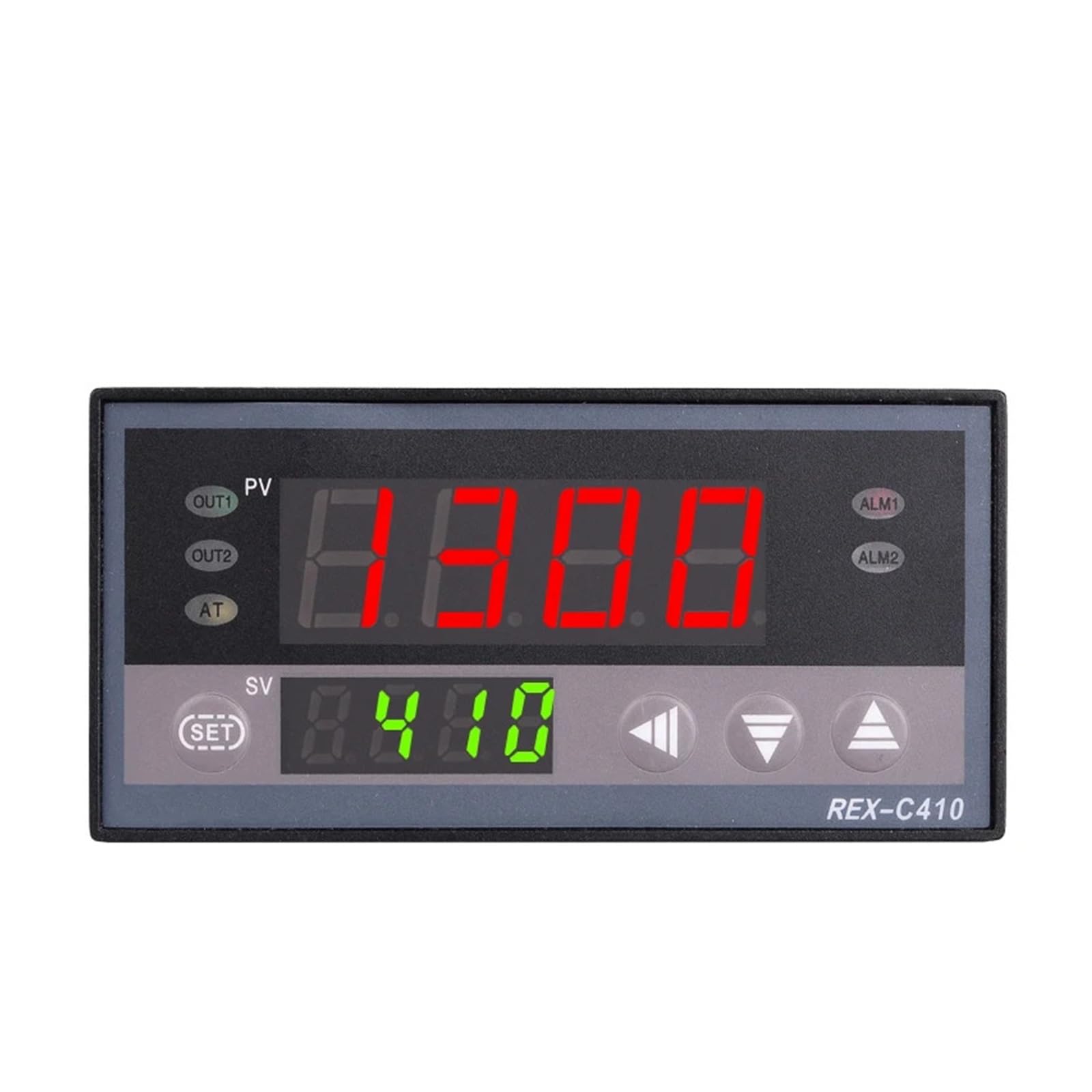
Şekil 3.1: Ön view of the REX-C410 controller. The upper red display shows the Process Value (PV), and the lower green display shows the Set Value (SV). Control buttons are located below the displays.

Şekil 3.2: Açısal ön view of the REX-C410 controller, showing the display and control buttons, along with the side profile where mounting clips would attach.
Temel Özellikler:
- Çift Ekran: Simultaneous display of Process Value (PV) and Set Value (SV) in Celsius.
- Evrensel Giriş: Supports various thermocouple types (K, J, S, E, R, B, N, T) and RTD types (PT100, Cu50).
- Ana Çıkış: Relay output for PID cooling/heating control.
- Alarm Çıkışı: One relay alarm output with 7 configurable modes (high, low, deviation, etc.).
- PID Kontrolü: Individually programmable PID control parameters (P, I, d, controlling period, digital filter coefficient).
- Boyutlar: 48mm x 96mm horizontal panel mount.
4. Kurulum ve Kurulum
4.1. Montaj
The REX-C410 is designed for panel mounting. Ensure adequate space for ventilation and wiring connections at the rear of the unit.

Figure 4.1: The REX-C410 controller shown with its included mounting clips, which secure the unit into a panel cutout.
4.2. Kablo Bağlantıları
Refer to the wiring diagrams below for proper connection of power, sensor input, and control outputs. Always ensure power is disconnected before wiring.

Şekil 4.2: Arka view of the REX-C410 showing the terminal block and a simplified wiring diagram. Terminals 1 and 2 are for AC power (AC100-240V). Terminals 3 and 4 are for the main output (OUT). Terminals 5, 6, 7, 8 are for sensor input (TC or RTD). Terminals 9, 10, 11 are for alarm output (ALM1).

Figure 4.3: Close-up of the rear terminals and product label. The label indicates model C410FK02-M*AN, range 0-400°C, output RELAY, and supply 100-240V AC, 50/60Hz.
Güç Kaynağı:
- Connect the AC power supply (85-265V AC, 50/60Hz) to terminals 1 and 2.
Sensör Girişi:
- For Thermocouple (TC) input (e.g., K type): Connect the positive lead to terminal 7 and the negative lead to terminal 8.
- For Resistance Temperature Detector (RTD) input (e.g., Pt100): Connect according to the specific RTD type (e.g., 3-wire Pt100 to terminals 5, 6, 7). Refer to the detailed wiring diagram on the unit or in the full product documentation for specific RTD connections.
Main Output (Relay):
- Connect the load to be controlled (e.g., heating element, cooling device) to terminals 3 and 4. This is a relay contact, so ensure the load's power requirements are within the relay's capacity (250V/3A AC or 30V/3A DC).
Alarm Output (ALM1):
- Connect alarm devices to terminals 9, 10, and 11. This is a normal open contact with a capacity of 250V/3A AC or 30V/3A DC.
5. Kullanım Talimatları
5.1. Basic Operation (Setting Temperature)
After proper installation and power-on, the controller will display the current process value (PV) on the upper red display and the set value (SV) on the lower green display.
- Basın AYARLAMAK button once. The SV display will begin to flash.
- Kullanın Yukarı (▲) Ve Aşağı (▼) arrow buttons to adjust the desired set temperature.
- Basın AYARLAMAK button again to confirm the new set value. The SV display will stop flashing, and the controller will begin to regulate the temperature to the new set point.
5.2. Parameter Settings (Advanced)
The REX-C410 allows for advanced configuration of control parameters, including PID constants (P, I, d), control period, digital filter coefficient, and alarm modes. These settings are typically adjusted by experienced users or control theory experts to optimize performance for specific applications.
Gelişmiş parametrelere erişmek için:
- Basılı tutun AYARLAMAK button for approximately 3-5 seconds until the parameter menu appears on the PV display.
- Kullanın AYARLAMAK button to cycle through the different parameters.
- Kullanın Yukarı (▲) Ve Aşağı (▼) arrow buttons to adjust the value of the selected parameter.
- Basılı tutun AYARLAMAK button again to save changes and exit the parameter menu.
Refer to the full technical manual for a detailed explanation of each parameter and its function. Incorrect parameter settings can lead to unstable control or damage to the controlled system.
6. Bakım
The REX-C410 controller is designed for reliable operation with minimal maintenance. Follow these guidelines to ensure longevity:
- Temizlik: Ön paneli periyodik olarak yumuşak, kuru bir bezle temizleyin. Aşındırıcı temizleyiciler veya çözücüler kullanmayın.
- Denetleme: Regularly inspect wiring connections for tightness and signs of corrosion or damage.
- Çevre: Çalışma ortamının belirtilen sıcaklık ve nem aralıklarında kalmasını sağlayın.
- Kalibrasyon: While the controller is factory calibrated, if precise accuracy drifts over time, professional recalibration may be required. This typically involves specialized equipment and procedures.
7. Sorun Giderme
This section addresses common issues you might encounter with the REX-C410 controller.
| Sorun | Olası Neden | Çözüm |
|---|---|---|
| Kumanda açılmıyor. | No power supply; incorrect wiring; blown fuse (internal). | Check power connections (terminals 1 & 2). Verify power source. Ensure correct voltage. If fuse is suspected, contact support. |
| PV display shows "HHHH" or "LLLL". | Sensor open circuit; sensor short circuit; incorrect sensor type setting; sensor not connected. | Check sensor wiring (terminals 5-8). Verify sensor type matches controller settings. Replace faulty sensor if necessary. |
| Temperature control is unstable (overshoot/undershoot). | PID parameters not optimized for the system; incorrect control mode. | Adjust PID parameters (P, I, d) or perform auto-tuning if available (refer to full manual). Ensure correct control mode (heating/cooling) is selected. |
| Output relay does not activate. | Wiring error; set value not reached; output disabled; faulty relay. | Check output wiring (terminals 3 & 4). Verify SV is set correctly. Check output parameters. If relay is faulty, contact support. |
For issues not listed here or if troubleshooting steps do not resolve the problem, please contact RWRAPS customer support.
8. Özellikler
| Örnek | REX-C410 |
| Görüntülemek | Dual display for Process Value (PV) and Set Value (SV) in Celsius (°C) |
| Sıcaklık Aralığı | 0-400°C (with K type thermocouple) |
| Termokupl Girişi | K, J, S, E, R, B, N, T |
| Thermo Resistor Input | PT100, Cu50 |
| Ana Çıktı | Relay: PID cooling/heating control |
| Alarm Çıkışı | 1 RELAY alarm: Normal open, capacity 250V/3A AC or 30V/3A DC. 7 alarm modes. |
| Kesinlik | %0.5 |
| Güç Kaynağı | 85-265V AC, 50/60Hz |
| Güç Tüketimi | <5VA |
| Boyutlar | 48mm x 96mm x 900mm (Depth) |
| Ağırlık | Yaklaşık 300 gram (10.6 ons) |
9. Garanti ve Destek
For warranty information, technical support, or service inquiries, please contact the manufacturer, RWRAPS, directly through their official channels. Keep your purchase receipt as proof of purchase.